一、下载匹配hadoop-3.x.y 版本的hive 3.1.2
下载地址 : http://mirror.bit.edu.cn/apache/hive/
二、上传至安装目录 /home/apache-hive-3.1.2-bin.tar.gz
解压:tar -zxvf apache-hive-3.1.2-bin.tar.gz 后重命名目录:/home/hive-3.1.2
三、编辑 /etc/profile 文件
......
if [ -n "${BASH_VERSION-}" ] ; then
        if [ -f /etc/bashrc ] ; then
                # Bash login shells run only /etc/profile
                # Bash non-login shells run only /etc/bashrc
                # Check for double sourcing is done in /etc/bashrc.
                . /etc/bashrc
       fi
fi

export JAVA_HOME=/usr/java/jdk1.8.0_131
export JRE_HOME=${JAVA_HOME}/jre
export HADOOP_HOME=/home/hadoop-3.3.0
export HIVE_HOME=/home/hive-3.1.2
export CLASSPATH=$($HADOOP_HOME/bin/hadoop classpath):$CLASSPATH
export HADOOP_COMMON_LIB_NATIVE_DIR=$HADOOP_HOME/lib/native
export PATH=$HADOOP_HOME/bin:$HADOOP_HOME/sbin:$PATH:$HIVE_HOME/bin
执行生效: source /etc/profile
四、将 /home/hadoop-3.3.0/share/hadoop/common/lib/guava-27.0-jre.jar 拷贝并替换掉 /home/hive-3.1.2/lib/guava-19.0.jar
五、上传mysql-connector-java-5.1.47.jar 至/home/hive-3.1.2/lib 目录下;
创建mysql数据库:db_hive
创建 hive-site.xml并上传至/home/hive-3.1.2/conf 目录下:
<?xml version="1.0" encoding="UTF-8" standalone="no"?> <?xml-stylesheet type="text/xsl" href="configuration.xsl"?><!-- Licensed to the Apache Software Foundation (ASF) under one or more contributor license agreements. See the NOTICE file distributed with this work for additional information regarding copyright ownership. The ASF licenses this file to You under the Apache License, Version 2.0 (the "License"); you may not use this file except in compliance with the License. You may obtain a copy of the License at http://www.apache.org/licenses/LICENSE-2.0 Unless required by applicable law or agreed to in writing, software distributed under the License is distributed on an "AS IS" BASIS, WITHOUT WARRANTIES OR CONDITIONS OF ANY KIND, either express or implied. See the License for the specific language governing permissions and limitations under the License. --><configuration> <!-- WARNING!!! This file is auto generated for documentation purposes ONLY! --> <!-- WARNING!!! Any changes you make to this file will be ignored by Hive. --> <!-- WARNING!!! You must make your changes in hive-site.xml instead. --> <!-- Hive Execution Parameters --> <!-- 插入一下代码 --> <property> <name>javax.jdo.option.ConnectionUserName</name> <value>数据库用户</value> </property> <property> <name>javax.jdo.option.ConnectionPassword</name> <value>数据库密码</value> </property> <property> <name>javax.jdo.option.ConnectionURL</name> <value>jdbc:mysql://****.mysql.rds.aliyuncs.com/db_hive?useSSL=false&rewriteBatchedStatements=true&useServerPrepStmts=true&cachePrepStmts=true&autoReconnect=true&failOverReadOnly=false</value> </property> <property> <name>javax.jdo.option.ConnectionDriverName</name> <value>com.mysql.jdbc.Driver</value> </property> <property> <name>hive.metastore.schema.verification</name> <value>false</value> </property> <property> <name>hbase.zookeeper.quorum</name> <value>39.108.***.***</value> </property> <property> <name>hbase.zookeeper.property.clientPort</name> <value>2181</value> </property> <!-- 到此结束代码 --> </configuration>
编辑hive-env.sh并覆盖至/home/hive-3.1.2/conf 目录下:
# Set HADOOP_HOME to point to a specific hadoop install directory
# HADOOP_HOME=${bin}/../../hadoop

# Hive Configuration Directory can be controlled by:
# export HIVE_CONF_DIR=

# Folder containing extra libraries required for hive compilation/execution can be controlled by:
# export HIVE_AUX_JARS_PATH=

export HADOOP_HOME=/home/hadoop-3.3.0
export HBASE_HOME=/home/hbase-2.2.4
六、执行# hive --version 确认是否安装成功

七、执行hive命令:# hive
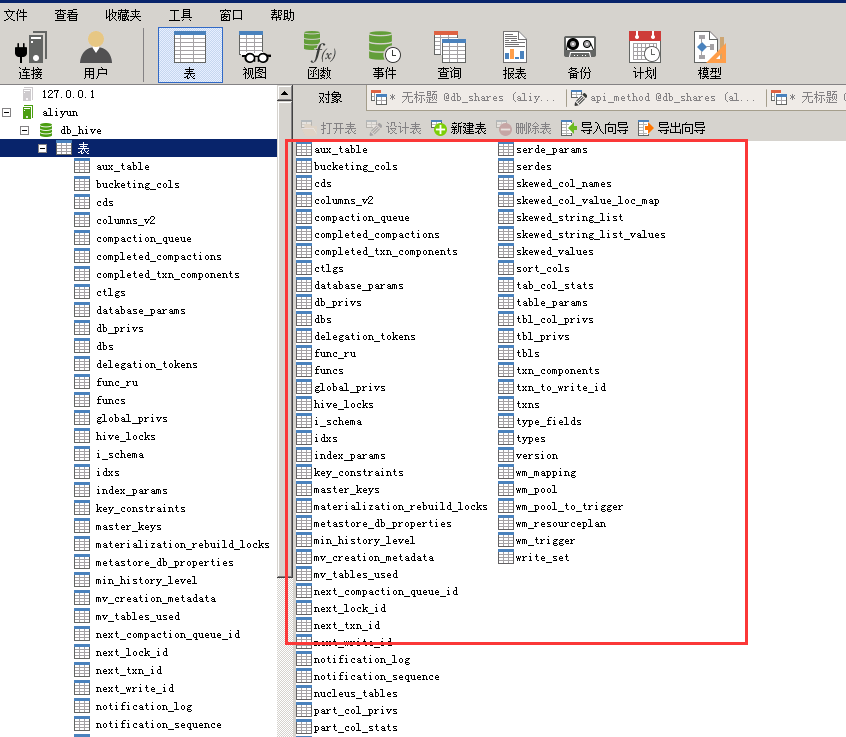
执行db_hive数据库表初始化命令:schematool -dbType mysql -initSchema
执行成功后即可看到库表信息:
执行与hbase数据库表关联的建表语句:CREATE EXTERNAL TABLE test(key string,id int,name string) STORED BY 'org.apache.hadoop.hive.hbase.HBaseStorageHandler' WITH SERDEPROPERTIES ("hbase.columns.mapping" = ":key,user:id,user:name") TBLPROPERTIES("hbase.table.name" = "test");
执行SQL查询:select * from test
