[root@jrgc130 software]# tar xf glibc-2.14.tar.gz[root@jrgc130 software]# cd glibc-2.14[root@jrgc130 glibc-2.14]# mkdir build[root@jrgc130 glibc-2.14]# cd build[root@jrgc130 build]# ../configure --prefix=/usr/local/glibc-2.14[root@jrgc130 build]# make -j4[root@jrgc130 build]# sudo make install执行make install时出现:
checking LD_LIBRARY_PATH variable... contains current directory configure: error:
*** LD_LIBRARY_PATH shouldn't contain the current directory when
*** building glibc. Please change the environment variable *** and run configure again.
解决办法:查看LD_LIBRARY_PATH echo $LD_LIBRARY_PATH,我的打印的是/usr/lib/qt44/lib:
configure里说:LD_LIBRARY_PATH不能以终结符作为开始和最后一个字符,不能有2个终结符连在一起,所以修改下LD_LIBRARY_PATH即可,
echo $LD_LIBRARY_PATH
检查出现的串的内容是否符合上述条件比如会有连在一起的::需要删除一个
把修改后的再赋值给LD_LIBRARY_PATH
export LD_LIBRARY_PATH=新串
Can't open configuration file/opt/glibc-2.14/etc/ld.so.conf: No such file or directory 输入:
touch /opt/glibc-2.14/etc/ld.so.conf
生成软连接: 没有先删除软连接再添加 不过没出问题
输入中加-r 不然会有omitting directory `/etc/ld.so.conf.d'
sudo cp -r /etc/ld.so.c* /opt/glibc-2.14/etc/
sudo ln -sf /opt/glibc-2.14/lib/libc-2.14.so /lib64/libc.so.6
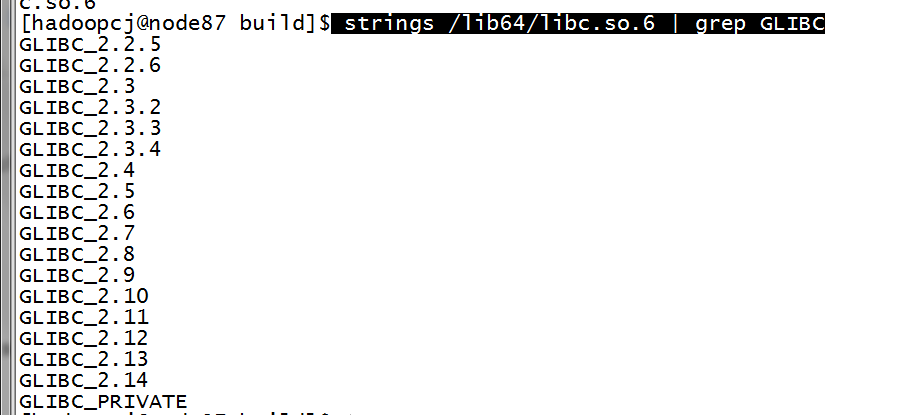
检查是否成功:
strings /lib64/libc.so.6 | grep GLIBC
开心~~~~~鸡冻