前言
这里使用ETL [Java代码] 实现
代码中使用axis调用webservice
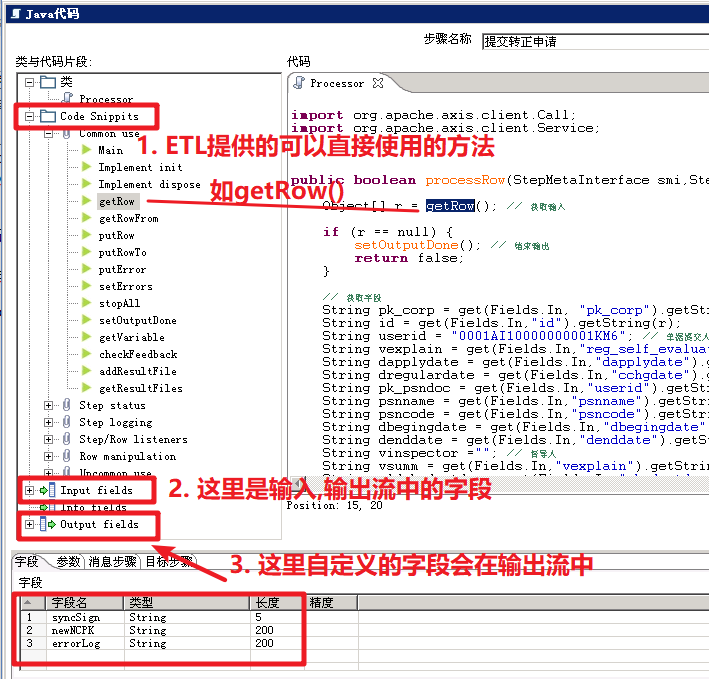
在ETL提供了 Processor类中直接写业务代码, 而且是每次读取一行数据
jar包准备
将需要用到的jar包提前放到data-integration/lib 或 data-integration/libswt/对应的目录下
我这里为了方便, 将需要的包发到了data-integration/libswt/win64/下
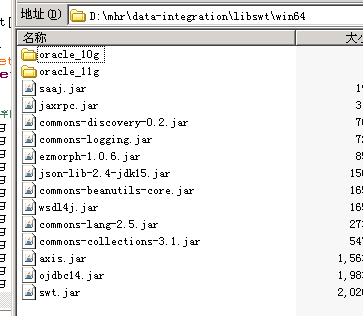
用到的相关包: 链接: https://pan.baidu.com/s/1vpUppn-57sc9z3tFGux3uA 密码: 3phi
代码示例
这里提供一个简单的示例供参考
import java.net.URL;

import javax.xml.namespace.QName;

import net.sf.json.JSONArray;
import net.sf.json.JSONObject;

import org.apache.axis.client.Call;
import org.apache.axis.client.Service;


public boolean processRow(StepMetaInterface smi,StepDataInterface sdi) throws KettleException{

	Object[] r = getRow(); // 获取输入, 这里获取流中的一行数据

	if (r == null) {
		setOutputDone(); // 结束输出, 说明流中没有数据了
		return false;
	}

	// 获取字段, 从r中获取需要的字段
	String pk_corp = get(Fields.In, "pk_corp").getString(r);


	// 因为我这里需要给WS接口发送的数据是[{"pk_corp":pk_corp},{}...]
	JSONArray syncDatas = new JSONArray();
	JSONObject syncData = new JSONObject();

	syncData.put("pk_corp",pk_corp);

	syncDatas.add(syncData);

	// 输出数组, 会输出到输出流
	Object[] outputRow = createOutputRow(r, data.outputRowMeta.size());
	JSONObject result = null;

try {
	// 输出日志,也是ETL提供的方法
	logBasic("【请求数据】" + syncDatas.toString());

	// 调用ws接口
	result = syncToNC(syncDatas.toString());

	logBasic("【结果】" + result.toString());

} catch (Exception e) {
	logError("【捕获异常】" + e.getMessage());

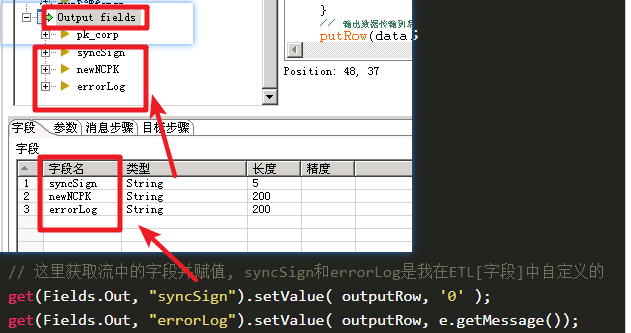
	// 这里获取流中的字段并赋值, syncSign和errorLog是我在ETL[字段]中自定义的
	get(Fields.Out, "syncSign").setValue( outputRow, '0' );
	get(Fields.Out, "errorLog").setValue( outputRow, e.getMessage());

	// 输出数据传输到下一步, 下一步接收的数据就会有我在[字段中]添加的字段
	putRow(data.outputRowMeta, outputRow);

	return true;
}

	if( result.containsKey("code") &&  result.getInt("code") == 0) {
		JSONArray resultDatas = result.getJSONArray("data");
		JSONObject resultData = resultDatas.getJSONObject(0);

		// 输出字段
		get(Fields.Out, "syncSign").setValue( outputRow, '1' );
		get(Fields.Out, "newNCPK").setValue( outputRow, resultData.getString("ncPK"));
	} else {
		// 输出字段
		get(Fields.Out, "syncSign").setValue( outputRow, '2' );
		get(Fields.Out, "errorLog").setValue( outputRow, result.getString("msg"));

	}

	putRow(data.outputRowMeta, outputRow);

	return true;
}

// 调用webservice
private static JSONObject syncToNC(String str) throws Exception {

		JSONObject jsonResult = null;
		// 接口地址  ( 这里后面不加"?wsdl"
		String endpoint = "http://localhost:8090/uapws/service/nc.ift.hs.ydrs.IAddStapplybService";
		// targetNamespace
		String targetNamespace = "http://ydrs.hs.ift.nc/IAddStapplybService";
		// 调用接口中的方法
		String operationName = "addStapplyb";
		String result = null;
		String message = null;

		// 接口方法名
		Service service = new Service();
		Call call = (Call) service.createCall();
		// 设置webservice地址
		call.setTargetEndpointAddress(new URL(endpoint));
		// 发布的方法名
		call.setOperationName(new QName(targetNamespace, operationName));
		// 设置参数
		call.addParameter("string", org.apache.axis.encoding.XMLType.XSD_STRING, javax.xml.rpc.ParameterMode.IN);
		// 返回类型
		call.setReturnType(org.apache.axis.encoding.XMLType.XSD_STRING);
		call.setEncodingStyle("utf-8");
		call.setUseSOAPAction(true);
		call.setSOAPActionURI(targetNamespace + operationName);
		// 设置参数组
		Object[] params = new Object[] { str };

		// 调用接口
		result = (String) call.invoke(params);
		// 处理结果
		if (result != null && ! "".equals(result)) {
			jsonResult = JSONObject.fromObject(result);
		}

		return jsonResult;
}
ETL中使用Java代码

自定义字段