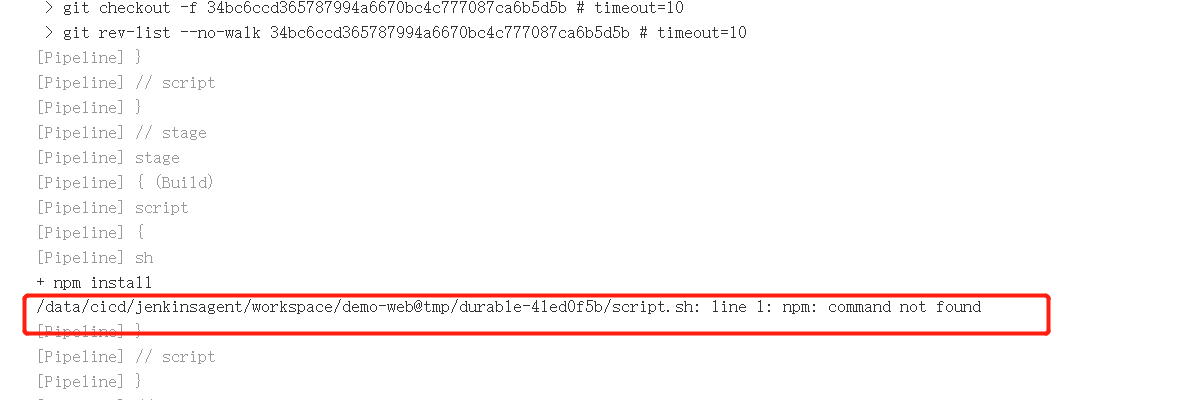
1.构建失败报错
2.原配置文件
···
		stage("Build"){
			steps {
				script {
				sh """
                       npm install
                       npm run build
                       """
				}
			}
		}
···
3.修改后配置文件
env.userEmail="xxx@qq.com"

pipeline {
	agent { label  "build" }
	options {
			skipDefaultCheckout true
	}

	stages {
		stage("GetCode"){
			steps{
				script{
					println("下载代码 --> 分支: ${env.branchName}")
 					checkout([$class: 'GitSCM', branches: [[name: "${env.branchName}"]],
                    extensions: [],
                    userRemoteConfigs: [[credentialsId: '3c97579a-acee-49db-a657-4ea2997ada29',
                               url: "${env.gitHttpURL}" ]]])

				}
			}

		}
		stage("Build"){
			steps {
				script {
					 sh """
                       export NODE_HOME=/usr/local/node-v14.16.1-linux-x64/
                       export PATH=\$PATH:\$NODE_HOME/bin
                       npm install
                       npm run build
                       """
				}
			}
		}
	}

	post {
		always {
			script{
				echo "always......"

			}
		}

		success {
			script {
				 EmailUser("${userEmail}","success") //调用函数
			}
		}
	}

}


def EmailUser(userEmail,status){
 	emailext body: """
            <!DOCTYPE html>
            <html>
            <head>
            <meta charset="UTF-8">
            </head>
            <body leftmargin="8" marginwidth="0" topmargin="8" marginheight="4" offset="0">
                <img src="http://192.168.1.200:8080/static/0eef74bf/images/headshot.png">
                <table width="95%" cellpadding="0" cellspacing="0" style="font-size: 11pt; font-family: Tahoma, Arial, Helvetica, sans-serif">
                    <tr>
                        <td><br />
                            <b><font color="#0B610B">构建信息</font></b>
                        </td>
                    </tr>
                    <tr>
                        <td>
                            <ul>
                                <li>项目名称:${JOB_NAME}</li>
                                <li>构建编号:${BUILD_ID}</li>
                                <li>构建状态: ${status} </li>
                                <li>项目地址:<a href="${BUILD_URL}">${BUILD_URL}</a></li>
                                <li>构建日志:<a href="${BUILD_URL}console">${BUILD_URL}console</a></li>
                            </ul>
                        </td>
                    </tr>
                    <tr>
                </table>
            </body>
            </html>  """,
            subject: "Jenkins-${JOB_NAME}项目构建信息 ",
            to: userEmail
}
5.结论
# 对于java或maven的路径的环境变量是放在/etc/profile中的, 而/etc/profile只有在用户登录的时候才会被load,Jenkins在运行命令时,使用的是Non-login的方式

# 配置mvn执行命令软链接

ln -sv /usr/local/maven/bin/mvn /usr/local/bin/mvn

# 配置npm执行命令软链接

ln -sv /usr/local/node-v16.13.1/bin/npm /usr/local/bin/npm
ln -sv /usr/local/node-v16.13.1/bin/node /usr/local/bin/node
vim /etc/profile
export PATH=$PATH:/usr/local/node-v16.13.1/bin
source /etc/profile