1.登录
<template>
  <div>
    <el-form ref="loginForm" :model="form" :rules="rules" label-width="80px" class="login-box">
      <h3 class="login-title">欢迎登录</h3>
      <el-form-item label="账号" prop="username">
        <el-input type="text" placeholder="请输入账号" v-model="form.username"/>
      </el-form-item>
      <el-form-item label="密码" prop="password">
        <el-input type="password" placeholder="请输入密码" v-model="form.password"/>
      </el-form-item>
      <el-form-item>
        <el-button type="primary" v-on:click="onSubmit('loginForm')">登录</el-button>
      </el-form-item>
    </el-form>

    <el-dialog
      title="温馨提示"
      :visible.sync="dialogVisible"
      width="30%"
      :before-close="handleClose">
      <span>请输入账号和密码</span>
      <span slot="footer" class="dialog-footer">
        <el-button type="primary" @click="dialogVisible = false">确 定</el-button>
      </span>
    </el-dialog>
  </div>
</template>

<script>
export  default {
  name:"Login",
  data(){
    return {
      form:{
        username: '',
        password: ''
      },
      //表单验证,需要再el-form-item 元素中增加prop属性
      rules:{
        username:[
            {required:true,message:'账号不能为空',trigger:'blur'}
          ],
    password:[
    {required: true,message: '密码不能为空',trigger:'blur'}
          ]
  },
    //对话框显示和隐藏
    dialogVisible:false
  }
  },
  methods:{
    onSubmit(formName) {
      //为表单绑定验证功能
      this.$refs[formName].validate((valid) =>{
        if (valid){
          //使用 vue-router路由到指定页面,该方式称之为编程式导航
          this.$router.push("/main");
        } else {
          this.dialogVisible = true;
          return false;
        }
      });
    }
  }
}
</script>

<style lang="scss" scoped>
.login-box{
  border: 1px solid #DCDFE6;
  width: 350px;
  margin:180px auto;
  padding:35px 35px 15px 35px;
  border-radius: 5px;
  -webkit-border-radius: 5px;
  -moz-border-radius: 5px;
  box-shadow:0 0 25px #909399;
}

.login-title{
  text-align:center;
  margin:0 auto 40px auto;
  color:#303133;
}
</style>
2.url路径错误
<template>
  <div>
    <h1>404,你的页面走丢了!</h1>
  </div>
</template>

<script>
export default {
  name: "NotFound"
}
</script>

<style scoped>

</style>
3.主页
<template>
  <div>
    <el-container>
      <el-aside width="200px">
        <el-menu :default-openeds="['1']">
          <el-submenu index="1">
            <template slot="title"><i class="el-icon-caret-right"></i>用户管理</template>
            <el-menu-item-group>
              <el-menu-item index="1-1">
                <!--name,地址,params:传递参数,需要对象:v-bind/:-->
               <router-link :to="{name:'UserP', params:{id:1}}">个人信息</router-link>
              </el-menu-item>
              <el-menu-item index="1-2">
                <router-link to="/user/list">用户列表</router-link>
              </el-menu-item>
              <el-menu-item index="1-3">
                <router-link to="/home">回到主页</router-link>
              </el-menu-item>
            </el-menu-item-group>
          </el-submenu>
          <el-submenu index="2">
           <template slot="title"><i class="el-icon-caret-right"></i>内容管理</template>
            <e1-menu-item-group>
             <el-menu-item index="2-1">分类管理</el-menu-item>
             <el-menu-item index="2-2">内容列表</el-menu-item>
            </e1-menu-item-group>
          </el-submenu>
          <el-submenu index="3">
            <template slot="title"><i class="el-icon-caret-right"></i>系统管理</template>
            <e1-menu-item-group>
              <el-menu-item index="3-1">系统设置</el-menu-item>
            </e1-menu-item-group>
          </el-submenu>
        </el-menu>
      </el-aside>
      <el-container>
        <el-header style="text-align: right; font-size: 12px">
         <el-dropdown>
            <i class="el-icon-setting" style="margin-right:15px"></i>
            <el-dropdown-menu slot="dropdown">
             <el-dropdown-item>个人信息</el-dropdown-item>
             <el-dropdown-item>退出登录</el-dropdown-item>
           </el-dropdown-menu>
          </el-dropdown>

        </el-header>

        <el-main>
          <router-view/>
        </el-main>
      </el-container>
    </el-container>
  </div>
</template>

<script>
export default {
  name: "main"
}
</script>

<style scoped lang="scss">
.el-header {
  background-color: #4abaf8;
  color: #333;
  line-height: 60px;
}

.el-aside {
  color: #333;
}
</style>
4.主页子模块,用户列表
<template>
  <h1>用户列表</h1>
</template>

<script>
export default {
  name: "UserList"
}
</script>

<style scoped>

</style>
5.主页子模块,个人信息
<template>
  <div>
    <!--所有元素必须不能放在根节点下-->
    <h1>个人信息</h1>
<!--    {{$route.params.id}}-->
    {{id}}
    <div v-model="form">
      <p v-model="form.name">{{form.name}}</p>
    </div>
  </div>

</template>

<script>
export default {
  props:['id'],
  name: "UserProfile",
  beforeRouteEnter:(to,from,next)=>{
    console.log("进入路由之前");//在这里加载数据(axios)
    next(vm=>{
      vm.getData();//进入路由之前执行getData
    });
  },
  beforeRouteLeave:(to,from,next)=>{
    console.log("进入路由之后");
    next();
  },
  data(){
    return{
      form:{
        name:'',
        url:''
      }
    }
  },
  methods:{
    getData:function (){
      this.axios({
        method:'get',
        url:'http://localhost:8080/static/mock/data.json'
      }).then(function (response){
          console.log(response);


      })
    }
  }
}
</script>

<style scoped>

</style>
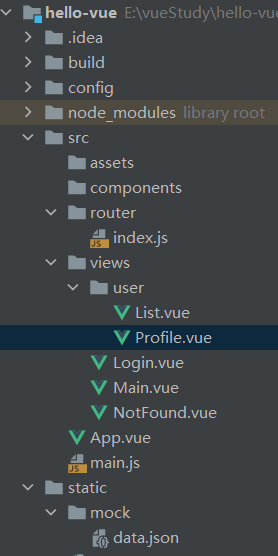
6.路由
import Vue from 'vue'
import Router from 'vue-router'

import Main from '../views/Main'
import Login from '../views/Login'

import UserList from '../views/user/List'
import Profile from '../views/user/Profile'

//404
import NotFound from "../views/NotFound";

Vue.use(Router);

export default new Router({
  mode:'history',
  routes:[
    {
      path:'/main',
      component:Main,//嵌套路由
      props:true,
      children:[
        {path: '/user/Profile/:id',name:'UserP',component: Profile,props:true},
        {path: '/user/List',component: UserList}
        //path,写的是服务端的网址,component中的才是真正要引入界面的地址
      ]
    },{
      path:'/login',
      component: Login
    },{//重定向
      path:'/home',
      redirect:'/main'//重定向到Main的请求上,走/main的path
    },{
      //404
      path: '*',
      component:NotFound
    }
  ]
});