win10 下如何调试Ie
网上有很多ie的测试工具,包括ms自己出的有,但是如果是win10系统,压根不需要这些玩意。
win10 浏览器edge虽然是重写过的,但是win10并没有完全抛弃ie,可能是为了照顾xxx人习惯ie,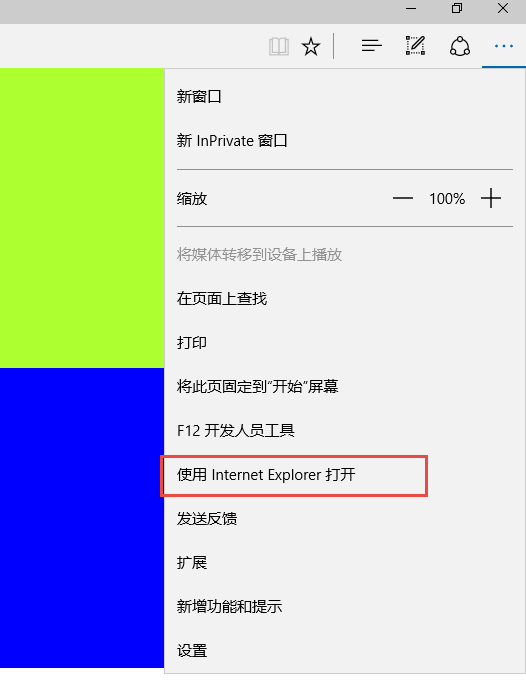 打开之后,按F12打开开发工具,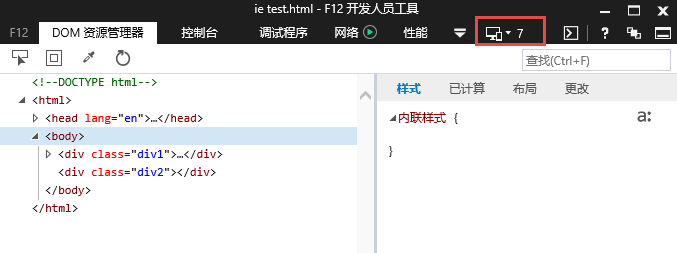
这样就可以用各个版本调试了。
Ie注意事项
html5shiv:解决ie9以下浏览器对html5新增标签的不识别,并导致CSS不起作用的问题。
respond.min:让不支持css3 Media Query的浏览器包括IE6-IE8等其他浏览器支持查询。
letskillie6.zh_CN.pack.js:IE6时代已经成为历史,尤其是许多IE6的老标准成为现在开发的诟病.给使用IE6的老用户发出一个提醒。


1  <!--[if lt IE 9]>
2     <script src="@ViewHelper.Content("/content/js/html5shiv.js")"></script>
3     <script src="@ViewHelper.Content("/content/js/respond.min.js")"></script>
4     <![endif]-->
5     <!--[if lt IE 6]>
6     <script src="@ViewHelper.Content("/content/js/letskillie6.zh_CN.pack.js")"></script>
7     <![endif]-->
当然可以直接使用bootcdn,http://www.bootcdn.cn/
Ie常见兼容
1、ie7 、8 不支持hover
解决思路:使用js来控制
2、ie的层级定位蔗照问题
 1 <!DOCTYPE html>
 2 <html>
 3 <head lang="en">
 4     <meta charset="UTF-8">
 5     <title></title>
 6     <style type="text/css">
 7         .div1 {height: 80px;border: 1px solid red;position: relative;}
 8         .div11 {width: 200px;height: 60px;position: absolute;left: 50px;top: 50px;background: orange;}
 9         .div2 {margin-top: 10px;height: 80px;border: 1px solid blue;position: relative; background-color: red}
10
11     </style>
12 </head>
13 <body>
14 <div class="div1">
15     <div class="div11"></div>
16 </div>
17 <div class="div2">
18
19 </div>
20 </body>
21 </html>
如上代码的结果:

如图有部分被父容器的兄弟元素覆盖;
解决思路:父容器与父容器的兄弟元素设置z-index,且父容器z-index大于父容器的兄弟元素;
 1 <!DOCTYPE html>
 2 <html>
 3 <head lang="en">
 4     <meta charset="UTF-8">
 5     <title></title>
 6     <style type="text/css">
 7         .div1 {height: 80px;border: 1px solid red;position: relative;
 8             z-index: 99;}
 9         .div11 {width: 200px;height: 60px;position: absolute;left: 50px;top: 50px;background: orange;}
10         .div2 {margin-top: 10px;height: 80px;border: 1px solid blue;position: relative; background-color: red;z-index: 1}
11
12     </style>
13 </head>
14 <body>
15 <div class="div1">
16     <div class="div11"></div>
17 </div>
18 <div class="div2">
19
20 </div>
21 </body>
22 </html>
3、e.stopPropagation(); ie6 、7 不支持
解决思路:
1  e = e || window.event;
2      if (e.stopPropagation) e.stopPropagation();
3      else if (window.event)
4         window.event.cancelBubble = true;// 针对 IE
4、IE不支持getElementsByClassName
解决思路:如果涉及到的元素很少,可以考虑加个id,反之给document对象里加入getElementsByClassName这个方法,这样的写法有一个好处,你什么不要改,这也算是符合了开闭原则。调用时加个判断,如果支持getElementsByClassName则不管,不支持则调用自己定义的getElementsByClassName;
 1 var getElementsByClassName = function (searchClass, node,tag) {
 2 if(document.getElementsByClassName){
 3 var nodes = (node || document).getElementsByClassName(searchClass),result = [];
 4 for(var i=0 ;node = nodes[i++];){
 5 if(tag !== "*" && node.tagName === tag.toUpperCase()){
 6 result.push(node)
 7 }else{
 8 result.push(node)
 9 }
10 }
11 return result
12 }else{
13 node = node || document;
14 tag = tag || "*";
15 var classes = searchClass.split(" "),
16 elements = (tag === "*" && node.all)? node.all : node.getElementsByTagName(tag),
17 patterns = [],
18 current,
19 match;
20 var i = classes.length;
21 while(--i >= 0){
22 patterns.push(new RegExp("(^|s)" + classes[i] + "(s|$)"));
23 }
24 var j = elements.length;
25 while(--j >= 0){
26 current = elements[j];
27 match = false;
28 for(var k=0, kl=patterns.length; k<kl; k++){
29 match = patterns[k].test(current.className);
30 if (!match) break;
31 }
32 if (match) result.push(current);
33 }
34 return result;
35 }
36 }
5、IE 双边距
解决思路:浮动元素加上display:inline
6、IE 清除浮动:
解决思路:
1、在IE8+以及主流的浏览器中,都支持:after这个伪类
1 .clear{
2 content: " ";
3     clear: both;
4     visibility: hidden;
5     display: block;
6     height: 0;
7 }
2、增加空元素,不推荐
给代码增加了无意义的元素;
3、父容器增加overflow ,不推荐
overflow 嵌套多了多少会存在问题;
4、推荐的写法
1 .clearfix:after {content:"200B"; display:block; height:0; clear:both; }
2 .clearfix { *zoom:1; }
......待续 20170818 ......
7、ios input select 边框阴影
1 input{
2     -webkit-appearance: none;
3 }
8、new Date(‘2017-08-18’)的浏览器兼容性问题
在ie 以及 Firefox 不能正确生成Date()对象
1 var time2 = (timeend+' 23:59:59').toString();
2 timestart = new Date(Date.parse(str.replace(/-/g,"/"))).getTime();
3 timeend = new Date(Date.parse(str.replace(/-/g,"/"))).getTime();
'2017-08-18' 无法被各个浏览器中,使用new Date(str)来正确生成日期对象的,正确做法是把日期格式转换为 2017/08/18
9、ios 中body 无法监听click事件
在body 中嵌套一层容器 如 div section artifact
1 <body>
2 <div class='contentMainBox'>
3 ...
4 ...
5 ...
6
7 </div>
8 </body>
10、audio ios不能自动播放
如果是基于web 如 微信:
 1 utility = {
 2     playAudio: function (id, src) {
 3         var audio = $('#' + id);
 4         if (audio.attr('src') == 'undefined') {
 5             audio.attr('src', src);
 6         }
 7
 8         function audioAutoPlay() {
 9             audio[0].play();
10             document.addEventListener("WeixinJSBridgeReady", function () {
11
12                 audio[0].play();
13
14             }, false);
15
16         }
17
18         audioAutoPlay();
19
20     }
21
22 }
23
24 utility.playAudio('music','mp3/music.mp3');
或者可以通过监听第一次触摸则播放
利用jq one 监听事件
1     $('.mainBox').one('touchstart', function () {
2         isAuto = true;
3         $('.musicBtn').click();
4     });
---------待续---------------