目录
HandlerMapping的常见种类
HandleMapping:处理映射器,可以理解为为请求的url查找对应的Controller类.
BeanNameUrlHandlerMapping
根据bean标签的名称找到对应的Controller类。

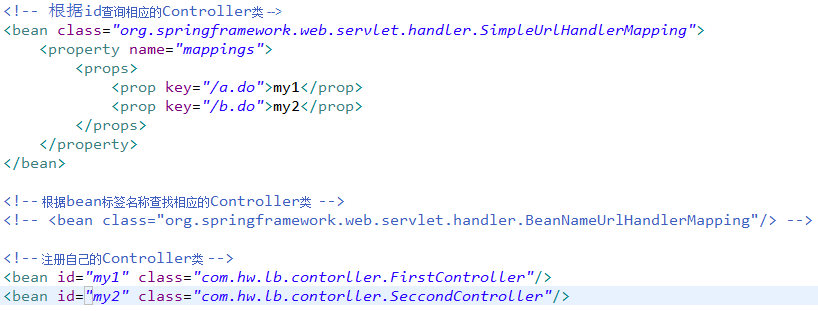
SimpleUrlHandlerMapping
根据bean的id查找对应的Controller类。
ControllerClassNameHandlerMapping
根据controller类的名字找到对应的Controller。

使用注解替代配置
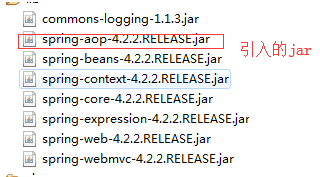
引入指定jar
**1.包扫描:扫描注解所在包
2.开启注解标签:Annotation
**
<?xml version="1.0" encoding="UTF-8"?>
<beans xmlns="http://www.springframework.org/schema/beans"
     xmlns:mvc="http://www.springframework.org/schema/mvc"
     xmlns:xsi="http://www.w3.org/2001/XMLSchema-instance"
     xmlns:context="http://www.springframework.org/schema/context"
     xsi:schemaLocation="http://www.springframework.org/schema/beans
        http://www.springframework.org/schema/beans/spring-beans.xsd
        http://www.springframework.org/schema/context
        http://www.springframework.org/schema/context/spring-context.xsd
        http://www.springframework.org/schema/mvc
        http://www.springframework.org/schema/mvc/spring-mvc.xsd">
     <!-- 包扫描 -->
     <context:component-scan base-package="com.hw.lb.controller.annotation"></context:component-scan>
     <!-- 启动注解器 -->
     <mvc:annotation-driven/>
     <!-- 配置视图解析器 -->
      <bean class="org.springframework.web.servlet.view.InternalResourceViewResolver">
           <property name="prefix" value="/WEB-INF/view/"/>
           <property name="suffix" value=".jsp"/>
      </bean>
</beans>
3.创建Controller类(在类中添加Controller注解,可以创建多个方法)
package com.hw.lb.controller.annotation;
import org.springframework.stereotype.Controller;
import org.springframework.web.bind.annotation.RequestMapping;
@Controller
public class FirstAnnotation {
     @RequestMapping("/list.do")
     public String list() {
           System.out.println("查询所有");
           return "login";
     }
}