JSTL标签和asp.net中的webform控件很像,但是功能确比asp.net的强很多。
配置过程,从最简单的项目开始:
1、下载JSTL标签库:http://archive.apache.org/dist/jakarta/taglibs/standard/binaries/jakarta-taglibs-standard-1.1.2.zip,也可直接上http://archive.apache.org/dist/jakarta/taglibs/standard/binaries/
2、新建Dynamic Web Project
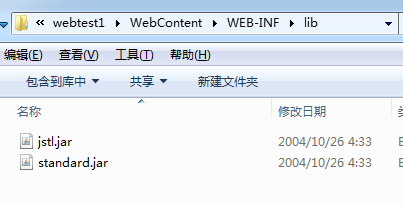
3、把下载好的文件,解压之后进去到lib目录下,拷贝如下文件:

到上面新建的项目下,放在:“workspace_web_testwebtest1WebContentWEB-INFlib”下
再设置web.xml文件,“workspace_web_testwebtest1WebContentWEB-INFweb.xml”,添加JSTL的支持,完成的结构如下:
<?xml version="1.0" encoding="UTF-8"?>
<web-app xmlns:xsi="http://www.w3.org/2001/XMLSchema-instance" xmlns="http://java.sun.com/xml/ns/javaee" xsi:schemaLocation="http://java.sun.com/xml/ns/javaee http://java.sun.com/xml/ns/javaee/web-app_3_0.xsd" id="WebApp_ID" version="3.0">
  <display-name>webtest1</display-name>
  <welcome-file-list>
    <welcome-file>index.html</welcome-file>
    <welcome-file>index.htm</welcome-file>
    <welcome-file>index.jsp</welcome-file>
    <welcome-file>default.html</welcome-file>
    <welcome-file>default.htm</welcome-file>
    <welcome-file>default.jsp</welcome-file>
  </welcome-file-list>
  <jsp-config>
    <taglib>
    <taglib-uri>http://java.sun.com/jstl/fmt</taglib-uri>
    <taglib-location>/WEB-INF/fmt.tld</taglib-location>
    </taglib>
    <taglib>
    <taglib-uri>http://java.sun.com/jstl/fmt-rt</taglib-uri>
    <taglib-location>/WEB-INF/fmt-rt.tld</taglib-location>
    </taglib>
    <taglib>
    <taglib-uri>http://java.sun.com/jstl/core</taglib-uri>
    <taglib-location>/WEB-INF/c.tld</taglib-location>
    </taglib>
    <taglib>
    <taglib-uri>http://java.sun.com/jstl/core-rt</taglib-uri>
    <taglib-location>/WEB-INF/c-rt.tld</taglib-location>
    </taglib>
    <taglib>
    <taglib-uri>http://java.sun.com/jstl/sql</taglib-uri>
    <taglib-location>/WEB-INF/sql.tld</taglib-location>
    </taglib>
    <taglib>
    <taglib-uri>http://java.sun.com/jstl/sql-rt</taglib-uri>
    <taglib-location>/WEB-INF/sql-rt.tld</taglib-location>
    </taglib>
    <taglib>
    <taglib-uri>http://java.sun.com/jstl/x</taglib-uri>
    <taglib-location>/WEB-INF/x.tld</taglib-location>
    </taglib>
    <taglib>
    <taglib-uri>http://java.sun.com/jstl/x-rt</taglib-uri>
    <taglib-location>/WEB-INF/x-rt.tld</taglib-location>
    </taglib>
    </jsp-config>
</web-app>
下一步是新建一个jstl.jsp进行测试,在页面的头写上:
<%@ taglib prefix="c" uri="http://java.sun.com/jsp/jstl/core" %>
完成的页面如下:
<%@ page language="java" contentType="text/html; charset=ISO-8859-1" pageEncoding="ISO-8859-1"%>
<%@ taglib prefix="c" uri="http://java.sun.com/jsp/jstl/core" %>
<!DOCTYPE html PUBLIC "-//W3C//DTD HTML 4.01 Transitional//EN" "http://www.w3.org/TR/html4/loose.dtd">
<html>
<head>
<meta http-equiv="Content-Type" content="text/html; charset=ISO-8859-1">
<title>Insert title here</title>
</head>
<body>
<c:out value="hello wolrd"></c:out>
</body>
</html>
运行的效果如下:
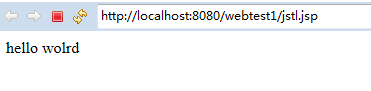
生成的html结构如下:

总结:用起来真的很爽,一次编写,全平台通用。
最后附上JSTL的教程:http://www.runoob.com/jsp/jsp-jstl.html