Vue2.0 【第四季】第1节 实例入门-实例属性
第1节 实例入门-实例属性
概述:实例就是在构造器外部操作构造器内部的属性选项或者方法,就叫做实例?实例的作用就是给原生的或者其他javascript框架一个融合的接口或者说是机会,让Vue和其他框架一起使用。
一、Vue和Jquery.js一起使用
下载并引入jQuery框架
下载可以去官网进行下载,我这里使用的版本是3.4.1,下载好后在需要的页面引入就可以了。当然你还有很多其它的方法引入jquery,只要可以顺利引入就可以了。
<script type="text/javascript" src="../assets/js/jquery-3.4.1.min.js"></script>
试着做一个案例,在DOM被挂载后修改里边的内容:
<!DOCTYPE html>
<html lang="en">
<head>
    <meta charset="UTF-8">
    <meta name="viewport" content="width=device-width, initial-scale=1.0">
    <title>example methods Demo</title>
    <script type="text/javascript" src="../assets/js/vue.js"></script>
    <script type="text/javascript" src="../assets/js/jquery-3.4.1.min.js"></script>
</head>
    <body>
        <h1>example methods Demo</h1>
        <hr>
        <div id="app">
            {{message}}
        </div>

        <script type="text/javascript">
            var app = new Vue({
                el:'#app',
                data:{
                    message:'hello world!'
                },
                mounted:function(){
                    $("#app").html('我是jQuery~!');
                }
            })
        </script>
    </body>
</html>
浏览器效果:
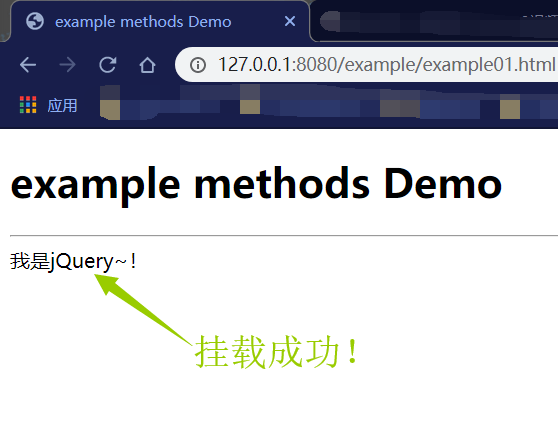
现在页面显示是:我是jQuery,而不是hello Vue了。
二、实例调用自定义方法
在Vue的构造器里我们写一个add方法,然后我们用实例的方法调用它。
构造器里的add方法:
methods:{
    add:function(){
        console.log("调用了ADD方法");
    }
}
实例调用:
app.add();
全部代码:
<!DOCTYPE html>
<html lang="en">
<head>
    <meta charset="UTF-8">
    <meta name="viewport" content="width=device-width, initial-scale=1.0">
    <title>example methods Demo</title>
    <script type="text/javascript" src="../assets/js/vue.js"></script>
    <script type="text/javascript" src="../assets/js/jquery-3.4.1.min.js"></script>
</head>
    <body>
        <h1>example methods Demo</h1>
        <hr>
        <div id="app">
            {{message}}
        </div>

        <script type="text/javascript">
            var app = new Vue({
                el:'#app',
                data:{
                    message:'hello world!'
                },
                mounted:function(){
                    $("#app").html('我是jQuery~!');
                },
                methods:{
                    add:function(){
                        console.log("调用了构造器内部的ADD方法");
                    }
                }
            })

            app.add();
        </script>
    </body>
</html>
浏览器效果:

PS:我们有可能把app.add()的括号忘记或省略,这时候我们得到的就是方法的字符串,但是并没有执行,所以必须要加上括号。