日常工作中经常需要将后台的数据导出成excel 格式,这里通过调用微软提供的类库来生成excel 文件。
具体是引用 了Microsoft.Office.Interop.Excel.dll 类库文件来生成excel 文件,这样使用起来比较方便,这是我的实例代码:
 public static void ExportExcel() {

            // excel 文件的数据源
            DataSet ds = CommonDB.executeQuery(CommandType.StoredProcedure, "GetAllProducts");


            try
            {
                Application statusExcel = new Microsoft.Office.Interop.Excel.Application();
                Workbook statusWorkbook = statusExcel.Application.Workbooks.Add(true);
                Worksheet wsStatusSheet = (Worksheet)statusWorkbook.Worksheets.Add(statusWorkbook.Sheets[1], Type.Missing, Type.Missing, Type.Missing);
                ((Worksheet)statusWorkbook.Sheets["Sheet1"]).Delete();
                wsStatusSheet.Name = "Status11";

                int excelCurrRow = 1;
                wsStatusSheet.Cells[excelCurrRow, 1] = "Name";
                wsStatusSheet.Cells[excelCurrRow, 2] = "Category";
                wsStatusSheet.Cells[excelCurrRow, 3] = "Price";
                wsStatusSheet.Cells[excelCurrRow, 4] = "Description";


                Range firstHeaderRow = wsStatusSheet.get_Range("A1:D1", System.Type.Missing);
                firstHeaderRow.Font.Bold = true;
                firstHeaderRow.Interior.Color = System.Drawing.ColorTranslator.ToOle(System.Drawing.ColorTranslator.FromHtml("#808080"));
                firstHeaderRow.Font.Color = 2;
                firstHeaderRow.Font.Name = "Calibri";
                firstHeaderRow.EntireRow.RowHeight = 30;
                firstHeaderRow.VerticalAlignment = Microsoft.Office.Interop.Excel.XlVAlign.xlVAlignCenter;

                Range statusSheetFirstColumn = wsStatusSheet.get_Range("A:A", System.Type.Missing);
                statusSheetFirstColumn.EntireColumn.ColumnWidth = 36.43;

                Range statusSheetSecondColumn = wsStatusSheet.get_Range("B:B", System.Type.Missing);
                statusSheetSecondColumn.EntireColumn.ColumnWidth = 15.71;

                Range statusSheetThirdColumn = wsStatusSheet.get_Range("C:C", System.Type.Missing);
                statusSheetThirdColumn.EntireColumn.ColumnWidth = 15.43;

                Range statusSheetFourthColumn = wsStatusSheet.get_Range("D:D", System.Type.Missing);
                statusSheetFourthColumn.EntireColumn.ColumnWidth = 17.86;


                excelCurrRow++;

                for (int i = 0; i < ds.Tables[0].Rows.Count; i++)
                {
                    for (int j = 1; j <= 4; j++)
                    {
                        wsStatusSheet.Cells[excelCurrRow, j] = ds.Tables[0].Rows[i][j - 1].ToString();
                    }
                    excelCurrRow++;
                }

                // 指定生成的文件名和路径
                string statusFilePath = ConfigurationManager.AppSettings["statusExcelPath"];
                string fileName = "Result_" + DateTime.Now.ToString("yyyyMMddHHmmss") + ".xlsx";
                fileName = statusFilePath + fileName;
                if (File.Exists(fileName))
                {
                    File.Delete(fileName);
                }

                object missing = System.Reflection.Missing.Value;

                // 保存excel 文件
                statusWorkbook.SaveAs(fileName, XlFileFormat.xlOpenXMLWorkbook, missing, missing, false, false, XlSaveAsAccessMode.xlNoChange,
       XlSaveConflictResolution.xlUserResolution, true, missing, missing, missing);


            }
            catch (Exception ex) {

            }
        }
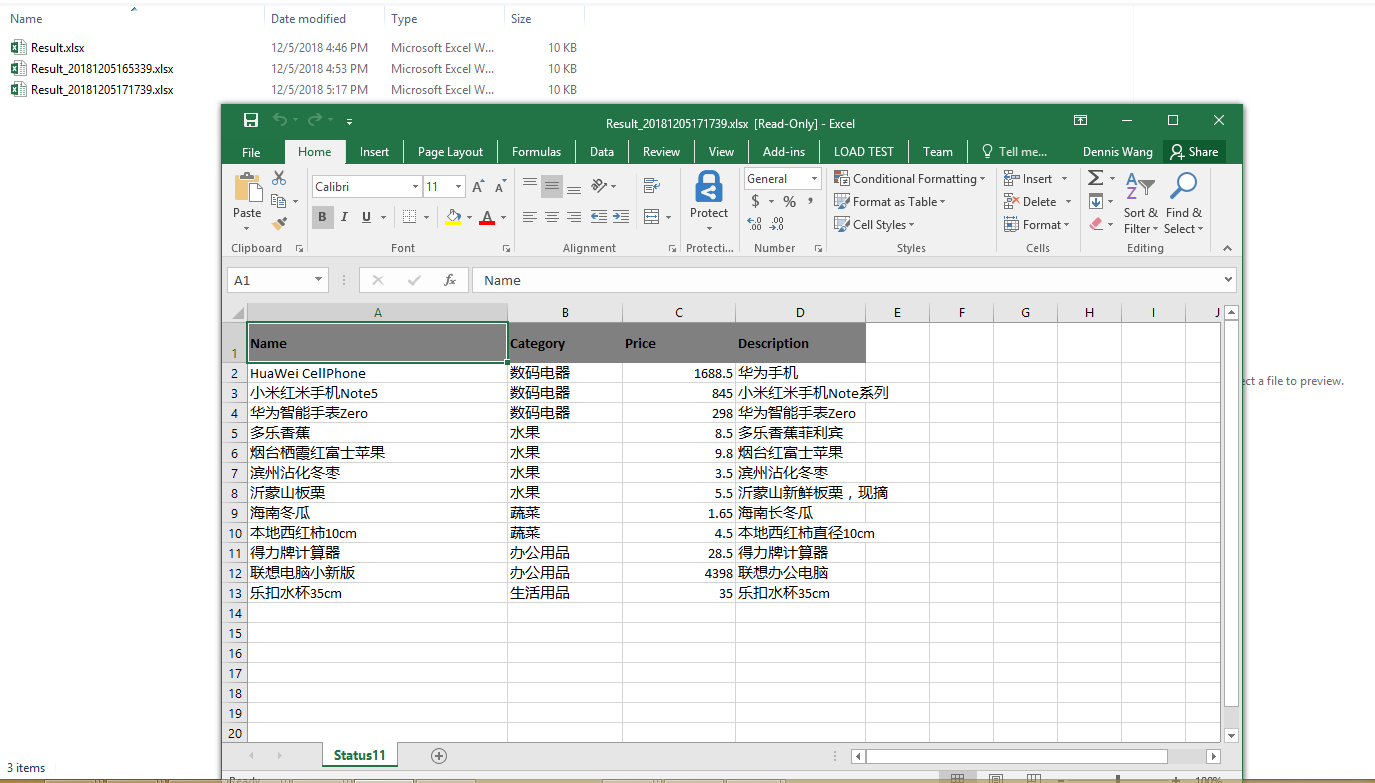
如下是生成的excel 文件截图: