错误背景:
前端做文件上传采用了jquery.form.js的ajaxSubmit方法,该方法可实现页面无刷新提交form表单以及文件上传。功能开发所用浏览器是谷歌,但是因为要求最低兼容ie8,功能开发完毕后,谷歌下完美运行,但是在ie8兼容模式下,却报错了,点了保存按钮后,数据提交到了后端,后端报错了,前端浏览器也因为后端报错无法返回,控制台也出现了错误信息。错误信息如下:
错误截图:
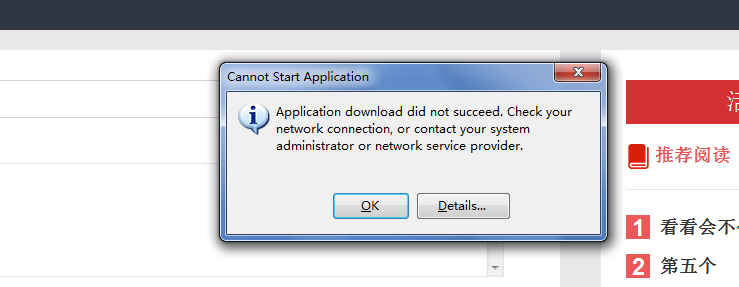
点开details
PLATFORM VERSION INFO
    Windows             : 6.1.7601.65536 (Win32NT)
    Common Language Runtime     : 4.0.30319.1026
    System.Deployment.dll         : 4.0.30319.1039 (RTMGDR.030319-1000)
    clr.dll             : 4.0.30319.1026 (RTMGDR.030319-1000)
    dfdll.dll             : 4.0.30319.1039 (RTMGDR.030319-1000)
    dfshim.dll             : 4.0.31106.0 (Main.031106-0000)

SOURCES
    Deployment url            : https://localhost:8070/Record/RecordFilePut

ERROR SUMMARY
    Below is a summary of the errors, details of these errors are listed later in the log.
    * Activation of https://localhost:8070/Record/RecordFilePut resulted in exception. Following failure messages were detected:
        + Downloading https://localhost:8070/Record/RecordFilePut did not succeed.
        + The underlying connection was closed: Could not establish trust relationship for the SSL/TLS secure channel.
        + The remote certificate is invalid according to the validation procedure.

COMPONENT STORE TRANSACTION FAILURE SUMMARY
    No transaction error was detected.

WARNINGS
    There were no warnings during this operation.

OPERATION PROGRESS STATUS
    * [2018-12-18 13:55:18] : Activation of https://localhost:8070/Record/RecordFilePut has started.

ERROR DETAILS
    Following errors were detected during this operation.
    * [2018-12-18 13:55:18] System.Deployment.Application.DeploymentDownloadException (Unknown subtype)
        - Downloading https://localhost:8070/Record/RecordFilePut did not succeed.
        - Source: System.Deployment
        - Stack trace:
            at System.Deployment.Application.SystemNetDownloader.DownloadSingleFile(DownloadQueueItem next)
            at System.Deployment.Application.SystemNetDownloader.DownloadAllFiles()
            at System.Deployment.Application.FileDownloader.Download(SubscriptionState subState)
            at System.Deployment.Application.DownloadManager.DownloadManifestAsRawFile(Uri& sourceUri, String targetPath, IDownloadNotification notification, DownloadOptions options, ServerInformation& serverInformation)
            at System.Deployment.Application.DownloadManager.DownloadDeploymentManifestDirectBypass(SubscriptionStore subStore, Uri& sourceUri, TempFile& tempFile, SubscriptionState& subState, IDownloadNotification notification, DownloadOptions options, ServerInformation& serverInformation)
            at System.Deployment.Application.DownloadManager.DownloadDeploymentManifestBypass(SubscriptionStore subStore, Uri& sourceUri, TempFile& tempFile, SubscriptionState& subState, IDownloadNotification notification, DownloadOptions options)
            at System.Deployment.Application.ApplicationActivator.PerformDeploymentActivation(Uri activationUri, Boolean isShortcut, String textualSubId, String deploymentProviderUrlFromExtension, BrowserSettings browserSettings, String& errorPageUrl)
            at System.Deployment.Application.ApplicationActivator.ActivateDeploymentWorker(Object state)
        --- Inner Exception ---
        System.Net.WebException
        - The underlying connection was closed: Could not establish trust relationship for the SSL/TLS secure channel.
        - Source: System
        - Stack trace:
            at System.Net.HttpWebRequest.GetResponse()
            at System.Deployment.Application.SystemNetDownloader.DownloadSingleFile(DownloadQueueItem next)
        --- Inner Exception ---
        System.Security.Authentication.AuthenticationException
        - The remote certificate is invalid according to the validation procedure.
        - Source: System
        - Stack trace:
            at System.Net.Security.SslState.StartSendAuthResetSignal(ProtocolToken message, AsyncProtocolRequest asyncRequest, Exception exception)
            at System.Net.Security.SslState.StartSendBlob(Byte[] incoming, Int32 count, AsyncProtocolRequest asyncRequest)
            at System.Net.Security.SslState.ProcessReceivedBlob(Byte[] buffer, Int32 count, AsyncProtocolRequest asyncRequest)
            at System.Net.Security.SslState.StartReceiveBlob(Byte[] buffer, AsyncProtocolRequest asyncRequest)
            at System.Net.Security.SslState.StartSendBlob(Byte[] incoming, Int32 count, AsyncProtocolRequest asyncRequest)
            at System.Net.Security.SslState.ProcessReceivedBlob(Byte[] buffer, Int32 count, AsyncProtocolRequest asyncRequest)
            at System.Net.Security.SslState.StartReceiveBlob(Byte[] buffer, AsyncProtocolRequest asyncRequest)
            at System.Net.Security.SslState.StartSendBlob(Byte[] incoming, Int32 count, AsyncProtocolRequest asyncRequest)
            at System.Net.Security.SslState.ProcessReceivedBlob(Byte[] buffer, Int32 count, AsyncProtocolRequest asyncRequest)
            at System.Net.Security.SslState.StartReceiveBlob(Byte[] buffer, AsyncProtocolRequest asyncRequest)
            at System.Net.Security.SslState.StartSendBlob(Byte[] incoming, Int32 count, AsyncProtocolRequest asyncRequest)
            at System.Net.Security.SslState.ForceAuthentication(Boolean receiveFirst, Byte[] buffer, AsyncProtocolRequest asyncRequest)
            at System.Net.Security.SslState.ProcessAuthentication(LazyAsyncResult lazyResult)
            at System.Threading.ExecutionContext.Run(ExecutionContext executionContext, ContextCallback callback, Object state, Boolean ignoreSyncCtx)
            at System.Threading.ExecutionContext.Run(ExecutionContext executionContext, ContextCallback callback, Object state)
            at System.Net.TlsStream.ProcessAuthentication(LazyAsyncResult result)
            at System.Net.TlsStream.Write(Byte[] buffer, Int32 offset, Int32 size)
            at System.Net.PooledStream.Write(Byte[] buffer, Int32 offset, Int32 size)
            at System.Net.ConnectStream.WriteHeaders(Boolean async)

COMPONENT STORE TRANSACTION DETAILS
    No transaction information is available.
错误解决:
一开始看到ie报错,第一反应是js不兼容,比如jquery版本或者jquery.form.js版本不兼容,一度试图更换版本。
据说jq2.0以上都不再支持ie8 我的jq是在2.0以下。
据说ie在在上传文件的时候回出现下载框,是响应类型没有设置,在后端获取到httpservletresponse对象,然后设置响应类型为text/json.但是依然没用
然后就疯狂翻帖子 找解决办法,终于看到一个大神说设置 produces="text/json"
RequestMapping中produces属性作用
注解RequestMapping中produces属性可以设置返回数据的类型以及编码,可以是json或者xml:
@RequestMapping(value="/xxx",produces = {"application/json;charset=UTF-8"})
或
@RequestMapping(value="/xxx",produces = {"application/xml;charset=UTF-8"})
但是必须要和@ResponseBody注解一起使用才可以,不加@ResponseBody注解相当于按照和返回String同名jsp页面解析自然就会报错。