1.浏览器自适应(即浏览器改变大小,里面的表格大小也会随之改变)要设置两个参数
(1)一般都要在body上设置class=“easyui-layout”;
<body class="easyui-layout">
</body>
(2)如果是datagrid,要给其设置fit:true。
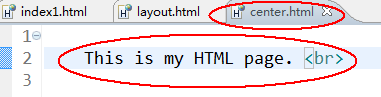
2.layout的href属性,该属性指引入目标页里面html的body代码,如果javascript不在body里面则不执行

目标页center.html里面可以直接写代码,如下图
3.如何获取到指定面板的指定属性
<!DOCTYPE html>
<html>
  <head>
    <title>layout.html</title>

    <meta http-equiv="keywords" content="keyword1,keyword2,keyword3">
    <meta http-equiv="description" content="this is my page">
    <meta http-equiv="content-type" content="text/html; charset=UTF-8">

    <script type="text/javascript" src="../easyui/jquery.min.js"></script>
    <script type="text/javascript" src="../easyui/jquery.easyui.min.js"></script>
    <script type="text/javascript" src="../easyui/locale/easyui-lang-zh_CN.js"></script>

   <link rel="stylesheet" href="../easyui/themes/default/easyui.css" type="text/css"></link>
   <link rel="stylesheet" href="../easyui/themes/icon.css" type="text/css"></link>
    <script type="text/javascript">
        $(function(){

        });
        function getCenterPanel(){
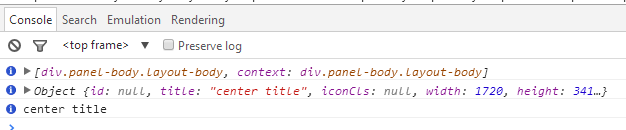
            var centerPanel=$("#cc").layout('panel','center');//使用panel方法,获取指定的区域如center,或north等。这样就获取到了center面板
            console.info(centerPanel);
            console.info(centerPanel.panel('options'));//获取到选项(options)属性(property)
            console.info(centerPanel.panel('options').title);//获取属性里面的title

        }
    </script>
  </head>

  <body class="easyui-layout" id="cc">
    <div data-options="region:'north',title:'North Title',split:true" style="height:100px;"></div>
    <div data-options="region:'south',title:'South Title',split:true" style="height:100px;"></div>
    <div data-options="region:'east',title:'East',split:true" style="100px;"></div>
    <div data-options="region:'west',title:'West',split:true" style="100px;"></div>
    <div data-options="region:'center',title:'center title'" style="padding:5px;background:#eee;">
        <input type="button" value="获取center面板" onclick="getCenterPanel()"/>
    </div>
</body>
</html>