Android 自带的toolbar 往往不能很好的的满足我们的个性化要求。因此我们经常使用自定的的标题栏。而Android系统本身也允许我们自定以标题栏。
记录一下,自定义标题栏常遇到的问题。先上效果图:
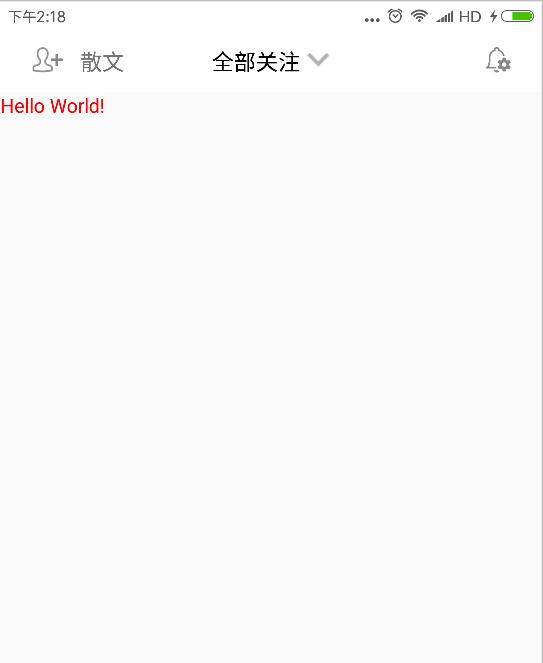
实现起来也很简单。在Activity 的 setContentView方法前添加
requestWindowFeature(Window.FEATURE_CUSTOM_TITLE);
其含义是允许用户自定义标题栏。
然后再在setContentView后添加
getWindow().setFeatureInt(Window.FEATURE_CUSTOM_TITLE, R.layout.custom_navigation_bar);
其中 R.layout.custom_navigation_bar 为我们自定义的标题栏样式,


 1 <?xml version="1.0" encoding="utf-8"?>
 2 <LinearLayout xmlns:android="http://schemas.android.com/apk/res/android"
 3     xmlns:tools="http://schemas.android.com/tools"
 4     android:layout_width="match_parent"
 5     android:layout_height="44dp"
 6     android:orientation="vertical"
 7     tools:context=".BaseActivity">
 8
 9     <LinearLayout
10         android:layout_width="match_parent"
11         android:layout_height="match_parent"
12         android:layout_weight="1"
13         android:orientation="horizontal"
14         android:padding="10dp">
15
16         <LinearLayout
17             android:layout_width="0dp"
18             android:layout_height="match_parent"
19             android:layout_weight="1"
20             android:gravity="left|center_vertical"
21             android:paddingBottom="2dp"
22             android:paddingTop="2dp">
23
24             <ImageView
25                 android:id="@+id/navigation_left"
26                 android:layout_width="wrap_content"
27                 android:layout_height="match_parent"
28                 android:src="@mipmap/rt_tianjiaguanzhu" />
29
30             <TextView
31                 android:id="@+id/navigation_left_text"
32                 android:layout_width="wrap_content"
33                 android:layout_height="wrap_content"
34                 android:text="散文"
35                 android:textSize="16sp" />
36
37         </LinearLayout>
38
39         <LinearLayout
40             android:layout_width="wrap_content"
41             android:layout_height="match_parent"
42             android:gravity="center"
43             android:paddingBottom="2dp"
44             android:paddingTop="2dp">
45
46             <TextView
47                 android:id="@+id/navigation_center"
48                 android:layout_width="wrap_content"
49                 android:layout_height="wrap_content"
50                 android:layout_gravity="center"
51                 android:layout_marginRight="5dp"
52                 android:text="全部关注"
53                 android:textAlignment="center"
54                 android:textColor="@color/black"
55                 android:textSize="16sp" />
56
57             <ImageView
58                 android:layout_width="wrap_content"
59                 android:layout_height="wrap_content"
60                 android:src="@mipmap/icon_down" />
61         </LinearLayout>
62
63         <LinearLayout
64             android:layout_width="0dp"
65             android:layout_height="match_parent"
66             android:layout_weight="1"
67             android:gravity="right|center_vertical"
68             android:paddingBottom="2dp"
69             android:paddingTop="2dp">
70
71             <ImageView
72                 android:id="@+id/navigation_right"
73                 android:layout_width="wrap_content"
74                 android:layout_height="match_parent"
75                 android:layout_gravity="center_vertical"
76                 android:src="@mipmap/settings" />
77         </LinearLayout>
78
79     </LinearLayout>
80
81     <View
82         android:layout_width="match_parent"
83         android:layout_height="0.5dp"
84         android:background="@color/lightgray" />
85
86 </LinearLayout>
最后设置主题,也只最容易出错的地方。对使用该方式添加标题栏的Activity 添加主题样式。
这是我的主题样式 应继承 android:Theme.Light 主题否则会报错。
1     <!-- 标题栏样式 -->
2     <style name="WindowTitleBackground" >
3         <item name="android:background">@color/colordarkgray</item>
4     </style>
5     <style name="MyTheme" parent="android:Theme.Light">
6         <item name="android:windowTitleSize">45dp</item>
7         <item name="android:windowTitleBackgroundStyle">@style/WindowTitleBackground</item>
8     </style>
Activity 引用代码如下。
android:theme="@style/MyTheme"

这样就可以实现自定义的效果了。


补充:上面说主题不继承 android:Theme.Light 会报错。查了一下是标题栏冲突的原因。
    我们只需要在继承的主题里添加如下属性就可以了。
    <item name="android:windowActionBar">false</item>
    <item name="android:windowNoTitle">false</item>
这样我们就可以继承别的主题使用一些高大上的效果了。如 Theme.AppCompat主题等。

有朋友问我,显示这个标题的时候同时也显示了系统自带的标题是什么原因,查看代码后发现他的Activity继承了AppCompatActivity 这里我们应继承Activity 就好了。