0.环境
mybaits maven log4j junit mysqlconncetor
  <dependencies>
    <dependency>
        <groupId>org.mybatis</groupId>
        <artifactId>mybatis</artifactId>
        <version>3.5.4</version>
    </dependency>
    <!--导入驱动程序-->
    <dependency>
        <groupId>mysql</groupId>
        <artifactId>mysql-connector-java</artifactId>
        <version>8.0.19</version>
    </dependency>
    <!--导入log4j-->
    <dependency>
        <groupId>log4j</groupId>
        <artifactId>log4j</artifactId>
        <version>1.2.12</version>
    </dependency>
    <!--导入slf,他是log4j的接口层-->
    <dependency>
        <groupId>org.slf4j</groupId>
        <artifactId>slf4j-api</artifactId>
        <version>2.0.0-alpha1</version>
    </dependency>
    <dependency>
        <groupId>org.slf4j</groupId>
        <artifactId>slf4j-log4j12</artifactId>
        <version>2.0.0-alpha1</version>
    </dependency>
    <!--导入junit测试包-->
    <dependency>
        <groupId>junit</groupId>
        <artifactId>junit</artifactId>
        <version>4.13</version>
    </dependency>
</dependencies>
<!--
上面一种方式虽然使用了mubaits的配置,但还是要写很多冗余代码
比如sql会话工厂每次都要创建,然后每次我们都要手动开启事务,回滚,关闭sqlsession等。
这种情况该如何解决呢
-->
<build>
    <plugins>
        <plugin>
            <!--使用插件,让项目使用java8编译等-->
            <groupId>org.apache.maven.plugins</groupId>
            <artifactId>maven-compiler-plugin</artifactId>
            <version>3.1</version>
            <configuration>
                <source>1.8</source>
                <target>1.8</target>
                <encoding>1.8</encoding>
            </configuration>
        </plugin>
    </plugins>
    <!--为了保证包目录下的配置文件在编译后能够发布到执行目录,需要指定编译后生成的文件内容 -->
        <resources>
            <resource>
                <directory>src/main/java</directory>
                <includes>
                    <include>**/*.xml</include>
                </includes>
            </resource>
            <resource>
                <directory>src/main/resources</directory>
            </resource>
        </resources>
</build>
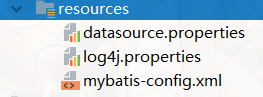
配置文件
1.dao层只有接口没有实现类
以后不用写接口的实现类,mybatis根据配置文件和对应接口的映射文件自动生成代理类。
2.mapper文件的放置位置
  映射文件与dao接口放在同一个包下,然后只需要在全局配置文件中指定接口所在的包即可,这样很方便,因为dao包中可能包含多个接口。
      <mappers>
    <!--使用mapper代理时,我们只需要指定dao所在接口的包即可
    只要在此包下面的接口和对应的配置文件就会被相互关联,并且mapper配置文件的
    文件名尽量和dao接口保持一致(这是在全局配置文件中配置)
    -->
          <package name="com.zero.dao"/>
      </mappers>
3.mapper映射文件中mapper节点的namespace属性
namespace属性值对应mapper节点中所有语句对应的dao层接口的全限定类名。

4.实现mapper代理
使用mapper代理的时候语句节点中的参数、返回值类型和id要和接口中的方法的参数,方法的返回值类型、方法名一致。
5.为了保证包目录下的配置文件在编译后能够发布到执行目录,所以需要指定编译后生成的文件内容。
<resources>
    <resource>
        <directory>src/main/java</directory>
        <includes>
            <include>**/*.xml</include>
        </includes>
    </resource>
    <resource>
        <directory>src/main/resources</directory>
    </resource>
</resources>
7.别名
  对于经常要用的jojo类,避免在映射文件中重复书写且全限定类名,我们在全局配置文件中添加pojo类的别名,在映射文件中需要填写此pojo类的别名的地方
  都可以使用此别名。
  <typeAliases>
      <typeAlias type="com.zero.pojo.User" alias="user"></typeAlias>
      <typeAlias type="com.zero.dao.UserMapper" alias="userMapper"></typeAlias>
  </typeAliases>
8.在 XML 中,一些字符拥有特殊的意义
  如果您把字符 "<" 放在 XML 元素中,会发生错误,这是因为解析器会把它当作新元素的开始。这样会产生 XML 错误:
  为了避免这个错误,用实体引用来代替 "<" 字符,如下:在 XML 中,有 5 个预定义的实体引用:在mybatis中,只有< 和&是非法的,使用实体引用来替代他

9,对于模糊查询
一般是对于字符串来说的,可以用${属性名}或者是${value}(如果是简单类型的话,比如int,String,${value}是固定写法)。
也可以使用concat,连接参数和%。
例如concat('%' , #{username} ,'%'),多个参数的模糊查询, 可以根据参数的顺序来进行选择
<select id="selectUserCount" parameterType="user" resultType="user">/*<*/
select id,username,userTime from user where id < 1 or username like concat('%',#{username},'%') or userTime > #{userTime}
</select>
<!--多个参数的查询-->
<select id="selectUserByOtherParams" resultType="user">/*这里也可以用param1和para2*/
select id,username,userTime from user where username like concat('%',#{param1},'%') or username like concat('%',#{param2},'%')
</select>`