1. ModBus的 Client/Server模型
2. 数据包格式及MBAP header (MODBUS Application Protocol header)
3. 大小端转换
4. 事务标识和缓冲清理
5. 示例代码
0. MODBUS MESSAGING ON TCP/IP IMPLEMENTATION GUIDE
下载地址:http://www.modbus.org/docs/Modbus_Messaging_Implementation_Guide_V1_0b.pdf
1. ModBus的 Client/Server模型

Client与Server之间有两种通讯方式:一种是TCP/IP,另一种是通过串口(Serial Port),本文重点介绍第一种通讯方式。第二种方式留了接口,暂时还没有实现。
2. 数据包格式及MBAP header (MODBUS Application Protocol header)
2.1 数据包格式
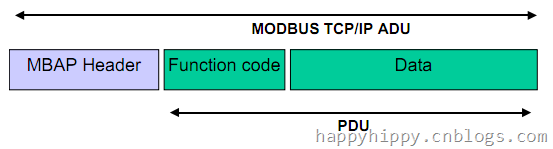
数据交换过程中,数据包的格式由三部分组成:协议头 + 功能码 + 数据(请求或接受的数据)。
这里主要用到下列两个功能码(十进制):
3: 读取寄存器中的值(Read Multiple Register)
16: 往寄存器中写值(Write Multiple Register)
2.2 MBAP header

协议头具体包括下列4个字段:
(1) Transaction Identifier:事务ID标识,Client每发送一个Request数据包的时候,需要带上该标识;当Server响应该请求的时候,会把该标识复制到Response中;这样客户端就可以进行容错判断,防止数据包发串了。
(2) Protocal Identifier:协议标识,ModBus协议中,该值为0;
(3) Length:整个数据包中,从当个前这个字节之后开始计算,后续数据量的大小(按byte计算)。
(4) Unit Identifier:-_-
3. 大小端转换
ModBus使用Big-Endian表示地址和数据项。因此在发送或者接受数据的过程中,需要对数据进行转换。
3.1 判断大小端

对于整数1,在两种机器上有两种不同的标示方式,如上图所示;因此,我们可以用&操作符来取其地址,再转换成指向byte的指针(byte*),最后再取该指针的值;若得到的byte值为1,则为Little-Endian,否则为Big-Endian。
1: unsafe
2: {
3: int tester = 1;
4: bool littleEndian = (*(byte*)(&tester)) == (byte)1;
5: }
3.2 整数/浮点数转换成Byte数组
.Net提供了现成的API,可以BitConverter.GetBytes(value)和BitConverter.ToXXOO(Byte[] data)来进行转换。下面的代码对该转换进行了封装,加入了Little-Endian转Big-Endian的处理(以int为例):
1: public class ValueHelper //Big-Endian可以直接转换
2: {
3: public virtual Byte[] GetBytes(int value)
4: {
5: return BitConverter.GetBytes(value);
6: }
7: public virtual int GetInt(byte[] data)
8: {
9: return BitConverter.ToInt32(data, 0);
10: }
11: }
12:
13: internal class LittleEndianValueHelper : ValueHelper //Little-Endian,转换时需要做翻转处理。
14: {
15: public override Byte[] GetBytes(int value)
16: {
17: return this.Reverse(BitConverter.GetBytes(value));
18: }
19: public virtual int GetInt(byte[] data)
20: {
21: return BitConverter.ToInt32(this.Reverse(data), 0);
22: }
23: private Byte[] Reverse(Byte[] data)
24: {
25: Array.Reverse(data);
26: return data;
27: }
28: }
4. 事务标识和缓冲处理
4.1 Transaction Identifier
上面2.2节中提到,Client每发送一个Request数据包的时候,需要带上一个标识;当Server响应该请求的时候,会把该标识复制到 Response中,返回给Client。这样Client就可以用来判断数据包有没有发串。在程序中,可以可以用一个变量及记录该标识:
1: private byte dataIndex = 0;
2:
3: protected byte CurrentDataIndex
4: {
5: get { return this.dataIndex; }
6: }
7:
8: protected byte NextDataIndex()
9: {
10: return ++this.dataIndex;
11: }
每次Client发送数据的时候,调用NextDataIndex()来取得事务标识;接着当Client读取Server的返回值的时候,需要判断数据包中的数据标识是否与发送时的标志一致;如果一致,则认为数据包有效;否则丢掉无效的数据包。
4.2 缓冲处理
上节中提到,如果Client接收到的响应数据包中的标识,与发送给Server的数据标识不一致,则认为Server返回的数据包无效,并丢弃该数据包。
如果只考虑正常情况,即数据木有差错,Client每次发送请求后,其请求包里面包含需要读取的寄存器数量,能算出从Server返回的数据两大小,这样 就能确定读完Server返回的所有缓冲区中的数据;每次交互后,Socket缓冲区中都为空,则整个过程没有问题。但是问题是:如果Server端出 错,或者数据串包等异常情况下,Client不能确定Server返回的数据包(占用的缓冲区)有多大;如果缓冲区中的数据没有读完,下次再从缓冲区中接 着读的时候,数据包必然是不正确的,而且会错误会一直延续到后续的读取操作中。
因此,每次读取数据时,要么全部读完缓冲区中的数据,要么读到错误的时候,就必须清楚缓冲区中剩余的数据。网上搜了半天,木有找到Windows下如何清 理Socket缓冲区的。有篇文章倒是提到一个狠招,每次读完数据后,直接把Socket给咔嚓掉;然后下次需要读取或发送数据的时候,再重新建立 Socket连接。
回过头再来看,其实,在Client与Server进行交互的过程中,Server每次返回的数据量都不大,也就一个MBAP Header + 几十个寄存器的值。因此,另一个处理方式,就是每次读取尽可能多的数据(多过缓冲区中的数据量),多读的内容,再忽略掉。暂时这么处理,期待有更好的解决 方法。
5. 源代码
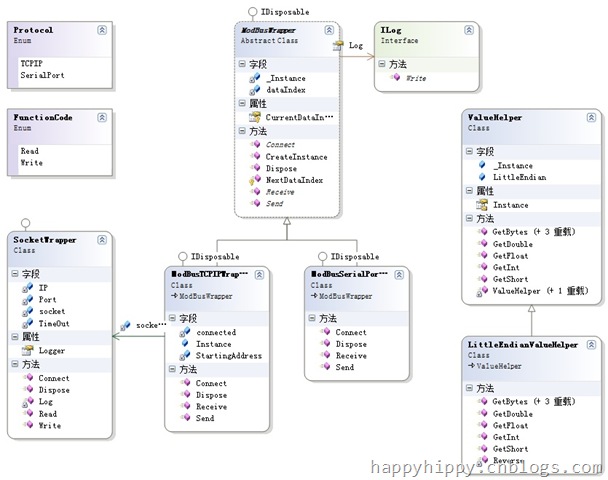
5.1 类图结构:
5.2 使用示例
(1) 写入数据:
1: this.Wrapper.Send(Encoding.ASCII.GetBytes(this.tbxSendText.Text.Trim()));
2:
3: public override void Send(byte[] data)
4: {
5: //[0]:填充0,清掉剩余的寄存器
6: if (data.Length < 60)
7: {
8: var input = data;
9: data = new Byte[60];
10: Array.Copy(input, data, input.Length);
11: }
12: this.Connect();
13: List<byte> values = new List<byte>(255);
14:
15: //[1].Write Header:MODBUS Application Protocol header
16: values.AddRange(ValueHelper.Instance.GetBytes(this.NextDataIndex()));//1~2.(Transaction Identifier)
17: values.AddRange(new Byte[] { 0, 0 });//3~4:Protocol Identifier,0 = MODBUS protocol
18: values.AddRange(ValueHelper.Instance.GetBytes((byte)(data.Length + 7)));//5~6:后续的Byte数量
19: values.Add(0);//7:Unit Identifier:This field is used for intra-system routing purpose.
20: values.Add((byte)FunctionCode.Write);//8.Function Code : 16 (Write Multiple Register)
21: values.AddRange(ValueHelper.Instance.GetBytes(StartingAddress));//9~10.起始地址
22: values.AddRange(ValueHelper.Instance.GetBytes((short)(data.Length / 2)));//11~12.寄存器数量
23: values.Add((byte)data.Length);//13.数据的Byte数量
24:
25: //[2].增加数据
26: values.AddRange(data);//14~End:需要发送的数据
27:
28: //[3].写数据
29: this.socketWrapper.Write(values.ToArray());
30:
31: //[4].防止连续读写引起前台UI线程阻塞
32: Application.DoEvents();
33:
34: //[5].读取Response: 写完后会返回12个byte的结果
35: byte[] responseHeader = this.socketWrapper.Read(12);
36: }
(2) 读取数据:
1: this.tbxReceiveText.Text = Encoding.ASCII.GetString(this.Wrapper.Receive());
2:
3: public override byte[] Receive()
4: {
5: this.Connect();
6: List<byte> sendData = new List<byte>(255);
7:
8: //[1].Send
9: sendData.AddRange(ValueHelper.Instance.GetBytes(this.NextDataIndex()));//1~2.(Transaction Identifier)
10: sendData.AddRange(new Byte[] { 0, 0 });//3~4:Protocol Identifier,0 = MODBUS protocol
11: sendData.AddRange(ValueHelper.Instance.GetBytes((short)6));//5~6:后续的Byte数量(针对读请求,后续为6个byte)
12: sendData.Add(0);//7:Unit Identifier:This field is used for intra-system routing purpose.
13: sendData.Add((byte)FunctionCode.Read);//8.Function Code : 3 (Read Multiple Register)
14: sendData.AddRange(ValueHelper.Instance.GetBytes(StartingAddress));//9~10.起始地址
15: sendData.AddRange(ValueHelper.Instance.GetBytes((short)30));//11~12.需要读取的寄存器数量
16: this.socketWrapper.Write(sendData.ToArray()); //发送读请求
17:
18: //[2].防止连续读写引起前台UI线程阻塞
19: Application.DoEvents();
20:
21: //[3].读取Response Header : 完后会返回8个byte的Response Header
22: byte[] receiveData = this.socketWrapper.Read(256);//缓冲区中的数据总量不超过256byte,一次读256byte,防止残余数据影响下次读取
23: short identifier = (short)((((short)receiveData[0]) << 8) + receiveData[1]);
24:
25: //[4].读取返回数据:根据ResponseHeader,读取后续的数据
26: if (identifier != this.CurrentDataIndex) //请求的数据标识与返回的标识不一致,则丢掉数据包
27: {
28: return new Byte[0];
29: }
30: byte length = receiveData[8];//最后一个字节,记录寄存器中数据的Byte数
31: byte[] result = new byte[length];
32: Array.Copy(receiveData, 9, result, 0, length);
33: return result;
34: }
(3) 测试发送和读取:

ModBus-TCP Client Tool(可以从网上下载,用来测试)中,可以点击“Edit Values”,修改寄存器中的值;然后再在测试程序中,点击“接收”,可以解析到修改后的值。这里只是测试发送和接收字符串,如果需要处理复杂的数字/ 字符串组合啥的,就需要自己定义数据格式和解析方式了。