正则表达式获取博客园随笔(一)
晚上起先和朋友们跑步去了,然
后回来之后洗了个澡,打开VS新建项目发现都会弹出一个问题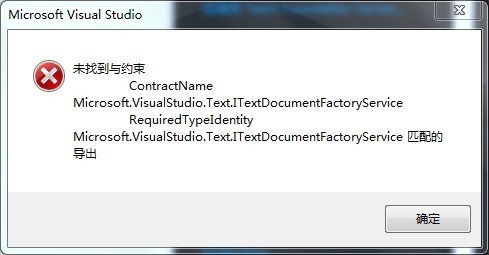
然后就去找万能的度娘了,http://bbs.csdn.net/topics/390514964?page=1#post-395015041
25楼真相,卸载掉那2个补丁就可以了,不过在卸载第一个补丁的时候你需要停止他指出的那个服务。
我当初刚开始接触正则是去年公司主管让我去学,然后发了个网址给我:http://www.cnblogs.com/ie421/archive/2008/07/23/1249896.html
看完后收益颇大,下面就开始正题。
之所以要获取博客园的内容是因为博客园造就了我,而大家也都是在博客园里相识,所以我们就以博客园为例子。
下面上传的这个是当初主管给我的一个类,大家可以参考参考,我今天的内容用到了里面的GetString()这个方法。在运行之前要引用System.Web
 View Code
using System;
using System.Collections.Generic;
using System.IO;
using System.IO.Compression;
using System.Linq;
using System.Net;
using System.Text;
using System.Web;
namespace CnblogsSearch
{
public class HttpClient
{
#region fields
private bool keepContext;
private string defaultLanguage = "zh-CN";
private Encoding defaultEncoding = Encoding.UTF8;
private string accept = "*/*";
private string userAgent = "Mozilla/4.0 (compatible; MSIE 6.0; Windows NT 5.2; SV1; .NET CLR 1.1.4322; .NET CLR 2.0.50727)";
private HttpVerb verb = HttpVerb.GET;
private HttpClientContext context;
private readonly List<HttpUploadingFile> files = new List<HttpUploadingFile>();
private readonly Dictionary<string, string> postingData = new Dictionary<string, string>();
private string url;
private WebHeaderCollection responseHeaders;
private int startPoint;
private int endPoint;
public bool boundaryed;
private string encodingType = "utf-8";
private int timeOut = 10000;
#endregion
#region events
public event EventHandler<StatusUpdateEventArgs> StatusUpdate;
private void OnStatusUpdate(StatusUpdateEventArgs e)
{
EventHandler<StatusUpdateEventArgs> temp = StatusUpdate;
if (temp != null)
temp(this, e);
}
#endregion
#region properties
public string EncodingType
{
get
{
return encodingType;
}
set
{
encodingType = value;
}
}
/// <summary>
/// 是否启用gzip压缩传输
/// </summary>
public bool IsGzip { get; set; }
/// <summary>
/// 是否在数据流中编码
/// </summary>
public bool encodeMemory { get; set; }
/// <summary>
/// 是否自动在不同的请求间保留Cookie, Referer
/// </summary>
public bool KeepContext
{
get { return keepContext; }
set { keepContext = value; }
}
public CookieContainer cookie;
/// <summary>
/// 期望的回应的语言
/// </summary>
public string DefaultLanguage
{
get { return defaultLanguage; }
set { defaultLanguage = value; }
}
/// <summary>
/// GetString()如果不能从HTTP头或Meta标签中获取编码信息,则使用此编码来获取字符串
/// </summary>
public Encoding DefaultEncoding
{
get { return defaultEncoding; }
set { defaultEncoding = value; }
}
public int TimeOut
{
get
{
return timeOut;
}
set
{
timeOut = value;
}
}
/// <summary>
/// 指示发出Get请求还是Post请求
/// </summary>
public HttpVerb Verb
{
get { return verb; }
set { verb = value; }
}
/// <summary>
/// 要上传的文件.如果不为空则自动转为Post请求
/// </summary>
public List<HttpUploadingFile> Files
{
get { return files; }
}
public List<RepeatPostData> repeatPostData
{
get;
set;
}
/// <summary>
/// 要发送的Form表单信息
/// </summary>
public Dictionary<string, string> PostingData
{
get { return postingData; }
}
/// <summary>
/// 获取或设置请求资源的地址
/// </summary>
public string Url
{
get { return url; }
set { url = value; }
}
/// <summary>
/// 用于在获取回应后,暂时记录回应的HTTP头
/// </summary>
public WebHeaderCollection ResponseHeaders
{
get { return responseHeaders; }
}
/// <summary>
/// 获取或设置期望的资源类型
/// </summary>
public string Accept
{
get { return accept; }
set { accept = value; }
}
/// <summary>
/// 获取或设置请求中的Http头User-Agent的值
/// </summary>
public string UserAgent
{
get { return userAgent; }
set { userAgent = value; }
}
/// <summary>
/// 获取或设置Cookie及Referer
/// </summary>
public HttpClientContext Context
{
get { return context; }
set { context = value; }
}
/// <summary>
/// 获取或设置获取内容的起始点,用于断点续传,多线程下载等
/// </summary>
public int StartPoint
{
get { return startPoint; }
set { startPoint = value; }
}
/// <summary>
/// 获取或设置获取内容的结束点,用于断点续传,多下程下载等.
/// 如果为0,表示获取资源从StartPoint开始的剩余内容
/// </summary>
public int EndPoint
{
get { return endPoint; }
set { endPoint = value; }
}
#endregion
#region constructors
/// <summary>
/// 构造新的HttpClient实例
/// </summary>
public HttpClient()
: this(null)
{
}
/// <summary>
/// 构造新的HttpClient实例
/// </summary>
/// <param name="url">要获取的资源的地址</param>
public HttpClient(string url)
: this(url, null)
{
}
/// <summary>
/// 构造新的HttpClient实例
/// </summary>
/// <param name="url">要获取的资源的地址</param>
/// <param name="context">Cookie及Referer</param>
public HttpClient(string url, HttpClientContext context)
: this(url, context, false)
{
}
/// <summary>
/// 构造新的HttpClient实例
/// </summary>
/// <param name="url">要获取的资源的地址</param>
/// <param name="context">Cookie及Referer</param>
/// <param name="keepContext">是否自动在不同的请求间保留Cookie, Referer</param>
public HttpClient(string url, HttpClientContext context, bool keepContext)
{
this.url = url;
this.context = context;
this.keepContext = keepContext;
if (this.context == null)
this.context = new HttpClientContext();
cookie = new CookieContainer();
}
#endregion
#region AttachFile
/// <summary>
/// 在请求中添加要上传的文件
/// </summary>
/// <param name="fileName">要上传的文件路径</param>
/// <param name="fieldName">文件字段的名称(相当于<input type=file name=fieldName>)里的fieldName)</param>
public void AttachFile(string fileName, string fieldName)
{
HttpUploadingFile file = new HttpUploadingFile(fileName, fieldName);
files.Add(file);
}
/// <summary>
/// 在请求中添加要上传的文件
/// </summary>
/// <param name="data">要上传的文件内容</param>
/// <param name="fileName">文件名</param>
/// <param name="fieldName">文件字段的名称(相当于<input type=file name=fieldName>)里的fieldName)</param>
public void AttachFile(byte[] data, string fileName, string fieldName)
{
HttpUploadingFile file = new HttpUploadingFile(data, fileName, fieldName);
files.Add(file);
}
#endregion
/// <summary>
/// 清空PostingData, Files, StartPoint, EndPoint, ResponseHeaders, 并把Verb设置为Get.
/// 在发出一个包含上述信息的请求后,必须调用此方法或手工设置相应属性以使下一次请求不会受到影响.
/// </summary>
public void Reset()
{
verb = HttpVerb.GET;
files.Clear();
postingData.Clear();
responseHeaders = null;
startPoint = 0;
endPoint = 0;
IsGzip = false;
if (repeatPostData != null) repeatPostData.Clear();
}
public string ip;
private IPEndPoint BindIPEndPointCallback(ServicePoint servicePoint, IPEndPoint remoteEndPoint, int retryCount)
{
return new IPEndPoint(IPAddress.Parse(ip), 0);
}
public string cookieStr = "";
private HttpWebRequest CreateRequest()
{
HttpWebRequest req = (HttpWebRequest)WebRequest.Create(url);
req.CookieContainer = cookie;
//req.Headers.Add("Accept-Language", defaultLanguage);
req.Accept = accept;
req.UserAgent = userAgent;
req.KeepAlive = true;
req.AllowAutoRedirect = true;
req.Timeout = TimeOut;
if (IsGzip)
{
req.Headers.Add("Accept-Encoding", "gzip");
}
if (ip != null)
{
req.ServicePoint.BindIPEndPointDelegate = new BindIPEndPoint(BindIPEndPointCallback);
}
if (context.Cookies != null)
req.CookieContainer.Add(context.Cookies);
if (!string.IsNullOrEmpty(context.Referer))
req.Referer = context.Referer;
if (verb == HttpVerb.HEAD)
{
req.Method = "HEAD";
return req;
}
if (postingData.Count > 0 || files.Count > 0)
verb = HttpVerb.POST;
if (cookieStr != "") req.Headers.Add("Cookie", cookieStr);
if (verb == HttpVerb.POST)
{
req.Method = "POST";
MemoryStream memoryStream = new MemoryStream();
StreamWriter writer;
if (encodeMemory)
{
writer = new StreamWriter(memoryStream, Encoding.GetEncoding(EncodingType));
}
else
writer = new StreamWriter(memoryStream);
if (files.Count > 0 || boundaryed)
{
string newLine = "
";
string boundary = Guid.NewGuid().ToString().Replace("-", "");
req.ContentType = "multipart/form-data; boundary=" + boundary;
foreach (string key in postingData.Keys)
{
writer.Write("--" + boundary + newLine);
writer.Write("Content-Disposition: form-data; name="{0}"{1}{1}", key, newLine);
writer.Write(postingData[key] + newLine);
}
foreach (HttpUploadingFile file in files)
{
writer.Write("--" + boundary + newLine);
writer.Write(
"Content-Disposition: form-data; name="{0}"; filename="{1}"{2}",
file.FieldName,
file.FileName,
newLine
);
writer.Write("Content-Type: image/jpeg" + newLine + newLine);
writer.Flush();
memoryStream.Write(file.Data, 0, file.Data.Length);
writer.Write(newLine);
writer.Write("--" + boundary + "--" + newLine);
}
}
else
{
req.ContentType = "application/x-www-form-urlencoded";
StringBuilder sb = new StringBuilder();
foreach (string key in postingData.Keys)
{
sb.AppendFormat("{0}={1}&",HttpUtility.UrlEncode(key, Encoding.GetEncoding(EncodingType)), HttpUtility.UrlEncode(postingData[key], Encoding.GetEncoding(EncodingType)));
}
if (repeatPostData != null)
{
foreach (var item in repeatPostData)
{
sb.AppendFormat("{0}={1}&", HttpUtility.UrlEncode(item.key, Encoding.GetEncoding(EncodingType)), HttpUtility.UrlEncode(item.value, Encoding.GetEncoding(EncodingType)));
}
}
if (sb.Length > 0)
sb.Length--;
writer.Write(sb.ToString());
}
writer.Flush();
using (Stream stream = req.GetRequestStream())
{
memoryStream.WriteTo(stream);
}
}
if (startPoint != 0 && endPoint != 0)
req.AddRange(startPoint, endPoint);
else if (startPoint != 0 && endPoint == 0)
req.AddRange(startPoint);
return req;
}
/// <summary>
/// 发出一次新的请求,并返回获得的回应
/// 调用此方法永远不会触发StatusUpdate事件.
/// </summary>
/// <returns>相应的HttpWebResponse</returns>
public HttpWebResponse GetResponse()
{
HttpWebRequest req = CreateRequest();
HttpWebResponse res = null;
try
{
res = (HttpWebResponse)req.GetResponse();
responseHeaders = res.Headers;
if (keepContext)
{
context.Cookies = res.Cookies;
context.Referer = url;
cookie.Add(context.Cookies);
}
}
catch (Exception)
{ throw; }
return res;
}
/// <summary>
/// 发出一次新的请求,并返回回应内容的流
/// 调用此方法永远不会触发StatusUpdate事件.
/// </summary>
/// <returns>包含回应主体内容的流</returns>
public Stream GetStream()
{
return GetResponse().GetResponseStream();
}
public string responseURL;
/// <summary>
/// 发出一次新的请求,并以字节数组形式返回回应的内容
/// 调用此方法会触发StatusUpdate事件
/// </summary>
/// <returns>包含回应主体内容的字节数组</returns>
public byte[] GetBytes()
{
byte[] result = new byte[] { 0, 1 };
try
{
HttpWebResponse res = GetResponse();
int length = (int)res.ContentLength;
responseURL = res.ResponseUri.AbsoluteUri;
MemoryStream memoryStream = new MemoryStream();
byte[] buffer = new byte[0x100];
Stream rs = res.GetResponseStream();
for (int i = rs.Read(buffer, 0, buffer.Length); i > 0; i = rs.Read(buffer, 0, buffer.Length))
{
memoryStream.Write(buffer, 0, i);
OnStatusUpdate(new StatusUpdateEventArgs((int)memoryStream.Length, length));
}
rs.Close();
result = memoryStream.ToArray();
}
catch (Exception)
{
throw;
}
return result;
}
/// <summary>
/// 发出一次新的请求,以Http头,或Html Meta标签,或DefaultEncoding指示的编码信息对回应主体解码
/// 调用此方法会触发StatusUpdate事件
/// </summary>
/// <returns>解码后的字符串</returns>
public string GetString()
{
byte[] data = GetBytes();
if (responseHeaders.AllKeys.Contains<string>("Content-Encoding") && responseHeaders["Content-Encoding"].Contains("gzip"))
{
//Console.WriteLine(responseHeaders["Content-Encoding"].ToString());
data = GZipDecompress(data);
}
string encodingName = GetEncodingFromHeaders();
if (encodingName == null)
encodingName = GetEncodingFromBody(data);
Encoding encoding;
if (encodingName == null)
encoding = defaultEncoding;
else
{
try
{
encoding = Encoding.GetEncoding(encodingName);
}
catch (ArgumentException)
{
encoding = defaultEncoding;
}
}
return encoding.GetString(data);
}
/// <summary>
/// 发出一次新的请求,对回应的主体内容以指定的编码进行解码
/// 调用此方法会触发StatusUpdate事件
/// </summary>
/// <param name="encoding">指定的编码</param>
/// <returns>解码后的字符串</returns>
public string GetString(Encoding encoding)
{
byte[] data = GetBytes();
return encoding.GetString(data);
}
/// <summary>
/// GZip解压函数
/// </summary>
/// <param name="data"></param>
/// <returns></returns>
private byte[] GZipDecompress(byte[] data)
{
using (MemoryStream stream = new MemoryStream())
{
using (GZipStream gZipStream = new GZipStream(new MemoryStream(data), CompressionMode.Decompress))
{
byte[] bytes = new byte[40960];
int n;
while ((n = gZipStream.Read(bytes, 0, bytes.Length)) != 0)
{
stream.Write(bytes, 0, n);
}
gZipStream.Close();
}
return stream.ToArray();
}
}
private string GetEncodingFromHeaders()
{
string encoding = null;
try
{
string contentType = responseHeaders["Content-Type"];
if (contentType != null)
{
int i = contentType.IndexOf("charset=");
if (i != -1)
{
encoding = EncodingType = contentType.Substring(i + 8);
}
}
}
catch (Exception)
{ }
return encoding;
}
private string GetEncodingFromBody(byte[] data)
{
//string encodingName = null;
string dataAsAscii = Encoding.ASCII.GetString(data);
if (dataAsAscii != null)
{
int i = dataAsAscii.IndexOf("charset=");
if (i != -1)
{
int j = dataAsAscii.IndexOf(""", i);
if (j != -1)
{
int k = i + 8;
EncodingType = dataAsAscii.Substring(k, (j - k) + 1);
char[] chArray = new char[2] { '>', '"' };
EncodingType = EncodingType.TrimEnd(chArray);
}
}
}
return EncodingType;
}
/// <summary>
/// 发出一次新的Head请求,获取资源的长度
/// 此请求会忽略PostingData, Files, StartPoint, EndPoint, Verb
/// </summary>
/// <returns>返回的资源长度</returns>
public int HeadContentLength()
{
Reset();
HttpVerb lastVerb = verb;
verb = HttpVerb.HEAD;
using (HttpWebResponse res = GetResponse())
{
verb = lastVerb;
return (int)res.ContentLength;
}
}
/// <summary>
/// 发出一次新的请求,把回应的主体内容保存到文件
/// 调用此方法会触发StatusUpdate事件
/// 如果指定的文件存在,它会被覆盖
/// </summary>
/// <param name="fileName">要保存的文件路径</param>
public void SaveAsFile(string fileName)
{
SaveAsFile(fileName, FileExistsAction.Overwrite);
}
/// <summary>
/// 发出一次新的请求,把回应的主体内容保存到文件
/// 调用此方法会触发StatusUpdate事件
/// </summary>
/// <param name="fileName">要保存的文件路径</param>
/// <param name="existsAction">指定的文件存在时的选项</param>
/// <returns>是否向目标文件写入了数据</returns>
public bool SaveAsFile(string fileName, FileExistsAction existsAction)
{
byte[] data = GetBytes();
switch (existsAction)
{
case FileExistsAction.Overwrite:
using (BinaryWriter writer = new BinaryWriter(new FileStream(fileName, FileMode.OpenOrCreate, FileAccess.Write)))
writer.Write(data);
return true;
case FileExistsAction.Append:
using (BinaryWriter writer = new BinaryWriter(new FileStream(fileName, FileMode.Append, FileAccess.Write)))
writer.Write(data);
return true;
default:
if (!File.Exists(fileName))
{
using (
BinaryWriter writer =
new BinaryWriter(new FileStream(fileName, FileMode.Create, FileAccess.Write)))
writer.Write(data);
return true;
}
else
{
return false;
}
}
}
}
public class HttpClientContext
{
private CookieCollection cookies;
private string referer;
public CookieCollection Cookies
{
get { return cookies; }
set { cookies = value; }
}
public string Referer
{
get { return referer; }
set { referer = value; }
}
}
public class RepeatPostData
{
public string key { get; set; }
public string value { get; set; }
}
public enum HttpVerb
{
GET,
POST,
HEAD,
}
public enum FileExistsAction
{
Overwrite,
Append,
Cancel,
}
public class HttpUploadingFile
{
private string fileName;
private string fieldName;
private byte[] data;
public string FileName
{
get { return fileName; }
set { fileName = value; }
}
public string FieldName
{
get { return fieldName; }
set { fieldName = value; }
}
public byte[] Data
{
get { return data; }
set { data = value; }
}
public HttpUploadingFile(string fileName, string fieldName)
{
this.fileName = fileName;
this.fieldName = fieldName;
using (FileStream stream = new FileStream(fileName, FileMode.Open))
{
byte[] inBytes = new byte[stream.Length];
stream.Read(inBytes, 0, inBytes.Length);
data = inBytes;
}
}
public HttpUploadingFile(byte[] data, string fileName, string fieldName)
{
this.data = data;
this.fileName = fileName;
this.fieldName = fieldName;
}
}
public class StatusUpdateEventArgs : EventArgs
{
private readonly int bytesGot;
private readonly int bytesTotal;
public StatusUpdateEventArgs(int got, int total)
{
bytesGot = got;
bytesTotal = total;
}
/// <summary>
/// 已经下载的字节数
/// </summary>
public int BytesGot
{
get { return bytesGot; }
}
/// <summary>
/// 资源的总字节数
/// </summary>
public int BytesTotal
{
get { return bytesTotal; }
}
}
}
然后我们先根据这个方法获取博客园首页的源代码
View Code
/// <summary>
/// 根据网址获取页面源码
/// </summary>
/// <param name="url"></param>
/// <returns></returns>
public string GetHtml(string url)
{
string ContentHtml = "";
try
{
HttpClient hc = new HttpClient();
hc.Url = url;
if (!hc.Url.Contains("http://"))//如果输入的网址没有包含http:// 则手动添加
{
hc.Url = "http://" + hc.Url;
}
ContentHtml = hc.GetString();
}
catch (Exception e)//如果上面的执行出错,则返回继续执行
{
return GetHtml(url);
}
return ContentHtml;
}
然后再观察每条随笔的规律,我们发现没条的开头是<div class="post_item_body">,结尾是<div class="clear">,那我们就可以根据这个规律来写出正则:Regex regexContent = new Regex("<div class="post_item_body">(?<content>.*?)<div class="clear"></div>",RegexOptions.Singleline);
然后可以使用这个正则来获取我们需要匹配的内容了

1         string Html= GetHtml("http://www.cnblogs.com/");
2             Regex regexContent = new Regex("<div class="post_item_body">(?<content>.*?)<div class="clear"></div>",RegexOptions.Singleline);
3             string blog = regexContent.Match(Html).Groups["content"].Value.ToString();
在这里我用到的正则匹配工具是Expresso,有需要的朋友可以留言。当然,如果我有什么地方写的不好的,欢迎各位指出。晚上就先到这里了,该洗洗睡了。