1、为 Action 标注 Attribute 限制访问

public class HomeController : Controller
{
    [HttpPost]
    public ActionResult Index()
    {
        return View();
    }
}
那么该 Index 的 Action 就只能够通过 Post 方法请求,其它例如 Get 方法请求则响应 404。
2、设置 View 所使用的 Model
假设有 Person 类。
则 Controll 代码:
public class HomeController : Controller
{
    public ActionResult Index()
    {
        var model = new Person();// 构建或从数据库获取一个 Person 类实例。
        return View(model);
    }
}
或者可以设置 ViewData 的 Model 属性。
public class HomeController : Controller
{
    public ActionResult Index()
    {
        var model = new Person();
        ViewData.Model = model;
        return View();
    }
}
View 代码:
@* 声明该 View 的 Model 类型 *@
@model Namespace.Person

……
    @* 输出 Person 对象的 Name 属性 *@
    @Model.Name
……
当然不声明 View 的 Model 类型也是可以的,但是这会失去 Model 类型约束以及语法提示等功能。
在声明了 Model 类型的情况下,View 继承自 WebViewPage<TModel> 抽象类。
而不声明 Model 类型的情况下,View 则继承自 WebViewPage<dynamic> 抽象类。
3、Model 验证
修改 Person 类,添加相应的 ValidationAttribute
public class Person
{
    [Required]
    [StringLength(5)]
    public string Name
    {
        get;
        set;
    }

    [Range(0, 150)]
    public int Age
    {
        get;
        set;
    }

    [Required]
    [EmailAddress]
    [DataType(DataType.EmailAddress)]
    public string Email
    {
        get;
        set;
    }
}
Controller 验证:
public class HomeController : Controller
{
    [HttpPost]
    public ActionResult Create(Person person)
    {
        if (ModelState.IsValid)
        {
            return Content("验证成功");
        }
        else
        {
            return Content("验证失败");
        }
    }
}
View 中的客户端验证:
<body>
    @* 引用 jquery 以及客户端验证脚本 *@
    <script src="~/Scripts/jquery-1.8.2.min.js"></script>
    <script src="~/Scripts/jquery.validate.min.js"></script>
    <script src="~/Scripts/jquery.validate.unobtrusive.min.js"></script>

    @using (Html.BeginForm())
    {
        <div>
            @Html.LabelFor(model => model.Name)
            @Html.EditorFor(model => model.Name)
            @Html.ValidationMessageFor(model => model.Name)
        </div>
        <div>
            @Html.LabelFor(model => model.Age)
            @Html.EditorFor(model => model.Age)
            @Html.ValidationMessageFor(model => model.Age)
        </div>
        <div>
            @Html.LabelFor(model => model.Email)
            @Html.EditorFor(model => model.Email)
            @Html.ValidationMessageFor(model => model.Email)
        </div>
        <div>
            <input type="submit" value="提交" />
        </div>
    }
</body>
效果:

4、修改 Route 路由伪装成 php
查找项目中的 RegisterRoutes 方法。默认路由如下:
public static void RegisterRoutes(RouteCollection routes)
{
    routes.IgnoreRoute("{resource}.axd/{*pathInfo}");

    routes.MapRoute(
        name: "Default",
        url: "{controller}/{action}/{id}",
        defaults: new
        {
            controller = "Home",
            action = "Index",
            id = UrlParameter.Optional
        }
    );
}
主要关心 MapRoute 这个扩展方法的 url 参数和 defaults 参数。在 url 参数中,通过花括号映射参数名,例如 {controller} 则映射到 controller,{id} 则映射到 id。所以如果有 /A/B/C 的 url 传入,则映射到 AController 的 B 方法并传入 C 作为 id 参数的值。
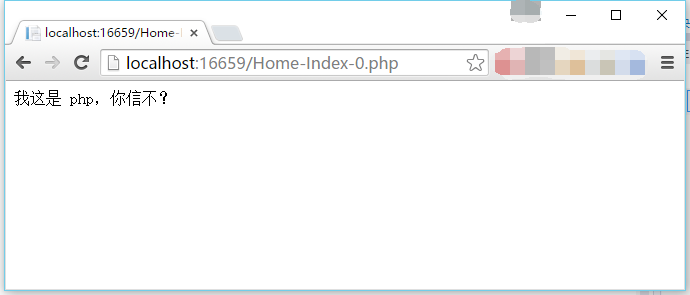
当然我们也可以简单修改路由来简单伪造成 php 页面。
修改 url 为 "{controller}-{action}-{id}.php"。
然后在项目根目录的 Web.config 中添加一项,如下图:
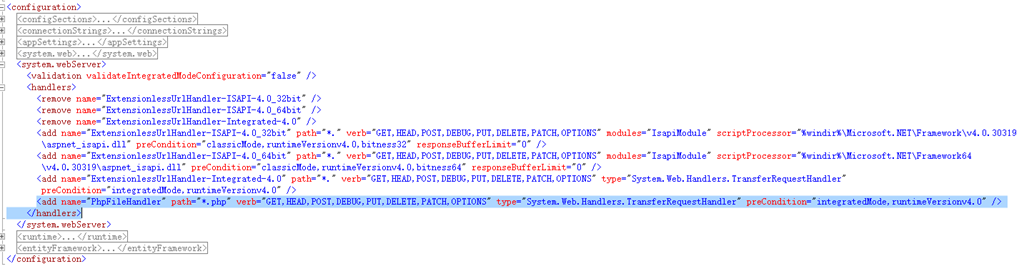
然后就可以访问了,输入例如 /Home-Index-0.php 之类的 url。效果:
当然也可以改成 jsp 或者其它来装逼。
5、Route 路由中的 UrlParameter.Optional
接下来讲解 defaults 参数,这个参数需要构造一个匿名类,并且这个匿名类的属性的名称需要跟 url 中相同。(当然多出一些没用到的属性也可)
默认路由中,controller 和 action 两个都很好懂,就是没有值的时候,分别使用 Home 和 Index。但 id 这个就不太好懂了。
经过查阅 msdn 及前人相关的资料我们可以知道,UrlParameter.Optional 是指假若没有提供值,则给予默认值。还是举个例子吧。
例如:
public class HomeController : Controller
{
    public ActionResult Index(int id)
    {
        return View();
    }
}
那么这里的 id 就是 0。
public class HomeController : Controller
{
    public ActionResult Index(string id)
    {
        return View();
    }
}
那么现在这个的 id 就是 null。
可见,UrlParameter.Optional 就相当于 default 关键字的作用。
6、继承 ActionFilterAttribute 实现 AOP 面向切面编程
首先我们需要新建一个 Attribute 并继承 ActionFilterAttribute。我就叫 TestActionAttribute 好了。
public class TestActionAttribute : ActionFilterAttribute
{
    public override void OnActionExecuted(ActionExecutedContext filterContext)
    {
        Debug.WriteLine("OnActionExecuted");
        base.OnActionExecuted(filterContext);
    }

    public override void OnActionExecuting(ActionExecutingContext filterContext)
    {
        Debug.WriteLine("OnActionExecuting");
        base.OnActionExecuting(filterContext);
    }

    public override void OnResultExecuted(ResultExecutedContext filterContext)
    {
        Debug.WriteLine("OnResultExecuted");
        base.OnResultExecuted(filterContext);
    }

    public override void OnResultExecuting(ResultExecutingContext filterContext)
    {
        Debug.WriteLine("OnResultExecuting");
        base.OnResultExecuting(filterContext);
    }
}
然后标注到 Action 上,运行。
我们可以见到按顺序输出:
OnActionExecuting
OnActionExecuted
OnResultExecuting
OnResultExecuted
在前面两个方法间是执行我们的 Action,在后面两个方法间是执行我们 Action 返回的 ActionResult。
那么这东西有什么用呢。举个小例子,可以用做验证。
修改 OnActionExecuting 方法。
public override void OnActionExecuting(ActionExecutingContext filterContext)
{
    var request = filterContext.HttpContext.Request;
    var userAgent = request.UserAgent;
    if (userAgent.IndexOf("chrome",StringComparison.OrdinalIgnoreCase)>=0)
    {
        filterContext.Result = new ContentResult()
        {
            Content = "chrome 禁止访问"
        };
    }
}
这里我们检测 UserAgent,如果是 chrome 那么就不能访问了。
运行之后,我们会发现 chrome 输出禁止访问,而 ie 等其它浏览器则仍然能继续访问。同时我们也可以通过断点验证到,chrome 访问的情况下,标注的 Action 的方法体不会再执行,即设置了 filterContext 的 Result 属性之后,就不再往下执行 Action 的流程了。(ActionResult 的流程还是依然执行的,也就是说 OnResultExecuting 和 OnResultExecuted 还是会继续执行的说)
这个只是个小例子,具体实际业务情况可以做用户登录验证、日志记录等等。