走进spring之springmvc
在动手之前,我们需要了解下springnvc.这里先献上一张springmvc的流程图及讲解。
Spring的MVC框架是一个基于DispatcherServlet的MVC框架,主要由DispatcherServlet、处理器映射、处理器、视图解析器、视图组成。每一个请求最先访问的都是DispatcherServlet,DispatcherServlet负责转发每一个Request请求给相应的Handler,Handler处理以后再返回相应的视图(View)和模型(Model),返回的视图和模型都可以不指定,即可以只返回Model或只返回View或都不返回。
Spring MVC的原理框图:
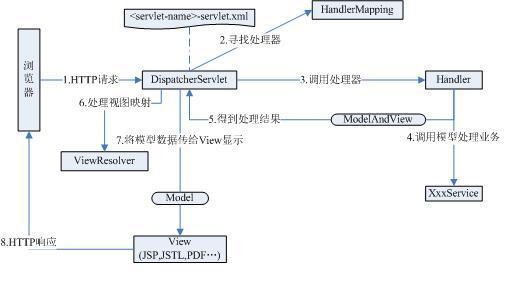
整个处理过程从一个HTTP请求开始:
1)DispatcherServlet接收到请求后,根据对应配置文件中配置的处理器映射,找到对应的处理器映射项(HandlerMapping),根据配置的映射规则,找到对应的处理器(Handler)。
2)调用相应处理器中的处理方法,处理该请求,处理器处理结束后会将一个ModelAndView类型的数据传给DispatcherServlet,这其中包含了处理结果的视图和视图中要使用的数据。
3)DispatcherServlet根据得到的ModelAndView中的视图对象,找到一个合适的ViewResolver(视图解析器),根据视图解析器的配置,DispatcherServlet将视图要显示的数据传给对应的视图,最后给浏览器构造一个HTTP响应。
DispatcherServlet是整个Spring MVC的核心。它负责接收HTTP请求组织协调Spring MVC的各个组成部分。其主要工作有以下三项:
1)截获符合特定格式的URL请求。
2)初始化DispatcherServlet上下文对应的WebApplicationContext,并将其与业务层、持久化层的WebApplicationContext建立关联。
3)初始化Spring MVC的各个组成组件,并装配到DispatcherServlet中
此时,我们已经对springmvc有了一定的了解,如果您对还理不清思路,没关系,下面让我们来进行实战演练,边练边学。
首先,让我们梳理下整体步骤:
1)导入包:springframework-3.0.RELEASE全部的包,servlet-api.jar,spring-webmvc.jar,spring.jar,comoms-logging.jar
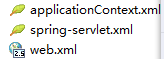
2)配置/WEB-INF下的web.xml,spring配置文件spring-servlet.xml,上下文applicationContext.xml
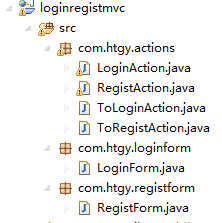
3)创建相关类:
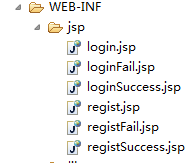
4)创建/WEB-INF/jsp下的jsp页面
开始配置XML文件!
web.xml
这里我们定义了请求分发Servlet,即:org.springframework.web.servlet.DispatcherServlet
DispatcherServlet 是Spring MVC 中负责请求调度的核心引擎,所有的请求将由此Servlet 根据配置分发至各个逻辑处理单元。其内部同时也维护了一个ApplicationContext实例。

<?xml version="1.0" encoding="UTF-8"?>
<web-app xmlns:xsi="http://www.w3.org/2001/XMLSchema-instance" xmlns="http://java.sun.com/xml/ns/javaee" xmlns:web="http://java.sun.com/xml/ns/javaee/web-app_2_5.xsd" xsi:schemaLocation="http://java.sun.com/xml/ns/javaee http://java.sun.com/xml/ns/javaee/web-app_2_5.xsd" version="2.5">
  <display-name>mvc_loginregist</display-name>

  <!-- servlet定义 -->
  <servlet>
    <servlet-name>spring</servlet-name>
    <servlet-class>org.springframework.web.servlet.DispatcherServlet</servlet-class>

    <!-- 可以自定义servlet.xml配置文件的位置和名称,默认为WEB-INF目录下,名称为[<servlet-name>]-servlet.xml,如spring-servlet.xml
    <init-param>
        <param-name>contextConfigLocation</param-name>
        <param-value>/WEB-INF/spring-servlet.xml</param-value>
    </init-param>
    -->

    <!-- 设置启动的优先级,这里表示表示启动容器时初始化该Servlet -->
    <load-on-startup>1</load-on-startup>
  </servlet>

  <!--通过将DispatcherServlet映射到/,声明了它会作为默认的servlet并且会处理所有请求,包括对静态资源的请求-->
  <servlet-mapping>
    <servlet-name>spring</servlet-name>
    <url-pattern>/</url-pattern>
  </servlet-mapping>

  <!-- 配置ContextLoaderListerner -->
  <listener>
    <listener-class>
     org.springframework.web.context.ContextLoaderListener
   </listener-class>
  </listener>

  <!-- 可以配置contextConfigLocation初始化参数
<context-param>
    <param-name>contextConfigLocation</param-name>
    <param-value>/WEB-INF/court-servlet.xml</param-value>
</context-param>

默认初始化参数为
<context-param>
    <param-name>contextConfigLocation</param-name>
    <param-value>/WEB-INF/applicationContext.xml</param-value>
</context-param>
这里使用默认参数
-->

  <!-- 跳转至首页,首页访问地址为http://localhost:8080/项目名-->
  <welcome-file-list>
    <welcome-file>/WEB-INF/jsp/login.jsp</welcome-file>
</welcome-file-list>
</web-app>
sping-servlet.xml
InternalResourceViewResolver在web应用程序的war文件中查找视图模板。视图模块的路径根据加完前缀和后缀的逻辑视图名称来确定,若返回“login”作为逻辑试图名称时,它最终会被解析成"/WEB-INF/jsp/login.jsp"路径
<?xml version="1.0" encoding="UTF-8"?>
<beans xmlns="http://www.springframework.org/schema/beans"
    xmlns:xsi="http://www.w3.org/2001/XMLSchema-instance"
    xsi:schemaLocation="
http://www.springframework.org/schema/beans
http://www.springframework.org/schema/beans/spring-beans-2.5.xsd">


<!-- ViewResolver  指定了表现层资源的前缀和后缀   -->
<bean class="org.springframework.web.servlet.view.InternalResourceViewResolver">
    <property name="viewClass" value="org.springframework.web.servlet.view.JstlView"/>
    <property name="prefix" value="/WEB-INF/jsp/"/>
    <property name="suffix" value=".jsp"/>
</bean>

<!--配置处理器映射-->
<bean id="loginMapping"
        class="org.springframework.web.servlet.handler.SimpleUrlHandlerMapping">
        <property name="mappings">
            <props>
                <prop key="doLogin">loginAction</prop><!-- 首字母必须小写,请求"doLogin"对应loginAction处理 -->
                <prop key="doRegist">registAction</prop>
                <prop key="toRegist">toRegistAction</prop>
                <prop key="toLogin">toLoginAction</prop>
            </props>
        </property>
    </bean>
</beans>
applicationContext.xml
<?xml version="1.0" encoding="UTF-8"?>
<beans xmlns="http://www.springframework.org/schema/beans"
    xmlns:xsi="http://www.w3.org/2001/XMLSchema-instance"
    xsi:schemaLocation="
http://www.springframework.org/schema/beans
http://www.springframework.org/schema/beans/spring-beans-2.5.xsd">


    <!-- 定义ToRegistAction -->
    <bean id="toRegistAction"
    class="com.htgy.actions.ToRegistAction">
    </bean>
    <!-- 定义ToLoginAction -->
    <bean id="toLoginAction"
    class="com.htgy.actions.ToLoginAction">
    </bean>

    <!-- 添加处理器配置 -->
    <!---定义LoginAction类-->
    <bean id="loginAction"
        class="com.htgy.actions.LoginAction">
        <property name="commandClass">
            <value>com.htgy.loginform.LoginForm</value>
        </property>
        <!-- 指定失败要返回的页面 --> <!-- 需修改 -->
        <property name="lFailView">
            <value>loginFail</value>
        </property>
        <!-- 指定成功要返回的页面 -->
        <property name="lSuccessView">
            <value>loginSuccess</value>
        </property>
    </bean>

    <!-- 定义RegistAction -->
    <bean id="registAction"
    class="com.htgy.actions.RegistAction">
    <property name="commandClass">
            <value>com.htgy.registform.RegistForm</value>
    </property>
    <!-- 注册成功返回的页面 -->
    <property name="rSuccessView">
    <value>registSuccess</value>
    </property>
    <!-- 取消注册返回的页面 -->
    <property name="rFailView">
     <value>registFail</value>
    </property>
    </bean>
    </beans>
下面是java类
LoginAction和RegistAction类继承了SimpleFormController,它是AbstractFormController的具体实现其功能是从表单中提取参数封装到command。
LoginAction类
package com.htgy.actions;

/*
 * 登录Controller层
 */
import java.util.HashMap;
import java.util.LinkedList;
import java.util.List;
import javax.servlet.http.HttpServletRequest;
import javax.servlet.http.HttpServletResponse;
import org.springframework.validation.BindException;
import org.springframework.web.servlet.ModelAndView;
import org.springframework.web.servlet.mvc.SimpleFormController;
import com.htgy.loginform.LoginForm;

public class LoginAction extends SimpleFormController {
    private String lFailView;
    private String lSuccessView;


    public String getLFailView() {
        return lFailView;
    }


    public void setLFailView(String lFailView) {
        this.lFailView = lFailView;
    }


    public String getLSuccessView() {
        return lSuccessView;
    }


    public void setLSuccessView(String lSuccessView) {
        this.lSuccessView = lSuccessView;
    }

    @Override
    protected ModelAndView onSubmit(HttpServletRequest request,
            HttpServletResponse response, Object command, BindException errors)
                    throws Exception {
        //讲表单的参数封装到command中
        LoginForm lf = (LoginForm)command;
        if (lf.getAccount().equals("111111") && lf.getPassword().equals("123456")){
            HashMap<String, Object> map = new HashMap<String, Object>();
            map.put("LoginForm", lf);
            List<String> msgList = new LinkedList<String>();
            msgList.add("你好,Spring MVC");
            map.put("msg", msgList);
            System.out.println("登录成功");
            //返回视图和模型,this.getLSuccessView()为视图,map为模型
            return new ModelAndView(this.getLSuccessView(),map);
        }else{
            return new ModelAndView(this.getLFailView());
        }
    }
}
RegsitAction类
package com.htgy.actions;
/*
 * 注册Controller层
 */
import java.util.HashMap;
import java.util.LinkedList;
import java.util.List;
import javax.servlet.http.HttpServletRequest;
import javax.servlet.http.HttpServletResponse;
import org.springframework.validation.BindException;
import org.springframework.web.servlet.ModelAndView;
import org.springframework.web.servlet.mvc.SimpleFormController;
import com.htgy.registform.RegistForm;

public class RegistAction extends SimpleFormController{
    private String rFailView;
    private String rSuccessView;


    public String getRFailView() {
        return rFailView;
    }


    public void setRFailView(String rFailView) {
        this.rFailView = rFailView;
    }


    public String getRSuccessView() {
        return rSuccessView;
    }


    public void setRSuccessView(String rSuccessView) {
        this.rSuccessView = rSuccessView;
    }


    @Override
     protected ModelAndView onSubmit(HttpServletRequest request,
                HttpServletResponse response, Object command, BindException errors)
                throws Exception {
        //讲表单的参数封装到command中
        RegistForm rf = (RegistForm)command;
        if (rf.getAccount().equals("111111") && rf.getPassFirst().equals("123456")
                &&rf.getPassSecond().equals("123456")){
            HashMap<String, Object> map = new HashMap<String, Object>();
            map.put("LoginForm", rf);
            List<String> msgList = new LinkedList<String>();
            msgList.add("你好,Spring MVC");
            map.put("msg", msgList);
            //返回视图和模型,this.getRSuccessView()为视图,map为模型
            return new ModelAndView(this.getRSuccessView(),map);
        }else{
            return new ModelAndView(this.getRFailView());
        }
        }

}
SimpleFormController类中的onsubmit方法用于获取表单传递的信息
ToLoginAction类
package com.htgy.actions;

/*
 * 跳转到login.jsp页面
 */
import javax.servlet.http.HttpServletRequest;
import javax.servlet.http.HttpServletResponse;
import org.springframework.web.servlet.ModelAndView;
import org.springframework.web.servlet.mvc.Controller;
public class ToLoginAction implements Controller {
    @Override
    public ModelAndView handleRequest(HttpServletRequest req, HttpServletResponse resp) throws Exception {
         return new ModelAndView("login");
    }
}
ToRegistAction类
package com.htgy.actions;

/*
 * 跳转到regist.jsp页面
 */
import javax.servlet.http.HttpServletRequest;
import javax.servlet.http.HttpServletResponse;
import org.springframework.web.servlet.ModelAndView;
import org.springframework.web.servlet.mvc.Controller;
public class ToRegistAction implements Controller {
    @Override
    public ModelAndView handleRequest(HttpServletRequest req, HttpServletResponse resp) throws Exception {
    return new ModelAndView("regist");
    }
}
Controller接口仅仅声明了一个方法handleRequest,它负责处理请求并返回合适的模型和视图。
LoginForm类
package com.htgy.loginform;

/*
 * 登录表单类
 */
public class LoginForm {
     private String account;
     private String password;

        public String getPassword() {
            return password;
        }

        public void setPassword(String password) {
            this.password = password;
        }

        public String getAccount() {
            return account;
        }

        public void setAccount(String account) {
            this.account = account;
        }
}
RegistForm类
package com.htgy.registform;

/*
 * 注册表单类
 */
public class RegistForm {
    private String account;
    private String passFirst;
    private String passSecond;
    public String getAccount() {
        return account;
    }
    public void setAccount(String account) {
        this.account = account;
    }
    public String getPassFirst() {
        return passFirst;
    }
    public void setPassFirst(String passFirst) {
        this.passFirst = passFirst;
    }
    public String getPassSecond() {
        return passSecond;
    }
    public void setPassSecond(String passSecond) {
        this.passSecond = passSecond;
    }

}
表单类必须具有set和get方法,便于请求的封装和提取。
jsp页面
login.jsp
<%@ page language="java" import="java.util.*" contentType="text/html; charset=utf-8"%>
<%
String path = request.getContextPath();
String basePath = request.getScheme()+"://"+request.getServerName()+":"+request.getServerPort()+path+"/";
%>

<!DOCTYPE HTML PUBLIC "-//W3C//DTD HTML 4.01 Transitional//EN">
<html>
  <head>
    <base href="<%=basePath%>">

    <title>登录</title>

    <meta http-equiv="pragma" content="no-cache">
    <meta http-equiv="cache-control" content="no-cache">
    <meta http-equiv="expires" content="0">
    <meta http-equiv="keywords" content="keyword1,keyword2,keyword3">
    <meta http-equiv="description" content="This is my page">
    <!--
    <link rel="stylesheet" type="text/css" href="styles.css">
    -->

  </head>

  <body>
  <center>
    <h1>登陆</h1>
    <hr>
    <%
        request.setCharacterEncoding("utf-8"); //解决中文乱码问题
    %>
    <form name="regForm" action="doLogin" method="post">
        <table>
            <tr>
                <td>账号:</td>
                <td><input type="text" name="account" />
                </td>
            </tr>
            <tr>
                <td>密码:</td>
                <td><input type="password" name="password" />
                </td>
            </tr>
            </table>
            <table>
            <tr>
                <td colspan="1"><input type="submit" value="登录" /></td>
                <td colspan="1"><input type="reset" value="重置" /></td>
            </tr>
            </table>
    </form>
    <br>还没有账号?请注册<input type="button" value="注册" onclick="window.location.href='toRegist'"/>
    </center>
  </body>
</html>
loginFail.jsp
<%@ page language="java" import="java.util.*" contentType="text/html; charset=utf-8"%>
<%
String path = request.getContextPath();
String basePath = request.getScheme()+"://"+request.getServerName()+":"+request.getServerPort()+path+"/";
%>

<!DOCTYPE HTML PUBLIC "-//W3C//DTD HTML 4.01 Transitional//EN">
<html>
  <head>
    <base href="<%=basePath%>">

    <title>登录失败</title>

    <meta http-equiv="pragma" content="no-cache">
    <meta http-equiv="cache-control" content="no-cache">
    <meta http-equiv="expires" content="0">
    <meta http-equiv="keywords" content="keyword1,keyword2,keyword3">
    <meta http-equiv="description" content="This is my page">
    <!--
    <link rel="stylesheet" type="text/css" href="styles.css">
    -->

  </head>

  <body>
  <center>
    登录失败<a href="toLogin">返回登录界面</a>
  </center>
  </body>
</html>
loginSuccess.jsp
<%@ page language="java" import="java.util.*" contentType="text/html; charset=utf-8"%>
<%
String path = request.getContextPath();
String basePath = request.getScheme()+"://"+request.getServerName()+":"+request.getServerPort()+path+"/";
%>

<!DOCTYPE HTML PUBLIC "-//W3C//DTD HTML 4.01 Transitional//EN">
<html>
  <head>
    <base href="<%=basePath%>">

    <title>登录成功</title>

    <meta http-equiv="pragma" content="no-cache">
    <meta http-equiv="cache-control" content="no-cache">
    <meta http-equiv="expires" content="0">
    <meta http-equiv="keywords" content="keyword1,keyword2,keyword3">
    <meta http-equiv="description" content="This is my page">
    <!--
    <link rel="stylesheet" type="text/css" href="styles.css">
    -->

  </head>
  <body>
  <center>
  <h1>登陆成功!!!!!!!!!!</h1>
    <hr>
  </center>
  </body>
</html>
regist.jsp
<%@ page language="java" import="java.util.*" contentType="text/html; charset=utf-8"%>
<%
String path = request.getContextPath();
String basePath = request.getScheme()+"://"+request.getServerName()+":"+request.getServerPort()+path+"/";
%>

<!DOCTYPE HTML PUBLIC "-//W3C//DTD HTML 4.01 Transitional//EN">
<html>
  <head>
    <base href="<%=basePath%>">

    <title>注册</title>

    <meta http-equiv="pragma" content="no-cache">
    <meta http-equiv="cache-control" content="no-cache">
    <meta http-equiv="expires" content="0">
    <meta http-equiv="keywords" content="keyword1,keyword2,keyword3">
    <meta http-equiv="description" content="This is my page">
    <!--
    <link rel="stylesheet" type="text/css" href="styles.css">
    -->

  </head>

  <body>
    <center>
    <%
        request.setCharacterEncoding("utf-8"); //解决中文乱码问题
    %>
    <h1>注册</h1><hr>
    <form name="regform" action="doRegist" method="post">
        <table>
            <tr>
                <td>账号:</td>
                <td><input type="text"  name="account" id="account"  maxLength="10"></td>
            </tr>
            <tr>
                <td>密码:</td>
                <td><input type="password" name="passFirst" id="passFirst" maxLength="12"  />
                </td>
            </tr>
            <tr>
                <td>确认密码:</td>
                <td><input type="password" name="passSecond" id="passSecond"  maxLength="12"  />
            </tr>
            <tr>
                <td>用户名:</td>
                <td><input type="text" name="username"  maxLength="9"/></td>
            </tr>
            </table>
            <table>
            <tr>
                <td colspan="1"><input type="submit" value="注册" /></td>
                <td colspan="1"><input type="reset" value="重置" /></td>
            </tr>
            </table>
    </form>
    <form name="regForm" action="toLogin">
        <table>
            <tr>
                <td colspan="2"><input type="submit" value="返回登录界面" />
                </td>
            </tr>
        </table>
    </form>
    </center>
  </body>
</html>
registFail.jsp
<%@ page language="java" import="java.util.*" contentType="text/html; charset=utf-8"%>
<%
String path = request.getContextPath();
String basePath = request.getScheme()+"://"+request.getServerName()+":"+request.getServerPort()+path+"/";
%>

<!DOCTYPE HTML PUBLIC "-//W3C//DTD HTML 4.01 Transitional//EN">
<html>
  <head>
    <base href="<%=basePath%>">

    <title>注册失败</title>

    <meta http-equiv="pragma" content="no-cache">
    <meta http-equiv="cache-control" content="no-cache">
    <meta http-equiv="expires" content="0">
    <meta http-equiv="keywords" content="keyword1,keyword2,keyword3">
    <meta http-equiv="description" content="This is my page">
    <!--
    <link rel="stylesheet" type="text/css" href="styles.css">
    -->

  </head>

  <body>
  <center>
    注册失败<br>
    <a href="toRegist">继续注册</a>
    <a href="toLogin">返回登录界面</a>
  </center>
  </body>
</html>
registSuccess.jsp
<%@ page language="java" import="java.util.*" contentType="text/html; charset=utf-8"%>
<%
String path = request.getContextPath();
String basePath = request.getScheme()+"://"+request.getServerName()+":"+request.getServerPort()+path+"/";
%>

<!DOCTYPE HTML PUBLIC "-//W3C//DTD HTML 4.01 Transitional//EN">
<html>
  <head>
    <base href="<%=basePath%>">

    <title>注册成功</title>

    <meta http-equiv="pragma" content="no-cache">
    <meta http-equiv="cache-control" content="no-cache">
    <meta http-equiv="expires" content="0">
    <meta http-equiv="keywords" content="keyword1,keyword2,keyword3">
    <meta http-equiv="description" content="This is my page">
    <!--
    <link rel="stylesheet" type="text/css" href="styles.css">
    -->

  </head>

  <body>
     <center>
  <h1>恭喜您!注册成功</h1><hr>
  返回登陆页面?<a href="toLogin"/>确定</a>
  </center>
  </body>
</html>
大功告成!~
本篇只是让大家初步了解了springmvc的构建和运行原理,之后我们再通过加入数据库来进行更深层次的了解。
总结:
1)在最开始接触springmvc时候,经常会把请求和视图搞反,正确的理解应该是客户传递请求给dispatcherServlet,dispatcherServlet处理请求后再将相应的视图传递给客户。