http://www.cyberciti.biz/faq/howto-linux-renew-dhcp-client-ip-address/‘m using Ubuntu Linux. How to force Linux to reacquire a new IP address from the DHCP server? What is the command in Linux equivalent to Windows’ “ipconfig /renew” command?
You need to use Dynamic Host Configuration Protocol Client i.e. dhclient command. The client normally doesn’t release the current lease as it is not required by the DHCP protocol. Some cable ISPs require their clients to notify the server if they wish to release an assigned IP address.
The dhclient command, provides a means for configuring one or more network interfaces using the Dynamic Host Configuration Protocol, BOOTP protocol, or if these protocols fail, by statically assigning an address.
Linux renew ip command
The -r flag explicitly releases the current lease, and once the lease has been released, the client exits. For example, open terminal and type the command:$ sudo dhclient -r
Now obtain fresh IP:$ sudo dhclient
How can I renew or release an IP in Linux for eth0?
To renew or release an IP address for the eth0 interface, enter:$ sudo dhclient -r eth0
$ sudo dhclient eth0
In this example, I am renewing an IP address for my wireless interface:
sudo dhclient -v -r eth0 sudo dhclient -v eth0 |
Sample outputs:
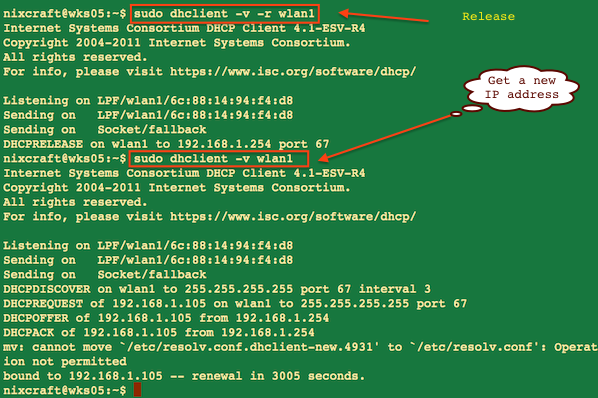
Fig.01: Renew DHCP address example
The -v option shows information on screen about dhcp server and obtained lease.
Other options in Linux to renew dhcp
There is no need to restart network service. Above command should work with any Linux distro such as RHEL, Fedora, CentOS, Ubuntu and others. On a related note you can also try out the following commands:# ifdown eth0
# ifup eth0
### RHEL/CentOS/Fedora specific command ###
# /etc/init.d/network restart
OR### Debian / Ubuntu Linux specific command ###
# /etc/init.d/networking restart
nmcli command (NetworkManager) to renew IP address in Linux
The NetworkManager daemon attempts to make networking configuration and operation as painless and automatic as possible by managing the primary network connection and other network interfaces, like Ethernet, WiFi, and Mobile Broadband devices command-line tool for controlling NetworkManager. The nmcli is a command-line tool for controlling NetworkManager and getting its status. To renew IP address using nmcli for connection named ‘nixcraft_5G’ (use ‘nmcli con‘ command to get list of all connections):
nmcli con nmcli con down id 'nixcraft_5G' nmcli con up id 'nixcraft_5G' |
Sample outputs:
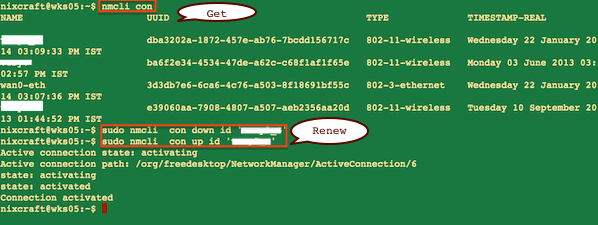
Fig.02: nmcli command in action
See also
- Man pages: nmcli(1), dhclient(8)