StaticFileMiddleware中间件如何处理针对文件请求
我们通过《以Web的形式发布静态文件》和《条件请求与区间请求》中的实例演示,以及上面针对条件请求和区间请求的介绍,从提供的功能和特性的角度对这个名为StaticFileMiddleware的中间进行了全面的介绍,接下来我们将更近一步,将从实现原理的角度来进一步认识这个中间件。 [本文已经同步到《ASP.NET Core框架揭秘》之中]
目录
一、StaticFileMiddleware
二、ContentTypeProvider
三、利用配置指定StaticFileOptions
四、实现原理
一、StaticFileMiddleware
不过在此之前,我们先来看看StaticFileMiddleware这个类型的定义。
1: public class StaticFileMiddleware
2: {
3: public StaticFileMiddleware(RequestDelegate next, IHostingEnvironment hostingEnv, IOptions<StaticFileOptions> options, ILoggerFactory loggerFactory);
4: public Task Invoke(HttpContext context);
5: }
如上面的代码片段所示,除了作为“下一个中间件”的next参数之前,StaticFileMiddleware的构造函数还包含三个参数。其中hostingEnv和loggerFactory这两个参数分别表示当前执行环境和用来创建Logger的工厂,最重要的options参数表示为这个中间件指定的配置选项,至于具体可以提供怎样的配置选项,我们只需要看看 StaticFileOptions这个类型提供了怎样的属性成员。
1: public class StaticFileOptions : SharedOptionsBase
2: {
3: public IContentTypeProvider ContentTypeProvider { get; set; }
4: public string DefaultContentType { get; set; }
5: public bool ServeUnknownFileTypes { get; set; }
6: public Action<StaticFileResponseContext> OnPrepareResponse { get; set; }
7:
8: public StaticFileOptions();
9: public StaticFileOptions(SharedOptions sharedOptions);
10: }
11:
12: public abstract class SharedOptionsBase
13: {
14: protected SharedOptionsBase(SharedOptions sharedOptions);
15: public IFileProvider FileProvider { get; set; }
16: public PathString RequestPath { get; set; }
17: }
18:
19: public class SharedOptions
20: {
21: public IFileProvider FileProvider { get; set; }
22: public PathString RequestPath { get; set; }
23: }
24:
25: public class StaticFileResponseContext
26: {
27: public HttpContext Context { get; }
28: public IFileInfo File { get; }
29: }
如上面的代码片段所示,StaticFileOptions继承自抽象类型SharedOptionsBase,后者实际上体现的是两个路径之间的映射关系,一个是HTTP请求采用的路径,另一个则是文件的物理地址,后者体现为一个FileProvider对象。不过也正是因为文件的读取是通过这个FileProvider来完成的,而FileProvider未必就一定对应着具体的物理文件,所以StaticFileMiddleware并不限于针对专门处理“物理文件”。
直接定义在StaticFileOptions中的前三个类型都与媒体类型的解析有关,其中ContentTypeProvider属性返回一个根据请求相对地址进行媒体类型的ContentTypeProvider对象。如果这个ContentTypeProvider不能正确解析出目标文件的媒体类型,我们可以利用DefaultContentType设置一个默认媒体类型。但是只有将另一个名为ServeUnknownFileTypes的属性设置为True的情况下,媒体类型不能正常识别的请求采用使用这个默认设置的媒体类型。
StaticFileOptions还具有一个OnPrepareResponse属性,它返回一个Action<StaticFileResponseContext>类型的委托对象,我们可以为这属性指定的委托对象来对最终的响应进行定制。至于作为委托输入参数的是一个类型为StaticFileResponseContext的对象,我们利用它可以获得当前的HTTP上下文和目标文件。
针对StaticFileMiddleware这个中间件的注册一般都是调用针对ApplicationBuilder的UseStaticFiles扩展方法来完成的。具体来说,一共具有三个UseStaticFiles方法重载供我们选择,如下所示的代码片段展示了这三个扩展方法的实现。
1: public static class StaticFileExtensions
2: {
3: public static IApplicationBuilder UseStaticFiles(this IApplicationBuilder app)
4: {
5: return app.UseMiddleware<StaticFileMiddleware>();
6: }
7:
8: public static IApplicationBuilder UseStaticFiles(this IApplicationBuilder app,StaticFileOptions options)
9: {
10: return app.UseMiddleware<StaticFileMiddleware>(Options.Create<StaticFileOptions>(options));
11: }
12:
13: public static IApplicationBuilder UseStaticFiles(this IApplicationBuilder app, string requestPath)
14: {
15: StaticFileOptions options = new StaticFileOptions
16: {
17: RequestPath = new PathString(requestPath)
18: };
19: return app.UseStaticFiles(options);
20: }
21: }
二、ContentTypeProvider
StaticFileMiddleware针对物理文件请求的处理并不仅仅限于完成文件内容的响应,还需要针对文件的格式解析出正确的媒体类型。对于客户端来说,如果无法确定媒体类型,获取的文件就像是一步无法解码的天书,毫无意义。StaticFileMiddleware利用指定的ContentTypeProvider来解析媒体类型,ContentTypeProvider是我们对实现了IContentTypeProvider接口的所有类型以及对应对象的统称。如下面的代码片段所示,IContentTypeProvider接口定义了唯一的方法TryGetContentType根据当前请求的相对路径来解析这个作为输出参数的媒体类型。
1: public interface IContentTypeProvider
2: {
3: bool TryGetContentType(string subpath, out string contentType);
4: }
StaticFileMiddleware默认使用的ContentProvider是一个具有如下定义的FileExtensionContentTypeProvider对象。顾名思义,FileExtensionContentTypeProvider利用物理文件的扩展名来解析对应的媒体类型,它利用其Mappings属性表示的字典维护了一个扩展名与媒体类型之间的映射关系。我们常用的数百种标准的文件扩展名和对应的媒体类型之间的映射关系都会保存在爱这个字典中。如果我们发布的文件具有一些特殊的扩展名,或者我们需要现有的某些扩展名映射为不同的媒体类型,这些通过添加或者修改映射关系来实现。
1: public class FileExtensionContentTypeProvider : IContentTypeProvider
2: {
3: public IDictionary<string, string> Mappings { get; }
4:
5: public FileExtensionContentTypeProvider();
6: public FileExtensionContentTypeProvider(IDictionary<string, string> mapping);
7:
8: public bool TryGetContentType(string subpath, out string contentType);
9: }
三、利用配置指定StaticFileOptions
由于StaticFileMiddleware的构造函数用来设置相关选项的options参数类型为IOptions<StaticFileOptions>,所以我们可以根据Options模式将StaticFileOptions对象承载的部分选项定义在配置文件中。比如我们利用如下所示的一个JSON文件开启了针对未知文件类型的支持,并设置了默认使用媒体类型(“application/octet-stream”),这两个配置项对应着StaticFileOptions的同名属性。
1: {
2: "serveUnknownFileTypes" : true,
3: "defaultContentType" : "application/octet-stream"
4: }
有了这个配置文件(假设文件名为“StaticFileOptions.json”),我们就可以按照如下的方式加载它并生成对应的Configuration对象,然后采用Options模式特有的编程模式实现与StaticFileOptions类型的映射。这样的配置将会自动应用到注册的StaticFileMiddleware中间件上。
1: public class Program
2: {
3: public static void Main()
4: {
5: IConfiguration config = new ConfigurationBuilder()
6: .AddJsonFile("StaticFileOptions.json")
7: .Build();
8:
9: new WebHostBuilder()
10: .UseContentRoot(Directory.GetCurrentDirectory())
11: .UseKestrel()
12: .ConfigureServices(svsc=>svsc.Configure<StaticFileOptions>(config))
13: .Configure(app=>app.UseStaticFiles())
14: .Build()
15: .Run();
16: }
17: }
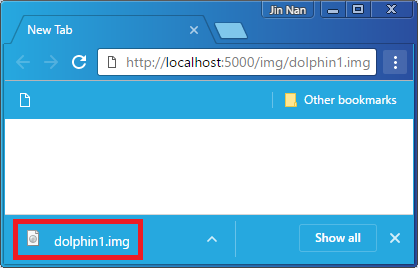
对于上面这样的应用,所有未知文件类型都将自动映射为“application/octet-stream”媒体类型。如果使用浏览器请求一个未知类型的文件(比如前面演示的“~/wwwroot/img/ dophin1.img”),目标文件将以如下图所示的形式以一个附件的形式被下载。
四、实现原理
为了上读者朋友们对针对静态文件的请求在StaticFileMiddleware中间件的处理具有更加深刻的认识,接下来我们会采用相对简单的代码来重新定义这个中间件。这部分作为选修内容供有兴趣的读者朋友阅读,忽略这些内容不会影响对后续内容的理解。这个模拟中间件具有与StaticFileMiddleware相同的能力,它能够将目标文件的内容采用正确的媒体类型响应给客户端,同时能够处理条件请求和区间请求。

StaticFileMiddleware中间处理针对静态文件请求的整个处理流程大体上可以划分为如上图所示的三个步骤:
- 获取目标文件:中间件根据请求的路径获取目标文件,并解析出正确的媒体类型。在此之前,中间件还会验证请求采用的方法,它支持GET和HEAD请求。除此之外,中间件还会获取文件最后被修改的时间,然后根据这个时间戳和文件内容的长度生成一个签名,响应消息的Last-odified和ETag报头的内容来源于此。
- 条件请求解析:获取与条件请求相关的四个报头(If-Match、If-None-Match、If-Modified-Since和If-Unmodified-Since)的值,根据HTTP规范计算出最终的条件状态。
- 响应请求:如果是区间请求,中间件会获取相关的报头(Range和If-Range)解析出正确的内容区间。中间件最终根据上面计算的条件状态和区间相关信息设置响应的响应报头,并根据需要响应整个文件的内容或者指定区间的内容。
接下来我们按照上述的这个流程来重新定义这个StaticFileMiddleware,不过在此之前先来了解一下我们预先定义的几个辅助性的扩展方法。如下面代码片段所示,扩展方法UseMethods用于判指定的请求是否采用指定的HTTP方法,而TryGetSubpath用于解析请求的目标文件的相对路径。TryGetContentType方法会根据指定的StaticFileOptions携带的ContentTypeProvider解析出正确的媒体类型,而TryGetFileInfo则根据指定的路径获取描述目标文件的FileInfo对象。至于最后的IsRangeRequest方法,它会根据是否携带Rang报头判断指定的请求是否是一个区间请求。
1: public static class Extensions
2: {
3: public static bool UseMethods(this HttpContext context, params string[] methods)
4: {
5: return methods.Contains(context.Request.Method, StringComparer.OrdinalIgnoreCase);
6: }
7:
8: public static bool TryGetSubpath(this HttpContext context, string requestPath, out PathString subpath)
9: {
10: return new PathString(context.Request.Path).StartsWithSegments(requestPath, out subpath);
11: }
12:
13: public static bool TryGetContentType(this StaticFileOptions options, PathString subpath, out string contentType)
14: {
15: return options.ContentTypeProvider.TryGetContentType(subpath.Value, out contentType) ||(!string.IsNullOrEmpty(contentType = options.DefaultContentType) && options.ServeUnknownFileTypes);
16: }
17:
18: public static bool TryGetFileInfo(this StaticFileOptions options, PathString subpath, out IFileInfo fileInfo)
19: {
20: return (fileInfo = options.FileProvider.GetFileInfo(subpath.Value)).Exists;
21: }
22:
23: public static bool IsRangeRequest(this HttpContext context)
24: {
25: return context.Request.GetTypedHeaders().Range != null;
26: }
27: }
如下所示的模拟类型 StaticFileMiddleware的定义。如果指定的StaticFileOptions没有提供FileProvider,我们会默认使用指向WebRoot目录的那个PhysicalFileProvider。如果一个具体的ContentTypeProvider没有显式指定,我们使用的则是一个FileExtensionContentTypeProvider对象。这两个默认值分别解释了两个问题,为什么请求的静态文件将WebRoot作为默认的根目录,以及为什么目标文件的扩展名决定响应的媒体类型。
1: public class StaticFileMiddleware
2: {
3: private RequestDelegate _next;
4: private StaticFileOptions _options;
5:
6: public StaticFileMiddleware(RequestDelegate next, IHostingEnvironment env, IOptions<StaticFileOptions> options)
7: {
8: _next = next;
9: _options = options.Value;
10: _options.FileProvider = _options.FileProvider??env.WebRootFileProvider;
11: _options.ContentTypeProvider = _options.ContentTypeProvider ?? new FileExtensionContentTypeProvider();
12: }
13: ...
14: }
我们上述的三个步骤分别实现在三个对应的方法(TryGetFileInfo、ResolvePreconditionState和SendResponseAsync)中,所以StaticFileMiddleware的Invoke方法按照如下的方式先后调用这三个方法完整对整个请求的处理。
1: public class StaticFileMiddleware
2: {
3: public async Task Invoke(HttpContext context)
4: {
5: IFileInfo fileInfo;
6: string contentType;
7: DateTimeOffset? lastModified;
8: EntityTagHeaderValue etag;
9:
10: if (this.TryGetFileInfo(context, out contentType, out fileInfo, out lastModified, out etag))
11: {
12: PreconditionState preconditionState = this.GetPreconditionState(context, lastModified.Value, etag);
13: await this.SendResponseAsync(preconditionState, context, etag, lastModified.Value, contentType, fileInfo);
14: return;
15: }
16: await _next(context);
17: }
18: ...
19: }
接下来我们的重点就集中到上述这三个方法的实现上。我们首先看看TryGetFileInfo方法是如何根据请求的路径获得描述目标文件的FileInfo对象的。如下面的代码片段所示,如果目标文件存在,这个方法除了将目标文件的FileInfo对象作为输出参数返回之外,与这个文件相关的数据(媒体类型、最后修改时间戳和封装签名的ETag)。
1: public class StaticFileMiddleware
2: {
3: public bool TryGetFileInfo(HttpContext context, out string contentType, out IFileInfo fileInfo, out DateTimeOffset? lastModified, out EntityTagHeaderValue etag)
4: {
5: contentType = null;
6: fileInfo = null;
7: PathString subpath;
8:
9: if (context.UseMethods("GET", "HEAD") &&context.TryGetSubpath(_options.RequestPath, out subpath) &&_options.TryGetContentType(subpath, out contentType) &&_options.TryGetFileInfo(subpath, out fileInfo))
10: {
11: DateTimeOffset last = fileInfo.LastModified;
12: long etagHash = last.ToFileTime() ^ fileInfo.Length;
13: etag = new EntityTagHeaderValue('"' + Convert.ToString(etagHash, 16) + '"');
14: lastModified = new DateTimeOffset(last.Year, last.Month, last.Day, last.Hour, last.Minute, last.Second, last.Offset).ToUniversalTime();
15: return true;
16: }
17:
18: etag = null;
19: lastModified = null;
20: return false;
21: }
22: }
方法 GetPreconditionState旨在获取与条件请求相关的四个报头(If-Match、If-None-Match、If-Modified-Since和If-Unmodified-Since)的值,并通过与目标文件当前的状态进行比较,进而得到一个最终的检验结果。针对这四个请求报头的检验最终会产生四种可能的结果,所以我们定义了如下一个PreconditionState枚举来表示它们。
1: private enum PreconditionState
2: {
3: Unspecified = 0,
4: NotModified = 1,
5: ShouldProcess = 2,
6: PreconditionFailed = 3,
7: }
对于定义在这个枚举类型中的四个选项,Unspecified表示请求中不包含这四个报头。如果将请求报头If-None-Match的值与当前文件签名进行比较,或者将请求If-Modified-Since报头的值与文件最后修改时间进行比较确定目标文件不曾改变,检验结果对应的枚举值为NotModified,反之对应的枚举值为ShouldProcess。如果目标文件当前的状态不满足If-Match或者If-Unmodified-Since报头表示的条件,检验结果对应的枚举值为PreconditionFailed,反之对应的枚举值为ShouldProcess。如果请求携带多个报头,针对它们会得出不同的检验结果,那么值最大的那个将最为最终的结果。如下面的代码片段所示,GetPreconditionState方法正是通过这样的逻辑得到这个标识最终条件检验结果的PreconditionState枚举。
1: public class StaticFileMiddleware
2: {
3: private PreconditionState GetPreconditionState(HttpContext context, DateTimeOffset lastModified, EntityTagHeaderValue etag)
4: {
5: PreconditionState ifMatch,ifNonematch, ifModifiedSince, ifUnmodifiedSince;
6: ifMatch = ifNonematch = ifModifiedSince = ifUnmodifiedSince = PreconditionState.Unspecified;
7:
8: RequestHeaders requestHeaders = context.Request.GetTypedHeaders();
9: //If-Match:ShouldProcess or PreconditionFailed
10: if (requestHeaders.IfMatch != null)
11: {
12: ifMatch = requestHeaders.IfMatch.Any(it => it.Equals(EntityTagHeaderValue.Any) || it.Compare(etag, true))
13: ? PreconditionState.ShouldProcess
14: : PreconditionState.PreconditionFailed;
15: }
16:
17: //If-None-Match:NotModified or ShouldProcess
18: if (requestHeaders.IfNoneMatch != null)
19: {
20: ifNonematch = requestHeaders.IfNoneMatch.Any(it => it.Equals(EntityTagHeaderValue.Any) || it.Compare(etag, true))
21: ? PreconditionState.NotModified
22: : PreconditionState.ShouldProcess;
23: }
24:
25: //If-Modified-Since: ShouldProcess or NotModified
26: if (requestHeaders.IfModifiedSince.HasValue)
27: {
28: ifModifiedSince = requestHeaders.IfModifiedSince < lastModified
29: ? PreconditionState.ShouldProcess
30: : PreconditionState.NotModified;
31: }
32:
33: //If-Unmodified-Since: ShouldProcess or PreconditionFailed
34: if (requestHeaders.IfUnmodifiedSince.HasValue)
35: {
36: ifUnmodifiedSince = requestHeaders.IfUnmodifiedSince > lastModified
37: ? PreconditionState.ShouldProcess
38: : PreconditionState.PreconditionFailed;
39: }
40:
41: //Return maximum.
42: return new PreconditionState[] { ifMatch, ifNonematch, ifModifiedSince, ifUnmodifiedSince }.Max();
43: }
44: ...
45: }
针对静态文件的处理最终实现在SendResponseAsync方法中,这个方法最终会设置相应的响应报头和状态码,如果需要还会将目标文件的内容写入到响应报文的主体。为响应选择怎样的状态码,设置哪些报头,以及响应内容的选择除了决定于GetPreconditionState方法返回的条件检验结果外,与区间请求相关的两个报头(Range和If-Range)也是决定因素之一。为了我们定义了如下这个TryGetRanges方法来解析这两个报头并计算出正确的区间。
1: public class StaticFileMiddleware
2: {
3: private bool TryGetRanges(HttpContext context, DateTimeOffset lastModified, EntityTagHeaderValue etag, long length, out IEnumerable<RangeItemHeaderValue> ranges)
4: {
5: ranges = null;
6: RequestHeaders requestHeaders = context.Request.GetTypedHeaders();
7:
8: //Check If-Range
9: RangeConditionHeaderValue ifRange = requestHeaders.IfRange;
10: if (ifRange != null)
11: {
12: bool ignore = (ifRange.EntityTag != null && !ifRange.EntityTag.Compare(etag, true)) ||(ifRange.LastModified.HasValue && ifRange.LastModified < lastModified);
13: if (ignore)
14: {
15: return false;
16: }
17: }
18:
19: List<RangeItemHeaderValue> list = new List<RangeItemHeaderValue>();
20: foreach (var it in requestHeaders.Range.Ranges)
21: {
22: //Range:{from}-{to} Or {from}-
23: if (it.From.HasValue)
24: {
25: if (it.From.Value < length - 1)
26: {
27: long to = it.To.HasValue ? Math.Min(it.To.Value, length - 1) : length - 1;
28: list.Add(new RangeItemHeaderValue(it.From.Value, to));
29: }
30: }
31: //Range:-{size}
32: else if (it.To.Value != 0)
33: {
34: long size = Math.Min(length, it.To.Value);
35: list.Add(new RangeItemHeaderValue(length - size, length - 1));
36: }
37: }
38: return ( ranges = list) != null;
39: }
40: …
41: }
如上面的代码片段所示,TryGetRanges方法会先获取If-Range报头的值,并与目标位文件当前的状态进行比较。如果当前状态不满足If-Range报头表示的条件,这种情况意味着目标文件内容发生变化,那么请求Range报头携带的区间信息将自动被忽略。至于Range报头携带的值,考虑到它具有不同的表现形式(比如“bytes={from}-{to}”、“bytes={from}-”或者“bytes=-{size}”)以及指定的端点是否超出目标文件长度,这个方法定义了相应的逻辑来检验区间定义的合法性以及计算出正确的区间范围。
对于区间请求,TryGetRanges的返回值表示目标文件的当前状态是否满足If-Range携带的条件相匹配。由于HTTP规范并未限制Range报头中设置的区间数量,所以这个方法通过输出参数返回的区间信息是一个元素类型为RangeItemHeaderValue的集合。如果集合为空,表示设置的区间不符合要求。
实现在SendResponseAsync方法中针对请求的处理不外乎指定响应状态码、设置响应报头和写入响应主体内。我们将前两个工作实现在HttpContext如下这个扩展方法SetResponseHeaders中。该方法会我们指定的响应状态码应用到指定的HttpContext,并设置相应的响应报头。
1: public static class Extensions
2: {
3: public static void SetResponseHeaders(this HttpContext context, int statusCode, EntityTagHeaderValue etag, DateTimeOffset lastModified, string contentType,long contentLength, RangeItemHeaderValue range = null)
4: {
5: context.Response.StatusCode = statusCode;
6: var responseHeaders = context.Response.GetTypedHeaders();
7: if (statusCode < 400)
8: {
9: responseHeaders.ETag = etag;
10: responseHeaders.LastModified = lastModified;
11: context.Response.ContentType = contentType;
12: context.Response.Headers[HeaderNames.AcceptRanges] = "bytes";
13: }
14: if (statusCode == 200)
15: {
16: context.Response.ContentLength = contentLength;
17: }
18:
19: if (statusCode == 416)
20: {
21: responseHeaders.ContentRange = new ContentRangeHeaderValue(contentLength);
22: }
23:
24: if (statusCode == 206 && range != null)
25: {
26: responseHeaders.ContentRange = new ContentRangeHeaderValue(range.From.Value, range.To.Value, contentLength);
27: }
28: }
29: }
如上面的代码片段所示,对于所有非错误类型的响应(主要指“200 OK”、“206 partial Content”和“304 Not Modified”),除了表示媒体类型的Content-Type报头之外,它们还具有三个额外的报头(Last-Modified、ETag和Accept-Range)。针对区间请求的两种响应(“206 partial Content”和“416 Range Not Satisfiable”),它们都具有一个Content-Range报头。
如下所示的是 SendResponseAsync方法的完整定义。它会根据条件请求和区间请求的解析结果来决定最终采用的响应状态码。响应状态和相关响应报头的设置通过调用上面这个SetResponseHeaders方法来完成。对于状态码为“200 OK”或者“206 Partial Content”的响应,这个方法会分别将整个文件内容或者指定区间的内容写入到响应报文的主体部分。至于文件的内容的读取,我们直接可以利用表示目标文件的FileInfo的CreateReadStream方法创建的读取文件输出流来实现。
1: public class StaticFileMiddleware
2: {
3: private async Task SendResponseAsync(PreconditionState state, HttpContext context, EntityTagHeaderValue etag, DateTimeOffset lastModified, string contentType, IFileInfo fileInfo)
4: {
5: switch (state)
6: {
7: //304 Not Modified
8: case PreconditionState.NotModified:
9: {
10: context.SetResponseHeaders(304, etag, lastModified, contentType, fileInfo.Length);
11: break;
12: }
13: //416 Precondition Failded
14: case PreconditionState.PreconditionFailed:
15: {
16: context.SetResponseHeaders(412, etag, lastModified, contentType,fileInfo.Length);
17: break;
18: }
19: case PreconditionState.Unspecified:
20: case PreconditionState.ShouldProcess:
21: {
22: //200 OK
23: if (context.UseMethods("HEAD"))
24: {
25: context.SetResponseHeaders(200, etag, lastModified, contentType, fileInfo.Length);
26: return;
27: }
28:
29: IEnumerable<RangeItemHeaderValue> ranges;
30: if (context.IsRangeRequest() && this.TryGetRanges(context, lastModified, etag, fileInfo.Length, out ranges))
31: {
32: RangeItemHeaderValue range = ranges.FirstOrDefault();
33: //416
34: if (null == range)
35: {
36: context.SetResponseHeaders(416, etag, lastModified,
37: contentType, fileInfo.Length);
38: return;
39: }
40: else
41: {
42: //206 Partial Content
43: context.SetResponseHeaders(206, etag, lastModified, contentType, fileInfo.Length, range);
44: context.Response.GetTypedHeaders().ContentRange = new ContentRangeHeaderValue(range.From.Value, range.To.Value, fileInfo.Length);
45: using (Stream stream = fileInfo.CreateReadStream())
46: {
47: stream.Seek(range.From.Value, SeekOrigin.Begin);
48: await StreamCopyOperation.CopyToAsync(stream, context.Response.Body, range.To - range.From + 1, context.RequestAborted);
49: }
50: return;
51: }
52: }
53: //200 OK
54: context.SetResponseHeaders(200, etag, lastModified, contentType, fileInfo.Length);
55: using (Stream stream = fileInfo.CreateReadStream())
56: {
57: await StreamCopyOperation.CopyToAsync(stream, context.Response.Body, fileInfo.Length, context.RequestAborted);
58: }
59: break;
60: }
61: }
62: }
63: }
ASP.NET Core应用针对静态文件请求的处理[1]: 以Web的形式发布静态文件
ASP.NET Core应用针对静态文件请求的处理[2]: 条件请求与区间请求
ASP.NET Core应用针对静态文件请求的处理[3]: StaticFileMiddleware中间件如何处理针对文件请求
ASP.NET Core应用针对静态文件请求的处理[4]: DirectoryBrowserMiddleware中间件如何呈现目录结构
ASP.NET Core应用针对静态文件请求的处理[5]: DefaultFilesMiddleware中间件如何显示默认页面