网络传输编程之TCP
网络传输编程指基于各种网络协议进行编程,包括TCP编程,UDP编程,P2P编程。本节介绍TCP编程。
(1)TCP简介:
TCP是TCP/IP体系中最重要的传输层协议,它提供全双工和可靠交付的服务,是大多数应用协议工作的基础。作为上层应用编程的基础,TCP编程也是最终实现应用程序网络功能的基石。
TCP是一种面向连接的,可靠的,基于字节流的传输层通信协议。在TCP/IP协议栈中,它位于IP协议之上;在整个网络协议簇中,它处于应用层诸多协议之下。由于网络上不同主机的应用层之间经常需要可靠的,像管道一样的连接,但是IP本身并不提供这样的机制,故需要由TCP完成传输管道功能。
(2)TCP工作过程:
TCP通过停止等待协议和连续ARQ协议实现可靠传输,工作过程分为连接建立,传输数据,连接终止三个过程:
1)连接建立
TCP建立连接的过程叫做握手,握手需要在客户和服务器之间交换三个TCP报文段。
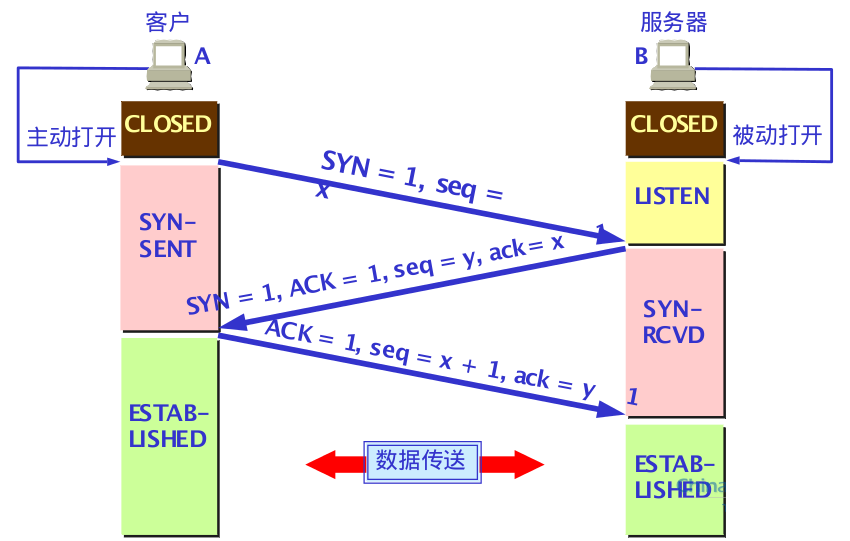
三次握手(three-way handshake):
第一次握手:建立连接时,客户端发送SYN包(SEQ=x)到服务器,并进入SYN_SEND状态,等待服务器确认。
第二次握手:服务器收到SYN包,必须确认客户的SYN(ACK=x+1),同时自己也会发送一个SYN包(SEQ=y),即SYN+ACK包,此时服务器进入SYN_RECV状态。
第三次握手:客户端收到服务端的SYN+ACK包,向服务器发送确认包ACK(ACK+1),此包发送完毕,客户端与服务端进入Established状态,完成三次握手。
B发送给A的报文段也可以拆分成两个报文段(先发确认报文段,再发同步报文段),这样三报文握手就变成了四报文握手。
最后A还要发送一次确认主要是为了防止已失效的连接请求报文突然又传送到了B,因而产生错误。(由于网络延时,B可能连续收到A发送的两个请求)
2)传输数据
TCP的全双工通信的双方即是发送方又是接收方。TCP协议负责把用户数据(字节流)按一定格式和长度组成多个数据报进行发送,并在接收到数据报之后按分解顺序重新组装和恢复用户数据。
利用TCP传输数据时,数据是以字节流的形式进行传输的。客户端与服务器建立连接后,发送方需要先将要发送的数据转换为字节流,然后发送给对方。发送数据时,程序员可以通过程序不断地将数据流写入TCP的发送缓存中,然后TCP自动从发送缓存中取出一定量的数据,将其组成TCP报文段逐个发给IP层,再通过IP层之下的网络接口发送出去。接收端从IP层接收到TCP报文段之后,将其暂时保存在接收缓存中,这是程序员就可以通过程序依次读取接收缓存中的数据,从而达到相互通信的目的。
3)连接终止
建立一个连接需要三次握手,而终止一个连接需要经过四次握手,这是由TCP的半关闭(half-close)造成的:
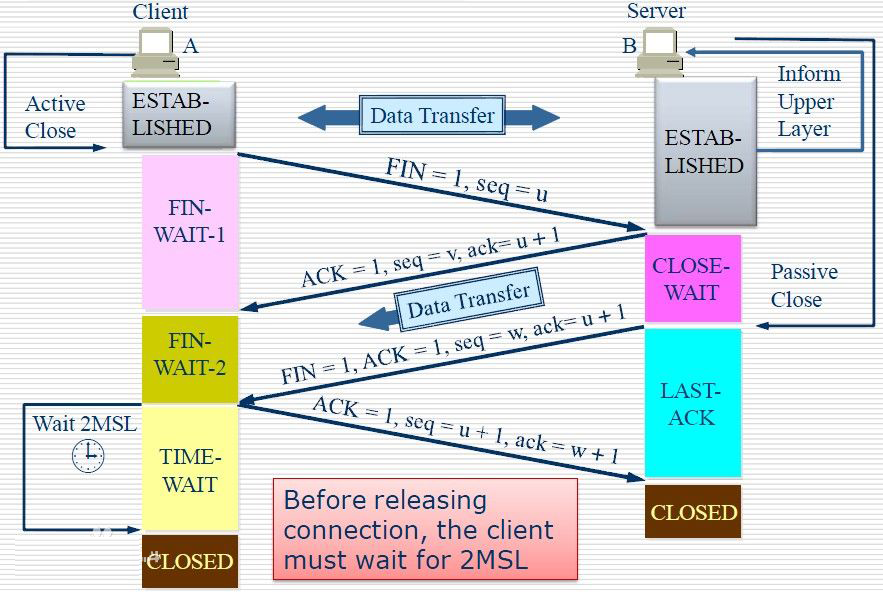
四次握手实现TCP连接的释放:
(1) TCP客户端发送一个FIN,关闭客户端到服务器端的数据传送。(客户端不再发送报文给服务器端,但可接受服务器端报文)
(2) 服务器收到这个FIN,它发回一个ACK,确认序号为收到的序号加1。
(3) 服务器关闭客户端的连接,发送一个FIN给客户端。(服务器端关闭到客户端的数据传送)
(4) 客户段发回ACK报文确认,并将确认序号设置为收到序号加1。
为了更清地看出TCP连接的各种状态之间的关系,下面给出TCP的有限状态集:

(3)TCP的同步编程与异步编程:
利用TCP开发应用程序时,.Net框架提供了两种工作方式,一种是同步(Synchronization)工作方式,一种是异步(Asynchronous)工作方式。
同步工作方式:利用TCP编写的程序执行到监听或接收语句时,在未完成当前工作(侦听到连接请求或收到对方发来的数据)前不再继续往下执行,线程处于阻塞状态,直到该语句结束才继续执行下一条语句。
异步工作方式:程序执行到监听或者接收语句时,不论当前工作是否完成,都会继续执行下去。
对于请求和发送语句,在同步和异步方式下并无差别:
TCP连接是网络传输层的"虚连接",真是的网络数据通信是通过TCP/IP体系的底层(IP层和网络接口)协议实现的。TCP线程在执行发送语句时,只需将待发送数据以字节流的形式写入发送缓存,在它"看来"自己发送数据的动作已经完成(实际上此时数据可能暂存在本地而并未发送出去),至于对方进程是否真正收到就与它无关了,于是发送线程可能继续往下执行其他的操作(不会阻塞),而真实的发送操作是由下层协议(IP)在适当的时机(对方接收准备好)完成的。
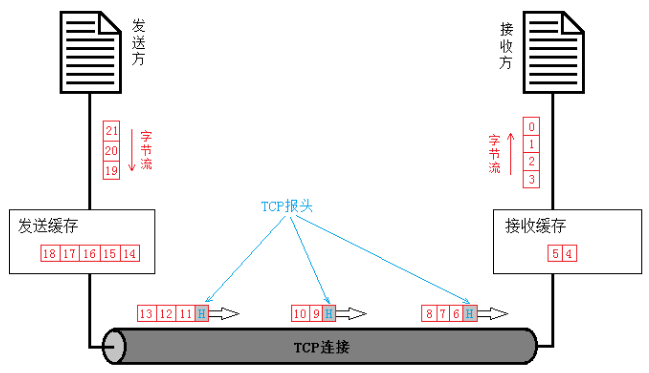
IP层为TCP提供了实际的传输服务,从而对上层应用程序屏蔽了主动(请求连接和发送数据)操作时的同步与异步差异。尽管如此,线程在被动(监听连接和接收数据)操作上仍有同步和异步之别。这是因为被动操作必须依赖于对方操作的结果,如接收数据时缓存中必须有内容,否则就无从接收。
(4)C#中的TCP编程类:
与同步工作方式和异步工作方式相对应,利用Socket类进行编程时,系统也提供相应的方法,分别称为同步套接字编程和异步套接字编程。但是使用套接字编程要考虑很对底层细节。为了简化编程复杂度,.NET又专门提供了两个类:TCPClient和TCPListener。TCP编程也分为同步TCP编程和异步TCP编程。
1)TCP Listener类:
TcpListener类用于监听和接收传入的连接请求。 该类的构造函数常用的有以下两种重载形式:
TcpListener(IPEndPoint iep)
TcpListener(IPAddress localAddr, int port)
应用示例:
IPEndPoint iep = new IPEndPoint(IPAddress.Parse(“210.2.2.1”), 9050); TCPListener t1= new TCPListener (iep);
TCPListener t2= new TCPListener (IPAddress.Any, 0)    IP地址和端口号均由系统自动分配
TCPListener类的常用方法:
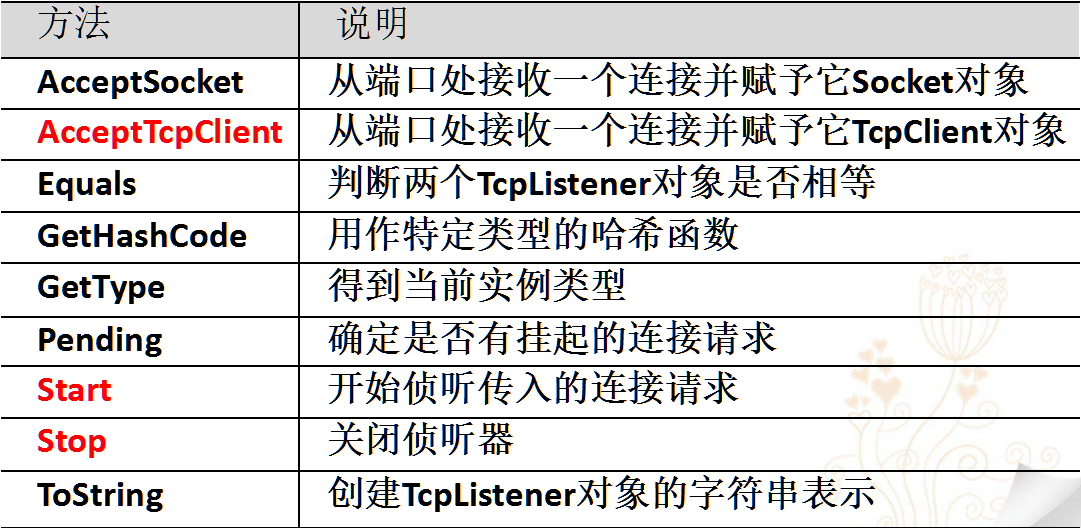
start方法:
public void Start()
开始侦听传入的连接请求。
public void Start(int backlog)
启动对具有最大挂起连接数的传入连接请求的侦听。
AcceptTcpClient方法:
public TcpClient AcceptTcpClient()
接受挂起的连接请求
Stop方法:
public void Stop()
关闭侦听器。
2)TCP Client类:
该构造函数创建一个默认的TcpClient对象,并自动分配本机(客户端)IP地址和端口号。TCPClient有四个重载函数:
TCPClient()
TCPClient(AddressFamily family)
TCPClient(IPEndpoint iep)
TCPClient(String hostname,int port)
应用示例:

1.TCPClient()
创建一个默认的TCPClient对象,并自动分配本机(客户端)IP地址和端口号。
还需调用Connect方法与服务器建立连接。
例如:
TcpClient tcpClient = new TcpClient();
tcpClient.Connect(“www.abcd.com”,  51888);
2.TCPClient(AddressFamily family)
创建一个默认的TCPClient对象,自动分配本机(客户端)IP地址和端口号,但是使用AddressFamily枚举指定使用哪种网络协议。
必须调用Connect方法与服务器建立连接。
例如:
TcpClient tcpClient = new TcpClient(AddressFamily.InterNetwork);
tcpClient.Connect(“www.abcd.com”,  51888);
3.TCPClient(IPEndpoint iep)
创建一个TCPClient对象,参数指定本机(客户端)IP地址和端口号。
必须调用Connect方法与服务器建立连接。
例如:
IPAddress[]  address = Dns.GetHostAddresses (Dns.GetHostName());
IPEndPoint iep = new IPEndPoint (address[0],  51888);
TcpClient tcpClient = new TcpClient(iep);
tcpClient.Connect(“www.abcd.com”,  51888);
4.TCPClient(String hostname,int port)
创建一个TCPClient对象,自动分配最合适的本地主机IP地址和端口号。
与参数指定的远程主机建立连接。
例如:
TcpClient tcpClient = new TcpClient(“www.abcd.com”,  51888);
它相当于:
TcpClient tcpClient = new TcpClient();
tcpClient Connect(“www.abcd.com”,  51888);
TCPClient类的常用属性:
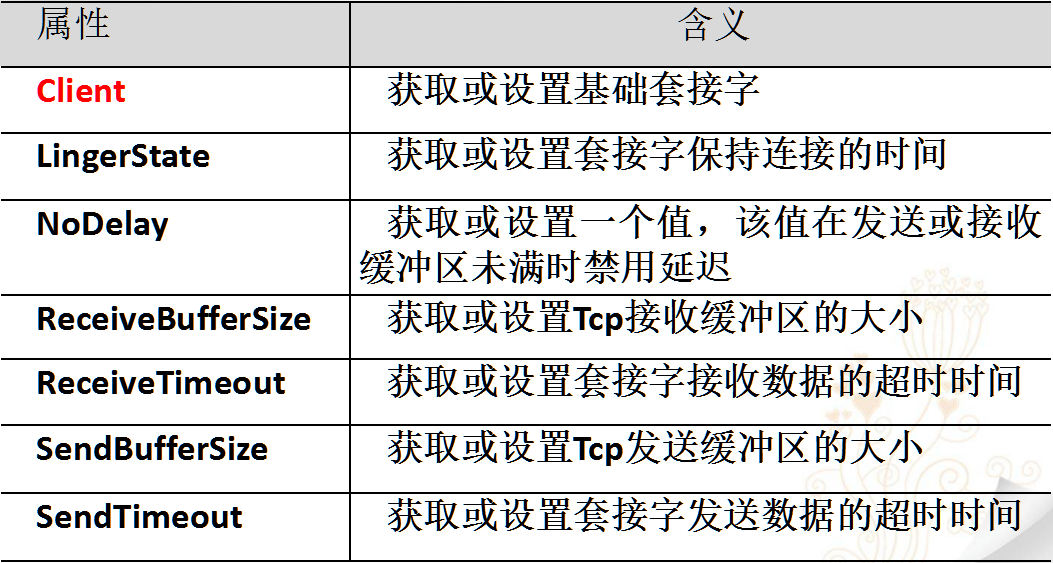
TCPClient类的常用方法:
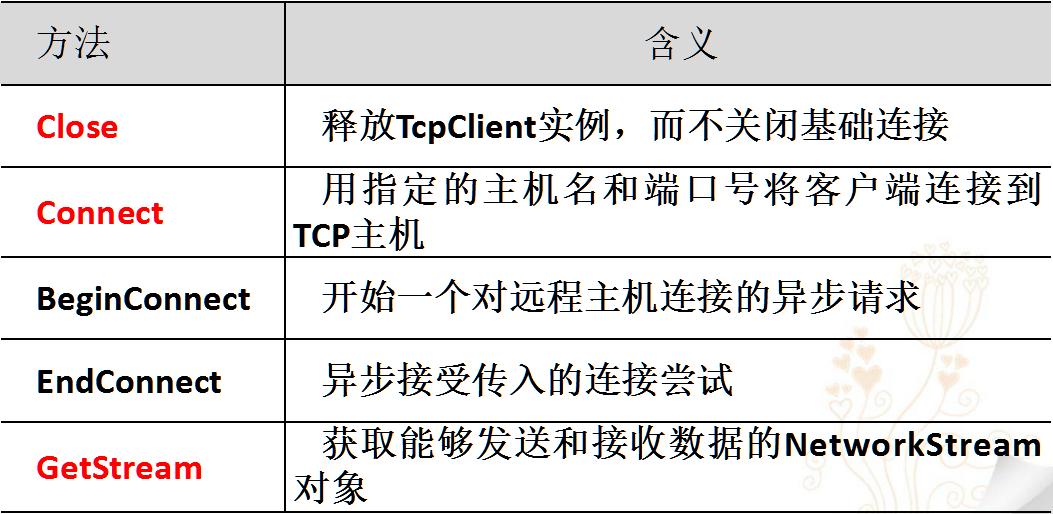
Connect方法:

GetStream方法:
public NetworkStream GetStream() 返回用于发送和接收数据的 NetworkStream。
示例:
TcpClient tcpClient = new TcpClient ();
NetworkStream netStream = tcpClient.GetStream (); //接收数据
byte[] bytes = new byte[tcpClient.ReceiveBufferSize]; netStream.Read (bytes, 0, (int)tcpClient.ReceiveBufferSize);
string returndata = Encoding.UTF8.GetString (bytes); //发送数据
Byte[] sendBytes = Encoding.UTF8.GetBytes ("Is anybody there?"); netStream.Write (sendBytes, 0, sendBytes.Length);
NetWorkStream的read方法:
从 NetworkStream 读取数据。
public override int Read(
    byte[] buffer,
    int offset,
    int size
)
NetWorkStream的Write方法:
将数据写入 NetworkStream 。
public override void Write(
    byte[] buffer,
    int offset,
    int size
)
(5)TCP编程实例:
TCP编程的步骤:
1.服务器端:
(1)创建一个TcpListener对象,然后调用该对象的Start方法在指定的端口进行监听。
(2)在单独的线程中,循环调用AcceptTcpClient方法接受客户端的连接请求,从该方法的返回结果中得到与该客户端对应的TcpClient对象,并利用该对象的GetStream方法得到NetworkStream对象,为进一步与对方通信作准备。
(3)每得到一个新的TcpClient对象,就创建一个与该客户对应的线程,在线程中与对应的客户进行通信。
(4)根据传送信息的情况确定是否关闭与客户的连接。
2.客户端:
(1)利用TcpClient的构造函数创建一个TcpClient对象。
(2)使用Connect方法与服务器建立连接。
(3)利用TcpClient对象的GetStream方法得到网络流,然后利用该网络流与服务器进行数据传输。
(4)创建一个线程监听指定的端口,循环接收并处理服务器发送过来的信息。
(5)完成工作后,向服务器发送关闭信息,并关闭与服务器的连接。
1)TCP同步:
服务端:
using System;
using System.Collections.Generic;
using System.ComponentModel;
using System.Data;
using System.Drawing;
using System.Linq;
using System.Text;
using System.Threading.Tasks;
using System.Windows.Forms;

//添加的引用
using System.Net;
using System.Net.Sockets;
using System.Threading;
using System.IO;

namespace SyncTCPServer
{
    public partial class ServerForm : Form
    {
        //成员变量
        private IPAddress localAddress;
        private int port = 18888;
        private TcpListener tcpListener;
        private TcpClient tcpClient;
        private NetworkStream networkStream;
        private BinaryReader br;
        private BinaryWriter bw;
        private int sendCount = 1;
        private int receiveCount = 10;

        /*----------声明用于方法回调的委托----------*/
        //用于ListBox显示消息
        private delegate void ShowMsgForViewCallBack(string str);
        private ShowMsgForViewCallBack showMsgForViewCallBack;
        //用于toolStripLabel显示当前窗体的状态
        private delegate void ShowStatusInfoCallBack(string str);
        private ShowStatusInfoCallBack showStatusInfoCallBack;
        //用于toolStrioProgressBar显示当前进度
        private delegate void ShowProgressProCallBack(int progress);
        private ShowProgressProCallBack showProgressProCallBack;
        //用于重置消息文本
        private delegate void ResetMessageTextCallBack();
        private ResetMessageTextCallBack resetMessageTextCallBack;

        //自己添加的两个委托,用于标识已发送或接受的数据个数
        private delegate void SendTextBoxCallBack();
        private SendTextBoxCallBack sendTextBoxCallBack;

        private delegate void ReceiveTextBoxCallBack(int count);
        private ReceiveTextBoxCallBack receiveTextBoxCallBack;
        public ServerForm()
        {
            InitializeComponent();
            //初始化绑定的IP地址,初始化窗口的显示内容
            IPAddress[] listenIp = Dns.GetHostAddresses("");
            localAddress = listenIp[3];
            sendTextBox.Text = sendCount.ToString();
            receiveTextBox.Text = receiveCount.ToString();
            toolStripProgressProc.Minimum = 0;
            toolStripStatusInfo.Text = "就绪";
            //将委托的方法进行进行实例化
            showMsgForViewCallBack = new ShowMsgForViewCallBack(showMessageForListBox);
            showStatusInfoCallBack = new ShowStatusInfoCallBack(showStatusInfo);
            showProgressProCallBack = new ShowProgressProCallBack(showStatusProgress);
            resetMessageTextCallBack = new ResetMessageTextCallBack(resetListViewItems);
            //自己加的
            sendTextBoxCallBack = new SendTextBoxCallBack(sendTextAdd);
            receiveTextBoxCallBack = new ReceiveTextBoxCallBack(receiveTextSubtract);
        }
        private void receiveTextSubtract(int count)
        {
            receiveTextBox.Text = count.ToString();
        }
        private void sendTextAdd()
        {
            sendCount++;
            sendTextBox.Text = sendCount.ToString();
        }
        private void showMessageForListBox(string str)
        {
            showMessageListBox.Items.Add(str);
            showMessageListBox.TopIndex = showMessageListBox.Items.Count - 1;
        }
        private void showStatusInfo(string str)
        {
            toolStripStatusInfo.Text = str;
        }
        private void showStatusProgress(int progress)
        {
            toolStripProgressProc.Value = progress;
        }
        private void resetListViewItems()
        {
            showMessageListBox.Text = "";
            showMessageListBox.Focus();
        }

        private void beginListenButton_Click(object sender, EventArgs e)
        {
            //当点击开始监听的时候
            try
            {
                tcpListener = new TcpListener(localAddress, port);
                tcpListener.Start();
                toolStripProgressProc.Maximum = 10;
                toolStripProgressProc.Value = 0;
                //启动一个线程接受请求
                Thread threadAccept = new Thread(AcceptClientConnect);
                threadAccept.Start();
            }
            catch(Exception ex)
            {
                showMessageListBox.Invoke(showMsgForViewCallBack, "监听时:" + ex.ToString());
            }
        }

        private void AcceptClientConnect(object obj)
        {
            toolStripContainer1.Invoke(showStatusInfoCallBack,"["+localAddress.ToString()+":"+ port +"]侦听");
            DateTime nowTime = DateTime.Now;
            while(nowTime.AddSeconds(1)>DateTime.Now){}
            try
            {
                toolStripContainer1.Invoke(showStatusInfoCallBack,"等待连接......");
                toolStripContainer1.Invoke(showProgressProCallBack, 1);
                tcpClient = tcpListener.AcceptTcpClient();
                //后续操作进度显示
                toolStripContainer1.Invoke(showProgressProCallBack, 10);
                if(tcpClient!=null)
                {
                    toolStripContainer1.Invoke(showStatusInfoCallBack, "接受了一个连接.");
                    networkStream = tcpClient.GetStream();
                    br = new BinaryReader(networkStream);
                    bw = new BinaryWriter(networkStream);
                }
            }
            catch
            {
                toolStripContainer1.Invoke(showStatusInfoCallBack, "停止侦听.");
                //间歇延时
                DateTime now = DateTime.Now;
                while (nowTime.AddSeconds(1) > DateTime.Now) { }
                toolStripContainer1.Invoke(showProgressProCallBack, 0);
                toolStripContainer1.Invoke(showStatusInfoCallBack, "就绪");
            }
        }

        private void receiveButton_Click(object sender, EventArgs e)
        {
            receiveCount = int.Parse(receiveTextBox.Text);
            toolStripProgressProc.Maximum = receiveCount;
            toolStripProgressProc.Value = 0;
            Thread threadReceive = new Thread(ReceiveMessage);
            threadReceive.Start();
        }

        private void ReceiveMessage(object obj)
        {
            toolStripContainer1.Invoke(showStatusInfoCallBack, "接收中");
            for (int i = 0; i < receiveCount;i++ )
            {
                try
                {
                    string receiveMessageStr = br.ReadString();
                    //后续操作进行进度显示
                    toolStripContainer1.Invoke(showProgressProCallBack, i+1);
                    receiveTextBox.Invoke(receiveTextBoxCallBack,10-i-1);
                    if (receiveMessageStr != null)
                    {
                        showMessageListBox.Invoke(showMsgForViewCallBack,receiveMessageStr);
                    }
                }catch(Exception e)
                {
                    showMessageListBox.Invoke(showMsgForViewCallBack, "接收时:" + e.ToString());
                    whenExceptionOcur();
                    break;
                }
            }
            toolStripContainer1.Invoke(showStatusInfoCallBack,"接收了"+receiveCount+"条消息.");
        }
        private void closeAll()
        {
            if (br != null)
            {
                br.Close();
            }
            if (bw != null)
            {
                bw.Close();
            }
            if (tcpClient != null)
            {
                tcpClient.Close();
            }
        }
        private void whenExceptionOcur()
        {
            closeAll();
            toolStripContainer1.Invoke(showStatusInfoCallBack, "连接断开");
            toolStripContainer1.Invoke(showProgressProCallBack, 0);
            DateTime now = DateTime.Now;
            while (now.AddSeconds(2) > DateTime.Now) { }
            Thread threadAccept = new Thread(AcceptClientConnect);
            threadAccept.Start();
        }
        private void sendButton_Click(object sender, EventArgs e)
        {
            sendCount = int.Parse(sendTextBox.Text);
            toolStripProgressProc.Maximum = sendCount;
            toolStripProgressProc.Value = 0;
            Thread threadSend = new Thread(new ParameterizedThreadStart(sendMessage));
            threadSend.Start(sendedTextBox.Text);
        }

        private void sendMessage(object obj)
        {
            string sendText = obj.ToString();
            toolStripContainer1.Invoke(showStatusInfoCallBack,"正在发送......");
            try
            {
                bw.Write(sendText);
                //后续操作进行进度显示
                toolStripContainer1.Invoke(showStatusInfoCallBack, "完毕");
                sendTextBox.Invoke(sendTextBoxCallBack);
                DateTime now = DateTime.Now;
                while (now.AddSeconds(2) > DateTime.Now) { }
                bw.Flush();
             }
             catch (Exception e)
            {
                showMessageListBox.Invoke(showMsgForViewCallBack,"发送时:"+e.ToString());
                whenExceptionOcur();
            }
        }

        private void disconnectButton_Click(object sender, EventArgs e)
        {
            //也可以用
            whenExceptionOcur();
        }

        private void clearButton_Click(object sender, EventArgs e)
        {
            showMessageListBox.Items.Clear();
        }

        private void closeListenButton_Click(object sender, EventArgs e)
        {
            tcpListener.Stop();
        }
    }
}
客户端:
using System;
using System.Collections.Generic;
using System.ComponentModel;
using System.Data;
using System.Drawing;
using System.Linq;
using System.Text;
using System.Threading.Tasks;
using System.Windows.Forms;

//添加的引用
using System.Net;
using System.Net.Sockets;
using System.Threading;
using System.IO;

namespace SyncTCPClient
{
    public partial class SyncTCPClientForm : Form
    {
        private TcpClient tcpClient;
        private NetworkStream networkStream;
        private BinaryReader br;
        private BinaryWriter bw;
        private int sendCount = 1;
        private int receiveCount = 10;

        private IPAddress serverIP;
        private int serverPort;

        /*----------声明用于方法回调的委托----------*/
        //用于ListBox显示消息
        private delegate void ShowMsgForViewCallBack(string str);
        private ShowMsgForViewCallBack showMsgForViewCallBack;
        //用于toolStripLabel显示当前窗体的状态
        private delegate void ShowStatusInfoCallBack(string str);
        private ShowStatusInfoCallBack showStatusInfoCallBack;
        //用于toolStrioProgressBar显示当前进度
        private delegate void ShowProgressProCallBack(int progress);
        private ShowProgressProCallBack showProgressProCallBack;
        //用于重置消息文本
        private delegate void ResetMessageTextCallBack();
        private ResetMessageTextCallBack resetMessageTextCallBack;

        //自己添加的两个委托,用于标识已发送或接受的数据个数
        private delegate void SendTextBoxCallBack();
        private SendTextBoxCallBack sendTextBoxCallBack;

        private delegate void ReceiveTextBoxCallBack(int count);
        private ReceiveTextBoxCallBack receiveTextBoxCallBack;
        public SyncTCPClientForm()
        {
            InitializeComponent();
            IPAddress[] serverIPS = Dns.GetHostAddresses("");
            serverIP = serverIPS[3];
            serverIPTextBox.Text = serverIP.ToString();
            serverPortTextBox.Text = "18888";
            serverPort =int.Parse(serverPortTextBox.Text);
            serverIPTextBox.SelectAll();
            sendTextBox.Text = sendCount.ToString();
            receiveTextBox.Text = receiveCount.ToString();
            toolStripProgressProc.Minimum = 0;
            toolStripProgressProc.Maximum = 10;
            showMsgForViewCallBack = new ShowMsgForViewCallBack(showMessageForListBox);
            showStatusInfoCallBack = new ShowStatusInfoCallBack(showStatusInfo);
            showProgressProCallBack = new ShowProgressProCallBack(showStatusProgress);
            resetMessageTextCallBack = new ResetMessageTextCallBack(resetListViewItems);
            //自己加的
            sendTextBoxCallBack = new SendTextBoxCallBack(sendTextAdd);
            receiveTextBoxCallBack = new ReceiveTextBoxCallBack(receiveTextSubtract);
        }
        private void receiveTextSubtract(int count)
        {
            receiveTextBox.Text = count.ToString();
        }
        private void sendTextAdd()
        {
            sendCount++;
            sendTextBox.Text = sendCount.ToString() ;
        }
        private void showMessageForListBox(string str)
        {
            showMessageListBox.Items.Add(str);
            showMessageListBox.TopIndex = showMessageListBox.Items.Count - 1;
        }
        private void showStatusInfo(string str)
        {
            toolStripStatusInfo.Text = str;
        }
        private void showStatusProgress(int progress)
        {
            toolStripProgressProc.Value = progress;
        }
        private void resetListViewItems()
        {
            showMessageListBox.Text = "";
            showMessageListBox.Focus();
        }

        private void connectButton_Click(object sender, EventArgs e)
        {
            //toolStripContainer1.Invoke(showProgressProCallBack,);
            toolStripProgressProc.Maximum = 10;
            toolStripProgressProc.Value = 0;
            //通过一个线程发起连接请求
            Thread threadConnnect = new Thread(ConnectToServer);
            threadConnnect.Start();
        }
        private void ConnectToServer()
        {
            try
            {
                toolStripContainer1.Invoke(showStatusInfoCallBack,"正在连接......");
                //IPHostEntry remoteHost = Dns.GetHostEntry(serverIPTextBox.Text);
                tcpClient = new TcpClient();
                toolStripContainer1.Invoke(showProgressProCallBack,1);
                tcpClient.Connect(serverIP,serverPort);
                //tcpClient.Connect(remoteHost,serverPort);
                toolStripContainer1.Invoke(showProgressProCallBack, 10);
                //间歇延时
                DateTime now = DateTime.Now;
                while (now.AddSeconds(1) > DateTime.Now) { }
                if(tcpClient!=null)
                {
                    toolStripContainer1.Invoke(showStatusInfoCallBack,"连接成功......");
                    networkStream = tcpClient.GetStream();
                    br = new BinaryReader(networkStream);
                    bw = new BinaryWriter(networkStream);
                }

            }catch(Exception e)
            {
                showMessageListBox.Invoke(showMsgForViewCallBack,e.ToString());
                toolStripContainer1.Invoke(showStatusInfoCallBack, "连接失败......");
                //间歇延时
                DateTime now = DateTime.Now;
                while (now.AddSeconds(1) > DateTime.Now) { }
                toolStripContainer1.Invoke(showProgressProCallBack, 0);
                toolStripContainer1.Invoke(showStatusInfoCallBack, "就绪");
            }
        }

        private void receiveButton_Click(object sender, EventArgs e)
        {
            receiveCount = int.Parse(receiveTextBox.Text);
            toolStripProgressProc.Maximum = receiveCount;
            toolStripProgressProc.Value = 0;
            Thread threadReceive = new Thread(ReceiveMessage);
            threadReceive.Start();
        }
        private void ReceiveMessage(object obj)
        {
            toolStripContainer1.Invoke(showStatusInfoCallBack, "接收中");
            for (int i = 0; i < receiveCount; i++)
            {
                try
                {
                    string receiveMessageStr = br.ReadString();
                    //后续操作进行进度显示
                    toolStripContainer1.Invoke(showProgressProCallBack, i + 1);
                    receiveTextBox.Invoke(receiveTextBoxCallBack,10-i-1);
                    if (receiveMessageStr != null)
                    {
                        showMessageListBox.Invoke(showMsgForViewCallBack, receiveMessageStr);
                    }
                }
                catch (Exception e)
                {
                    showMessageListBox.Invoke(showMsgForViewCallBack, "接收时:" + e.ToString());
                    closeAll();
                    toolStripContainer1.Invoke(showStatusInfoCallBack, "连接断开......");
                    toolStripContainer1.Invoke(showProgressProCallBack, 0);
                    break;
                }
            }
            toolStripContainer1.Invoke(showStatusInfoCallBack, "接收了" + receiveCount + "条消息.");
        }
        private void closeAll()
        {
            if (br != null)
            {
                br.Close();
            }
            if (bw != null)
            {
                bw.Close();
            }
            if (tcpClient != null)
            {
                tcpClient.Close();
            }
        }

        private void clearButton_Click(object sender, EventArgs e)
        {
            showMessageListBox.Items.Clear();
        }
        private void disconnectButton_Click(object sender, EventArgs e)
        {
            closeAll();
            toolStripContainer1.Invoke(showStatusInfoCallBack, "连接断开......");
            toolStripContainer1.Invoke(showProgressProCallBack, 0);
        }
        private void sendButton_Click(object sender, EventArgs e)
        {
            sendCount = int.Parse(sendTextBox.Text);
            toolStripProgressProc.Maximum = sendCount;
            toolStripProgressProc.Value = 0;
            Thread threadSend = new Thread(new ParameterizedThreadStart(sendMessage));
            threadSend.Start(sendedText.Text);
        }
        private void sendMessage(object obj)
        {
            string sendText = obj.ToString();
            toolStripContainer1.Invoke(showStatusInfoCallBack, "正在发送......");
                try
                {
                    bw.Write(sendText);
                    //后续操作进行进度显示
                    sendTextBox.Invoke(sendTextBoxCallBack);
                    DateTime now = DateTime.Now;
                    while (now.AddSeconds(1) > DateTime.Now) { }
                    bw.Flush();
                }
                catch (Exception e)
                {
                    showMessageListBox.Invoke(showMsgForViewCallBack, "发送时:" + e.ToString());
                    Close();
                    toolStripContainer1.Invoke(showStatusInfoCallBack, "连接断开......");
                    toolStripContainer1.Invoke(showProgressProCallBack, 0);
                }
            toolStripContainer1.Invoke(showStatusInfoCallBack, "完毕");
        }
    }
}
实验效果:
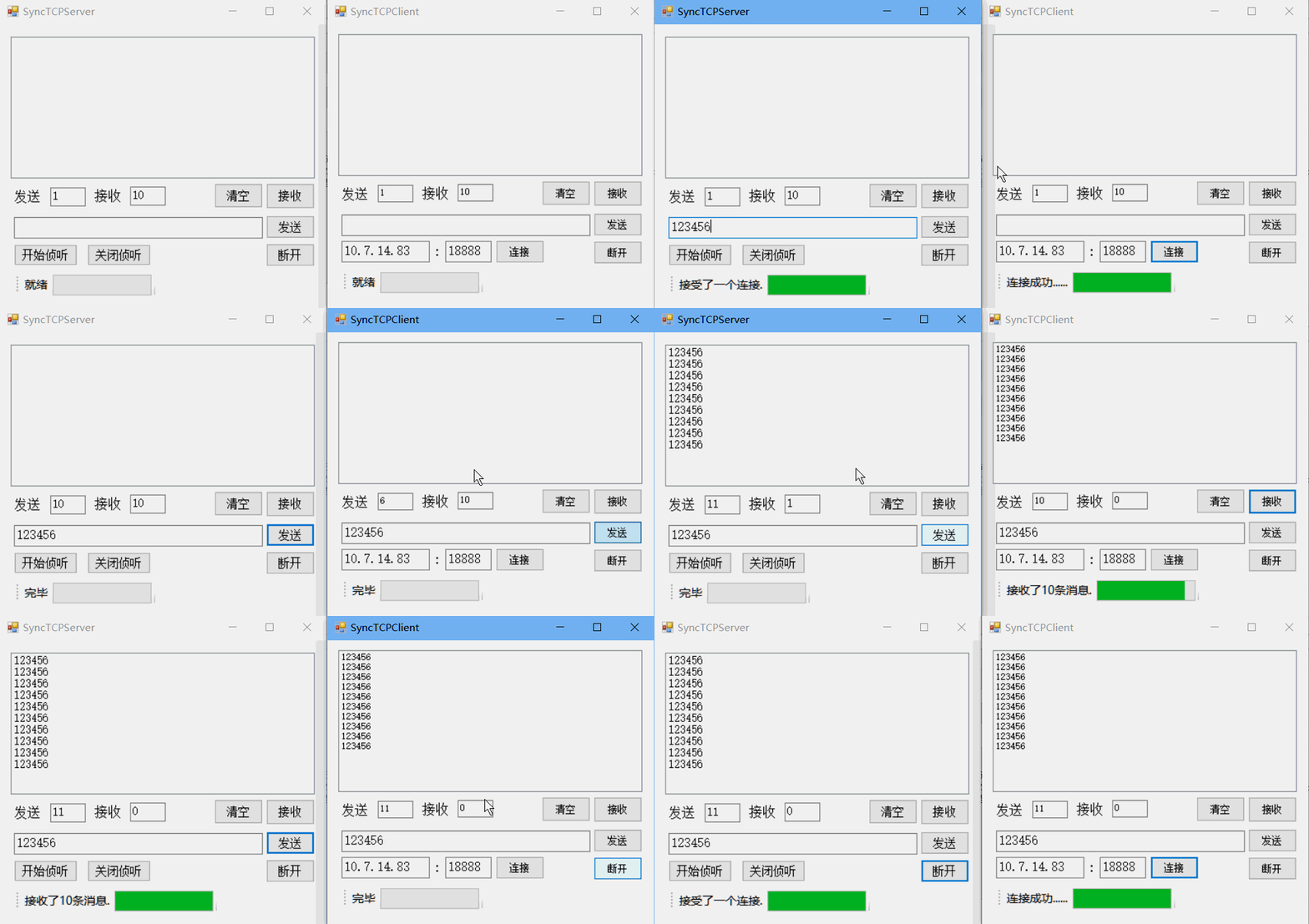
2)TCP异步:
服务端:
using System;
using System.Collections.Generic;
using System.ComponentModel;
using System.Data;
using System.Drawing;
using System.Linq;
using System.Text;
using System.Windows.Forms;

using System.Net;
using System.Net.Sockets;
using System.Threading;
using System.IO;

namespace ASyncTcpServer
{
    public partial class frmAsyncTcpServer : Form
    {
        private IPAddress localAddress;
        private const int port =52888;
        private TcpListener tcpListener;
        private TcpClient tcpClient;
        private NetworkStream networkStream;
        private BinaryReader br;
        private BinaryWriter bw;
        private int sendCount = 1;
        private int receiveCount = 10;
        /*------------声明委托------------*/
        //显示消息
        private delegate void ShwMsgforViewCallBack(string str);
        private ShwMsgforViewCallBack shwMsgforViewCallBack;
        //显示状态
        private delegate void ShwStatusInfoCallBack(string str);
        private ShwStatusInfoCallBack shwStatusInfoCallBack;
        //显示进度
        private delegate void ShwProgressProcCallBack(int progress);
        private ShwProgressProcCallBack shwProgressProcCallBack;
        //重置消息文本
        private delegate void ResetMsgTxtCallBack();
        private ResetMsgTxtCallBack resetMsgTxtCallBack;
        /*------------声明委托------------*/
       // 异步调用(与要调用的的方法具有相同签名)
        private delegate void ReceiveMessageDelegate(out string receiveMessage);
        private ReceiveMessageDelegate receiveMessageDelegate;
        private delegate void SendMessageDelegate(string sendMessage);
        private SendMessageDelegate sendMessageDelegate;
        public frmAsyncTcpServer()
        {
            InitializeComponent();
            /*----------定义委托----------*/
            //显示消息
            shwMsgforViewCallBack = new ShwMsgforViewCallBack(ShwMsgforView);
            //显示状态
            shwStatusInfoCallBack = new ShwStatusInfoCallBack(ShwStatusInfo);
            //显示进度
            shwProgressProcCallBack = new ShwProgressProcCallBack(ShwProgressProc);
            //重置消息文本
            resetMsgTxtCallBack = new ResetMsgTxtCallBack(ResetMsgTxt);
            /*----------定义委托----------*/
            receiveMessageDelegate = new ReceiveMessageDelegate(AsyncRcvMsg);//接收消息
            sendMessageDelegate = new SendMessageDelegate(AsyncSndMsg);//发送消息
            IPAddress[] listenIp = Dns.GetHostAddresses("");
            localAddress = listenIp[3];
            tbxSendCount.Text = sendCount.ToString();
            tbxReceiveCount.Text = receiveCount.ToString();
            toolStripProgressProc.Minimum = 0;
        }

        /*----------定义回调函数----------*/
        //显示消息
        private void ShwMsgforView(string str)
        {
            lstbxMsgView.Items.Add(str);
            lstbxMsgView.TopIndex = lstbxMsgView.Items.Count - 1;
        }

        //显示状态
        private void ShwStatusInfo(string str)
        {
            toolStripStatusInfo.Text = str;
        }

        //显示进度
        private void ShwProgressProc(int progress)
        {
            toolStripProgressProc.Value = progress;
        }

        //重置消息文本
        private void ResetMsgTxt()
        {
            tbxMsg.Text = "";
            tbxMsg.Focus();
        }
        /*----------定义回调函数----------*/
        private void AsyncRcvMsg(out string receiveMessage)
        {
            receiveMessage = null;
            try
            {
                receiveMessage = br.ReadString();
            }
            catch
            {
                if (br != null)
                {
                    br.Close();
                }
                if (bw != null)
                {
                    bw.Close();
                }
                if (tcpClient != null)
                {
                    tcpClient.Close();
                }
                statusStripInfo.Invoke(shwStatusInfoCallBack, "连接断开!");
                statusStripInfo.Invoke(shwProgressProcCallBack, 0);
            }
        }
        private void AsyncSndMsg(string sendMessage)
        {
            try
            {
                bw.Write(sendMessage);
                DateTime now = DateTime.Now;
                while (now.AddSeconds(5) > DateTime.Now) { }
                bw.Flush();

            }
            catch
            {
                if (br != null)
                {
                    br.Close();
                }
                if (bw != null)
                {
                    bw.Close();
                }
                if (tcpClient != null)
                {
                    tcpClient.Close();
                }
                statusStripInfo.Invoke(shwStatusInfoCallBack, "连接断开!");
                statusStripInfo.Invoke(shwProgressProcCallBack, 0);
            }
        }
        private void btnStart_Click(object sender, EventArgs e)
        {
            tcpListener = new TcpListener(localAddress, port);
            tcpListener.Start();
            toolStripProgressProc.Maximum = 100;
            toolStripProgressProc.Value = 0;
            //启动一个线程接受请求
            Thread threadAccept = new Thread(AcceptClientConnect);
            threadAccept.Start();
        }

        //接受请求
        private void AcceptClientConnect()
        {
            statusStripInfo.Invoke(shwStatusInfoCallBack, "[" + localAddress + ":" + port + "]侦听...");
            //间歇延时
            DateTime nowtime = DateTime.Now;
            while (nowtime.AddSeconds(1) > DateTime.Now) { }
            AsyncCallback acceptcallback=new AsyncCallback(AcceptClientCallBack);
            statusStripInfo.Invoke(shwStatusInfoCallBack, "等待连接...");
            statusStripInfo.Invoke(shwProgressProcCallBack, 1);
            IAsyncResult result=tcpListener.BeginAcceptTcpClient(acceptcallback,tcpListener);
            int i=2;
            while(result.IsCompleted==false){
                  statusStripInfo.Invoke(shwProgressProcCallBack,i);
                  i++;
                  if(i==10){
                      i=0;
                  }
                Thread.Sleep(30);
            }
        }
        private void AcceptClientCallBack(IAsyncResult iar){
             try{
                     tcpListener=(TcpListener)iar.AsyncState;
                     tcpClient=tcpListener.EndAcceptTcpClient(iar);
                     //后续操作进度显示
                    statusStripInfo.Invoke(shwProgressProcCallBack, 100);
                if (tcpClient != null)
                {
                    statusStripInfo.Invoke(shwStatusInfoCallBack, "接受了一个连接!");
                    networkStream = tcpClient.GetStream();
                    br = new BinaryReader(networkStream);
                    bw = new BinaryWriter(networkStream);
                }
            }
            catch
            {
                statusStripInfo.Invoke(shwStatusInfoCallBack, "停止侦听。");
                //间歇延时
                DateTime now = DateTime.Now;
                while (now.AddSeconds(1) > DateTime.Now) { }
                statusStripInfo.Invoke(shwProgressProcCallBack, 0);
                statusStripInfo.Invoke(shwStatusInfoCallBack, "就绪");
            }
        }
        private void btnReceive_Click(object sender, EventArgs e)
        {
            receiveCount = int.Parse(tbxReceiveCount.Text);
            toolStripProgressProc.Maximum = receiveCount;
            toolStripProgressProc.Value = 0;
            Thread threadReceive = new Thread(ReceiveMessage);
            threadReceive.Start();
        }

        //接收消息
        private void ReceiveMessage()
        {
            statusStripInfo.Invoke(shwStatusInfoCallBack, "接收中...");
            string receiveString = null;
            for (int i = 0; i < receiveCount; i++)
            {
                try
                {
                    IAsyncResult result = receiveMessageDelegate.BeginInvoke(out receiveString, null, null);
                    int j = 1;
                    while (result.IsCompleted == false)
                    {
                        statusStripInfo.Invoke(shwProgressProcCallBack, j);
                        j++;
                        if (j == receiveCount)
                        {
                            j = 0;
                        }
                        Thread.Sleep(500);
                    }
                    receiveMessageDelegate.EndInvoke(out receiveString, result);
                    statusStripInfo.Invoke(shwProgressProcCallBack, receiveCount);
                    if (receiveString != null)
                    {
                        lstbxMsgView.Invoke(shwMsgforViewCallBack, receiveString);
                    }
                }
                catch
                {

                    DateTime now = DateTime.Now;
                    while (now.AddSeconds(2) > DateTime.Now) { }
                    Thread threadAccept = new Thread(AcceptClientConnect);
                    threadAccept.Start();
                    break;
                }
            }
            statusStripInfo.Invoke(shwStatusInfoCallBack, "接收了" + receiveCount + "条消息.");
        }


        private void btnSend_Click(object sender, EventArgs e)
        {
            sendCount = int.Parse(tbxSendCount.Text);
            toolStripProgressProc.Maximum = sendCount;
            toolStripProgressProc.Value = 0;
            Thread threadSend = new Thread(new ParameterizedThreadStart(SendMessage));
            threadSend.Start(tbxMsg.Text);
        }

        //发送消息
        private void SendMessage(object state)
        {
            statusStripInfo.Invoke(shwStatusInfoCallBack, "正在发送...");
            for (int i = 0; i < sendCount; i++)
            {
                try
                {
                    IAsyncResult result = sendMessageDelegate.BeginInvoke(state.ToString(), null, null);
                    while (result.IsCompleted == false)
                    {
                        Thread.Sleep(30);
                    }
                    sendMessageDelegate.EndInvoke(result);
                    statusStripInfo.Invoke(shwProgressProcCallBack, i + 1);
                }
                catch
                {
                    DateTime now = DateTime.Now;
                    while (now.AddSeconds(2) > DateTime.Now) { }
                    Thread threadAccept = new Thread(AcceptClientConnect);
                    threadAccept.Start();
                    break;
                }

            }
            statusStripInfo.Invoke(shwStatusInfoCallBack, "完毕");
            //间歇延时
            DateTime nowtime = DateTime.Now;
            while (nowtime.AddSeconds(1) > DateTime.Now) { }
            statusStripInfo.Invoke(shwProgressProcCallBack, 0);
            tbxMsg.Invoke(resetMsgTxtCallBack, null);
        }
        private void btnDisconnect_Click(object sender, EventArgs e)
        {
            if (br != null)
            {
                br.Close();
            }
            if (bw != null)
            {
                bw.Close();
            }
            if (tcpClient != null)
            {
                tcpClient.Close();
            }
            toolStripStatusInfo.Text = "连接断开!";
            toolStripProgressProc.Maximum = 100;
            toolStripProgressProc.Value = 0;
            //间歇延时
            DateTime now = DateTime.Now;
            while (now.AddSeconds(2) > DateTime.Now) { }
            //重启一个线程等待接受新的请求
            Thread threadAccept = new Thread(AcceptClientConnect);
            threadAccept.Start();
        }

        private void btnStop_Click(object sender, EventArgs e)
        {
            tcpListener.Stop();
        }

        private void btnClear_Click(object sender, EventArgs e)
        {
            lstbxMsgView.Items.Clear();
        }
    }
}
客户端:
using System;
using System.Collections.Generic;
using System.ComponentModel;
using System.Data;
using System.Drawing;
using System.Linq;
using System.Text;
using System.Windows.Forms;

using System.Net;
using System.Net.Sockets;
using System.Threading;
using System.IO;

namespace ASyncTcpClient
{
    public partial class frmAsyncTcpClient : Form
    {
        private TcpClient tcpClient;
        private NetworkStream networkStream;
        private BinaryReader br;
        private BinaryWriter bw;
        private int sendCount = 1;
        private int receiveCount = 10;
        /*------------声明委托------------*/
        //显示消息
        private delegate void ShwMsgforViewCallBack(string str);
        private ShwMsgforViewCallBack shwMsgforViewCallBack;
        //显示状态
        private delegate void ShwStatusInfoCallBack(string str);
        private ShwStatusInfoCallBack shwStatusInfoCallBack;
        //显示进度
        private delegate void ShwProgressProcCallBack(int progress);
        private ShwProgressProcCallBack shwProgressProcCallBack;
        //重置消息文本
        private delegate void ResetMsgTxtCallBack();
        private ResetMsgTxtCallBack resetMsgTxtCallBack;
        /*------------声明委托------------*/
        private delegate void ReceiveMessageDelegate(out string receiveMessage);
        private ReceiveMessageDelegate receiveMessageDelegate;
        private delegate void SendMessageDelegate(string sendMessage);
        private SendMessageDelegate sendMessageDelegate;

        public frmAsyncTcpClient()
        {
            InitializeComponent();
            /*----------定义委托----------*/
            //显示消息
            shwMsgforViewCallBack = new ShwMsgforViewCallBack(ShwMsgforView);
            //显示状态
            shwStatusInfoCallBack = new ShwStatusInfoCallBack(ShwStatusInfo);
            //显示进度
            shwProgressProcCallBack = new ShwProgressProcCallBack(ShwProgressProc);
            //重置消息文本
            resetMsgTxtCallBack = new ResetMsgTxtCallBack(ResetMsgTxt);
            receiveMessageDelegate = new ReceiveMessageDelegate(AsyncRcvMsg);//接收消息
            sendMessageDelegate = new SendMessageDelegate(AsyncSndMsg);//发送消息

            /*----------定义委托----------*/
            IPAddress[] serverIp = Dns.GetHostAddresses("");
            tbxSrvIp.Text = serverIp[3].ToString();
            tbxSrvIp.SelectAll();
            tbxPort.Text = "52888";
            tbxSendCount.Text = sendCount.ToString();
            tbxReceiveCount.Text = receiveCount.ToString();
            toolStripProgressProc.Minimum = 0;
        }

        /*----------定义回调函数----------*/
        //显示消息
        private void ShwMsgforView(string str)
        {
            lstbxMsgView.Items.Add(str);
            lstbxMsgView.TopIndex = lstbxMsgView.Items.Count - 1;
        }

        //显示状态
        private void ShwStatusInfo(string str)
        {
            toolStripStatusInfo.Text = str;
        }

        //显示进度
        private void ShwProgressProc(int progress)
        {
            toolStripProgressProc.Value = progress;
        }

        //重置消息文本
        private void ResetMsgTxt()
        {
            tbxMsg.Text = "";
            tbxMsg.Focus();
        }
        /*----------定义回调函数----------*/
        //异步方法
        private void AsyncRcvMsg(out string receiveMessage)
        {
            receiveMessage = null;
            try
            {
                receiveMessage = br.ReadString();
            }
            catch
            {
                if (br != null)
                {
                    br.Close();
                }
                if (bw != null)
                {
                    bw.Close();
                }
                if (tcpClient != null)
                {
                    tcpClient.Close();
                }
                statusStripInfo.Invoke(shwStatusInfoCallBack, "连接断开!");
                statusStripInfo.Invoke(shwProgressProcCallBack, 0);
            }
        }
        private void AsyncSndMsg(string sendMessage)
        {
            try
            {
                bw.Write(sendMessage);
                DateTime now= DateTime.Now;
                while(now.AddSeconds(5)>DateTime.Now){}
                bw.Flush();

            }
            catch
            {
                if (br != null)
                {
                    br.Close();
                }
                if (bw != null)
                {
                    bw.Close();
                }
                if (tcpClient != null)
                {
                    tcpClient.Close();
                }
                statusStripInfo.Invoke(shwStatusInfoCallBack, "连接断开!");
                statusStripInfo.Invoke(shwProgressProcCallBack, 0);
            }
        }
        private void btnConnect_Click(object sender, EventArgs e)
        {
            toolStripProgressProc.Maximum = 100;
            toolStripProgressProc.Value = 0;
            //通过一个线程发起请求
            Thread threadConnect = new Thread(ConnectoServer);
            threadConnect.Start();
        }

        //发起连接请求
        private void ConnectoServer()
        {
            AsyncCallback requestcallback = new AsyncCallback(RequestCallBack);
            statusStripInfo.Invoke(shwStatusInfoCallBack, "正在连接...");
            statusStripInfo.Invoke(shwProgressProcCallBack, 1);
            tcpClient = new TcpClient(AddressFamily.InterNetwork);
            IAsyncResult result=tcpClient.BeginConnect(IPAddress.Parse(tbxSrvIp.Text),int.Parse(tbxPort.Text),requestcallback,tcpClient);
            while(result.IsCompleted==false){
                Thread.Sleep(30);
            }
        }
        //回调函数,用于向服务进程发起连接请求
          private void RequestCallBack(IAsyncResult iar){
                 try{
                     tcpClient=(TcpClient)iar.AsyncState;
                     tcpClient.EndConnect(iar);
                     //后续操作进度显示
                    statusStripInfo.Invoke(shwProgressProcCallBack, 100);
                //间歇延时
                DateTime nowtime = DateTime.Now;
                while (nowtime.AddSeconds(1) > DateTime.Now) { }
                if (tcpClient != null)
                {
                    statusStripInfo.Invoke(shwStatusInfoCallBack, "连接成功!");
                    networkStream = tcpClient.GetStream();
                    br = new BinaryReader(networkStream);
                    bw = new BinaryWriter(networkStream);
                }
            }
            catch
            {
                statusStripInfo.Invoke(shwStatusInfoCallBack, "连接失败!");
                //间歇延时
                DateTime now = DateTime.Now;
                while (now.AddSeconds(1) > DateTime.Now) { }
                statusStripInfo.Invoke(shwProgressProcCallBack, 0);
                statusStripInfo.Invoke(shwStatusInfoCallBack, "就绪");
            }
}
        private void btnReceive_Click(object sender, EventArgs e)
        {
            receiveCount = int.Parse(tbxReceiveCount.Text);
            toolStripProgressProc.Maximum = receiveCount;
            toolStripProgressProc.Value = 0;
            Thread threadReceive = new Thread(ReceiveMessage);
            threadReceive.Start();
        }

        //接收消息
        private void ReceiveMessage()
        {
            statusStripInfo.Invoke(shwStatusInfoCallBack, "接收中...");
            string receiveString = null;
            for (int i = 0; i < receiveCount; i++)
            {
                try
                {
                    IAsyncResult result = receiveMessageDelegate.BeginInvoke(out receiveString, null, null);
                    int j = 1;
                    while (result.IsCompleted == false)
                    {
                        statusStripInfo.Invoke(shwProgressProcCallBack, j);
                        j++;
                        if (j == receiveCount)
                        {
                            j = 0;
                        }
                        Thread.Sleep(500);
                    }
                    receiveMessageDelegate.EndInvoke(out receiveString, result);
                    statusStripInfo.Invoke(shwProgressProcCallBack, receiveCount);
                    if (receiveString != null)
                    {
                        lstbxMsgView.Invoke(shwMsgforViewCallBack, receiveString);
                    }
                }
                catch
                {

                    DateTime now = DateTime.Now;
                    while (now.AddSeconds(2) > DateTime.Now) { }
                    break;
                }
            }
            statusStripInfo.Invoke(shwStatusInfoCallBack, "接收了" + receiveCount + "条消息.");
        }

        private void btnSend_Click(object sender, EventArgs e)
        {
            sendCount = int.Parse(tbxSendCount.Text);
            toolStripProgressProc.Maximum = sendCount;
            toolStripProgressProc.Value = 0;
            Thread threadSend = new Thread(new ParameterizedThreadStart(SendMessage));
            threadSend.Start(tbxMsg.Text);
        }

        //发送消息
        private void SendMessage(object state)
        {
            statusStripInfo.Invoke(shwStatusInfoCallBack, "正在发送...");
            for (int i = 0; i < sendCount; i++)
            {
                try
                {
                    IAsyncResult result = sendMessageDelegate.BeginInvoke(state.ToString(), null, null);
                    while (result.IsCompleted == false)
                    {
                        Thread.Sleep(30);
                    }
                    sendMessageDelegate.EndInvoke(result);
                    statusStripInfo.Invoke(shwProgressProcCallBack, i + 1);
                }
                catch{
                      DateTime now=DateTime.Now;
                    while(now.AddSeconds(2)>DateTime.Now){}
                    break;
                }

            }
            statusStripInfo.Invoke(shwStatusInfoCallBack, "完毕");
            //间歇延时
            DateTime nowtime = DateTime.Now;
            while (nowtime.AddSeconds(1) > DateTime.Now) { }
            statusStripInfo.Invoke(shwProgressProcCallBack, 0);
            tbxMsg.Invoke(resetMsgTxtCallBack, null);
        }

        private void btnDisconnect_Click(object sender, EventArgs e)
        {
            if (br != null)
            {
                br.Close();
            }
            if (bw != null)
            {
                bw.Close();
            }
            if (tcpClient != null)
            {
                tcpClient.Close();
            }
            toolStripStatusInfo.Text = "连接断开!";
            toolStripProgressProc.Maximum = 100;
            toolStripProgressProc.Value = 0;
            DateTime nowtime = DateTime.Now;
            while (nowtime.AddSeconds(2) > DateTime.Now) { }

        }

        private void btnClear_Click(object sender, EventArgs e)
        {
            lstbxMsgView.Items.Clear();
        }
    }
}
显示结果:
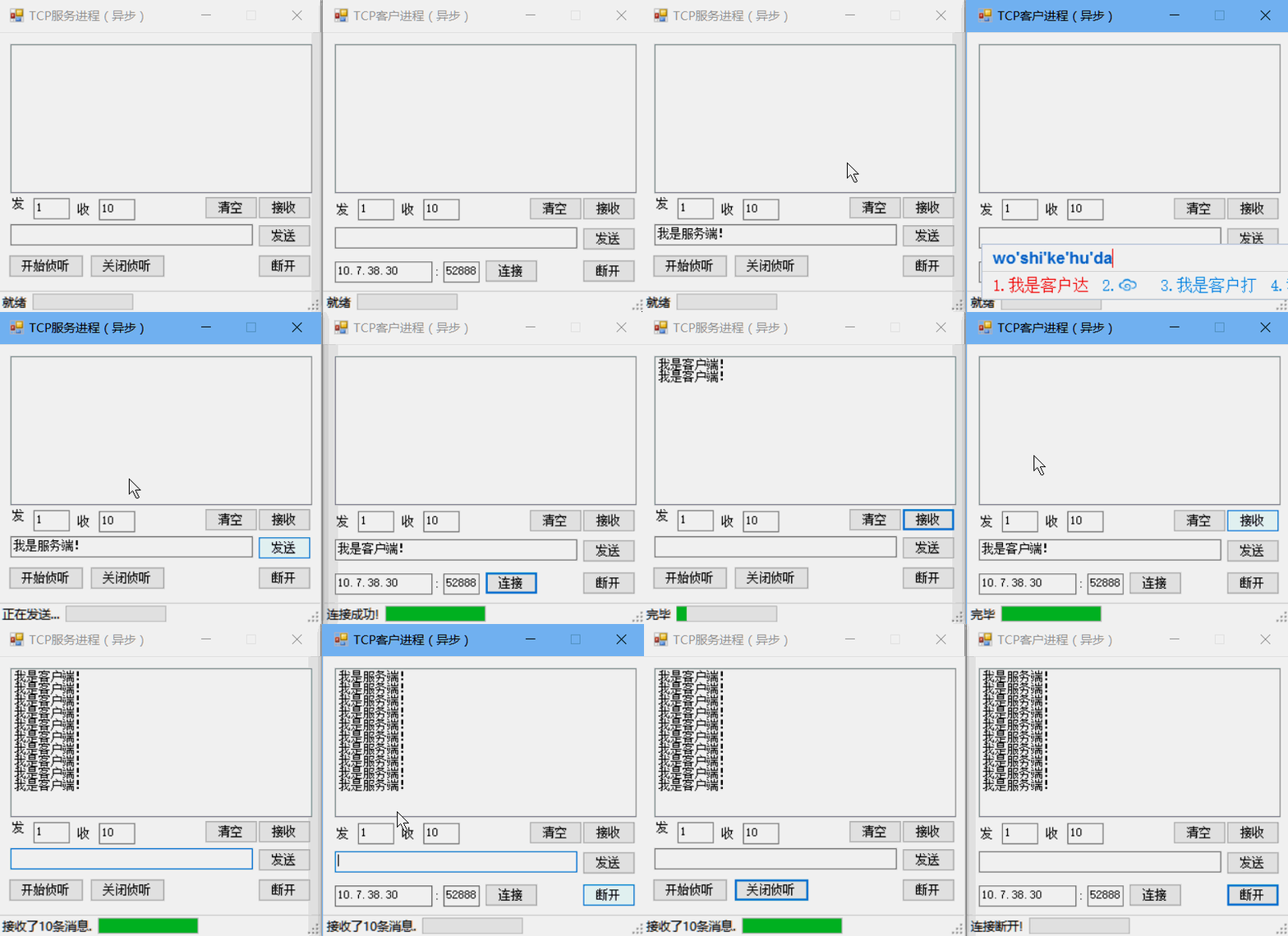
注意:这里并不支持IPV6的地址,因此要注意取本机的Ip地址集时要选对Ip地址。
(6)异步TCP程序设计:
使用异步操作方式设计程序就是异步程序设计。异步程序设计有两种模式:
1.基于事件
(1)封装了异步编程的复杂性,简化了设计难度
(2)屏蔽了异步操作原理
2.基于IAsyncResult
(1)提供了更灵活的控制功能
(2)通过前缀分别为Begin和End的两个方法实现开始和结束异步操作
(3)每个Begin方法都必须有一个与其对应的End方法
(4)程序在调用Begin方法后,调用该方法的线程会继续执行下面的语句,同时该方法用另一个单独的线程执行异步操作,当异步操作完成后,会返回一个实现IAsyncResult接口的对象。
(5)调用Begin方法后,应该调用End方法来结束异步操作。
1)基于IAsyncResult的异步设计模式:
TcpListener和TcpClient除了提供同步模式下的对应的方法外,还为基于IAsyncResult的异步设计模式提供了相应的方法。
基本原理:
基于IAsyncResult的异步设计模式通过前缀分别为Begin和End的两个方法实现开始和结束异步操作,每个Begin方法都必须有一个与之对应的End方法。程序在调用Begin方法后,调用该方法的线程会继续执行下面的语句,同时该方法用另一个单独的线程执行异步操作,当异步操作完成后,会返回一个实现IAsyncResult接口的对象,该对象存储了有关异步操作的信息:
IAsyncResult的属性:
(1)AsyncState
获取用户定义的对象,它限定或包含关于异步操作的信息。
(2)AsyncWaitHandle
获取用于等待异步操作完成的 WaitHandle。
(3)CompletedSynchronously
获取异步操作是否同步完成的指示。
(4)IsCompleted
获取异步操作是否已完成的指示。
AsyncCallback委托:
AsyncCallback委托用于在异步操作完成时调用指定的回调方法。在基于IAsyncResult的异步操作方式下,程序可以再启动异步操作后执行其它代码,因此必须有一种机制,以保证该异步操作完成时能够及时通知调用者。AsyncCallback委托就是为实现这种机制提供的。
回调方法是在程序中事先定义的,在回调方法中,通过End方法获得Begin方法的返回值和所有输入或输出参数,从而达到在异步操作方式下的参数传递的目的。
public delegate void AsyncCallback( IAsyncResult ar)使用 AsyncCallback 委托在一个单独的线程中处理异步操作的结果。
回调方法采用 IAsyncResult 参数,该参数随后可用来获取异步操作的结果。
异步设计模式控制同步问题:
基于IAsyncResult的异步设计模式控制同步问题非常麻烦,而且代码难以理解,因此在实际设计中一般不采用AsyncCallback委托处理异步操作的结果,而是采用轮询方式判断异步操作是否完成。思路:调用Begin方法得到IAsyncResult对象,再循环判断该对象的IsCompleted属性决定操作是否完成。(这时将Begin方法的AsyncCallback参数设置为null即可)
2)异步Tcp编程常用方法:
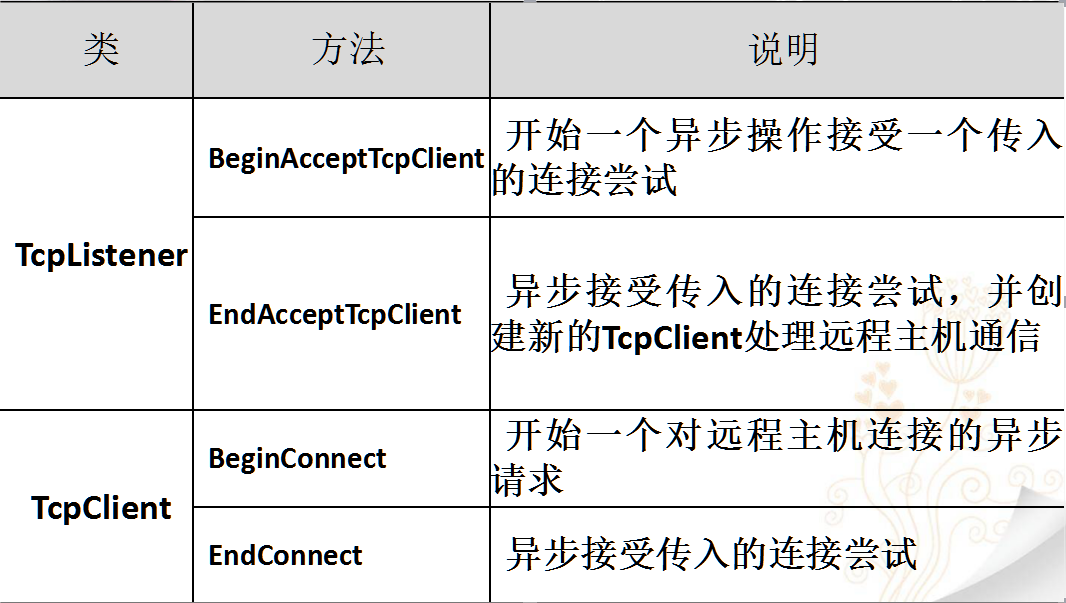
BeginAcceptTcpClient:
开始一个异步操作来接受一个传入的连接尝试。
public IAsyncResult BeginAcceptTcpClient(
    AsyncCallback callback,
    Object state)
参数:
一个 AsyncCallback 委托,它引用操作完成时要调用的方法。
一个用户定义对象,其中包含接收操作的相关信息。当操作完成时,此对象会被传递给 callback 委托。
返回值:
一个 IAsyncResult,它引用 TcpClient 的异步创建。
EndAcceptTcpClient:
异步接受传入的连接尝试,并创建新的 TcpClient 来处理远程主机通信。
public TcpClient EndAcceptTcpClient(
    IAsyncResult asyncResult)
参数:
BeginAcceptTcpClient 方法调用返回的 IAsyncResult。
返回值:
TcpClient 。
BeginConnect:
开始一个对远程主机连接的异步请求。
BeginConnect(IPAddress, Int32, AsyncCallback, Object)
开始一个对远程主机连接的异步请求。远程主机由 IPAddress 和端口号 (Int32) 指定。
BeginConnect(IPAddress[], Int32, AsyncCallback, Object)
开始一个对远程主机连接的异步请求。远程主机由 IPAddress 数组和端口号 (Int32) 指定。
BeginConnect(String, Int32, AsyncCallback, Object)
开始一个对远程主机连接的异步请求。远程主机由主机名 (String) 和端口号 (Int32) 指定。
返回值:IAsyncResult 。
EndConnect:
异步接受传入的连接尝试。
public void EndConnect(
    IAsyncResult asyncResult)
参数:
BeginConnect 调用所返回的 IAsyncResult 对象。
3)异步收发数据
用NetWorkStream对象的BeginRead和BeginWrite方法需解决TCP的无消息边界问题,非常麻烦。
TCP的无消息边界:
虽然采用TCP协议通信时,接收方能够按照发送方发送的顺序接收数据,但是在网络传输中,可能会出现发送方一次发送的消息与接收方一次接收的消息不一致的现象:
发送方第一次发送的字符串数据为“12345”,第二次发送的字符串数据为“abcde”:
1.正常情况下,接收方接收的字符串应该是第一次接收:“12345”,第二次接收:“abcde”。
2.当收发信息速度非常快时,接收方也可能一次接收到的内容就是“12345abcde”,即两次或者多次发送的内容一起接收。 接收方也可能会经过多次才能接收到发送方发送的消息。例如第一次接收到“1234”,第二次为“45ab”,第三次为“cde”。
因为TCP协议是字节流形式的、无消息边界的协议,由于受网络传输中的不确定因素的影响,因此不能保证单个Send方法发送的数据被单个Receive方法读取。
解决TCP协议消息边界问题的方法:
1.第一种方法是发送固定长度的消息。
BinaryReader和BinaryWriter对象提供了多种重载方法,发送和接收具有固定长度类型的数据非常方便。
2.第二种方法是将消息长度与消息一起发送。
BinaryReader对象和BinaryWriter对象同样是实现这种方法的最方便的途径。
3.第三种方法是使用特殊标记分隔消息。例如用回车换行(
)作为分隔符。这种方法主要用于消息中不包含特殊标记的场合。
解决方法:(用BinaryReader和BinaryWriter类)
提供同步的方法
使用异步方式调用同步方法
4)异步方式调用同步方法:
步骤:
1.声明一个与要调用的方法具有相同签名的委托
2.调用委托的BeginInvoke方法开始异步执行
3.调用委托的EndInvoke方法结束异步操作
声明委托:
private BinaryWriter bw;
......
private delegate void SendMessageDelegate(string sendMessage);//定义
private SendMessageDelegate sendMessageDelegate;//声明
sendMessageDelegate = new SendMessageDelegate(AsyncSndMsg);//实例化
//调用方法
private void AsyncSndMsg(string sendMessage)
{
       bw.Write(sendMessage);
    bw.Flush();
}
调用BeginInvoke方法:
委托的BeginInvoke方法
参数:
1.与异步执行方法的参数相同
2.可选。一个 AsyncCallback 委托,该委托引用在异步调用完成时要调用的方法。
3.可选。一个用户定义的对象,该对象可向回调方法传递信息。
返回值:
IAsyncResult,可用于监视异步调用进度。
private bool needExit;
…
IAsyncResult result = sendMessageDelegate.BeginInvoke(sendMessage, null, null);
while (result.IsCompleted == false)
{    if (needExit)
    {    break;    }
    Thread.Sleep (50);
}
调用EndInvoke方法:
Endlnvoke方法用于检索异步调用的结果,并结束异步调用。
调用Beginlnvoke之后,随时可以调用该方法。
如果异步调用尚未完成,则Endlnvoke会一直阻止调用线程,直到异步调用完成。
例如,在退出轮询后,可以直接通过下面的代码结束异步调用:
sendMessageDelegate.EndInvoke(result);
5)四种进行异步调用的常用方法
调用 BeginInvoke 之后:
a.进行某些操作,然后调用 EndInvoke 一直阻止到调用完成。
b.使用 IAsyncResult.AsyncWaitHandle 属性获取 WaitHandle,使用它的 WaitOne 方法一直阻止执行直到发出 WaitHandle 信号,然后调用 EndInvoke。
c.轮询由 BeginInvoke 返回的 IAsyncResult的IsCompleted属性,确定异步调用何时完成,然后调用 EndInvoke。
d.将用于回调方法的委托传递给 BeginInvoke。异步调用完成后,将在 ThreadPool 线程上执行该方法。该回调方法将调用 EndInvoke。
示例:
1.使用EndInvoke等待异步调用
public delegate string AsyncMethodCaller(int callDuration, out int threadId);
AsyncMethodCaller caller = new AsyncMethodCaller(ad.TestMethod);
IAsyncResult result = caller.BeginInvoke(3000, out threadId, null, null);
Thread.Sleep(0);
Console.WriteLine("Main thread {0} does some work.",Thread.CurrentThread.ManagedThreadId);
// Call EndInvoke to wait for the asynchronous call to complete,
// and to retrieve the results.
string returnValue = caller.EndInvoke(out threadId, result);
Console.WriteLine("The call executed on thread {0}, with return value "{1}".",  threadId, returnValue);
2.使用WaitHandle
等待异步调用
public delegate string AsyncMethodCaller(int callDuration, out int threadId);
AsyncMethodCaller caller = new AsyncMethodCaller(ad.TestMethod);
IAsyncResult result = caller.BeginInvoke(3000, out threadId, null, null);
Thread.Sleep(0);
Console.WriteLine("Main thread {0} does some work.",
Thread.CurrentThread.ManagedThreadId);
// Wait for the WaitHandle to become signaled.
result.AsyncWaitHandle.WaitOne();
// Perform additional processing here.
// Call EndInvoke to retrieve the results.
string returnValue = caller.EndInvoke(out threadId, result);
Console.WriteLine("The call executed on thread {0}, with return value "{1}".", threadId, returnValue);
3.轮询异步调用完成
public delegate string AsyncMethodCaller(int callDuration, out int threadId);
AsyncMethodCaller caller = new AsyncMethodCaller(ad.TestMethod);
// Initiate the asychronous call.
IAsyncResult result = caller.BeginInvoke(3000, out threadId, null, null);
// Poll while simulating work.
while(result.IsCompleted == false) {
     Thread.Sleep(10);
}
// Call EndInvoke to retrieve the results.
string returnValue = caller.EndInvoke(out threadId, result);
Console.WriteLine("The call executed on thread {0}, with return value "{1}".",  threadId, returnValue);
4.异步调用完成时执行回调方法
public delegate string AsyncMethodCaller(int callDuration, out int threadId);
AsyncMethodCaller caller = new AsyncMethodCaller(ad.TestMethod);
// Initiate the asychronous call.  Include an AsyncCallback
// delegate representing the callback method, and the data
// needed to call EndInvoke.
IAsyncResult result = caller.BeginInvoke(3000,out threadId, new AsyncCallback(CallbackMethod),caller );
Console.WriteLine("Press Enter to close application.");
Console.ReadLine();
// Callback method must have the same signature as the
// AsyncCallback delegate.
static void CallbackMethod(IAsyncResult ar)
{
     // Retrieve the delegate.
     AsyncMethodCaller caller = (AsyncMethodCaller) ar.AsyncState;
     // Call EndInvoke to retrieve the results.
     string returnValue = caller.EndInvoke(out threadId, ar);
     Console.WriteLine("The call executed on thread {0}, with return value "{1}".", threadId, returnValue);
}
实验文档:http://files.cnblogs.com/files/MenAngel/TCP.zip