简介
Qt 多语言支持很强大,很好用。
首先要强调的是程序中需要翻译的字符串最好都用 tr("message") 这种形式,这里的 "message" 就是需要翻译的字符串,统一用英文来表示,也就是说开发过程中程序的默认语言是英文,
开发完成后,用 Qt 多语言工具将程序翻译成不同的语言。
需要用到的工具就是 Qt 自带的 lupdate, lrelease, linguist 这3个,不同的二进制发布版本会存放在不同的安装目录。
例如我的编译器版本是 mingw53_32,那么它们存放的路径如下:
D:QtQt5.11.15.11.1mingw53_32inlupdate.exe
D:QtQt5.11.15.11.1mingw53_32inlinguist.exe
D:QtQt5.11.15.11.1mingw53_32inlrelease.exe
如果没有把这个 bin 路径添加到系统的 PATH 路径,那么就需要填写完整的路径来启动可执行文件。
三个工具的作用
- lupdate 工具用来提取程序中由
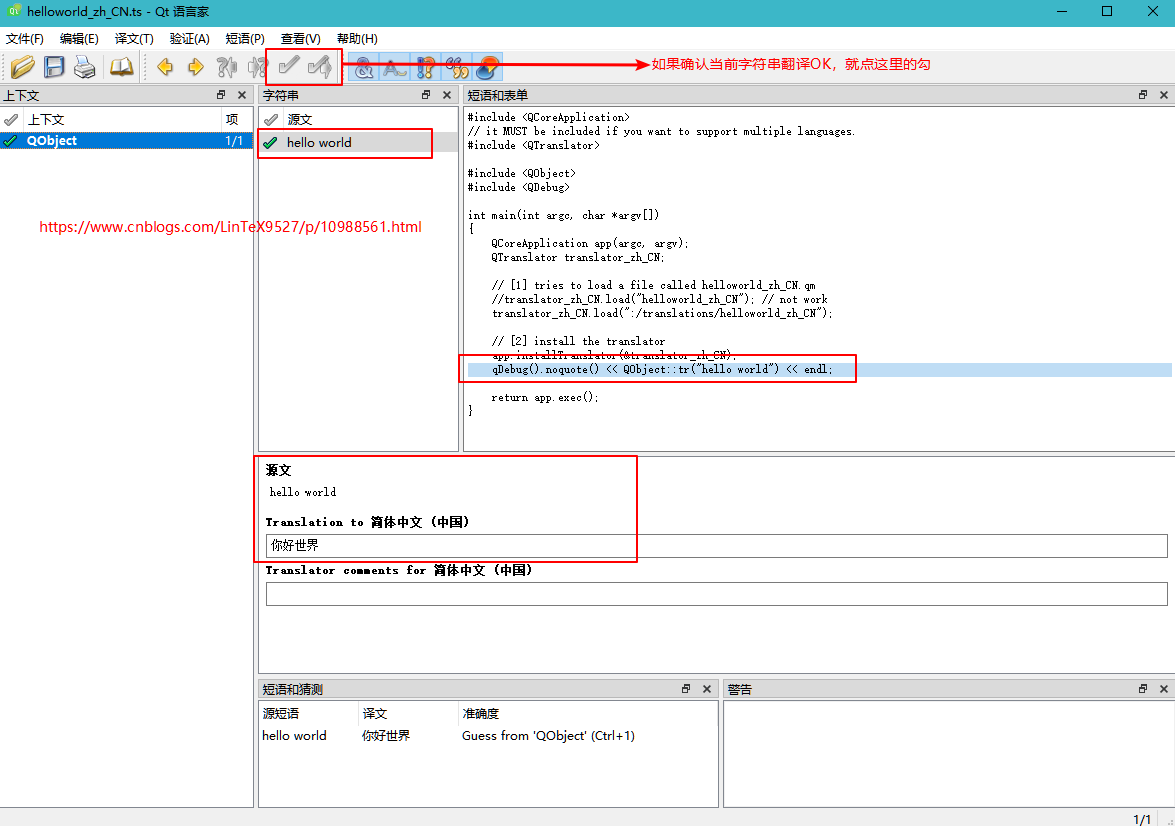
tr()等函数包含的带翻译的字符串到一个文本文件proXXX_zh_CN.ts中,例如这里需要翻译成中文简体,开发过程中需要用到此 ts 文件; - linguist 工具会打开上一步的 ts 文件,然后让开发人员翻译,例如 "hello world" 翻译成中文,需要填写对应的单词表,如果不填写,那么就不会产生翻译,程序最终输出的就是原始的 "hello world";
- lrelease 工具会把上一步的 ts 文件转换为 QM 文件,例如
proXXX_zh_CN.qm,这个文件才是应用读取的翻译文件,发布应用程序应当提供这个文件。
一个简单的 helloworld 程序
命令行程序,开发完成后,需要翻译的字符串就是这一行代码中的字符串:
qDebug().noquote() << QObject::tr("hello world") << endl;
翻译过程,大致步骤如下:
0. 用默认语言(例如英语)开发应用;
- 应用开发完成,用 lupdate 工具提取待翻译的字符串到 TS 文件,用 linguist 工具打开 TS 文件,翻译文本;
- 翻译完成用 lrelease 工具把 TS 文件转换为 QM 文件;
- 程序中加载 QM 文件,并安装翻译对象。
- 打包发布应用程序。
手把手示例
0. 用默认语言开发应用
新建一个控制台应用 helloworld,用 qDebug() 输出一句话即可。
1. 用工具 lupdate 提取待翻译的字符串生成 ts 文件,并用 linguist 工具打开并翻译
这一连串的动作,我用脚本实现了,代码如下:
:: @ECHO OFF
SET LUPDATE_BIN=D:QtQt5.11.15.11.1mingw53_32inlupdate.exe
SET LINGUIST_BIN=D:QtQt5.11.15.11.1mingw53_32inlinguist.exe
SET PRO_NAME=helloworld.pro
SET TS_FILENAME=helloworld_zh_CN.ts

START %LUPDATE_BIN% -pro %PRO_NAME% -ts %TS_FILENAME%

START %LINGUIST_BIN% %TS_FILENAME%

EXIT
功能很简单,首先设置 lupdate 和 linguist 工具路径,然后根据项目设置工程的文件名字和需要翻译的文件名字,然后启动程序,第一步生成 TS 文件,第二步用 linguist 打开刚刚生成的 TS 文件。
在这个应用中只有一个单词需要翻译,示例如下:
2. 翻译完成,用 lrelease 工具把 TS 文件转换为 QM 文件
这个动作我也用脚本实现了,代码如下:
:: convert *.ts to *.qm file.
SET LRELEASE_BIN=D:QtQt5.11.15.11.1mingw53_32inlrelease.exe
SET TS_FILENAME=helloworld_zh_CN.ts
SET QM_FILENAME=helloworld_zh_CN.qm

START %LRELEASE_BIN% %TS_FILENAME% -qm %QM_FILENAME%
3. 修改代码,程序中加载 QM 文件
这个步骤才是重点,划分为以下几个小步骤:
- 头文件包含
#include <QTranslator>,注意在 PRO 文件中添加这一句话TRANSLATIONS = helloworld_zh_CN.ts - 新建一个
QTranslator translator_zh_CN示例,然后加载QM文件,相关代码如下:
    QTranslator translator_zh_CN;

    // [1] tries to load a file called helloworld_zh_CN.qm
    //translator_zh_CN.load("helloworld_zh_CN"); // not work
    translator_zh_CN.load(":/translations/helloworld_zh_CN");
这里的 QM 文件我是添加到 QRC 文件中,所以引用的路径是以 :/prefix/filename 形式。
QRC 文件如何使用以后再说。
- 安装翻译语言,一句话搞定
app.installTranslator(&translator_zh_CN);
4. 发布应用程序
不是本文重点,以后再说。
附上源文件
helloworld.pro 内容如下:
QT -= gui

CONFIG += c++11 console
CONFIG -= app_bundle

# The following define makes your compiler emit warnings if you use
# any feature of Qt which as been marked deprecated (the exact warnings
# depend on your compiler). Please consult the documentation of the
# deprecated API in order to know how to port your code away from it.
DEFINES += QT_DEPRECATED_WARNINGS

# You can also make your code fail to compile if you use deprecated APIs.
# In order to do so, uncomment the following line.
# You can also select to disable deprecated APIs only up to a certain version of Qt.
#DEFINES += QT_DISABLE_DEPRECATED_BEFORE=0x060000    # disables all the APIs deprecated before Qt 6.0.0

SOURCES +=
        main.cpp

# [3] add this file to the project.
TRANSLATIONS = helloworld_zh_CN.ts

RESOURCES +=
    helloworld.qrc
main.cpp 内容如下:
#include <QCoreApplication>
// it MUST be included if you want to support multiple languages.
#include <QTranslator>

#include <QObject>
#include <QDebug>

int main(int argc, char *argv[])
{
    QCoreApplication app(argc, argv);
    QTranslator translator_zh_CN;

    // [1] tries to load a file called helloworld_zh_CN.qm
    //translator_zh_CN.load("helloworld_zh_CN"); // not work
    translator_zh_CN.load(":/translations/helloworld_zh_CN");

    // [2] install the translator
    app.installTranslator(&translator_zh_CN);
    qDebug().noquote() << QObject::tr("hello world") << endl;

    return app.exec();
}
helloworld.qrc 内容如下:
<RCC>
    <qresource prefix="/translations">
        <file alias="helloworld_zh_CN">helloworld_zh_CN.qm</file>
    </qresource>
</RCC>
最后是调用 lupdate, linguist 和 lrelease 的脚本.
lupdate_helloworld.bat 内容如下:
:: @ECHO OFF
SET LUPDATE_BIN=D:QtQt5.11.15.11.1mingw53_32inlupdate.exe
SET LINGUIST_BIN=D:QtQt5.11.15.11.1mingw53_32inlinguist.exe
SET PRO_NAME=helloworld.pro
SET TS_FILENAME=helloworld_zh_CN.ts

START %LUPDATE_BIN% -pro %PRO_NAME% -ts %TS_FILENAME%

START %LINGUIST_BIN% %TS_FILENAME%

EXIT
lrelease_helloworld.bat 内容如下:
:: convert *.ts to *.qm file.
SET LRELEASE_BIN=D:QtQt5.11.15.11.1mingw53_32inlrelease.exe
SET TS_FILENAME=helloworld_zh_CN.ts
SET QM_FILENAME=helloworld_zh_CN.qm

START %LRELEASE_BIN% %TS_FILENAME% -qm %QM_FILENAME%
声明
欢迎转载,请注明出处和作者,同时保留声明。
作者:LinTeX9527
出处:https://www.cnblogs.com/LinTeX9527/p/10988561.html
本博客的文章如无特殊说明,均为原创,转载请注明出处。如未经作者同意必须保留此段声明,且在文章页面明显位置给出原文连接,否则保留追究法律责任的权利。