模式定义
适配器模式(Adapter Pattern) :将一个接口转换成客户希望的另一个接口,适配器模式使接口不兼容的那些类可以一起工作,其别名为包装器(Wrapper)。适配器模式既可以作为类结构型模式,也可以作为对象结构型模式。如果适配者(三方类库修改)只需要修改适配器
UML类图
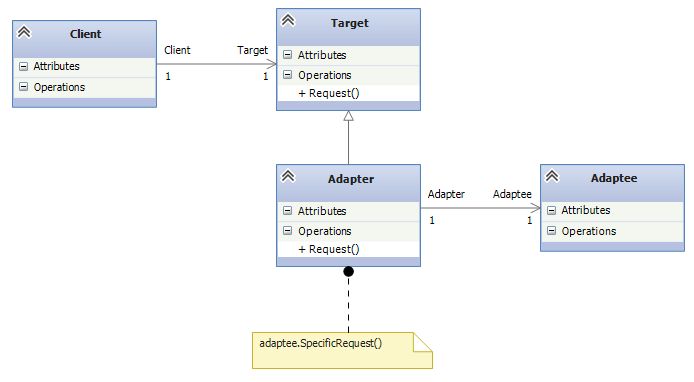
- 目标抽象类(Target) 客户需要用的特定接口
- 适配器类(Adapter) 关联适配者类,实现目标抽象类接口
- 适配者类(Adaptee) 被适配的角色,它定义了一个已经存在的接口,这个接口需要适配(一般只三方类库)
- 客户端(Client) 针对目标抽象类进行编程
代码结构
public static class AdapteeApp
	{
		public static void Run()
		{
			Target target = new Adapter();
			target.Request();
		}
	}
	public class Target
	{
		public virtual void Request()
		{
			Console.WriteLine("Called Target Request()");
		}
	}
	public class Adapter :Target
	{
		private Adaptee _adaptee = new Adaptee();

		public override void Request()
		{
			_adaptee.SpecificRequest();
		}

	}
	public class Adaptee
	{
		public void SpecificRequest()
		{
			Console.WriteLine("Called specificRequest()");
		}
	}
情景模式
在开发中用到适配者模式,一般指引入第三方类库,且第三方类库的接口并非完全一直。这里以缓存操作为例,项目刚开始缓存存在内存,随着项目数据的增多决定引入Redis做缓存,然而Redis的缓存操作接口并非与本系统操作接口完全一致,这里通过适配者模式解决(这点也体现依赖倒置:高层不应依赖底层,应依赖接口)。
	public static class AdapteeApp
	{
		public static void Run()
		{
			CacheManage cache1 = new DictionaryCache();
			cache1.Set("name", "LoveTomato");
			Console.WriteLine(cache1.Get("name").ToString());

			CacheManage cache2 = new RedisCacheAdapter();
			cache2.Set("name", "LoveTomato");
			Console.WriteLine(cache2.Get("name").ToString());
		}
	}
	public interface CacheManage
	{
		object Get(string key);
		void Set(string key, object value);
		bool IsExist(string key);
		void Remove(string key);
		void Clear();
	}

	public class DictionaryCache : CacheManage
	{
		private Dictionary<string, object> _dic = new Dictionary<string, object>();
		public void Clear()
		{
			_dic.Clear();
		}
		public object Get(string key)
		{
			object obj = null;
			if (this.IsExist(key))
			{
				obj = _dic[key];
			}
			return obj;
		}
		public bool IsExist(string key)
		{
			bool b = false;
			if (_dic.Keys.Contains(key))
			{
				b = true;
			}
			return b;
		}
		public void Remove(string key)
		{
			if (this.IsExist(key))
			{
				_dic.Remove(key);
			}
		}
		public void Set(string key, object value)
		{
			_dic[key] = value;
		}
	}

	public class RedisCacheAdapter : CacheManage
	{
		private RedisCache redisCache = new RedisCache();
		public void Clear()
		{
			redisCache.Empty();
		}
		public object Get(string key)
		{
			return redisCache.Get(key);
		}
		public bool IsExist(string key)
		{
			return redisCache.IsSet(key);
		}
		public void Remove(string key)
		{
			redisCache.Delete(key);
		}
		public void Set(string key, object value)
		{
			redisCache.Set(key, value);
		}
	}
	public class RedisCache
	{
		public void Empty()
		{ }
		public object Get(string key)
		{
			return null;
		}
		public void Set(string key, object value)
		{ }
		public bool IsSet(string key)
		{
			return false;
		}
		public void Delete(string key)
		{ }
	}