一. 介绍
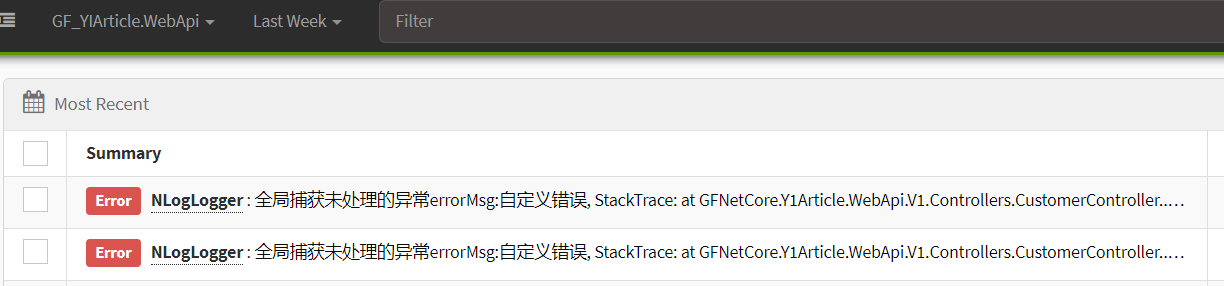
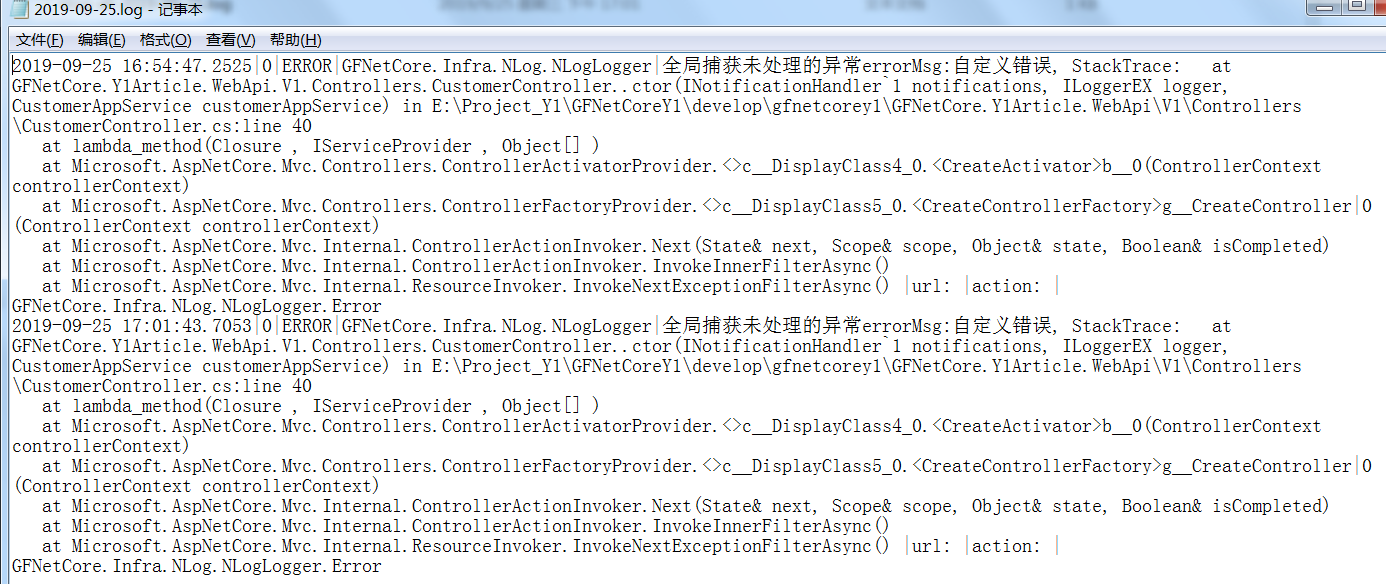
在一上篇中介绍了Exceptionless的基本使用,这篇主要讲Exceptionless结合Nlog的实现双重日志记录,包括Exceptionles的UI可视化日志以及Nlog的txt文件日志。再是从Apollo配置中心读取配置文件,当系统越庞大越多时,需要配置的参数也越来越多,可以通过使用Apollo配置中心来统一管理,例如:配置数据库连接地址、Exceptionless的对应项目的apikey值,redis连接地址等等所有可配置的参数。
1.1 asp.net core中Apollo配置
打开asp.net core 项目,删除appsettings.json文件默认内容,在添加配置如下所示:
{
  "apollo": {
    "AppId": "100001",
    "MetaServer": "http://192.168.0.100:8080/",
    "Env": "Dev",
    "Meta": {
      "DEV": "http://192.168.0.100:8080/",
      "FAT": "http://192.168.0.100:8080/",
      "UAT": "http://192.168.0.100:8080/",
      "PRO": "http://192.168.0.100:8080/"
    }
  }
}
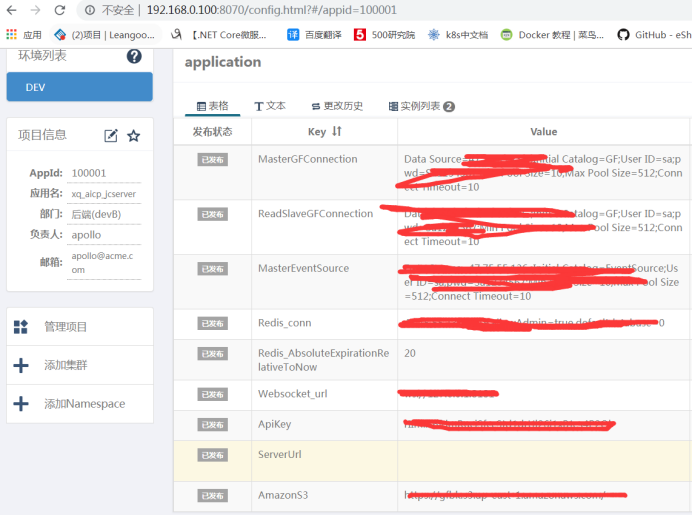
appsettings.json配置对应的Apollo客户端配置中心如下,这里端口8070是Apollo客户端配置界面。端口8080是.net core程序读取Apollo配置地址。Apollo配置中参数都是以key-value的形式存储。
下面是读取Apollo配置文件的关键代码:
安装包如下:
        Install-Package Microsoft.Extensions.Configuration -Version 2.2.0
        Install-Package Com.Ctrip.Framework.Apollo.Configuration -Version 2.0.3
      private static IConfigurationRoot _root = null;

        /// <summary>
        /// 获取Apollo的config
        /// </summary>
        /// <returns></returns>
        public static IConfigurationRoot GetRoot()
        {
            if (_root != null)
            {
                return _root;
            }

            //先获取appsettings.json的配置
            var config = new ConfigurationBuilder()
             .SetBasePath(Directory.GetCurrentDirectory())
             .AddJsonFile("appsettings.json")
             .Build();

            //连接Apollo
            string appId = config.GetSection("apollo").GetSection("AppId").Value;
            string metaServer = config.GetSection("apollo").GetSection("MetaServer").Value;
            var  configuration = new ConfigurationBuilder()
                .AddApollo(appId, metaServer)
                // .AddDefault(ConfigFileFormat.Xml)
                // .AddDefault(ConfigFileFormat.Json)
                // .AddDefault(ConfigFileFormat.Yml)
                // .AddDefault(ConfigFileFormat.Yaml)
                .AddDefault().AddNamespace("application")
                .Build();
            _root = configuration;
            return _root;
        }
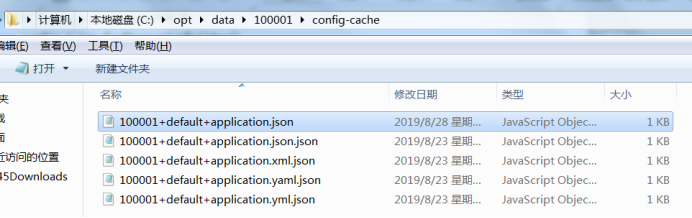
注意:如果变量configuration 中没有读取到Apollo参数值,可以从configuration 对象的参数中查找返回的异常信息。如果读取成功会缓存一份文件到本地,如下所示:
      //下面是从Apollo(AppId:100001)的配置中心获取Key为“ApiKey”的value值:
       string apiKey = GetRoot().GetSection("ApiKey").Value;
关于Apollo更多资料,包括Apollo服务端部署,参考官方文档:https://github.com/ctripcorp/apollo
1.2 Nlog结合Exceptionles
安装包如下:
     Install-Package Exceptionless.NLog
      Install-Package NLog.Web.AspNetCore
在Nlog的基础上,结合Exceptionles,关键代码如下
(也可尝试通过配置文件实现 https://github.com/exceptionless/Exceptionless.Net/tree/master/src/Platforms/Exceptionless.NLog):
     /// <summary>
        /// 返回Nlog.Logger
        /// </summary>
        /// <returns></returns>
        public Logger GetExceptionlessLogger()
        {
            var config = new LoggingConfiguration();
            var exceptionlessTarget = new ExceptionlessTarget();

            //读取Apploo的Exceptionless配置参数
            string apiKey = ConfigHelper.GetRoot().GetSection("ApiKey").Value;
            string serverUrl = ConfigHelper.GetRoot().GetSection("ServerUrl")?.Value;
            exceptionlessTarget.ApiKey = apiKey;
            exceptionlessTarget.ServerUrl = serverUrl;

            exceptionlessTarget.Layout = "${longdate} |  ${callsite} |  ${level}  | ${message}";
            exceptionlessTarget.Name = "exceptionless";
            //添加exceptionless的Target对象
            config.AddTarget("exceptionless", exceptionlessTarget);
            config.LoggingRules.Add(new LoggingRule("*", global::NLog.LogLevel.Error, exceptionlessTarget));
            LogManager.Configuration = config;
            return LogManager.GetCurrentClassLogger();
     }


        /// <summary>
        /// Nlog.Logger对象
        /// </summary>
        private Logger _logger
        {
            get
            {
                return  N.NLogBuilder.ConfigureNLog("Config\NLog.config").GetCurrentClassLogger();
            }
        }

        /// <summary>
        /// 带有Exceptionless的Nlog.Logger对象
        /// </summary>
        private Logger _exceptionlessLogger
        {
            get
            {
                ExceptionlessHelper helper = new ExceptionlessHelper();
                return helper.GetExceptionlessLogger();
            }
        }
     //记录错误日志
      public void Error<T>(IFormatProvider formatProvider, T value)
        {
            _logger.Error(formatProvider, value);
            _exceptionlessLogger.Error(formatProvider, value);
        }
二. Nlog结合Exceptionles代码优化
在1.2中介绍了二种日志的结合,下面把1.2的代码进行优化改造,主要包括:
(1) 去掉nlog的配置文件,使用编码来处理
(2) 记录日志时,只需要一个_logger.Error,就能同时记录到txt文件和exceptionless中。
        /// <summary>
        /// Nlog.Logger对象
        /// </summary>
        private Logger _logger
        {
            get
            {
                var config = new LoggingConfiguration();// N.NLogBuilder.ConfigureNLog("Config\NLog.config");
                //添加exceptionless日志文件
                var exceptionlessTarget = GetExceptionlessTarget();
                config.AddTarget("exceptionless", exceptionlessTarget);
                config.AddRule(LogLevel.Debug, LogLevel.Fatal, exceptionlessTarget);

                //添加txt日志文件
                var logfile = new FileTarget("logfile") { FileName =string.Format(@"c:	emp{0}.log",DateTime.Now.ToString("yyyy-MM-dd")) };
                logfile.Layout = "${longdate}|${event-properties:item=EventId_Id:whenEmpty=0}|${uppercase:${level}}|${logger}|${message} ${exception:format=tostring}|url: ${aspnet-request-url}|action: ${aspnet-mvc-action}|${callsite}";
                config.AddRule(LogLevel.Debug, LogLevel.Fatal, logfile);

                LogManager.Configuration = config;
                return LogManager.GetCurrentClassLogger();
            }
        }

        /// <summary>
        /// 返回Nlog Target
        /// </summary>
        /// <returns></returns>
        public static ExceptionlessTarget GetExceptionlessTarget()
        {
            var exceptionlessTarget = new ExceptionlessTarget();
            //读取Apploo配置的Exceptionless地址
            string apiKey = ConfigHelper.GetRoot().GetSection("ApiKey").Value;
            string serverUrl = ConfigHelper.GetRoot().GetSection("ServerUrl")?.Value;
            exceptionlessTarget.ApiKey = apiKey;
            exceptionlessTarget.ServerUrl = serverUrl;
            exceptionlessTarget.Layout = "${longdate} |  ${callsite} |  ${level}  | ${message}";
            exceptionlessTarget.Name = "exceptionless";
            return exceptionlessTarget;
        }

        //记录日志
        public void Error(string message, Exception exception)
        {
            _logger.Error(exception, message);
        }
效果如下所示: