UIView Subclass
UILabel, 继承于UIView, 标签视图, 用于显示文字
1.创建视图标签, 并设置位置大小
UILabel *label = [[UILabel alloc] initWithFrame:CGRectMake(20, 100, 375 - 40, 100)];
    //文本
    label.text = @"Hello world, fine thanks and you Hello world, fine thanks and you";
    //对齐方式, 左对齐
    label.textAlignment = NSTextAlignmentCenter;
    //文本颜色, 默认黑色
    label.textColor = [UIColor colorWithRed:0.400 green:0.400 blue:1.000 alpha:1.000];
字体(样式, 大小), 默认: 17号字, 系统样式
UIFont, 字体类, 继承于NSObject
使用系统字体
label.font = [UIFont systemFontOfSize:24];
自定义字体
UIFont *font2 = [UIFont fontWithName:@"Bangla Sangam MN" size:24];
显示所有字体样式的名称
NSLog(@"%@", [UIFont familyNames]);
行数, 默认是1, 0代表根据文字自动设置行数
label.numberOfLines = 0;
文字的阴影颜色
label.shadowColor = [UIColor grayColor];
文字的阴影偏移
label.shadowOffset = CGSizeMake(2, 1);
换行模式
label.lineBreakMode = NSLineBreakByWordWrapping;
2.设置属性
label.backgroundColor = [UIColor cyanColor];
3.添加到父视图
[self.window addSubview:label];
4.释放
[label release];
UITextField, 单行文本输入框, 继承于UIControl
cmd + k 模拟键盘显示
    UITextField *textField = [[UITextField alloc] initWithFrame:CGRectMake(20, 240, 375 - 40, 40)];
    textField.backgroundColor = [UIColor colorWithWhite:0.800 alpha:1.000];
属性
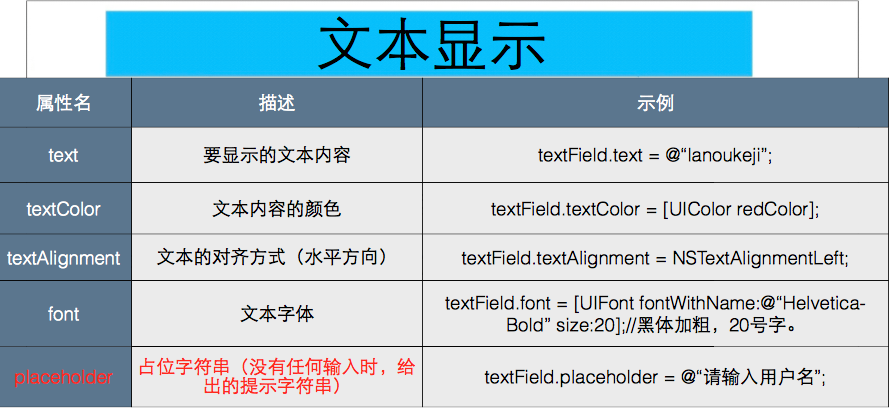
//    占位符
    textField.placeholder = @"请输入你的密码";
    //文本
    textField.text = @"";
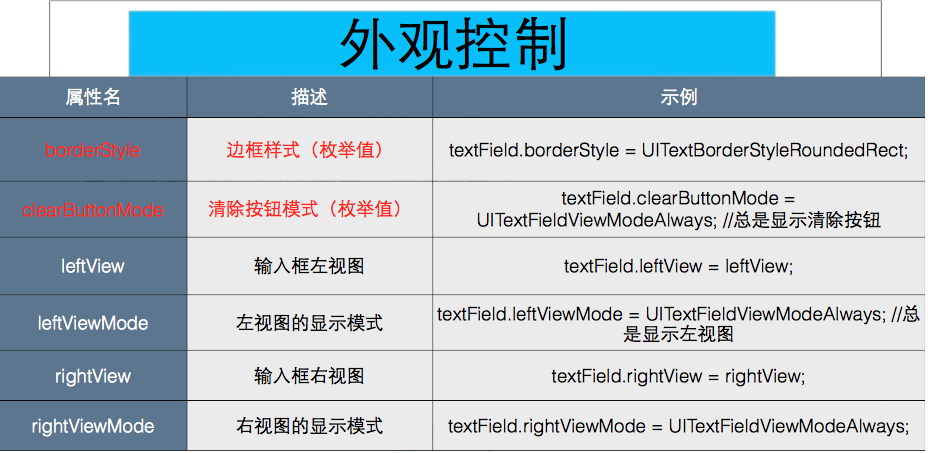
    //边框样式, 默认: none
    textField.borderStyle = UITextBorderStyleRoundedRect;
    //文字颜色
    textField.textColor = [UIColor magentaColor];
    //字体
    textField.font = [UIFont systemFontOfSize:26];
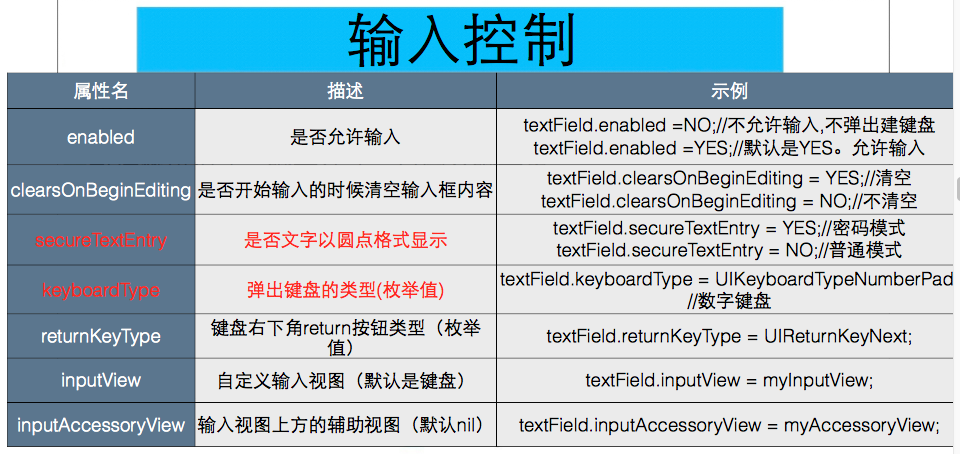
    //是否安全输入, 默认为: NO
    textField.secureTextEntry = NO;
清除按钮的显示模式
UITextFieldViewModeNever: 不显示
UITextFieldViewModeWhileEditing: 编辑时显示
UITextFieldViewModeWhileEditing: 不编辑时显示
UITextFieldViewModeAlways: 有内容时一直显示
textField.clearButtonMode = UITextFieldViewModeWhileEditing;
重新开始编辑时, 是否清除内容
textField.clearsOnBeginEditing = YES;
    //键盘返回键的样式
    textField.returnKeyType = UIReturnKeyDone;
    //让appdelegate成为textField的代理
    textField.delegate = self;
    //键盘样式
    textField.keyboardType = UIKeyboardTypeDefault;
    [self.window addSubview:textField];
    [textField release];
//UITextFieldDelegate, 类名+代理(系统的协议命名是固定的)
@interface AppDelegate : UIResponder <UIApplicationDelegate, UITextFieldDelegate>
UIButton, 按钮类, 继承于UIControl, 可以接收用户的点击, 并实现某些功能
    UIButton *button = [UIButton buttonWithType:UIButtonTypeCustom];
    button.frame = CGRectMake(100, 320, 375 - 200, 40);
    button.backgroundColor = [UIColor colorWithRed:0.400 green:1.000 blue:0.400 alpha:1.000];
button标题
    //正常状态
    [button setTitle:@"确认" forState:UIControlStateNormal];
    //高亮状态, 长按
    [button setTitle:@"登陆" forState:UIControlStateHighlighted];
    //不可用状态
    [button setTitle:@"无效" forState:UIControlStateDisabled];
    //选中状态
    [button setTitle:@"选中" forState:UIControlStateSelected];
    //是否可用, 默认YES
    button.enabled = YES;
    //是否选中
    button.selected = NO;
     //标题颜色
    [button setTitleColor:[UIColor colorWithRed:0.251 green:0.000 blue:0.502 alpha:1.000] forState:UIControlStateNormal];
    //标题文字大小, button是一个复合视图(由多个视图组成), 其中显示文字就是titleLable
    button.titleLabel.font = [UIFont systemFontOfSize:24];
设置button图片
UIImage, 图片类, 继承于NSObject
注: png可以省略后缀, 其他格式必须写后缀
[button setImage:[UIImage imageNamed:@"button"] forState:UIControlStateNormal];
设置背景图片
[button setBackgroundImage:[UIImage imageNamed:@"button"] forState:UIControlStateNormal];
点击button, 执行某个操作(方法)
参数1: 方法的执行者
参数2: 执行哪一个方法
参数3: 什么时候执行方法
- (void)pressButton {
    self.window.backgroundColor = [UIColor colorWithRed:arc4random() % 266 / 255.0 green:arc4random() % 266 / 255.0 blue:arc4random() % 266 / 255.0 alpha:arc4random() % 266 / 255.0];
}
   [button addTarget:self action:@selector(pressButton) forControlEvents:UIControlEventTouchUpInside];
    [self.window addSubview:button];
   label = [[UILabel alloc] initWithFrame:CGRectMake(20, 60, 335, 40)];
    label.backgroundColor = [UIColor whiteColor];
//    label.tag = 102;
    [self.window addSubview:label];
    [label release];

    textField = [[UITextField alloc] initWithFrame:CGRectMake(20, 120, 335, 40)];
    textField.backgroundColor = [UIColor whiteColor];
    textField.placeholder = @"请输入内容";
//    textField.tag = 101;
    [self.window addSubview:textField];
    [textField release];

    UIButton *button = [UIButton buttonWithType:UIButtonTypeCustom];
    button.frame = CGRectMake(120, 180, 120, 40);
    button.backgroundColor = [UIColor blueColor];
    [button setTitle:@"OK" forState:UIControlStateNormal];
    [button addTarget:self action:@selector(submit) forControlEvents:UIControlEventTouchUpInside];
    [self.window addSubview:button];
- (void)submit {
    NSLog(@"hi");
    //1, UIView tag
    //父视图通过tag值, 找到某个子视图,强制性转换
      UITextField *textField = (UITextField *)[self.window viewWithTag:101];
      NSLog(@"%@", textField.text);
      UILabel *label = (UILabel *)[self.window viewWithTag:102];
      label.text = textField.text;

    //2. 扩大变量的作用域, 写成实例变量
    label.text = textField.text;

}
//实例变量
@interface AppDelegate () {
    UITextField *textField;
    UILabel *label;
}
#pragma mark - UITextFieldDelegate
- (BOOL)textFieldShouldReturn:(UITextField *)textField {
    NSLog(@"点击了return按钮");
    //让textField的键盘收回, 结束编辑
    [textField resignFirstResponder];
    return YES;
}

//textField是否允许编辑
- (BOOL)textFieldShouldBeginEditing:(UITextField *)textField {
    return YES;
}

- (void)textFieldDidBeginEditing:(UITextField *)textField {
    NSLog(@"已经开始编辑");
}
//textField是否允许结束编辑
- (BOOL)textFieldShouldEndEditing:(UITextField *)textField {
    return YES;
}

- (void)textFieldDidEndEditing:(UITextField *)textField {
    NSLog(@"已经结束编辑");
}

//是否允许对当前的字符串进行修改
- (BOOL)textField:(UITextField *)textField shouldChangeCharactersInRange:(NSRange)range replacementString:(NSString *)string {
    NSLog(@"location: %lu length: %lu  %@", range.location, range.length, string);
    if ([string isEqualToString:@"a"]) {
        return NO;
    }
    return YES;
}
//控制清除按钮是否有效
- (BOOL)textFieldShouldClear:(UITextField *)textField {
    return NO;
}
点击键盘return按钮实现键盘回收的步骤:
1、将AppDelete作为UITextField的delegate
2、AppDelete.h文件接受UITextFieldDelegate协议
3、AppDelete.m文件实现textFieldShouldReturn:⽅方法
•UITextField不应该在类内部(.m⽂文件)实现textFieldShouldReturn:, 因为有时候,我们点return的时候,并不总是想回收键盘,例如:有两个输入框,第一个输入框输入完成之后,用户点return按钮,将光标移动到第二个输入框(即:第二个输入框称为第一响应者)
•对于一个V来说,自己只负责触发事件,事件由外界实现,即 delegate。
UIApplicationMain
1UIApplicationMain在程序入口函数main函数中调用,主要实现了3个
功能: 创建应用程序(UIApplication)实例 创建应用程序代理实例
建立事件循环(runloop:死循环,不断检测程序运行状态,是否被触摸 晃动等)
在AppDelete.m各个代理方法里打印log,查看各个代理方法的执行方法和执行顺序。
NSLog(@"%s %d",__FUNCTION__,__LINE__);
UITextField
 UIButton


