第一步:准备
1. 操作系统
CentOS-7-x86_64-Everything-1511
2. 安装包
kafka_2.12-0.10.2.0.tgz
zookeeper-3.4.9.tar.gz
3. Java 环境
Zookeeper 和 Kafka 的运行都需要 Java 环境,Kafka 默认使用 G1 垃圾回收器。如果不更改垃圾回收期,官方推荐使用 7u51 以上版本的 JRE 。如果使用老版本的 JRE,需要更改 Kafka 的启动脚本,指定 G1 以外的垃圾回收器。
本文使用系统自带的 Java 环境。

第二步:Zookeeper 集群搭建
1. 简介
Kafka 依赖 Zookeeper 管理自身集群(Broker、Offset、Producer、Consumer等),所以先要安装 Zookeeper。
为了达到高可用的目的,Zookeeper 自身也不能是单点,接下来就介绍如何搭建一个最小的 Zookeeper 集群(3个 zk 节点)。
2. 安装
# tar zxvf zookeeper-3.4.9.tar.gz
# mv zookeeper-3.4.9 zookeeper
3. 配置
1)配置文件位置
路径:zookeeper/conf
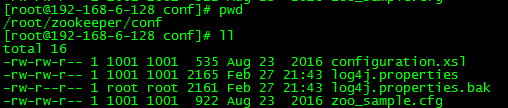
2)生成配置文件
将 zoo_sample.cfg 复制一份,命名为 zoo.cfg,此即为Zookeeper的配置文件。
# cd zookeeper
# cd conf
# cp zoo_sample.cfg zoo.cfg
3)编辑配置文件
默认配置:

配置完成:
# The number of milliseconds of each tick
tickTime=2000
# The number of ticks that the initial
# synchronization phase can take
initLimit=10
# The number of ticks that can pass between
# sending a request and getting an acknowledgement
syncLimit=5
# the directory where the snapshot is stored.
# do not use /tmp for storage, /tmp here is just
# example sakes.
dataDir=/root/zookeeper/data
dataLogDir=/root/zookeeper/logs
# the port at which the clients will connect
clientPort=2181
# the maximum number of client connections.
# increase this if you need to handle more clients
#maxClientCnxns=60
#
# Be sure to read the maintenance section of the
# administrator guide before turning on autopurge.
#
# http://zookeeper.apache.org/doc/current/zookeeperAdmin.html#sc_maintenance
#
# The number of snapshots to retain in dataDir
#autopurge.snapRetainCount=3
# Purge task interval in hours
# Set to "0" to disable auto purge feature
#autopurge.purgeInterval=1
server.0=192.168.6.128:4001:4002
server.1=192.168.6.129:4001:4002
server.2=192.168.6.130:4001:4002
说明:
- dataDir 和 dataLogDir 需要在启动前创建完成
- clientPort 为 zookeeper的服务端口
- server.0、server.1、server.2 为 zk 集群中三个 node 的信息,定义格式为 hostname:port1:port2,其中 port1 是 node 间通信使用的端口,port2 是node 选举使用的端口,需确保三台主机的这两个端口都是互通的。
4. 更改日志配置
Zookeeper 默认会将控制台信息输出到启动路径下的 zookeeper.out 中,通过如下方法,可以让 Zookeeper 输出按尺寸切分的日志文件:
1)修改conf/log4j.properties文件,将
zookeeper.root.logger=INFO, CONSOLE
改为
zookeeper.root.logger=INFO, ROLLINGFILE
2)修改bin/zkEnv.sh文件,将
ZOO_LOG4J_PROP="INFO,CONSOLE"
改为
ZOO_LOG4J_PROP="INFO,ROLLINGFILE"
5. 按照上述操作,在另外两台主机上安装并配置 zookeeper
6. 创建 myid 文件
分别在三台主机的 dataDir 路径下创建一个文件名为 myid 的文件,文件内容为该 zk 节点的编号。
例如,在第一台主机上建立的 myid 文件内容是 0,第二台是 1。
7. 启动
启动三台主机上的 zookeeper 服务
# cd bin
# ./zkServer.sh start
返回信息:

8. 查看集群状态
3个节点启动完成后,可依次执行如下命令查看集群状态:
./zkServer.sh status
192.168.6.128 返回:

192.168.6.129 返回:

192.168.6.130 返回:

如上所示,3个节点中,有1个 leader 和两个 follower。
9. 测试集群高可用性
1)停掉集群中的为 leader 的 zookeeper 服务,本文中的leader为 server2。
# ./zkServer.sh stop
返回信息:

2)查看集群中 server0 和 server1 的的状态
server0:

server1:

此时,server1 成为了集群中的 leader,server0依然为 follower。
3)启动 server2 的 zookeeper 服务,并查看状态
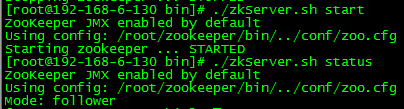
此时,server2 成为了集群中的 follower。
此时,Zookeeper 集群的安装及高可用性验证已完成!
第三步:Kafka 集群搭建
1. 简介
本文会安装配置一个具有两个 Broker 组成的 Kafka 集群,并在其上创建一个具有两个分区的Topic。
2. 安装
# tar zxvf kafka_2.12-0.10.2.0.tgz
# mv kafka_2.12-0.10.2.0 kafka
3. 配置
1)配置文件位置
路径:kafka/config/server.properties

2)默认配置
# Licensed to the Apache Software Foundation (ASF) under one or more
# contributor license agreements.  See the NOTICE file distributed with
# this work for additional information regarding copyright ownership.
# The ASF licenses this file to You under the Apache License, Version 2.0
# (the "License"); you may not use this file except in compliance with
# the License.  You may obtain a copy of the License at
#
#    http://www.apache.org/licenses/LICENSE-2.0
#
# Unless required by applicable law or agreed to in writing, software
# distributed under the License is distributed on an "AS IS" BASIS,
# WITHOUT WARRANTIES OR CONDITIONS OF ANY KIND, either express or implied.
# See the License for the specific language governing permissions and
# limitations under the License.

# see kafka.server.KafkaConfig for additional details and defaults

############################# Server Basics #############################

# The id of the broker. This must be set to a unique integer for each broker.
broker.id=0

# Switch to enable topic deletion or not, default value is false
#delete.topic.enable=true

############################# Socket Server Settings #############################

# The address the socket server listens on. It will get the value returned from
# java.net.InetAddress.getCanonicalHostName() if not configured.
#   FORMAT:
#     listeners = listener_name://host_name:port
#   EXAMPLE:
#     listeners = PLAINTEXT://your.host.name:9092
#listeners=PLAINTEXT://:9092

# Hostname and port the broker will advertise to producers and consumers. If not set,
# it uses the value for "listeners" if configured.  Otherwise, it will use the value
# returned from java.net.InetAddress.getCanonicalHostName().
#advertised.listeners=PLAINTEXT://your.host.name:9092

# Maps listener names to security protocols, the default is for them to be the same. See the config documentation for more details
#listener.security.protocol.map=PLAINTEXT:PLAINTEXT,SSL:SSL,SASL_PLAINTEXT:SASL_PLAINTEXT,SASL_SSL:SASL_SSL

# The number of threads handling network requests
num.network.threads=3

# The number of threads doing disk I/O
num.io.threads=8

# The send buffer (SO_SNDBUF) used by the socket server
socket.send.buffer.bytes=102400

# The receive buffer (SO_RCVBUF) used by the socket server
socket.receive.buffer.bytes=102400

# The maximum size of a request that the socket server will accept (protection against OOM)
socket.request.max.bytes=104857600


############################# Log Basics #############################

# A comma seperated list of directories under which to store log files
log.dirs=/tmp/kafka-logs

# The default number of log partitions per topic. More partitions allow greater
# parallelism for consumption, but this will also result in more files across
# the brokers.
num.partitions=1

# The number of threads per data directory to be used for log recovery at startup and flushing at shutdown.
# This value is recommended to be increased for installations with data dirs located in RAID array.
num.recovery.threads.per.data.dir=1

############################# Log Flush Policy #############################

# Messages are immediately written to the filesystem but by default we only fsync() to sync
# the OS cache lazily. The following configurations control the flush of data to disk.
# There are a few important trade-offs here:
#    1. Durability: Unflushed data may be lost if you are not using replication.
#    2. Latency: Very large flush intervals may lead to latency spikes when the flush does occur as there will be a lot of data to flush.
#    3. Throughput: The flush is generally the most expensive operation, and a small flush interval may lead to exceessive seeks.
# The settings below allow one to configure the flush policy to flush data after a period of time or
# every N messages (or both). This can be done globally and overridden on a per-topic basis.

# The number of messages to accept before forcing a flush of data to disk
#log.flush.interval.messages=10000

# The maximum amount of time a message can sit in a log before we force a flush
#log.flush.interval.ms=1000

############################# Log Retention Policy #############################

# The following configurations control the disposal of log segments. The policy can
# be set to delete segments after a period of time, or after a given size has accumulated.
# A segment will be deleted whenever *either* of these criteria are met. Deletion always happens
# from the end of the log.

# The minimum age of a log file to be eligible for deletion due to age
log.retention.hours=168

# A size-based retention policy for logs. Segments are pruned from the log as long as the remaining
# segments don't drop below log.retention.bytes. Functions independently of log.retention.hours.
#log.retention.bytes=1073741824

# The maximum size of a log segment file. When this size is reached a new log segment will be created.
log.segment.bytes=1073741824

# The interval at which log segments are checked to see if they can be deleted according
# to the retention policies
log.retention.check.interval.ms=300000

############################# Zookeeper #############################

# Zookeeper connection string (see zookeeper docs for details).
# This is a comma separated host:port pairs, each corresponding to a zk
# server. e.g. "127.0.0.1:3000,127.0.0.1:3001,127.0.0.1:3002".
# You can also append an optional chroot string to the urls to specify the
# root directory for all kafka znodes.
zookeeper.connect=localhost:2181

# Timeout in ms for connecting to zookeeper
zookeeper.connection.timeout.ms=6000
3)更改配置
############################# Server Basics #############################

# The id of the broker. This must be set to a unique integer for each broker.
broker.id=0

# Switch to enable topic deletion or not, default value is false
#delete.topic.enable=true

############################# Socket Server Settings #############################

# The address the socket server listens on. It will get the value returned from
# java.net.InetAddress.getCanonicalHostName() if not configured.
#   FORMAT:
#     listeners = listener_name://host_name:port
#   EXAMPLE:
#     listeners = PLAINTEXT://your.host.name:9092
listeners=PLAINTEXT://:9092
port=9092
host.name=192.168.6.128
advertised.host.name=192.168.6.128
advertised.port=9092

# Hostname and port the broker will advertise to producers and consumers. If not set,
# it uses the value for "listeners" if configured.  Otherwise, it will use the value
# returned from java.net.InetAddress.getCanonicalHostName().
#advertised.listeners=PLAINTEXT://your.host.name:9092

# Maps listener names to security protocols, the default is for them to be the same. See the config docume
ntation for more details
#listener.security.protocol.map=PLAINTEXT:PLAINTEXT,SSL:SSL,SASL_PLAINTEXT:SASL_PLAINTEXT,SASL_SSL:SASL_SS
L

# The number of threads handling network requests
num.network.threads=3

# The number of threads doing disk I/O
num.io.threads=8

# The send buffer (SO_SNDBUF) used by the socket server
socket.send.buffer.bytes=102400

# The receive buffer (SO_RCVBUF) used by the socket server
socket.receive.buffer.bytes=102400

# The maximum size of a request that the socket server will accept (protection against OOM)
socket.request.max.bytes=104857600


############################# Log Basics #############################

# A comma seperated list of directories under which to store log files
log.dirs=/root/kafka/logs

# The default number of log partitions per topic. More partitions allow greater
# parallelism for consumption, but this will also result in more files across
# the brokers.
num.partitions=1

# The number of threads per data directory to be used for log recovery at startup and flushing at shutdown
.
# This value is recommended to be increased for installations with data dirs located in RAID array.
num.recovery.threads.per.data.dir=1

############################# Log Flush Policy #############################

# Messages are immediately written to the filesystem but by default we only fsync() to sync
# the OS cache lazily. The following configurations control the flush of data to disk.
# There are a few important trade-offs here:
#    1. Durability: Unflushed data may be lost if you are not using replication.
#    2. Latency: Very large flush intervals may lead to latency spikes when the flush does occur as there
will be a lot of data to flush.
#    3. Throughput: The flush is generally the most expensive operation, and a small flush interval may le
ad to exceessive seeks.
# The settings below allow one to configure the flush policy to flush data after a period of time or
# every N messages (or both). This can be done globally and overridden on a per-topic basis.

# The number of messages to accept before forcing a flush of data to disk
#log.flush.interval.messages=10000

# The maximum amount of time a message can sit in a log before we force a flush
#log.flush.interval.ms=1000

############################# Log Retention Policy #############################

# The following configurations control the disposal of log segments. The policy can
# be set to delete segments after a period of time, or after a given size has accumulated.
# A segment will be deleted whenever *either* of these criteria are met. Deletion always happens
# from the end of the log.

# The minimum age of a log file to be eligible for deletion due to age
log.retention.hours=168

# A size-based retention policy for logs. Segments are pruned from the log as long as the remaining
# segments don't drop below log.retention.bytes. Functions independently of log.retention.hours.
#log.retention.bytes=1073741824

# The maximum size of a log segment file. When this size is reached a new log segment will be created.
log.segment.bytes=1073741824

# The interval at which log segments are checked to see if they can be deleted according
# to the retention policies
log.retention.check.interval.ms=300000

############################# Zookeeper #############################

# Zookeeper connection string (see zookeeper docs for details).
# This is a comma separated host:port pairs, each corresponding to a zk
# server. e.g. "127.0.0.1:3000,127.0.0.1:3001,127.0.0.1:3002".
# You can also append an optional chroot string to the urls to specify the
# root directory for all kafka znodes.
zookeeper.connect=192.168.6.128:2181,192.168.6.129:2181,192.168.6.130:2181

# Timeout in ms for connecting to zookeeper
zookeeper.connection.timeout.ms=6000
配置的详细说明请参考官方文档:http://kafka.apache.org/documentation.html#brokerconfigs
注意:按照官方文档的说法,advertised.host.name 和 advertised.port 这两个参数用于定义集群向 Producer 和 Consumer 广播的节点 host 和 port,如果不定义,会默认使用 host.name 和 port 的定义。但在实际应用中,发现如果不定义 advertised.host.name 参数,使用 Java 客户端从远端连接集群时,会发生连接超时,抛出异常:org.apache.kafka.common.errors.TimeoutException: Batch Expired
经过过 debug 发现,连接到集群是成功的,但连接到集群后更新回来的集群 meta 信息却是错误的。metadata 中的 Cluster 信息中节点的 hostname 是一串字符,而不是实际的ip地址。这串其实是远端主机的 hostname,这说明在没有配置 advertised.host.name 的情况下,Kafka 并没有像官方文档宣称的那样改为广播我们配置的 host.name,而是广播了主机配置的 hostname 。远端的客户端并没有配置 hosts,所以自然是连接不上这个 hostname 的。要解决这一问题,把 host.name 和 advertised.host.name 都配置成绝对的 ip 地址就可以了。
4. 在另一台主机上安装 kafka,并做配置
5. 在两台主机上分别启动 Kafka 服务
# bin/kafka-server-start.sh -daemon config/server.properties
官方给出的启动方法是:bin/kafka-server-start.sh config/server.properties &
6. 创建分区和 topic
1)创建一个名为 ruready,拥有两个分区,两个副本的Topic
# bin/kafka-topics.sh --create --zookeeper 192.168.6.128:2181,192.168.6.129:2181,192.168.6.130:2181 --replication-factor 2 --partitions 2 --topic ruready
返回信息:

2)查看 Topic 状态
# bin/kafka-topics.sh --describe --zookeeper 192.168.6.128:2181,192.168.6.129:2181,192.168.6.130:2181 --topic ruready
返回信息:
