引言
点亮LED实际上是为了学习如何配置IO口使其输出高低电平。这一节的内容相当于学习C/C++时的hello world!。
准备环节
在keil5工程根目录新建文件夹HARDWARE。在新建的文件夹中新建文件 led.h 和 led.c 。
同时需要将上述文件以及相应的FWLib下的文件加入工程,这里不再赘述。
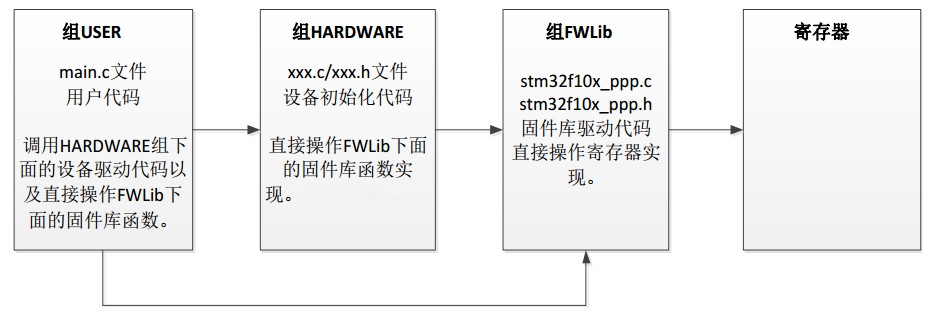
根目录下各文件的调用关系如下:
# 编码
步骤:
- 使能所在总线的时钟
- 配置IO口信息
- 初始化IO口
- main函数内调用
led.h
#ifndef __LED_H
#define __LED_H
#include "sys.h"

#define LED0 PEout(5)// PE5
#define LED1 PEout(6)// PE6	这两行均为位带操作,这里不再展开

void LED_Init(void);	//声明LED的初始化操作

#endif
led.c
#include "led.h"

void LED_Init(void)
{

	GPIO_InitTypeDef  GPIO_InitStructure;	//定义IO口配置信息的结构体

	RCC_APB2PeriphClockCmd(RCC_APB2Periph_GPIOE, ENABLE);	//初始化所在总线的时钟
    //以下三行为IO口配置信息
	GPIO_InitStructure.GPIO_Pin = GPIO_Pin_5|GPIO_Pin_6;	//IO口位置信息
	GPIO_InitStructure.GPIO_Mode = GPIO_Mode_Out_PP;		//IO口输出模式	输出模式详见最后补充
	GPIO_InitStructure.GPIO_Speed = GPIO_Speed_50MHz;		//IO口输出速度

    GPIO_Init(GPIOE, &GPIO_InitStructure);	//利用上述信息初始化IO口

	GPIO_SetBits(GPIOE, GPIO_Pin_5);
	GPIO_SetBits(GPIOE, GPIO_Pin_6);		//点亮相应IO口的LED
//    GPIO_ResetBits(GPIOB, GPIO_Pin_5);	该函数可以熄灭相应IO口的LED

}
main.c
#include "led.h"
#include "delay.h"	//提供了相关的延时函数

int main(void){
	delay_init();	//延时函数初始化
	LED_Init();		//led.c内编写的该函数

	while(1){		//while内的函数实现了每隔300ms改变一次两LED的亮灭状态
		LED0 = 1;
		LED1 = 1;
		delay_ms(300);
		LED0 = 0;
		LED1 = 0;
		delay_ms(300);
	}
}
补充
GPIO口的八种输入输出模式见如下链接:(color{#0000FF}{https://www.cnblogs.com/Rane/p/11829471.html})