线上页面代码模板
<!DOCTYPE html>
<html lang="en">
<head>
    <meta charset="UTF-8"/>
    <meta name="viewport" content="width=device-width, initial-scale=1.0"/>
    <title>公众号兑换卡密</title>
    <style>
        body, div, p, ul, li, a {
            margin: 0;
            padding: 0;
            list-style: none;
            text-decoration: none;
        }

        .wrap {
             750px;
            height: 100%;
            margin: 0 auto;
        }

        nav {
            font-weight: 700;
            padding: 20px 10px;
            box-sizing: border-box;
            background: #f9f9f9;
        }

        .nav-title {
            margin: 0 0 20px;
        }

        .nav-content, .nav-end, .card-time {
            font-size: 15px;
            line-height: 30px;
        }

        .nav-tel {
            color: #ff143f;
        }

        .list {
             750px;
            margin: 20px 0;
        }

        .list ul {
             100%;
            height: 36px;
            font-size: 13px;
            display: flex;
            align-items: center;
            /* justify-content: space-around; */
            background: #e4e4e4;
            border-radius: 8px 8px 0 0;
        }

        .list .list-ul {
            background: #fff;
            border-radius: 0;
            height: 52px;
            line-height: 52px;
            background: #f9f9f9;
        }

        .list .list-ul li {
            font-size: 12px;
        }

        /*产品名称*/
        .goodsName {
            text-align: center;
             150px;
            padding-left: 6px;
        }
        .goodsName-li{
             150px;
            text-align: center;
        }
        .orderNo  {
            text-align: center;
             175px;
        }
        .orderNo-li  {
            text-align: center;
             175px;
        }
        .facePrice  {
            text-align: right;
             75px;
        }
        .facePrice-li{
             75px;
            text-align: center;
        }
        .cardNo  {
            text-align: center;
             150px;
        }
        .cardNo-li  {
            text-align: center;
            150px;
        }

        .cardPwd  {
            text-align: center;
             75px;
        }
        .cardPwd-li  {
            text-align: center;
             75px;
        }
        .cardDate{
            text-align:center;  125px;
        }
    </style>
</head>
<body>
<div class="wrap">
    <!-- 上部分导航 -->
    <nav>
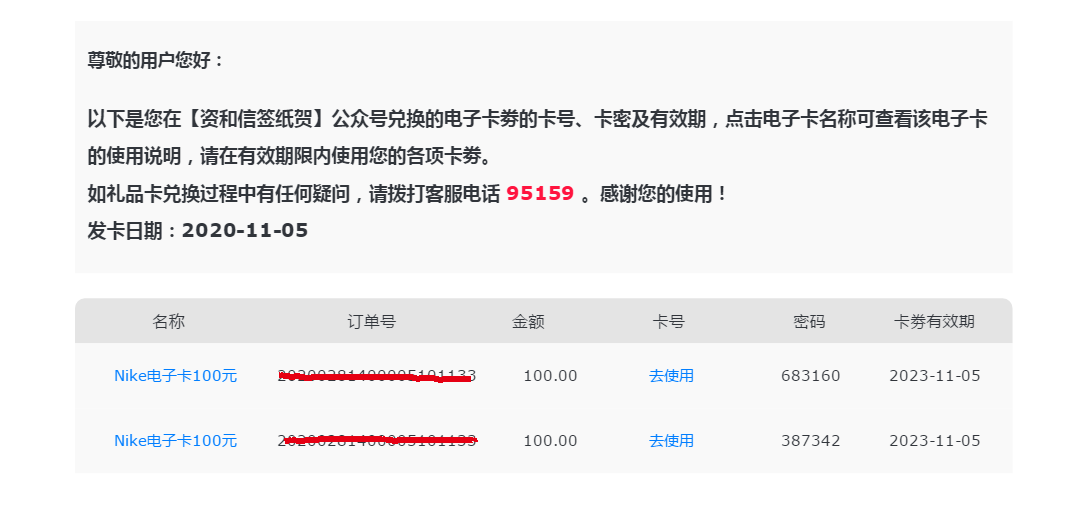
        <p class="nav-title">尊敬的用户您好:</p>
        <p class="nav-content">以下是您在【资和信签纸贺】公众号兑换的电子卡劵的卡号、卡密及有效期,点击电子卡名称可查看该电子卡
            的使用说明,请在有效期限内使用您的各项卡劵。
        </p>
        <p class="nav-end">如礼品卡兑换过程中有任何疑问,请拨打客服电话 <span class="nav-tel">95159</span> 。感谢您的使用!</p>
        <p class="card-time">发卡日期:<span id="time"></span></p>
    </nav>
    <!-- 下部分列表数据 -->
    <div class="list" id="table-head">
        <ul>
            <li class="goodsName-li">名称</li>
            <li class="orderNo-li">订单号</li>
            <li class="facePrice-li">金额</li>
            <li class="cardNo-li">卡号</li>
            <li class="cardPwd-li">密码</li>
            <li class="cardDate">卡劵有效期</li>
        </ul>
    </div>
</div>
</body>
</html>
--后期所以css样式基于模板进行修改就非常简单,不用修改java程序代码
import cn.hutool.extra.mail.MailUtil;
import org.dom4j.*;
import org.dom4j.io.SAXReader;
import org.dom4j.io.XMLWriter;
import org.slf4j.Logger;
import org.slf4j.LoggerFactory;
import org.springframework.beans.factory.annotation.Autowired;
import org.springframework.core.io.Resource;
import org.springframework.core.io.ResourceLoader;
import org.springframework.stereotype.Service;

import java.io.FileReader;
import java.io.FileWriter;
import java.io.IOException;
import java.text.SimpleDateFormat;
import java.util.*;

/**
 * @Author: SimonHu
 * @Date: 2020/11/5 8:59
 * @Description:
 */
@Service
public class SendHTMLMail {
    private static final Logger log = LoggerFactory.getLogger(SendHTMLMail.class);
    @Autowired
    private ResourceLoader resourceLoader;

    public static void main(String[] args) {
        List<Map> list = new ArrayList<Map>();
        Map map = new HashMap();
        map.put("cardNo", "11111");
        map.put("cardPwd", "11111");
        Map map2 = new HashMap();
        map2.put("cardNo", "http://www.baidu.com");
        map2.put("cardPwd", "11111");
        list.add(map);
        list.add(map2);
        SendHTMLMail sendHTMLMail = new SendHTMLMail();
        sendHTMLMail.sendSimpleMail("8771014@qq.com", "10001", list);
    }

    /**
     * @param sendMail
     * @param orderNo
     * @param sendJson
     * @return void
     * @Description:发送邮件
     * @Author:SimonHu
     * @Date: 2020/11/5 10:25
     */
    public void sendSimpleMail(String sendMail, String orderNo, List<Map> sendJson) {
        SAXReader reader = new SAXReader();
        Document document = null;
        FileWriter fwriter = null;
        XMLWriter writer = null;
        FileReader in = null;
        try {
            //获取模板html文档
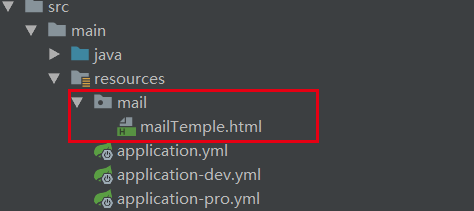
            Resource resource = resourceLoader.getResource("classpath:mail/mailTemple.html");
            document = reader.read(resource.getInputStream());
            Element root = document.getRootElement();
            //获取id为time的节点。
            Element time = getNodes(root, "id", "time");
            Element tableHead = getNodes(root, "id", "table-head");
            //设置发卡日期
            time.setText(new SimpleDateFormat("yyyy-MM-dd").format(new Date()));
            Element tabElement = this.tableDocument(orderNo, sendJson);
            if (tabElement != null) {
                tableHead.appendContent(tabElement);
            }
            //保存到临时文件
            fwriter = new FileWriter("classpath:temp.html");
            writer = new XMLWriter(fwriter);
            writer.write(document);
            writer.flush();
            //读取临时文件,并把html数据写入到字符串str中,通过邮箱工具发送
            in = new FileReader("classpath:temp.html");
            char[] buff = new char[1024 * 10];
            in.read(buff);
            String str = new String(buff);
            log.info("================开始发送邮件======================");
            MailUtil.send(sendMail, "【签纸贺】公众号兑换卡密", str.toString(), true);
            log.info("================邮件发送完成======================");
        } catch (Exception e) {
            log.error("------sendSimpleMail-----", e);
        } finally {
			//关闭流
            if (null != in) {
                try {
                    in.close();
                } catch (IOException e) {
                    e.printStackTrace();
                }
            }
            if (null != writer) {
                try {
                    writer.close();
                } catch (IOException e) {
                    e.printStackTrace();
                }
            }
            if (null != fwriter) {
                try {
                    fwriter.close();
                } catch (IOException e) {
                    e.printStackTrace();
                }
            }
        }
    }

    /**
     * @param orderNo
     * @param sendJson
     * @return java.lang.String
     * @Description:获取table数据
     * @Author:SimonHu
     * @Date: 2020/11/5 9:32
     */
    public Element tableDocument(String orderNo, List<Map> sendJson) {
        StringBuffer eamilContext = new StringBuffer();
        if (sendJson != null && !sendJson.isEmpty()) {
            for (Map map : sendJson) {
                eamilContext.append("<ul class="list-ul"><li class="goodsName" ><a href="https://xxx/xxx/order/xxx?xxx=")
                        .append(map.get("goodsId")).append("" style="color:#007eff;">")
                        .append(map.get("goodsName"))
                        .append("</a></li><li class="orderNo" >").append(orderNo)
                        .append("</li><li class="facePrice">")
                        .append(map.get("facePrice"));
                if (String.valueOf(map.get("cardNo")).indexOf("http") == -1) {
                    eamilContext.append("</li><li class="cardNo" >").append(map.get("cardNo"));
                } else {
                    eamilContext.append("</li><li class="cardNo"><a href="").append(map.get("cardNo")).append("" style="color:#007eff;">去使用</a>");
                }
                eamilContext.append("</li><li class="cardPwd">")
                        .append(map.get("cardPwd"))
                        .append("</li><li class="cardDate">").append(map.get("expireTime")).append("</li></ul>");
            }
        }
        String htmlStr = "<div>" + eamilContext.toString() + "</div>";
        try {
            Document document = DocumentHelper.parseText(htmlStr);
            return document.getRootElement();
        } catch (DocumentException e) {
            log.error(e.getMessage());
        }
        return null;
    }

    /**
     * 方法描述:递归遍历子节点,根据属性名和属性值,找到对应属性名和属性值的那个子孙节点。
     *
     * @param node      要进行子节点遍历的节点
     * @param attrName  属性名
     * @param attrValue 属性值
     * @return 返回对应的节点或null
     */
    public Element getNodes(Element node, String attrName, String attrValue) {
        // 当前节点的所有属性
        final List<Attribute> listAttr = node.attributes();
        // 遍历当前节点的所有属性
        for (final Attribute attr : listAttr) {
            // 属性名称
            final String name = attr.getName();
            // 属性的值
            final String value = attr.getValue();
//            System.out.println("属性名称:" + name + "---->属性值:" + value);
            if (attrName.equals(name) && attrValue.equals(value)) {
                return node;
            }
        }
        // 递归遍历当前节点所有的子节点
        // 所有一级子节点的list
        final List<Element> listElement = node.elements();
        //遍历所有一级子节点
        for (Element e : listElement) {
            Element temp = getNodes(e, attrName, attrValue);
            // 递归
            if (temp != null) {
                return temp;
            }
            ;
        }
        return null;
    }
}