GPU驱动:R390
cuda:9.1
gcc:5.4.0
anaconda:2
GPU运算能力:2.1
CPU:8G
系统:ubuntu 16.04 x86_64
安装一般依赖项:
sudo apt-get install libprotobuf-dev libleveldb-dev libsnappy-dev libopencv-dev libhdf5-serial-dev protobuf-compiler
sudo apt-get install --no-install-recommends libboost-all-dev
还有官网提到的:
以及anaconda,这些没什么特别注意的,我选择的是anaconda2,因为我要用segnet,不过我也配了3,版本可以说是文件夹,库都在那放着,你要谁,你就在caffe的config中指定谁,他就会去找,所以理论上来讲,你无比自由想用谁用谁,你可以一个项目配一个caffe。我就是这么干的。甚至不同的数据库还称一个caffe。一个不爽想从gpu换cpu那就直接make clean,然后你的caffe大楼就会井然有序的拆除。暂时还没出现什么问题。等我看看caffe 官方doc
安装驱动
1.很重要的是:如果你用ubuntu那你的显卡驱动以及cuda都必须!用apt安装!,要不cuda可能会崩溃,原文:
‘for CUDA version. Note, the cuda version may break if your NVIDIA driver and CUDA toolkit are not installed by APT.’
所以推荐:http://www.cnblogs.com/xujianqing/p/6142963.html这篇文中的显卡驱动安装方式,但是!!!版本号要从375换到390,因为cuda9要求驱动390
安装cuda
官网要求的gcc版本是5.3.1,然而自带的是5.4,不过我依旧安装成功了。如果有问题再看吧。而且在http://caffe.berkeleyvision.org/install_apt.html caffe官网的ubuntu安装页,写了16.04要用版本8的cuda,然而网上有不少9的教程,于是我来试试小白鼠好了。而且我的gpu运算能力只有2.1。可以看出我这是在作死的边缘试探。

那么试探结果就是走不通:
http://www.cnblogs.com/SweetBeens/p/8603306.html
虽然有的人安装成功,但是我没这个缘分。。
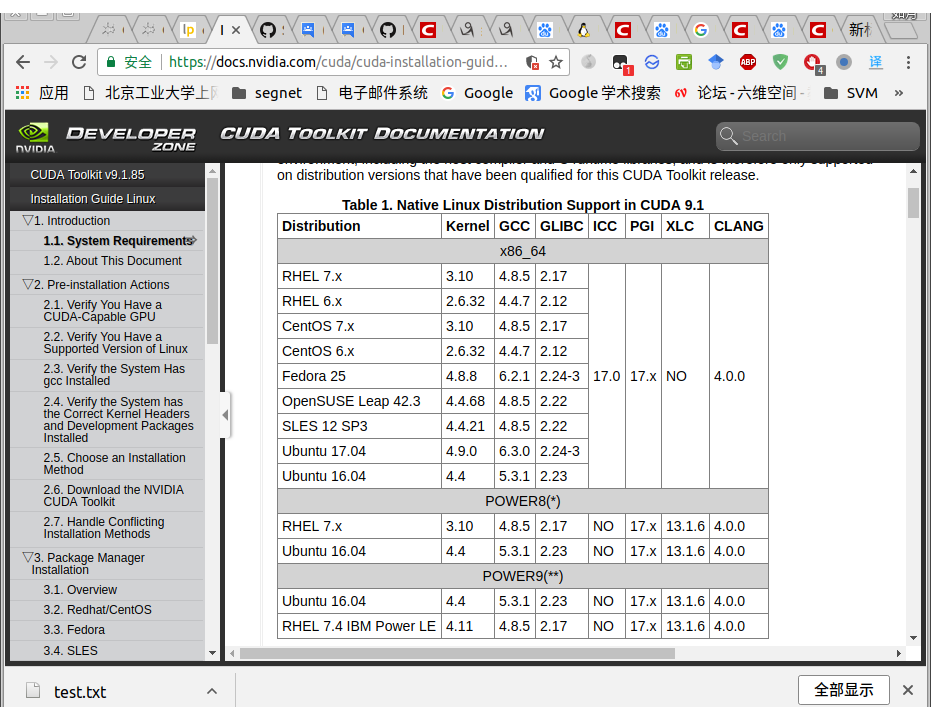
https://developer.nvidia.com/cuda-gpus包括可以安装的CUDA的Gpu型号
1.首先你要看https://docs.nvidia.com/cuda/cuda-installation-guide-linux/index.html#package-manager-metas,里面有个kernel版本安装要求,这个版本必须匹配你电脑的版本,而且在cuda之前安装,因为如果你跳过这个步骤,那么cuda driver就会自己找个版本。
具体命令
sudo apt-get install linux-headers-$(uname -r)
2.安装cuda现在官网提供的最新版本9.1,要求R390驱动,如果你想要这个版本的cuda,直接复制粘贴网上的命令行,我也不知道会出现什么。
‘Before installing the CUDA Toolkit on Linux, please ensure that you have the latest NVIDIA driver R390 installed. The latest NVIDIA R390 driver is available at: www.nvidia.com/drivers’
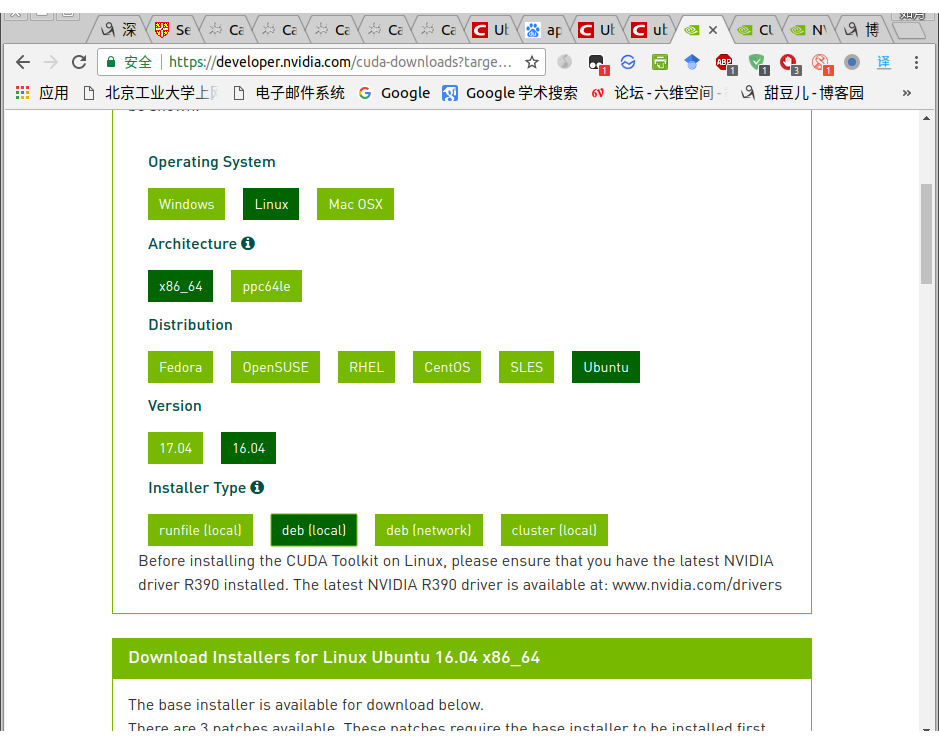
并且推荐使用官网提供的命令行,以及终端建议的命令行。
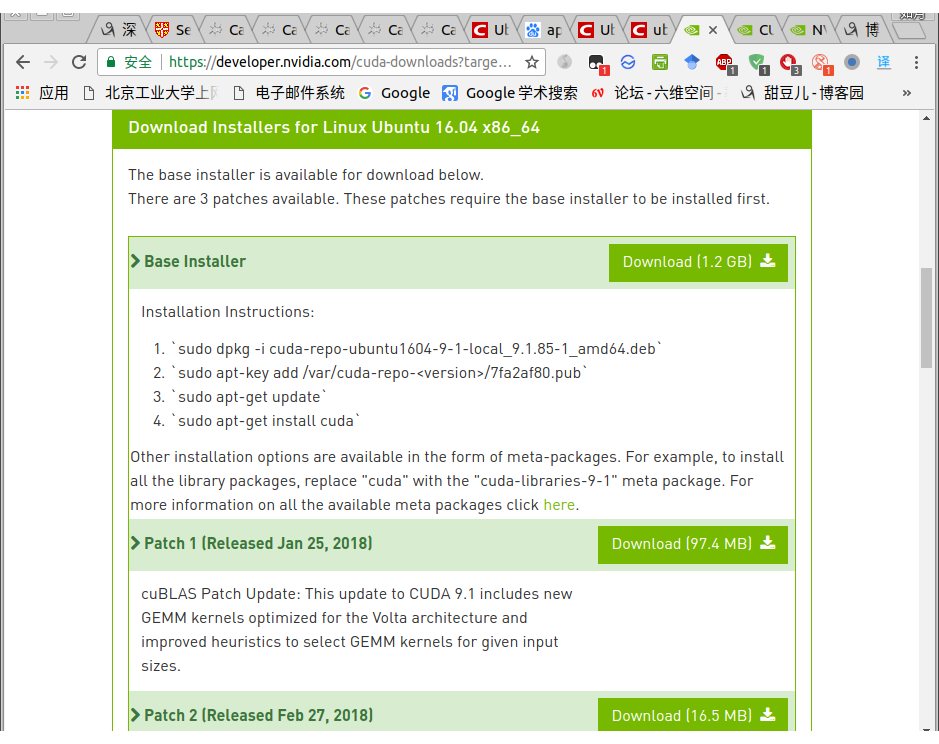
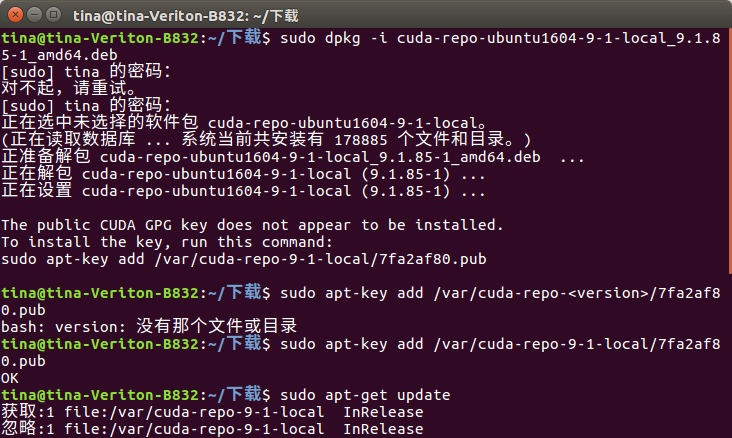
3.安装library package工具包
参见https://docs.nvidia.com/cuda/cuda-installation-guide-linux/index.html#package-manager-metas
3.7节,我就不翻译了命令行是:
cat /var/lib/apt/lists/*cuda*Packages | grep "Package:"
sudo apt-get install cuda
sudo apt-get install cuda-drivers
测试安装cuda
cd /usr/local/cuda-9.1/samples/1_Utilities/deviceQuery

make

sudo ./deviceQuery
这个注意自己的路径,就是你的安装路径是否是这个,以及你的版本号,这都是经常需要注意的。我这个意思就是我安装的是9.1
如果安装成功就会出现你的GPU配置:
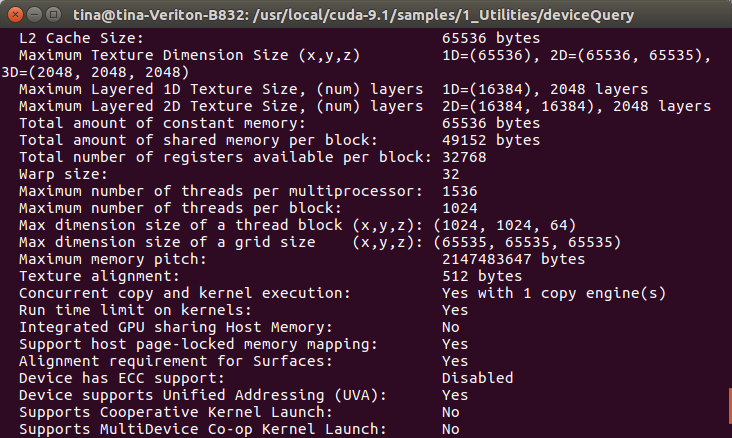
安装caffe
比较重要的是配置文件,也就是makefile.config.
你不要复制粘贴,你要读,很容易读懂的,#之后的内容不用看,是注释掉的。你必须要改的是CPU_only,cuda路径,还有anaconda路径,不是让你满电脑找安在那里了。
通常情况下安装路径和我一样,但是文件夹里面可能会有细节的不同,这个不同来源于版本。也就是说你的版本和我一样你就可以复制粘贴了。
## Refer to http://caffe.berkeleyvision.org/installation.html
# Contributions simplifying and improving our build system are welcome!

# cuDNN acceleration switch (uncomment to build with cuDNN).
# USE_CUDNN := 1

# CPU-only switch (uncomment to build without GPU support).
# CPU_ONLY := 1

# To customize your choice of compiler, uncomment and set the following.
# N.B. the default for Linux is g++ and the default for OSX is clang++
# CUSTOM_CXX := g++

# CUDA directory contains bin/ and lib/ directories that we need.
CUDA_DIR := /usr/local/cuda-9.1
# On Ubuntu 14.04, if cuda tools are installed via
# "sudo apt-get install nvidia-cuda-toolkit" then use this instead:
# CUDA_DIR := /usr

# CUDA architecture setting: going with all of them.
# For CUDA < 6.0, comment the *_50 lines for compatibility.
CUDA_ARCH := -gencode arch=compute_30,code=sm_30
        -gencode arch=compute_35,code=sm_35
        -gencode arch=compute_50,code=sm_50
        -gencode arch=compute_50,code=compute_50

# BLAS choice:
# atlas for ATLAS (default)
# mkl for MKL
# open for OpenBlas
BLAS := atlas
# Custom (MKL/ATLAS/OpenBLAS) include and lib directories.
# Leave commented to accept the defaults for your choice of BLAS
# (which should work)!
# BLAS_INCLUDE := /path/to/your/blas
# BLAS_LIB := /path/to/your/blas

# Homebrew puts openblas in a directory that is not on the standard search path
# BLAS_INCLUDE := $(shell brew --prefix openblas)/include
# BLAS_LIB := $(shell brew --prefix openblas)/lib

# This is required only if you will compile the matlab interface.
# MATLAB directory should contain the mex binary in /bin.
# MATLAB_DIR := /usr/local
# MATLAB_DIR := /Applications/MATLAB_R2012b.app

# NOTE: this is required only if you will compile the python interface.
# We need to be able to find Python.h and numpy/arrayobject.h.
#PYTHON_INCLUDE := /usr/include/python2.7
        #/usr/lib/python2.7/dist-packages/numpy/core/include
# Anaconda Python distribution is quite popular. Include path:
# Verify anaconda location, sometimes it's in root.
 ANACONDA_HOME := $(HOME)/anaconda2
 PYTHON_INCLUDE := $(ANACONDA_HOME)/include
         $(ANACONDA_HOME)/include/python2.7
         $(ANACONDA_HOME)/lib/python2.7/site-packages/numpy/core/include

# We need to be able to find libpythonX.X.so or .dylib.
#PYTHON_LIB := /usr/lib
 PYTHON_LIB := $(ANACONDA_HOME)/lib

# Homebrew installs numpy in a non standard path (keg only)
# PYTHON_INCLUDE += $(dir $(shell python -c 'import numpy.core; print(numpy.core.__file__)'))/include
# PYTHON_LIB += $(shell brew --prefix numpy)/lib

# Uncomment to support layers written in Python (will link against Python libs)
 WITH_PYTHON_LAYER := 1

# Whatever else you find you need goes here.
INCLUDE_DIRS := $(PYTHON_INCLUDE) /usr/local/include
LIBRARY_DIRS := $(PYTHON_LIB) /usr/local/lib /usr/lib

# If Homebrew is installed at a non standard location (for example your home directory) and you use it for general dependencies
# INCLUDE_DIRS += $(shell brew --prefix)/include
# LIBRARY_DIRS += $(shell brew --prefix)/lib

# Uncomment to use `pkg-config` to specify OpenCV library paths.
# (Usually not necessary -- OpenCV libraries are normally installed in one of the above $LIBRARY_DIRS.)
# USE_PKG_CONFIG := 1

BUILD_DIR := build
DISTRIBUTE_DIR := distribute

# Uncomment for debugging. Does not work on OSX due to https://github.com/BVLC/caffe/issues/171
# DEBUG := 1

# The ID of the GPU that 'make runtest' will use to run unit tests.
TEST_GPUID := 0

# enable pretty build (comment to see full commands)
Q ?= @
然后在make all的时候 ,出现了:
nvcc fatal   : Unsupported gpu architecture 'compute_20'
,看http://blog.csdn.net/kemgine/article/details/78781377,删除了两行cuda配置,我放上来的config已经删掉了,请注意这一点。
于是我换到了8.0
然后就没有错误了,然后我如愿以偿的得到了内存不足这一个错误。。。
下面给出8.0的成功的config文件仅供参考
## Refer to http://caffe.berkeleyvision.org/installation.html
# Contributions simplifying and improving our build system are welcome!

# cuDNN acceleration switch (uncomment to build with cuDNN).
# USE_CUDNN := 1

# CPU-only switch (uncomment to build without GPU support).
# CPU_ONLY := 1

# To customize your choice of compiler, uncomment and set the following.
# N.B. the default for Linux is g++ and the default for OSX is clang++
# CUSTOM_CXX := g++

# CUDA directory contains bin/ and lib/ directories that we need.
CUDA_DIR := /usr/local/cuda-8.0
# On Ubuntu 14.04, if cuda tools are installed via
# "sudo apt-get install nvidia-cuda-toolkit" then use this instead:
# CUDA_DIR := /usr

# CUDA architecture setting: going with all of them.
# For CUDA < 6.0, comment the *_50 lines for compatibility.
CUDA_ARCH := -gencode arch=compute_20,code=sm_20
                -gencode arch=compute_30,code=sm_30
        -gencode arch=compute_35,code=sm_35
        -gencode arch=compute_50,code=sm_50
        -gencode arch=compute_50,code=compute_50

# BLAS choice:
# atlas for ATLAS (default)
# mkl for MKL
# open for OpenBlas
BLAS := atlas
# Custom (MKL/ATLAS/OpenBLAS) include and lib directories.
# Leave commented to accept the defaults for your choice of BLAS
# (which should work)!
# BLAS_INCLUDE := /path/to/your/blas
# BLAS_LIB := /path/to/your/blas

# Homebrew puts openblas in a directory that is not on the standard search path
# BLAS_INCLUDE := $(shell brew --prefix openblas)/include
# BLAS_LIB := $(shell brew --prefix openblas)/lib

# This is required only if you will compile the matlab interface.
# MATLAB directory should contain the mex binary in /bin.
# MATLAB_DIR := /usr/local
# MATLAB_DIR := /Applications/MATLAB_R2012b.app

# NOTE: this is required only if you will compile the python interface.
# We need to be able to find Python.h and numpy/arrayobject.h.
#PYTHON_INCLUDE := /usr/include/python2.7
        #/usr/lib/python2.7/dist-packages/numpy/core/include
# Anaconda Python distribution is quite popular. Include path:
# Verify anaconda location, sometimes it's in root.
 ANACONDA_HOME := $(HOME)/anaconda2
 PYTHON_INCLUDE := $(ANACONDA_HOME)/include
         $(ANACONDA_HOME)/include/python2.7
         $(ANACONDA_HOME)/lib/python2.7/site-packages/numpy/core/include

# We need to be able to find libpythonX.X.so or .dylib.
#PYTHON_LIB := /usr/lib
 PYTHON_LIB := $(ANACONDA_HOME)/lib

# Homebrew installs numpy in a non standard path (keg only)
# PYTHON_INCLUDE += $(dir $(shell python -c 'import numpy.core; print(numpy.core.__file__)'))/include
# PYTHON_LIB += $(shell brew --prefix numpy)/lib

# Uncomment to support layers written in Python (will link against Python libs)
 WITH_PYTHON_LAYER := 1

# Whatever else you find you need goes here.
INCLUDE_DIRS := $(PYTHON_INCLUDE) /usr/local/include
LIBRARY_DIRS := $(PYTHON_LIB) /usr/local/lib /usr/lib

# If Homebrew is installed at a non standard location (for example your home directory) and you use it for general dependencies
# INCLUDE_DIRS += $(shell brew --prefix)/include
# LIBRARY_DIRS += $(shell brew --prefix)/lib

# Uncomment to use `pkg-config` to specify OpenCV library paths.
# (Usually not necessary -- OpenCV libraries are normally installed in one of the above $LIBRARY_DIRS.)
# USE_PKG_CONFIG := 1

BUILD_DIR := build
DISTRIBUTE_DIR := distribute

# Uncomment for debugging. Does not work on OSX due to https://github.com/BVLC/caffe/issues/171
# DEBUG := 1

# The ID of the GPU that 'make runtest' will use to run unit tests.
TEST_GPUID := 0

# enable pretty build (comment to see full commands)
Q ?= @