
简单爬虫框架:
爬虫调度器 -> URL管理器 -> 网页下载器(urllib2) -> 网页解析器(BeautifulSoup) -> 价值数据
Demo1:
# coding:utf8
import urllib2,cookielib

url = "https://www.baidu.com"

print '第一种方法'
response1 = urllib2.urlopen(url)
print response1.getcode() #返回状态码
print len(response1.read()) #返回的网页内容的长度

print "第二种方法"
request = urllib2.Request(url)
request.add_header("user-agent","Mozilla/5.0")
response2 = urllib2.urlopen(request)
print response2.getcode()
print len(response2.read())

print '第三种方法'
cj = cookielib.CookieJar()
opener = urllib2.build_opener(urllib2.HTTPCookieProcessor(cj))
urllib2.install_opener(opener)
response3 = urllib2.urlopen(url)
print response3.getcode() #返回状态码
print cj    #返回cookie
print response3.read()  #返回网页内容
Python有哪几种网页解析器:
正则表达式、html.parser、Beautiful Soup、lxml
BeautifulSoup:
- Python第三方库,用于从HTML或XML中提取数据
- 官网:http://www.crummy.com/software/BeautifulSoup/bs4/doc/
安装并测试beautifulsoup4:
- 安装:pip install beautifulsoup4
- 测试:import bs4
如果PyCharm无法识别beautifulsoup4,则在设置里找到Python Intercepter这一项,改为python2.7版本即可。
Demo2:
# coding:utf-8
import re
from bs4 import BeautifulSoup

# 示例代码片段(来自beautifulsoup官网)
html_doc = """
<html><head><title>The Dormouse's story</title></head>
<body>
<p class="title"><b>The Dormouse's story</b></p>

<p class="story">Once upon a time there were three little sisters; and their names were
<a href="http://example.com/elsie" class="sister" id="link1">Elsie</a>,
<a href="http://example.com/lacie" class="sister" id="link2">Lacie</a> and
<a href="http://example.com/tillie" class="sister" id="link3">Tillie</a>;
and they lived at the bottom of a well.</p>

<p class="story">...</p>
"""

soup = BeautifulSoup(html_doc,'html.parser',from_encoding='utf-8')

print '获取所有的链接'
links = soup.find_all('a')
for link in links:
    print link.name,link['href'],link.get_text()

print '获取lacie的链接'
link_node = soup.find('a',href='http://example.com/lacie')
print link_node.name,link_node['href'],link_node.get_text()

print '正则匹配'
link_node = soup.find('a', href= re.compile(r"ill"))
print link_node.name,link_node['href'],link_node.get_text()

print '获取p段落文字'
p_node = soup.find('p', class_="title")
print p_node.name,p_node.get_text()
实战编写爬取百度百科页面:
目录结构:
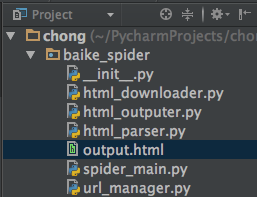
注:mac osx下用alt+enter添加相应方法
(爬虫调度器)spider_main.py:
# coding=utf-8
from baike_spider import url_manager,html_downloader,html_parser,html_outputer

class SpiderMain(object):
    def __init__(self):
        self.urls = url_manager.UrlManager()    #url管理器
        self.downloader = html_downloader.HtmlDownloader()  #下载器
        self.parser = html_parser.HtmlParser()  #解析器
        self.outputer = html_outputer.HtmlOutputer()    #输出器

    def craw(self, root_url):
        count = 1 #判断当前爬取的是第几个url
        self.urls.add_new_url(root_url)
        while self.urls.has_new_url():      #循环,爬取所有相关页面,判断异常情况
            try:
                new_url = self.urls.get_new_url()   #取得url
                print 'craw %d : %s' % (count, new_url) #打印当前是第几个url
                html_cont = self.downloader.download(new_url)   #下载页面数据
                new_urls, new_data = self.parser.parse(new_url,html_cont)    #进行页面解析得到新的url以及数据

                self.urls.add_new_urls(new_urls) #添加新的url
                self.outputer.collect_data(new_data) #收集数据

                if count == 10:  # 此处10可以改为100甚至更多,代表循环次数
                    break

                count = count + 1
            except:
                print 'craw failed'

        self.outputer.output_html()   #利用outputer输出收集好的数据

if __name__=="__main__":
    root_url = "http://baike.baidu.com/view/21087.htm"
    obj_spider = SpiderMain()   # 创建
    obj_spider.craw(root_url)   # craw方法启动爬虫
(url管理器)url_manager.py:
# coding=utf-8
class UrlManager(object):

    def __init__(self):
         self.new_urls = set()  # 待爬取url
         self.old_urls = set()  # 已爬取url

    def add_new_url(self, url):    # 向管理器中添加一个新的url
        if url is None:
            return
        if url not in self.new_urls and url not in self.old_urls:
            self.new_urls.add(url)

    def add_new_urls(self, urls): # 向管理器中添加新的更多的url
        if urls is None or len(urls) == 0:
            return
        for url in urls:
            self.add_new_url(url)

    def has_new_url(self):  # 判断管理器是否有新的待爬取的url
        return len(self.new_urls) != 0

    def get_new_url(self):  # 从管理器中获取一个新的待爬取的url
        new_url = self.new_urls.pop()
        self.old_urls.add(new_url)
        return new_url
(下载器)html_downloader.py:
import urllib2

class HtmlDownloader(object):

    def download(self, url):
        if url is None:
            return None

        response = urllib2.urlopen(url)

        if response.getcode() != 200:
            return None

        return response.read()
(解析器)html_parser.py:
import re
import urlparse
from bs4 import BeautifulSoup

class HtmlParser(object):

    def parse(self,page_url,html_cont):
        if page_url is None or html_cont is None:
            return

        soup = BeautifulSoup(html_cont,'html.parser', from_encoding='utf-8')
        new_urls = self._get_new_urls(page_url, soup)
        new_data = self._get_new_data(page_url, soup)
        return new_urls, new_data

    def _get_new_urls(self, page_url, soup):
        new_urls = set()
        # /view/123.htm
        links = soup.find_all('a', href=re.compile(r"/view/d+.htm"))
        for link in links:
            new_url = link['href']
            new_full_url = urlparse.urljoin(page_url, new_url)
            new_urls.add(new_full_url)
        return new_urls

    def _get_new_data(self, page_url, soup):
        res_data = {}
        # url
        res_data['url'] = page_url

        # <dd class="lemmaWgt-lemmaTitle-title"> <h1>Python</h1>
        title_node = soup.find('dd',class_="lemmaWgt-lemmaTitle-title").find("h1")
        res_data['title'] = title_node.get_text()

        # <div class="lemma-summary" label-module="lemmaSummary">
        summary_node = soup.find('div',class_="lemma-summary")
        res_data['summary'] = summary_node.get_text()

        return res_data
(数据输出)html_outputer.py:
# coding=utf-8
class HtmlOutputer(object):
    #初始化
    def __init__(self):
        self.datas = []

    def collect_data(self, data):   #收集数据
        if data is None:
            return
        self.datas.append(data)

    def output_html(self):  #输出数据
        fout = open('output.html', 'w')

        fout.write("<html>")

        fout.write("<head>")
        fout.write("<meta charset= 'UTF-8'>")
        fout.write("</head>")

        fout.write("<body>")
        fout.write("<table>")

        # ASCII
        for data in self.datas:
            fout.write("<tr>")
            fout.write("<td>%s</td>" % data['url'])
            fout.write("<td>%s</td>" % data['title'].encode('utf-8'))
            fout.write("<td>%s</td>" % data['summary'].encode('utf-8'))
            fout.write("</tr>")

        fout.write("</html>")
        fout.write("</body>")
        fout.write("</table>")

        fout.close()
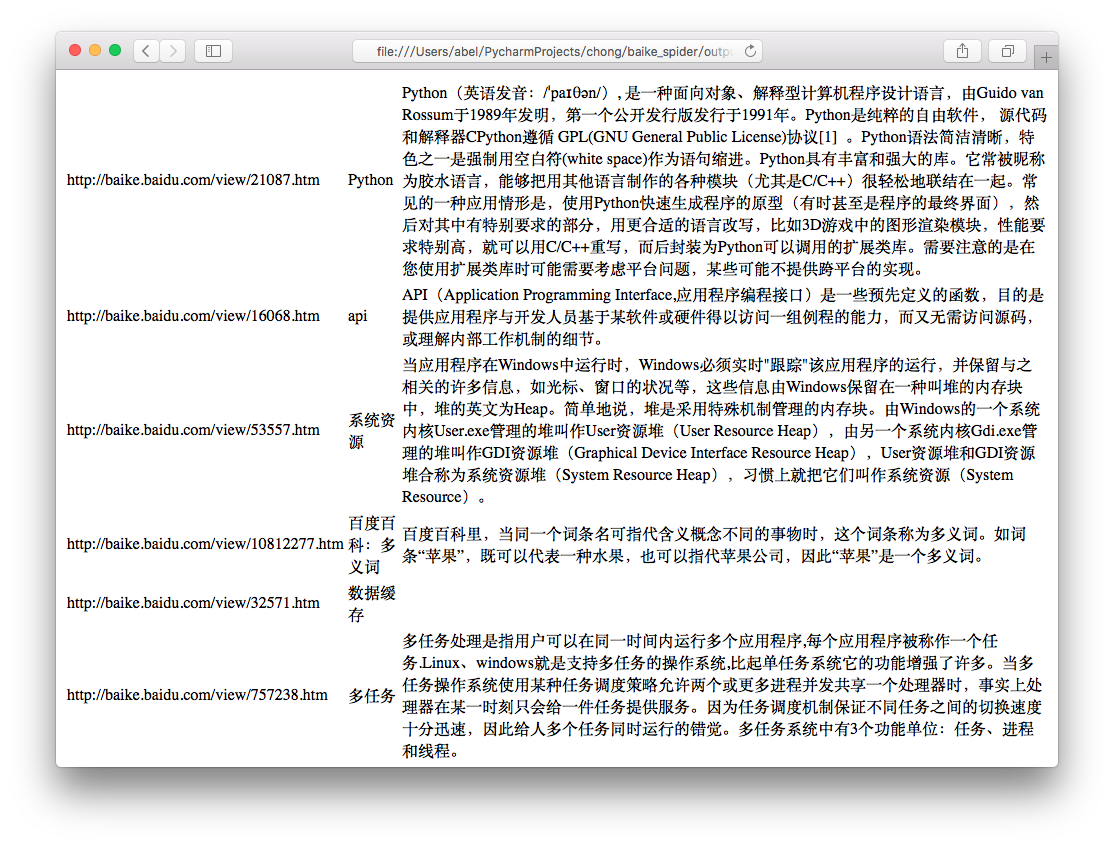
运行程序spider_main.py可进行爬取页面,最终文件输出为output.html,里面包含词条和词条解释,爬取完毕。
output.html:
这只是最简单的爬虫,如果想深入学习,还有登录、验证码、Ajax、服务器防爬虫、多线程、分布式等等。