内容提供者可以实现应用间查询数据库的需求
一.在提供数据库访问的应用设置内容提供者
public class AccountProvider extends ContentProvider {
    static final int QUERYSUCCESS=0;

    private static final UriMatcher sURIMatcher = new UriMatcher(UriMatcher.NO_MATCH);

    static {
        sURIMatcher.addURI("com.eason.provider","query",0);
    }
/*
    *selectionArg查询参数
    *selection查询条件
    */
    @Override
    public Cursor query(Uri uri,String[] projection,String selection,String[] selectionArgs,String sortOrder) {
        int code=sURIMatcher.match(uri);
        if(code==QUERYSUCCESS){
            SQLiteDatabase db =new MyOpenHelper(getContext()).getReadableDatabase();
            Cursor cursor=db.query("info",projection,selection,selectionArgs,null,null,null);
            return cursor;
        }else throw new IllegalArgumentException("路径有问题啊兄弟");
    }

}
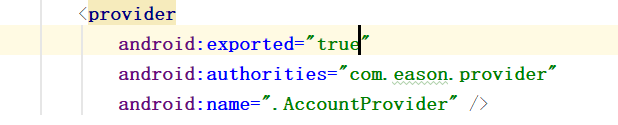
- 记得在清单文件中配置组件
- 在清单文件里provider节点的exported属性设置为true,没有设置将会报错
- exported属性作用:是否支持其它应用调用当前组件。默认值:如果包含有intent-filter 默认值为true; 没有intent-filter默认值为false.
二.在访问数据库的应用内实现内容解释者
protected void onCreate(Bundle savedInstanceState) {
        super.onCreate(savedInstanceState);
        setContentView(R.layout.activity_main);

        ContentResolver cr=getContentResolver();
        Uri uri=Uri.parse("content://com.eason.provider/query");
        Cursor cursor=cr.query(uri,null,null,null,null);
        if (cursor.getCount()>0&&cursor!=null){
        while(cursor.moveToNext()){
            System.out.println(cursor.getString(1));
            System.out.println(cursor.getString(2));
        }
        }
    }
-
执行query操作时,设置uri要根据内容提供者中的sURIMatcher.addURI("com.eason.provider","query",0)来写.