1. RadioButton (单选按钮)
嵌入到RadioGroup中实现单选效果
android:checkedButton="radio的id值"
int getcheckedRadioButtonid(); //活动被选中的 RadioButton的id
实咧:
<?xml version="1.0" encoding="utf-8"?>
<LinearLayout xmlns:android="http://schemas.android.com/apk/res/android"
android:orientation="vertical"
android:layout_width="fill_parent"
android:layout_height="fill_parent"
>
<RadioGroup
android:id="@+id/sex"
android:layout_width="400px"
android:layout_height="wrap_content"
android:orientation="horizontal"
android:checkedButton="@+id/male"
>
<RadioButton
android:text="男"
android:id="@+id/male"
android:layout_width="60px"
android:layout_height="wrap_content"
/>
<RadioButton
android:text="女"
android:id="@+id/female"
android:layout_width="60px"
android:layout_height="wrap_content"
/>
</RadioGroup>
</LinearLayout>
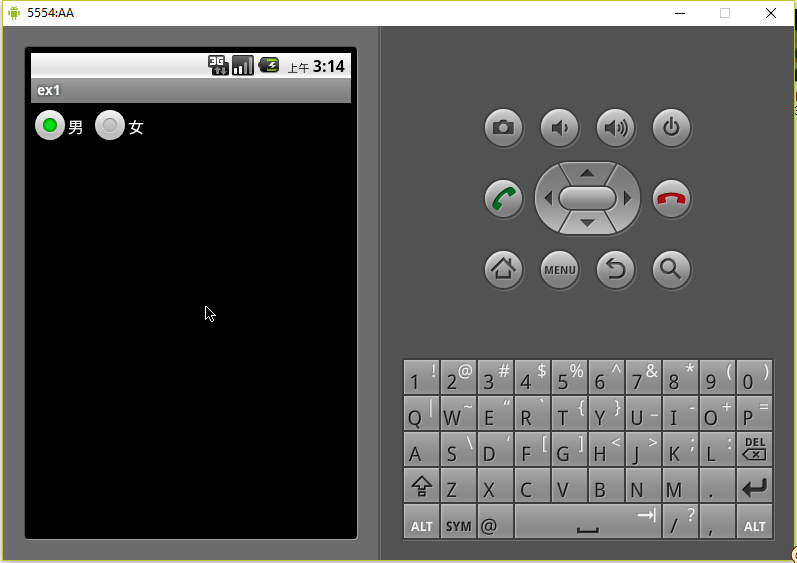
实现效果:
2. ImageView (图片控件)
android :src //图片资源id
android :maxWidth //最大宽度
android :maxHeight //最大高度
android:adjustViewBound //设置true ,则maxWidth和maxHeight生效
3. ImageButton (图片按钮)
4. TimePicker (时间控件)
5. DatePicker (日期)
// 修改日期
void updateDate(int year, int monthOfYear, int dayOfMonth)
注意: monthOFfYear是从0-11表示1-12月