参考内容:
http://blog.csdn.net/harvic880925/article/details/38984705
http://blog.it985.com/14433.html
1.使用SpannableString给textview 文本设置背景色
 1 public class MainActivity extends AppCompatActivity {
 2
 3     private TextView tv1;
 4     private TextView tv2;
 5     private int back_color;
 6     private int text_color;
 7
 8     @Override
 9     protected void onCreate(Bundle savedInstanceState) {
10         super.onCreate(savedInstanceState);
11         setContentView(R.layout.activity_main);
12         initialize();
13         back_color = ContextCompat.getColor(this,R.color.colorPrimary);
14         text_color = ContextCompat.getColor(this,R.color.colorAccent);
15 //        Spanned.SPAN_EXCLUSIVE_EXCLUSIVE,
16 //        这是在 setSpan 时需要指定的 flag,这几个属性不好理解, 还是直接运行看结果吧
17 //        它是用来标识在 Span 范围内的文本前后输入新的字符时是否把它们也应用这个效果。
18 //        Spanned.SPAN_EXCLUSIVE_EXCLUSIVE(前后都不包括)、
19 //        Spanned.SPAN_INCLUSIVE_EXCLUSIVE(前面包括,后面不包括)、
20 //        Spanned.SPAN_EXCLUSIVE_INCLUSIVE(前面不包括,后面包括)、
21 //        Spanned.SPAN_INCLUSIVE_INCLUSIVE(前后都包括)。
22         SpannableString sb1 = new SpannableString("好好学习");
23         SpannableString sb2 = new SpannableString("天天向上");
24         sb1.setSpan(new BackgroundColorSpan(back_color),0,sb1.length(), Spanned.SPAN_EXCLUSIVE_EXCLUSIVE);
25
26         sb2.setSpan(new ForegroundColorSpan(text_color),0,sb2.length(),Spanned.SPAN_INCLUSIVE_EXCLUSIVE);
27         SpannableStringBuilder ssb = new SpannableStringBuilder();
28         ssb.append(sb1).append(sb2);
29         tv1.setText(ssb);
30     }
31
32     private void initialize() {
33         tv1 = (TextView) findViewById(R.id.tv1);
34         tv2 = (TextView) findViewById(R.id.tv2);
35     }
36 }
2.运行截图:
3.给textview设置点击事件
public class MainActivity extends AppCompatActivity {
    private TextView tv1;
    private TextView tv2;
    private int back_color;
    private int text_color;

    @Override
    protected void onCreate(Bundle savedInstanceState) {
        super.onCreate(savedInstanceState);
        setContentView(R.layout.activity_main);
        initialize();
        back_color = ContextCompat.getColor(this,R.color.colorPrimary);
        text_color = ContextCompat.getColor(this,R.color.colorAccent);
        SpannableString sb1 = new SpannableString("好好学习,hello world");
        SpannableString sb2 = new SpannableString("天天向上");
        sb1.setSpan(new BackgroundColorSpan(back_color),0,sb1.length(), Spanned.SPAN_EXCLUSIVE_INCLUSIVE);

        sb1.setSpan(new ClickableSpan() {
            @Override
            public void onClick(View widget) {
                Log.e("click","click");
            }

            @Override
            public void updateDrawState(TextPaint ds) {
                super.updateDrawState(ds);
                ds.setUnderlineText(false);//取消下划线
                ds.setColor(text_color);
            }
        },4,sb1.length(),Spanned.SPAN_EXCLUSIVE_INCLUSIVE);

        tv1.setText(sb1);
        tv1.setMovementMethod(LinkMovementMethod.getInstance());//必须设置,否则没有点击触发
    }

    private void initialize() {
        tv1 = (TextView) findViewById(R.id.tv1);
        tv2 = (TextView) findViewById(R.id.tv2);
    }
}
4.运行效果图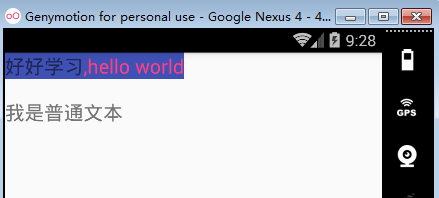
点击 ",hello world" 会触发点击事件!