在OpenResty中使用lua-zlib的方法
==================================================================
1、查看 zlib在centos 中是否存在?
rpm -qa | grep zlib
显示:
zlib-devel-1.2.3-29.el6.x86_64
zlib-1.2.3-29.el6.x86_64
表示已安装,不用过多担心 。
====================================================================
2、安装cmake编译器
yum install -y gcc gcc-c++ make automake
wget http://www.cmake.org/files/v2.8/cmake-2.8.10.2.tar.gz
tar -zxvf cmake-2.8.10.2.tar.gz
cd cmake-2.8.10.2
./bootstrap
gmake
gmake install
检查cmake安装
cmake --version
显示
cmake version 2.8.10.2
表示安装成功
====================================================================
3、下载lua-zlib包,并解压
unzip lua-zlib-master.zip
cd /usr/local/software/lua-zlib-master
cmake -DLUA_INCLUDE_DIR=/usr/local/openresty/luajit/include/luajit-2.1
make
cp zlib.so /usr/local/openresty/lualib/zlib.so
====================================================================
4、在lua脚本中调用

 location /test {
                   default_type  text/html;
                   content_by_lua '
                        local zlib = require "zlib"
                        local encoding = ngx.req.get_headers()["Content-Encoding"]
                        -- post参数在接收前首先要执行这个
                        ngx.req.read_body();

                        if encoding == "gzip" then
                                local body = ngx.req.get_body_data()
                                if body then
                                        local stream = zlib.inflate()
                                        local r=stream(body);
                                        ngx.req.set_body_data(r);
                                end
                        else
                                ngx.say("输入的内容未经过gzip压缩。");
                                ngx.exit(ngx.HTTP_OK);
                        end

                        --输出参数看看
                        local args = ngx.req.get_post_args()
                        for key, val in pairs(args) do
                        if type(val) == "table" then
                                ngx.say(table.concat(val, ", "))
                        else
                                ngx.say(val)
                        end
                        end
                    ';
                }
====================================================================
5、用c#来模块提交gzip压缩后的数据到服务器
private void button3_Click(object sender, EventArgs e)
        {
            var url = "http://192.168.1.100/test";
            var body = "body=黄海是我的名字!";
            var ret=HttpUtil.PostHttpByGzip(url, body);
            Console.WriteLine(ret);
        }
/// <summary>
        /// 功能:发起POST请求,可选择是否使用在发起时的BODY GZIP压缩
        /// 作者:黄海
        /// 时间:2015-01-02
        /// </summary>
        /// <param name="url"></param>
        /// <param name="body"></param>
        /// <returns></returns>
        public static string PostHttpByGzip(string url, string body)
        {
                var req = WebRequest.Create(url);
                req.Method = "POST"; // "post"
                req.Timeout = 20000;
                req.ContentType = "application/x-www-form-urlencoded";
                req.Headers.Add("Content-Encoding", "gzip");
                var reqStream = req.GetRequestStream();
                var gz = new GZipStream(reqStream, CompressionMode.Compress);
                var sw = new StreamWriter(gz, Encoding.UTF8);
                sw.Write(body);
                sw.Close();
                gz.Close();
                reqStream.Close();
                var myResponse = req.GetResponse();
                var sr = new StreamReader(myResponse.GetResponseStream());
                var ret=sr.ReadToEnd();
                sr.Close();
                myResponse.Close();
                return ret;
        }
====================================================================
问题总结:
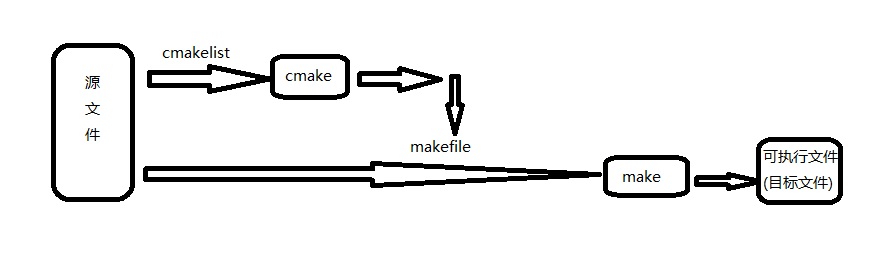
Makefile是linux下面的文件,对于一个包含很多文件的工程,如果直接编译,那么我们就需要使用一些命令将所有的文件都包括进来。如果我们对其中的一些文件稍做修改,那么我们需要重新输入这些命令。Makefile文件就可以很好的解决这个问题,它将所需要的命令都包含在这个Makefile文件中,然后简单的make一下就完成了所有的步骤。