https://tecadmin.net/install-tomcat-8-on-centos-rhel-and-ubuntu/
Apache Tomcat is an opensource web hosting server for Java based web application. Tomcat is licensed under Apache License version 2. Apache has released stable version of Tomcat 8 on June 25, 2014. Which is available for download on its official site. Apache tomcat 8 has upgraded some features. Below are few details about Tomcat 8.
- Tomcat 8 requires JAVA 7 or Higher to work.
- Tomcat 8 supports Java Servlet 3.1
- Tomcat 8 supports JavaServer Pages 2.3
- Tomcat 8 supports Java Unified Expression Language 3.0
- Tomcat 8 supports Java WebSocket 1.0
This article will help you to Install Tomcat 8 on your CentOS/RHEL and Ubuntu systems. Tomcat 8 stable release is available for download. To install other version of tomcat visit Install Tomcat 7 on CentOS/RHEL or Install Tomcat 7 on Ubuntu as per your operating system used.
Step 1 – Verify JAVA
JAVA is the first requirement of Tomcat installation. Use following command to check if you have java installed already on your system.
# java -version

java version "1.8.0_60"
Java(TM) SE Runtime Environment (build 1.8.0_60-b27)
Java HotSpot(TM) 64-Bit Server VM (build 25.60-b23, mixed mode)
Tomcat 8 is designed to run on Java SE 7 and later. So make sure you have installed correct version on your system. If you don’t have Java installed on your system or installed lower version, use one of following link to install Java first.
Step 2 – Downloading Tomcat Archive
Download Apache Tomcat 8 archive file using following commands or you can visit Tomcat 8official download page for download most recent available version. After downloading extract archive file in /opt directory. You may change this location as per your setup.
# cd /opt
# wget http://www.us.apache.org/dist/tomcat/tomcat-8/v8.0.27/bin/apache-tomcat-8.0.27.tar.gz
# tar xzf apache-tomcat-8.0.27.tar.gz
Step 3 – Configure Environment Variables
Before starting Tomcat, configure CATALINA_HOME environment variable in your system using following commands.
# echo "export CATALINA_HOME="/opt/apache-tomcat-8.0.27"" >> ~/.bashrc
# source ~/.bashrc
Step 4 – Starting Tomcat
Tomcat is very easy to use, There are no need to compile its source. You simple extract the archive and start the tomcat server. Tomcat by default start on port 8080, So make sure no other application using the same port.
# cd /opt/apache-tomcat-8.0.27
# ./bin/startup.sh
[Sample Output]
Using CATALINA_BASE:   /opt/apache-tomcat-8.0.27
Using CATALINA_HOME:   /opt/apache-tomcat-8.0.27
Using CATALINA_TMPDIR: /opt/apache-tomcat-8.0.27/temp
Using JRE_HOME:        /opt/jdk1.8.0_60
Using CLASSPATH:       /opt/apache-tomcat-8.0.27/bin/bootstrap.jar:/opt/apache-tomcat-8.0.27/bin/tomcat-juli.jar
Tomcat started.
Step 5 – Access Tomcat in Browser
Tomcat server works on port 8080 default. Access tomcat on web browser by connecting your server on port 8080.
http://svr1.tecadmin.net:8080
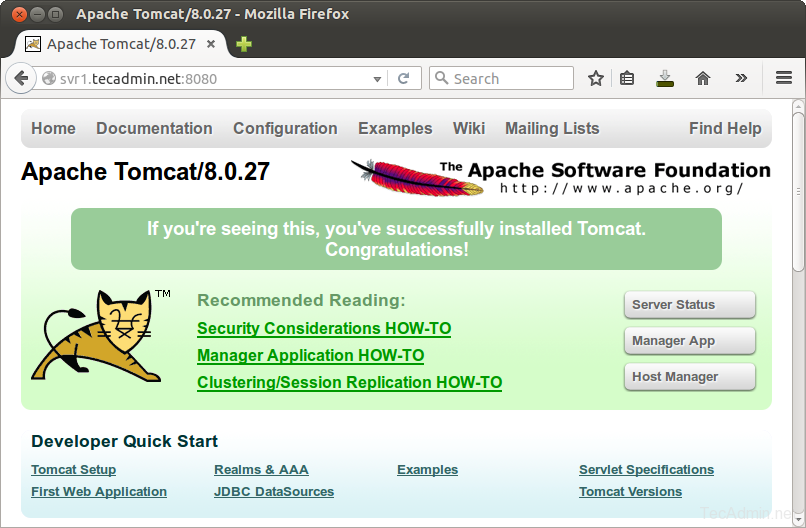
Step 6 – Setup User Accounts
Finally we need to create user accounts to secure and access admin/manager pages. Editconf/tomcat-users.xml file in your editor and paste inside <tomcat-users> </tomcat-users> tags.
<!-- user manager can access only manager section -->
<role rolename="manager-gui" />
<user username="manager" password="_SECRET_PASSWORD_" roles="manager-gui" />

<!-- user admin can access manager and admin section both -->
<role rolename="admin-gui" />
<user username="admin" password="_SECRET_PASSWORD_" roles="manager-gui,admin-gui" />