一、HTTP请求的方法
在HTTP/1.1协议中,定义了8种发送HTTP请求的方法,有GET、POST、OPTION、HEAD、PUT、DELETE、TRACE、CONNECT、PACH。根据HTTP协议的解释,不同的方法对资源有不同的操作方式:
1、PUT:增
2、DELETE:删
3、POST:改
4、GET:查
其中最常用的时GET和POST。GET和POST的主要区别在数据的传递上。
1、GET
在URL后面以?的形式跟上发给服务器的参数,多个参数之间用&隔开,比如:
http://localhost:8080/MJServer/login?username=name&pwd=123
由于浏览器和服务器对URL的长度限制,因此在URL后面附带的参数是有限制的,通常不超过1KB。
2、POST
POST发给服务器的参数都放在请求体中,理论上POST传递的数据大小是没有限制的。
3、如何选择
如果要传递大量数据,比如文件上传,只能用POST请求。安全性来说,GET要比POST差些,如果包含一些敏感的信息建议用POST,如果仅仅是从服务器获取数据,例如查询一些信息,建议使用GET,如果是增加、修改和删除数据,建议用POST。
二、iOS中发送HTTP请求的方案
苹果原生的解决方案有:
1、NSURLConnection --用法比较简单的直接的一种方案。
2、NSURLSession --iOS 7新出的技术,比上一种方案功能更强大
3、CFNetwork --底层的解决方案,纯C语言
第三方框架,比较常用的有:
1、ASIHttpRequest:功能强大,但是已经停止更新
2、AFNetworking:简单易用,提供了基本够用的功能。
为了提高开发效率,建议使用第三方框架。
1、NSURLConnection
1、常用类:
NSURL:请求地址
NSURLRequest:封装一个请求,保存发给服务器的全部数据,包含一个NSURL对象、请求行、请求头、请求体等。
NSMutableURLRequest:NSURLRequest的子类
NSURLConnection:建立客户端和服务器的连接,发送NSURLRequest的数据给服务器,并接收来自服务器的响应数据。
2、NSURLConnection的使用
先看一段获取天气情况的代码:
/**
 *  获取天气信息---异步block
 */
- (void)getWeatherInfo0 {
    //显示一个加载框
    MBProgressHUD *hud = [MBProgressHUD showHUDAddedTo:[UIApplication sharedApplication].windows.lastObject animated:YES];
    hud.labelText = @"正在加载";
    hud.dimBackground = YES;
    hud.removeFromSuperViewOnHide = YES;

    //发送HTTP请求
    NSString *str = @"http://www.weather.com.cn/adat/sk/101010100.html";
    NSURL *url = [NSURL URLWithString:str];
    NSURLRequest *request = [NSURLRequest requestWithURL:url];

    [NSURLConnection sendAsynchronousRequest:request queue:[NSOperationQueue mainQueue] completionHandler:^(NSURLResponse *response, NSData *data, NSError *connectionError) {
        //对返回的数据进行处理,例如json解析
        NSDictionary *dict = [NSJSONSerialization JSONObjectWithData:data options:NSJSONReadingMutableContainers error:nil];

        NSDictionary *weatherinfoDict = [dict objectForKey:@"weatherinfo"];
        [self weatherInfoHandler:weatherinfoDict];

        [hud hide:YES];
    }];

}

/**
 *  处理获取的天气信息
 *
 *  @param weatherinfoDict 天气信息
 */
- (void)weatherInfoHandler:(NSDictionary *)weatherinfoDict {
    //解析获取的内容
    //city
    NSString *city = [weatherinfoDict objectForKey:@"city"];
    UILabel *cityLabel = [[UILabel alloc] init];
    cityLabel.text = [NSString stringWithFormat:@"城市:%@", city];
    cityLabel.frame = CGRectMake(110, 90, 100, 25);
    [self.view addSubview:cityLabel];
    //发布时间
    NSString *time = [weatherinfoDict objectForKey:@"time"];
    UILabel *timeLabel = [[UILabel alloc] init];
    timeLabel.text = [NSString stringWithFormat:@"发布时间:%@", time];
    timeLabel.frame = CGRectMake(110, 120, 130, 25);
    [self.view addSubview:timeLabel];
    //风向
    NSString *wd = [weatherinfoDict objectForKey:@"WD"];
    UILabel *wdLabel = [[UILabel alloc] init];
    wdLabel.text = [NSString stringWithFormat:@"风向:%@", wd];
    wdLabel.frame = CGRectMake(110, 150, 100, 25);
    [self.view addSubview:wdLabel];
    //风级
    NSString *ws = [weatherinfoDict objectForKey:@"WS"];
    UILabel *wsLabel = [[UILabel alloc] init];
    wsLabel.text = [NSString stringWithFormat:@"风级:%@", ws];
    wsLabel.frame = CGRectMake(110, 180, 100, 25);
    [self.view addSubview:wsLabel];
}
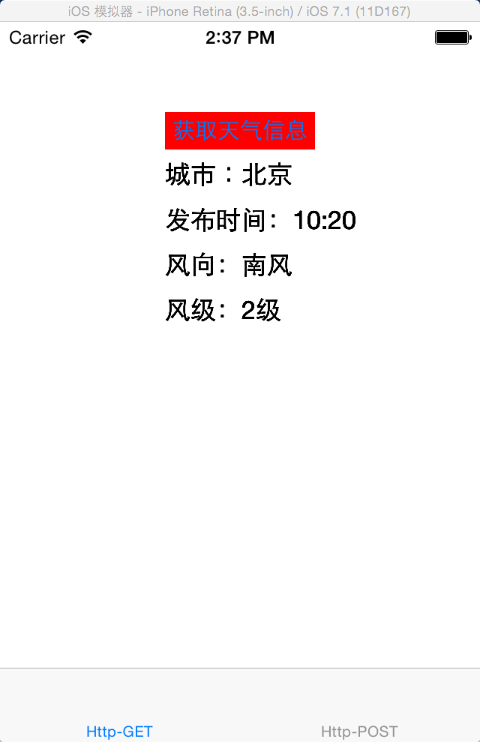
首先使用一个获取天气的地址创建一个NSURL对象,设置请求路径;然后使用NSURL创建一个NSURLRequest对象,设置请求头和请求体,最后使用NSURLConnection发送NSURLRequest。
最后显示结果:
NSURLConnection发送请求的方法有以下几种:
1、异步请求,异步请求根据数据处理的方式可分为2种:
a、block回调方式
+ (void)sendAsynchronousRequest:(NSURLRequest*) request
                          queue:(NSOperationQueue*) queue
              completionHandler:(void (^)(NSURLResponse* response, NSData* data, NSError* connectionError)) handler NS_AVAILABLE(10_7, 5_0);
request是构造的NSURLRequest请求,queue是后面的block处理所在的线程,completionHandler是处理获取的数据所在的block。
b、代理方式
/* Designated initializer */
- (id)initWithRequest:(NSURLRequest *)request delegate:(id)delegate startImmediately:(BOOL)startImmediately NS_AVAILABLE(10_5, 2_0);

- (id)initWithRequest:(NSURLRequest *)request delegate:(id)delegate;
+ (NSURLConnection*)connectionWithRequest:(NSURLRequest *)request delegate:(id)delegate;
在这种情况下,需要调用start方法开始发送请求
- (void)start NS_AVAILABLE(10_5, 2_0);
成为NSURLConnection的代理,根据需要选择遵守相应的代理
1. NSURLConnectionDelegate
2. NSURLConnectionDataDelegate
3. NSURLConnectionDownloadDelegate
下面是使用代理处理方式发送请求的代码:
/**
 *  获取天气信息---异步代理方式
 */
- (void)getWeatherInfo1 {
    //发送HTTP请求
    NSString *str = @"http://www.weather.com.cn/adat/sk/101010100.html";
    NSURL *url = [NSURL URLWithString:str];
    NSURLRequest *request = [NSURLRequest requestWithURL:url];

    NSURLConnection *connection = [[NSURLConnection alloc] initWithRequest:request delegate:self startImmediately:NO];
    [connection start];
}

#pragma mark 代理回调
- (void)connection:(NSURLConnection *)connection didReceiveData:(NSData *)data {
    NSDictionary *dict = [NSJSONSerialization JSONObjectWithData:data options:NSJSONReadingMutableContainers error:nil];
    if (dict) {
        NSDictionary *weatherinfoDict = [dict objectForKey:@"weatherinfo"];
        [self weatherInfoHandler:weatherinfoDict];
    }
}
- (id)initWithRequest:(NSURLRequest *)request delegate:(id)delegate startImmediately:(BOOL)startImmediately NS_AVAILABLE(10_5, 2_0);
这个方法的startImmediately如果为YES的话,表示建立连接后就立即开始下载数据,如果为NO的话需要调用start方法开始下载数据。
2、同步请求
+ (NSData *)sendSynchronousRequest:(NSURLRequest *)request returningResponse:(NSURLResponse **)response error:(NSError **)error;
response是相应信息,有状态行和响应头等响应信息。下面是使用同步请求获取的天气信息:
/**
 *  获取天气信息---同步请求
 */
- (void)getWeatherInfo1 {
    //发送HTTP请求
    NSString *str = @"http://www.weather.com.cn/adat/sk/101010100.html";
    NSURL *url = [NSURL URLWithString:str];
    NSURLRequest *request = [NSURLRequest requestWithURL:url];

    NSURLResponse *response = nil;
    NSData *data = [NSURLConnection sendSynchronousRequest:request returningResponse:&response error:nil];
    NSDictionary *dict = [NSJSONSerialization JSONObjectWithData:data options:NSJSONReadingMutableContainers error:nil];
    NSDictionary *weatherinfoDict = [dict objectForKey:@"weatherinfo"];
    [self weatherInfoHandler:weatherinfoDict];

    //
    NSLog(@"response %@", [response description]);
}
最后的Log输出是:
2015-07-02 15:57:25.102 HttpDemo[1915:607] response  { URL: http://www.weather.com.cn/adat/sk/101010100.html } { status code: 200, headers {
    "Accept-Ranges" = bytes;
    Age = 176;
    "CC_CACHE" = "TCP_HIT";
    "Cache-Control" = "max-age=1800";
    Connection = "keep-alive";
    "Content-Encoding" = gzip;
    "Content-Length" = 181;
    "Content-Type" = "text/html; charset=utf-8";
    Date = "Thu, 02 Jul 2015 07:54:29 GMT";
    Expires = "Thu, 02 Jul 2015 08:25:49 GMT";
    Server = "Apache/2.2.0";
    "Set-Cookie" = "BIGipServerwww_pool=1253639229.20480.0000; path=/";
} }
同步请求会堵塞主线程,一般网络请求常用异步请求。另外,上面HTTP请求的请求方法都是默认的GET方法,如果要更改请求方法和请求体可以使用NSURLRequest的子类NSMutableURLRequest,常用设置有:
- (void)setURL:(NSURL *)URL;     //设置请求地址
- (void)setCachePolicy:(NSURLRequestCachePolicy)policy; //设置缓存策略
- (void)setTimeoutInterval:(NSTimeInterval)seconds;  //设置超时时间
- (void)setHTTPMethod:(NSString *)method;    //设置请求方法
- (void)setAllHTTPHeaderFields:(NSDictionary *)headerFields; //设置请求头部域
- (void)setHTTPBody:(NSData *)data;   //设置请求体
最后附上Demo:HTTP协议(二)demo