1、Connect to the server using the mongo shell
mongo mongodb://localhost:27017
2、Create the user administrator
Change to the admin database:
use admin
db.createUser(
  {
    user: "Admin",
    pwd: "Admin123",
    roles: [ { role: "userAdminAnyDatabase", db: "admin" } ]
  }
)
执行成功显示如下提示:

Then disconnect from the mongo shell (Ctrl+D)
3、Enable authentication in mongod configuration file
编辑mongodb 配置文件:
sudo vim /etc/mongod.conf
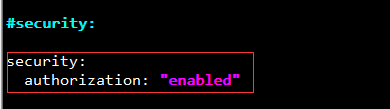
在 # security: 节点下输入以下内容:
security:
  authorization: "enabled"
4、save the file and restart mongod :
sudo service mongod restart
5、 Connect and authenticate as the user administrator
mongo mongodb://localhost:27017
use admin
db.auth("Admin", "Admin123")
6、Finally, create additional users as needed
use BIMDB
db.createUser(
  {
    user: "myTester",
    pwd: "xyz123",
    roles: [ { role: "readWrite", db: "BIMDB" } ]
  }
)
7、use auth on appsetting.json
mongodb://myTester:xyz123@10.100.150.99:27017/BIMDB