安装:
pip3 install beautifulsoup4
pip install beautifulsoup4
Beautifulsoup4 解析器使用 lxml,原因为,解析速度快,容错能力强,效率够高
安装解析器:
pip install lxml
使用方法:
- 加载 beautifulsoup4 模块
- 加载 urllib 库的 urlopen 模块
- 使用 urlopen 读取网页,如果是中文,需要添加 utf-8 编码模式
- 使用 beautifulsoup4 解析网页
#coding: utf8
#python 3.7

from bs4 import BeautifulSoup
from urllib.request import urlopen

#if chinese apply decode()
html = urlopen("https://www.anviz.com/product/entries/1.html").read().decode('utf-8')
soup = BeautifulSoup(html, features='lxml')
all_li = soup.find_all("li",{"class","product-subcategory-item"})
for li_title in all_li:
  li_item_title = li_title.get_text()
  print(li_item_title)
Beautifulsoup4文档: https://www.crummy.com/software/BeautifulSoup/bs4/doc.zh/#id13
方法同 jQuery 类似:
//获取所有的某个标签:soup.find_all('a'),find_all() 和 find() 只搜索当前节点的所有子节点,孙子节点
find_all()
soup.find_all("a")  //查找所有的标签
soup.find_all(re.compile("a"))  //查找匹配包含 a 的标签
soup.find_all(id="link2")
soup.find_all(href=re.compile("elsie")) //搜索匹配每个tag的href属性
soup.find_all(id=True)  //搜索匹配包含 id 的属性
soup.find_all("a", class_="sister")  //搜索匹配 a 标签中 class 为 sister
soup.find_all("p", class_="strikeout")
soup.find_all("p", class_="body strikeout")
soup.find_all(text="Elsie")  //搜索匹配内容为 Elsie
soup.find_all(text=["Tillie", "Elsie", "Lacie"])
soup.find_all("a", limit=2)  //当搜索内容满足第2页时,停止搜索
//获取tag中包含的文本内容
get_text()
soup.get_text("|")
soup.get_text("|", strip=True)
//用来搜索当前节点的父辈节点
find_parents()
find_parent()
//用来搜索兄弟节点
find_next_siblings() //返回所有符合条件的后面的兄弟节点
find_next_sibling()  //只返回符合条件的后面的第一个tag节点
//用来搜索兄弟节点
find_previous_siblings() //返回所有符合条件的前面的兄弟节点
find_previous_sibling() //返回第一个符合条件的前面的兄弟节点

find_all_next()  //返回所有符合条件的节点
find_next()  //返回第一个符合条件的节点

find_all_previous() //返回所有符合条件的节点
find_previous()  //返回第一个符合条件的节点

.select() 方法中传入字符串参数,即可使用CSS选择器的语法找到tag
soup.select("body a")
soup.select("head > title")
soup.select("p > a")
soup.select("p > a:nth-of-type(2)")
soup.select("#link1 ~ .sister")
soup.select(".sister")
soup.select("[class~=sister]")
soup.select("#link1")
soup.select('a[href]')
soup.select('a[href="http://example.com/elsie"]')

.wrap() 方法可以对指定的tag元素进行包装 [8] ,并返回包装后的结果
爬取 anviz 网站产品列表图片: demo
使用了
BeautifulSoup
requests
os
#Python 自带的模块有以下几个,使用时直接 import 即可
    import json
    import random     //生成随机数
    import datetime
    import time
    import os       //建立文件夹
#coding: utf8
#python 3.7

from bs4 import BeautifulSoup
import requests
import os

URL = "https://www.anviz.com/product/entries/2.html"
html = requests.get(URL).text
os.makedirs("./imgs/",exist_ok=True)
soup = BeautifulSoup(html,features="lxml")

all_li = soup.find_all("li",class_="product-subcategory-item")
for li in all_li:
    imgs = li.find_all("img")
    for img in imgs:
        imgUrl = "https://www.anviz.com/" + img["src"]
        r = requests.get(imgUrl,stream=True)
        imgName = imgUrl.split('/')[-1]
        with open('./imgs/%s' % imgName, 'wb') as f:
            for chunk in r.iter_content(chunk_size=128):
                f.write(chunk)
        print('Saved %s' % imgName)
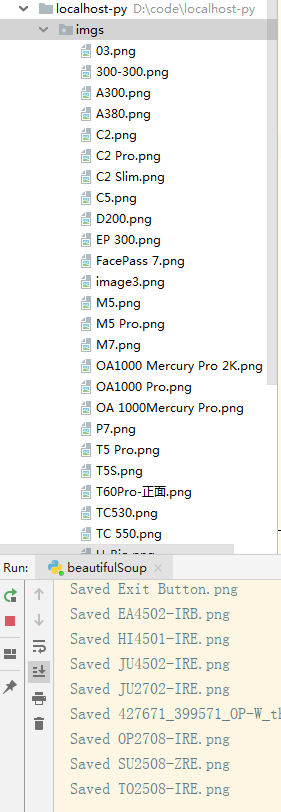
爬取的这个 URL 地址是写死的,其实这个网站是分三大块的,末尾 ID 不一样,还没搞明白怎么自动全爬。