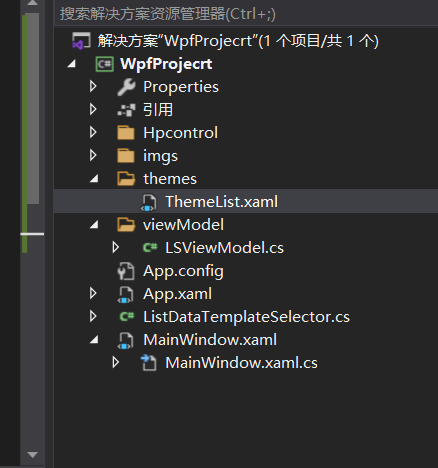
theme 文件
<ResourceDictionary xmlns="http://schemas.microsoft.com/winfx/2006/xaml/presentation"
xmlns:x="http://schemas.microsoft.com/winfx/2006/xaml"
xmlns:local="clr-namespace:WpfProjecrt.Hpcontrol">
<DataTemplate x:Key="HumanMessageDataTemplate">
<TextBlock Text="hello world"
Margin="0,0,0,0"
HorizontalAlignment="Right"
Foreground="#4d4d4d"
TextWrapping="Wrap"
FontSize="16"
FontFamily="楷体"/>
</DataTemplate>
<DataTemplate x:Key="DriverMessageDataTemplate">
<Grid HorizontalAlignment="Left">
<Grid Background="#ffffff">
<local:TestControl></local:TestControl>
</Grid>
</Grid>
</DataTemplate>
</ResourceDictionary>
2, 将theme 文件添加到App.xaml文件
<Application x:Class="WpfProjecrt.App"
xmlns="http://schemas.microsoft.com/winfx/2006/xaml/presentation"
xmlns:x="http://schemas.microsoft.com/winfx/2006/xaml"
xmlns:local="clr-namespace:WpfProjecrt"
StartupUri="MainWindow.xaml">
<Application.Resources>
<ResourceDictionary>
<ResourceDictionary.MergedDictionaries>
<ResourceDictionary Source="/themes/ThemeList.xaml"/>
</ResourceDictionary.MergedDictionaries>
</ResourceDictionary>
</Application.Resources>
</Application>
3, 添加listview 的选择器 ListDataTemplateSelector
public class ListDataTemplateSelector : DataTemplateSelector
{
public override DataTemplate SelectTemplate(object item, DependencyObject container)
{
DataTemplate dt= App.Current.Resources["DriverMessageDataTemplate"] as DataTemplate;
return dt;
// return App.Current.Resources["DriverMessageDataTemplate"] as DataTemplate;
}
}
4, 使用 现实的xml文件
<Window x:Class="WpfProjecrt.MainWindow"
xmlns="http://schemas.microsoft.com/winfx/2006/xaml/presentation"
xmlns:x="http://schemas.microsoft.com/winfx/2006/xaml"
xmlns:d="http://schemas.microsoft.com/expression/blend/2008"
xmlns:mc="http://schemas.openxmlformats.org/markup-compatibility/2006"
xmlns:local="clr-namespace:WpfProjecrt"
xmlns:local2="clr-namespace:WpfProjecrt.Hpcontrol"
mc:Ignorable="d"
Title="MainWindow" Height="450" Width="800">
<Grid>
<Grid>
<Grid.RowDefinitions>
<RowDefinition Height="auto"></RowDefinition>
<RowDefinition></RowDefinition>
</Grid.RowDefinitions>
<StackPanel Grid.Row="0">
<Image x:Name="mg" Height="100" Width="100"></Image>
<TextBlock Name="tb" >open web page</TextBlock>
<ComboBox x:Name="cb" DisplayMemberPath="name" ItemsSource="{Binding mm}"></ComboBox>
</StackPanel>
<ListView ItemsSource="{Binding mm}" ItemTemplateSelector="{Binding lss}" Grid.Row="1" x:Name="lw" Padding="0,16,0,0">
</ListView>
</Grid>
</Grid>
</Window>
对应后面的cs 文件
public class Meal
{
public string name
{
set;
get;
}
}
public partial class MainWindow : Window
{
public MainWindow()
{
InitializeComponent();
this.Loaded += MainWindow_Loaded;
this.DataContext = this;
// cb.ItemsSource = mcollection;
//lw.ItemsSource = mcollection;
//lw.ItemTemplateSelector = ListViewDataTemplateSelector;
}
private void MainWindow_Loaded(object sender, RoutedEventArgs e)
{
var link = new Hyperlink()
{
NavigateUri = new Uri("https://www.baidu.com"),
Inlines = { new Run() { Text = "baidu" } }
};
link.Click += Link_Click;
tb.Inlines.Add( link );
for(int i=0; i<100; i++)
{
Meal m = new Meal();
m.name = i.ToString();
mcollection.Add(m);
}
// mg.Source=new ImageSource()
BitmapImage image = new BitmapImage(new Uri("./imgs/123.jpg", UriKind.Relative));
mg.Source = image;
}
private ObservableCollection<Meal> mcollection = new ObservableCollection<Meal>();
public ObservableCollection<Meal> mm
{
get
{
return mcollection;
}
}
public ListDataTemplateSelector lss
{
get
{
return ls;
}
}
private ListDataTemplateSelector ls = new ListDataTemplateSelector();
private void Link_Click(object sender, RoutedEventArgs e)
{
System.Diagnostics.Process.Start(((Hyperlink)sender).NavigateUri.ToString());
}
}
总结, xml 文件绑定属性最好用CLR的包装器包装一下,
否则可能包装不上。