目前通用物体和场景识别支持超过 10 万类常见物体和场景识别,接口返回图片内 1 个或多个物体的名称,并可获取百科信息。适用于图像或视频内容分析、拍照识图等业务场景。
功能介绍
1. 识别物体或场景名称
支持识别动物、植物、商品、建筑、风景、动漫、食材、公众人物等 10 万个常见物体及场景,接口返回大类及细分类的名称结果。
2. 获取百科信息
支持获取图片识别结果对应的百科信息,接口返回百科词条 URL、图片和摘要描述,可选择是否需要返回百科信息。
应用场景
- 图片内容分析与推荐:对用户浏览的图片或观看的视频内容进行识别,根据识别结果给出相关内容推荐或广告展示。广泛应用于新闻资讯类、视频类 app 等内容平台中
- 拍照识图:根据用户拍摄照片,识别图片中物体名称及百科信息,提高用户交互体验,广泛应用于智能手机厂商、拍照识图及科普类 app 中
- 拍照闯关趣味营销:设计线上营销活动,根据用户拍摄照片,自动识别图片中物体信息是否符合活动要求,提升用户交互体验,减少人工审核成本
接口描述
该请求用于通用物体及场景识别,即对于输入的一张图片(可正常解码,且长宽比适宜),输出图片中的多个物体及场景标签。
请求说明
- HTTP 方法:
POST - 请求 URL:
https://aip.baidubce.com/rest/2.0/image-classify/v2/advanced_general - URL参数:
access_token - Header 参数:
Content-Type=application/x-www-form-urlencoded - Body 参数:见下表
| 参数 | 是否必选 | 类型 | 可选值范围 | 说明 |
|---|---|---|---|---|
| image | true | string | - | 图像数据,base64 编码,要求 base64 编码后大小不超过 4M,最短边至少 15px,最长边最大4096px,支持 jpg/png/bmp 格式。注意:图片需要 base64 编码、去掉编码头(data:image/jpg;base64,)后,再进行 urlencode |
| baike_num | 否 | integer | 0 | 返回百科信息的结果数,默认不返回 |
返回说明
返回参数如下表:
| 字段 | 是否必选 | 类型 | 说明 |
|---|---|---|---|
| log_id | 是 | uint64 |
唯一的 log id,用于问题定位 |
| result_num | 是 | unit32 |
返回结果数目,及 result 数组中的元素个数 |
| result | 是 | arrry(object) |
标签结果数组 |
| +keyword | 是 | string |
图片中的物体或场景名称 |
| +score | 是 | float |
置信度,0 - 1 |
| +root | 是 | string |
识别结果的上层标签,有部分钱币、动漫、烟酒等 tag 无上层标签 |
| +baike_info | 否 | object |
对应识别结果的百科词条名称 |
| ++baike_url | 否 | string |
对应识别结果百度百科页面链接 |
| ++image_url | 否 | string |
对应识别结果百科图片链接 |
| ++description | 否 | string |
对应识别结果百科内容描述 |
返回示例如下:
{
	"log_id": "4269290077301074002",
	"result_num": 5,
	"result": [
		{
			"score": 0.203018,
			"root": "植物-树",
			"baike_info": {
				"baike_url": "http://baike.baidu.com/item/%E6%A0%91/2699484",
				"image_url": "http://imgsrc.baidu.com/baike/pic/item/6159252dd42a2834218a2c2154b5c9ea15cebfef.jpg",
				"description": "树状图是一种数据结构,它是由n(n>=1)个有限结点组成一个具有层次关系的集合。把它叫做“树”是因为它看起来像一棵倒挂的树,也就是说它是根朝上,而叶朝下的。它具有以下的特点:每个结点有零个或多个子结点;没有父结点的结点称为根结点;每一个非根结点有且只有一个父结点;除了根结点外,每个子结点可以分为多个不相交的子树;"
			},
			"keyword": "树"
		},
		{
			"score": 0.15084,
			"root": "自然风景-其他",
			"keyword": "风景"
		},
		{
			"score": 0.100728,
			"root": "自然风景-天空",
			"keyword": "天空"
		},
		{
			"score": 0.052704,
			"root": "商品-工艺品",
			"keyword": "工艺品"
		},
		{
			"score": 0.003729,
			"root": "商品-工艺品",
			"keyword": "佛像"
		}
	]
}
C++ 代码实现调用
这里假设已经将环境配置好了,环境配置的文章可以参考 Windows 下使用 Vcpkg 配置百度 AI 图像识别 C++开发环境(VS2017)。
为了方便,首先根据返回参数定义了一个结构体,该结构体包括了返回参数中的参数,如下:
struct GeneralInfo {
	std::string keyword;
	float score;
	std::string root;
	std::string baikeurl;
	std::string imageurl;
	std::string baikedesc;

	void print() {
		std::cout << std::setw(30) << std::setfill('-') << '
';
		std::cout << "keyword: " << keyword << "
";
		std::cout << "score: " << std::fixed << std::setprecision(4) << score << "
";
		std::cout << "root: " << root << "
";
		if (baikeurl != "null")
			std::cout << "baikeurl: " << baikeurl << "
";
		if (imageurl != "null")
			std::cout << "imageurl: " << imageurl << "
";
		if (baikedesc != "null")
			std::cout << "baikedesc: " << baikedesc << "
";
	}
};
然后定义了一个类来调用接口并获取结果
class General
{
public:
	General();
	~General();

	Json::Value request(std::string imgBase64, std::map<std::string, std::string>& options);

	int getResultNum();

	// get all return results
	void getAllResult(std::vector<GeneralInfo>& results);

	// only get first result
	void getResult(GeneralInfo& result);


private:
	Json::Value obj_;
	std::string url_;
	uint32_t result_num_;
	// file to save token key
	std::string filename_;
};
类中的私有成员 obj_ 表示返回结果对应的 json 对象。url_ 表示请求的 url,result_num_ 表示返回结果数,filename_ 表示用于存储 access token 的文件的文件名。
request 函数输入请求图像的 base64 编码以及请求参数,返回一个 json 对象,json 对象中包含请求的结果。
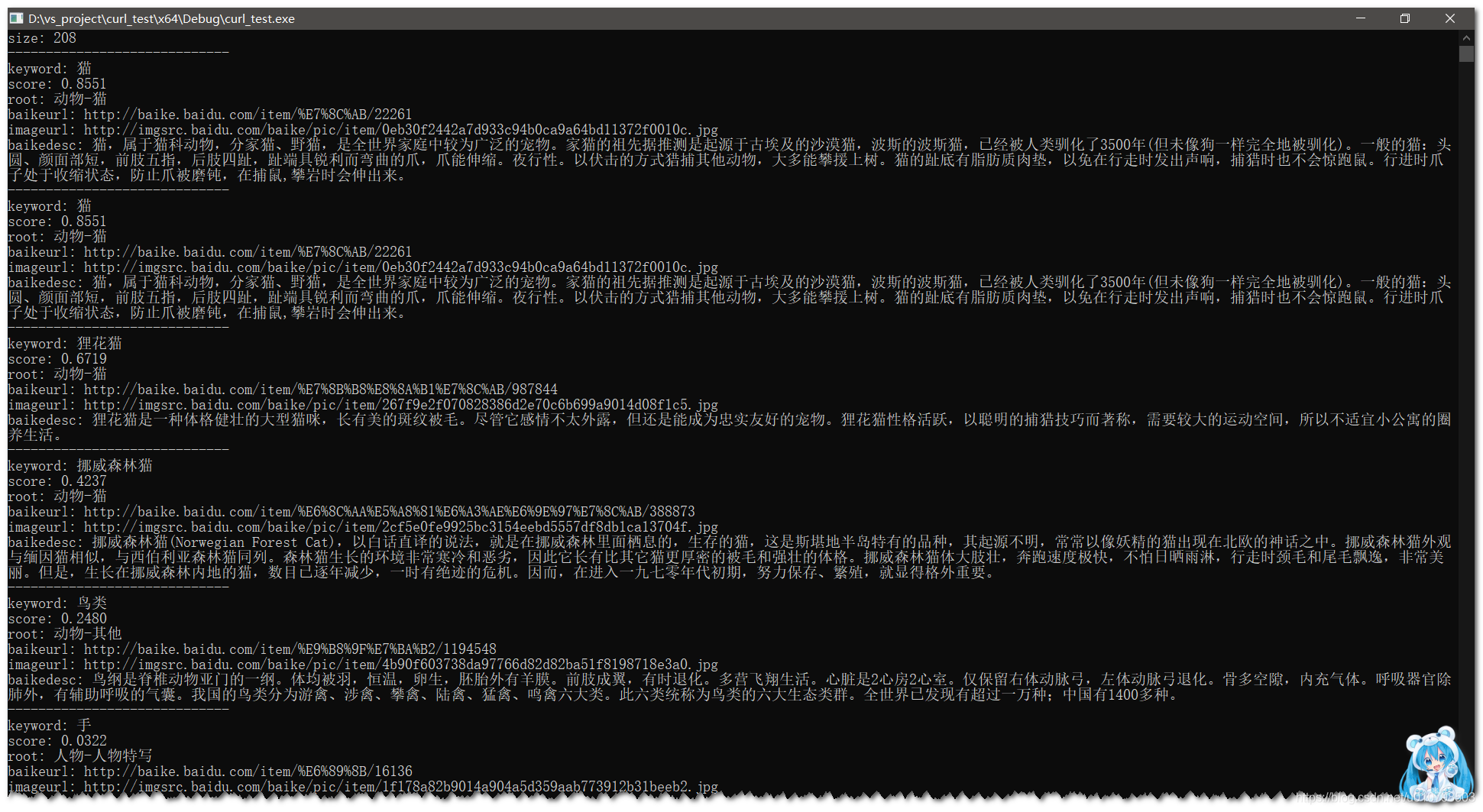
getAllResult 将所有返回结果存放到一个 vector 中。getResult 只返回第一条结果,也就是分数最高的结果。
完整代码如下
General.h 代码如下:
#pragma once
#include "util.h"

struct GeneralInfo {
	std::string keyword;
	float score;
	std::string root;
	std::string baikeurl;
	std::string imageurl;
	std::string baikedesc;

	void print() {
		std::cout << std::setw(30) << std::setfill('-') << '
';
		std::cout << "keyword: " << keyword << "
";
		std::cout << "score: " << std::fixed << std::setprecision(4) << score << "
";
		std::cout << "root: " << root << "
";
		if (baikeurl != "null")
			std::cout << "baikeurl: " << baikeurl << "
";
		if (imageurl != "null")
			std::cout << "imageurl: " << imageurl << "
";
		if (baikedesc != "null")
			std::cout << "baikedesc: " << baikedesc << "
";
	}
};

class General
{
public:
	General();
	~General();

	Json::Value request(std::string imgBase64, std::map<std::string, std::string>& options);

	int getResultNum();

	// get all return results
	void getAllResult(std::vector<GeneralInfo>& results);

	// only get first result
	void getResult(GeneralInfo& result);


private:
	Json::Value obj_;
	std::string url_;
	uint32_t result_num_;
	// file to save token key
	std::string filename_;
};

void generalTest();
General.cpp 代码如下:
#include "General.h"

General::General()
{
	filename_ = "tokenKey";
	url_ = "https://aip.baidubce.com/rest/2.0/image-classify/v2/advanced_general";
}


General::~General()
{
}

Json::Value General::request(std::string imgBase64, std::map<std::string, std::string>& options)
{
	std::string response;
	Json::Value obj;
	std::string token;

	// 1. get HTTP post body
	std::string body;
	mergeHttpPostBody(body, imgBase64, options);

	// 2. get HTTP url with access token
	std::string url = url_;
	getHttpPostUrl(url, filename_, token);

	// 3. post request, response store the result
	int status_code = httpPostRequest(url, body, response);
	if (status_code != CURLcode::CURLE_OK) {
		obj["curl_error_code"] = status_code;
		obj_ = obj;
		return obj; // TODO: maybe should exit
	}

	// 4. make string to json object
	generateJson(response, obj);

	// if access token is invalid or expired, we will get a new one
	if (obj["error_code"].asInt() == 110 || obj["error_code"].asInt() == 111) {
		token = getTokenKey();
		writeFile(filename_, token);
		return request(imgBase64, options);
	}

	obj_ = obj;

	checkErrorWithExit(obj);

	result_num_ = getResultNum();

	return obj;
}

int General::getResultNum()
{
	return obj_["result_num"].asInt();
}

void General::getAllResult(std::vector<GeneralInfo>& results)
{
	results.reserve(result_num_);
	GeneralInfo tmp;

	for (uint32_t i = 0; i < result_num_; ++i) {
		tmp.keyword = UTF8ToGB(obj_["result"][i]["keyword"].asString().c_str());
		tmp.score = obj_["result"][i]["score"].asFloat();
		tmp.root = UTF8ToGB(obj_["result"][i]["root"].asString().c_str());
		tmp.baikeurl = obj_["result"][i]["baike_info"].get("baike_url", "null").asString();
		tmp.imageurl = obj_["result"][i]["baike_info"].get("image_url", "null").asString();
		tmp.baikedesc = UTF8ToGB(obj_["result"][i]["baike_info"].get("description", "null").asString().c_str());
		results.push_back(tmp);
	}
}

void General::getResult(GeneralInfo& result)
{
	result.keyword = UTF8ToGB(obj_["result"][0]["keyword"].asString().c_str());
	result.score = obj_["result"][0]["score"].asFloat();
	result.root = UTF8ToGB(obj_["result"][0]["root"].asString().c_str());
	result.baikeurl = obj_["result"][0]["baike_info"].get("baike_url", "null").asString();
	result.imageurl = obj_["result"][0]["baike_info"].get("image_url", "null").asString();
	result.baikedesc = UTF8ToGB(obj_["result"][0]["baike_info"].get("description", "null").asString().c_str());
}


void generalTest()
{

	std::cout << "size: " << sizeof(GeneralInfo) << "
";

	// read image and encode to base64
	std::string imgFile = "./images/cat.jpg";
	std::string imgBase64;
	imgToBase64(imgFile, imgBase64);

	// set options
	std::map<std::string, std::string> options;
	options["baike_num"] = "5";


	Json::Value obj;
	General generalObj;
	obj = generalObj.request(imgBase64, options);

	GeneralInfo result;
	generalObj.getResult(result);
	result.print();

	std::vector<GeneralInfo> results;
	generalObj.getAllResult(results);

	for (auto & vec : results) {
		vec.print();
	}
}
util.h 代码如下:
#pragma once
#include <curl/curl.h>
#include <string>
#include <map>
#include <iostream>
#include <fstream>
#include <json/json.h>
#include <iomanip>
#include <opencv2/opencv.hpp>
#include "base64.h"

size_t writeCallback(void *ptr, size_t size, size_t nmemb, void *userdata);
std::string getTokenKey();
int readImageFile(const char *filename, std::string& out);
void imgToBase64(std::string &imgFile, std::string &imgBase64);
int writeFile(const std::string & fileString, const std::string &str);
int readFile(const std::string & fileString, std::string &str);
std::string UTF8ToGB(const char* str);
void mergeHttpPostBody(std::string &body, std::string imgBase64, std::map<std::string, std::string>& options);
void getHttpPostUrl(std::string &url, std::string &filename, std::string &token);
int httpPostRequest(std::string &url, std::string &body, std::string &response);
void generateJson(std::string &response, Json::Value &obj);
void checkErrorWithExit(Json::Value &obj);
util.cpp 代码如下:
#include "util.h"

// callback function for curl
size_t writeCallback(void *ptr, size_t size, size_t nmemb, void *userdata)
{
	std::string *str = dynamic_cast<std::string *>((std::string *)userdata);
	str->append((char *)ptr, size * nmemb);
	return size * nmemb;
}

// get access token from server by get method
std::string getTokenKey() {
	std::string url = "https://aip.baidubce.com/oauth/2.0/token";
	std::string apikey = "FP6E0dqEnGTPAXMYpUDXW7tb";
	std::string secritkey = "MoNhkCh3VhtXpMft7Xoj4hQy4iHVbNZu";
	std::map<std::string, std::string> params;
	std::string response;

	params["grant_type"] = "client_credentials";
	params["client_id"] = apikey;
	params["client_secret"] = secritkey;

	// append url with parameters
	for (auto it = params.begin(); it != params.end(); ++it) {
		url += (it == params.begin() ? "?" : "&") + it->first + "=" + it->second;
	}

	CURL *curl = curl_easy_init();

	struct curl_slist * slist = NULL;

	curl_easy_setopt(curl, CURLOPT_URL, url.c_str());
	curl_easy_setopt(curl, CURLOPT_HTTPHEADER, slist);
	curl_easy_setopt(curl, CURLOPT_WRITEFUNCTION, writeCallback);  // set callback function
	curl_easy_setopt(curl, CURLOPT_WRITEDATA, &response); // set var to receive return info from callback function
	curl_easy_setopt(curl, CURLOPT_NOSIGNAL, true);
	curl_easy_setopt(curl, CURLOPT_SSL_VERIFYPEER, false);
	curl_easy_setopt(curl, CURLOPT_SSL_VERIFYHOST, false);
	curl_easy_setopt(curl, CURLOPT_VERBOSE, false);

	int status_code = curl_easy_perform(curl);

	curl_easy_cleanup(curl);
	curl_slist_free_all(slist);

	Json::Value obj;
	if (status_code != CURLcode::CURLE_OK) {
		obj["curl_error_code"] = status_code;
		return obj.toStyledString();
	}

	// parse json string
	JSONCPP_STRING error;
	Json::CharReaderBuilder builder;
	const std::unique_ptr<Json::CharReader> reader(builder.newCharReader());
	reader->parse(response.data(), response.data() + response.size(), &obj, &error);
	std::string access_token = obj["access_token"].asString();

	return access_token;
}

// read image file [https://stackoverflow.com/questions/9612121/how-to-read-image-files-and-store-it-in-memorystdstring-in-c]
int readImageFile(const char *filename, std::string& out) {
	std::ifstream in(filename, std::ios::in | std::ios::binary);
	if (in) {
		std::ostringstream oss;
		oss << in.rdbuf();
		out.assign(oss.str());
		return 0;
	}
	else {
		std::cerr << "Can't open image!" << std::endl;
		return -1;
	}
}

void imgToBase64(std::string &imgFile, std::string &imgBase64) {
	// read image and encode to base64
	std::string out;
	readImageFile(imgFile.c_str(), out);
	imgBase64 = base64_encode(out.c_str(), (int)out.size());
}

int writeFile(const std::string & fileString, const std::string &str) {
	std::ofstream out(fileString, std::ios::binary);
	if (out.is_open()) {
		out << str;
		out.close();
	}

	return 0;
}

int readFile(const std::string & fileString, std::string &str) {
	std::ifstream in(fileString);
	if (!in.is_open()) {
		str = "";
		return -1;
	}

	char buffer[256];
	while (!in.eof()) {
		in.getline(buffer, sizeof(buffer));
	}

	str = buffer;
	return 0;
}


std::string UTF8ToGB(const char* str)
{
	std::string result;
	WCHAR *strSrc;
	LPSTR szRes;

	int i = MultiByteToWideChar(CP_UTF8, 0, str, -1, NULL, 0);
	strSrc = new WCHAR[i + 1];
	MultiByteToWideChar(CP_UTF8, 0, str, -1, strSrc, i);

	i = WideCharToMultiByte(CP_ACP, 0, strSrc, -1, NULL, 0, NULL, NULL);
	szRes = new CHAR[i + 1];
	WideCharToMultiByte(CP_ACP, 0, strSrc, -1, szRes, i, NULL, NULL);

	result = szRes;
	delete[]strSrc;
	delete[]szRes;
	return result;
}

void mergeHttpPostBody(std::string &body, std::string imgBase64, std::map<std::string, std::string>& options) {
	body = "image=" + std::string(curl_escape(imgBase64.c_str(), int(imgBase64.size()))) + "&";
	// append body with options
	for (auto it = options.begin(); it != options.end(); ++it) {
		body += std::string(curl_escape(it->first.c_str(), (int)it->first.size()))
			+ "=" + std::string(curl_escape(it->second.c_str(), (int)it->second.size())) + "&";
	}
}

// first get token from file (if exist), then add token to url
void getHttpPostUrl(std::string &url, std::string &filename, std::string &token) {
	// if token file is not exist, a new one should be create
	if (readFile(filename, token) < 0) {
		token = getTokenKey();
		writeFile(filename, token);
	}

	url = url + "?access_token=" + token;
}

int httpPostRequest(std::string &url, std::string &body, std::string &response) {
	struct curl_slist * slist = NULL;

	CURL *curl = curl_easy_init();

	// set headers, actually this is used by default
	std::string headers = "Content-Type:application/x-www-form-urlencoded";
	slist = curl_slist_append(slist, headers.c_str());

	curl_easy_setopt(curl, CURLOPT_URL, url.c_str());
	curl_easy_setopt(curl, CURLOPT_HTTPHEADER, slist);
	curl_easy_setopt(curl, CURLOPT_POST, true);
	curl_easy_setopt(curl, CURLOPT_POSTFIELDS, body.data());
	curl_easy_setopt(curl, CURLOPT_POSTFIELDSIZE, body.size());
	curl_easy_setopt(curl, CURLOPT_WRITEFUNCTION, writeCallback);
	curl_easy_setopt(curl, CURLOPT_WRITEDATA, (void *)&response);
	curl_easy_setopt(curl, CURLOPT_NOSIGNAL, true);
	curl_easy_setopt(curl, CURLOPT_SSL_VERIFYPEER, false);
	curl_easy_setopt(curl, CURLOPT_SSL_VERIFYHOST, false);
	curl_easy_setopt(curl, CURLOPT_VERBOSE, false);

	int status_code = curl_easy_perform(curl);

	curl_easy_cleanup(curl);
	curl_slist_free_all(slist);

	return status_code;
}

void generateJson(std::string &response, Json::Value &obj) {
	// parse json string
	JSONCPP_STRING error;
	Json::CharReaderBuilder builder;
	const std::unique_ptr<Json::CharReader> reader(builder.newCharReader());
	reader->parse(response.data(), response.data() + response.size(), &obj, &error);
}

void checkErrorWithExit(Json::Value &obj)
{
	if (obj.get("error_code", "null")) {
		std::cerr << obj.get("error_code", "null") << " : " << obj.get("error_msg", "null") << std::endl;
		system("pause");
		exit(EXIT_FAILURE);
	}
}
运行结果