目录
一、索引测试
1.准备测试数据
#1. 准备表
create table t1(
id int,
name varchar(20),
gender char(6),
email varchar(50)
);

#2. 创建存储过程,实现批量插入记录
delimiter $$ #声明存储过程的结束符号为$$
create procedure auto_insert1()
BEGIN
    declare i int default 1;
    while(i<3000000)do #300w数据
    insert into t1 values(i,'mm','male',concat('mm',i,'@boy'));
    set i=i+1;
    end while;
END$$  #$$结束
delimiter ; #重新声明分号为结束符号

#3. 查看存储过程
show create procedure auto_insert1G

#4. 调用存储过程
call auto_insert1(); # 过程会很慢,一分钟后可强制结束,也已将创建了一些
2.未创建索引前的查询速度缓慢
#无索引:从头到尾扫描一遍,所以查询速度很慢
mysql> select * from s1 where id=333;
+------+---------+--------+----------------+
| id   | name    | gender | email          |
+------+---------+--------+----------------+
|  333 | mm| male     | cm333@oldboy   |
+------+---------+--------+----------------+
1 row in set (1.33 sec)

mysql> explain select * from s1 where id=333;

mysql> select * from s1 where email='cm333@oldboy';
+------+---------+--------+----------------+
| id   | name    | gender | email          |
+------+---------+--------+----------------+
|  333 | cm333   | male   | cm333@oldboy   |
+------+---------+--------+----------------+
1 row in set (1.50 sec)
3.加上索引后查询速度极快
1. 一定是为搜索条件的字段创建索引,比如select * from s1 where id > 5;就需要为id加上索引

2. 在表中已经有大量数据的情况下,建索引会很慢,且占用硬盘空间,插入删除更新都很慢,只有查询快
比如create index idx on s1(id);会扫描表中所有的数据,然后以id为数据项,创建索引结构,存放于硬盘的表中。
建完以后,再查询就会很快了

mysql> create index idx on s1(id);

3. 需要注意的是:innodb表的索引会存放于s1.ibd文件中,而myisam表的索引则会有单独的索引文件table1.MYI

mysql> select * from s1 where id=333;
+------+---------+--------+----------------+
| id   | name    | gender | email          |
+------+---------+--------+----------------+
|  333 | cm333   | male   | cm333@oldboy   |
+------+---------+--------+----------------+
1 row in set (0.01 sec)

#  建立完索引,那个数据的ibd文件是变大了,但是如果删除完索引,但是那个ibd文件却不会变小,这是一个bug
#  因为ibd里面的数据和索引里面的内容都放在ibd文件里了
二、正确使用索引
1、索引命中也未必会加速
并不是说我们创建了索引就一定会加快查询速度,若想利用索引达到预想的提高查询速度的效果,我们在添加索引时,必须遵循以下问题

# 1、如何正确使用索引
1、以什么字段的值为基础构建索引
2、最好是不为空、唯一、占用空间小的字段

# 2、针对全表查询语句如何优化?
应用场景:用户想要浏览所有的商品信息
select count(id) from s1;

如何优化:
开发层面分页查找,用户每次看现从数据中拿

# 3、针对等值查询
以重复度低字段为基础创建索引加速效果明显
create index xxx on s1(id);
select count(id) from s1 where id = 33;

以重复度高字段为基础创建索引加速效果明显
create index yyy on s1(name);
select count(id) from s1 where name="egon"; -- 速度极慢
select count(id) from s1 where name!="egon";  -- 速度快
select count(id) from s1 where name="yy";  -- 速度快

以占用空间大字段为基础创建索引加速效果不明显

# 总结:给重复低、且占用空间小的字段值为基础构建索引

# 4、关于范围查询
select count(id) from s1 where id=33;
select count(id) from s1 where id>33;
select count(id) from s1 where id>33 and id < 36;
select count(id) from s1 where id>33 and id < 1000000;

# 总结:innodb存储能加速范围查询,但是查询范围不能特别大

5、关于条件字段参与运算
select count(id) from s1 where id*12 = 10000;
select count(id) from s1 where id = 10000/12;
select count(id) from s1 where func(id) = 10000/12;

# 总结:不要让条件字段参与运算,或者说传递给函数
范围问题,或者说条件不明确,条件中出现这些符号或关键字:>、>=、<、<=、!= 、between...and...、like
2、大于号、小于号
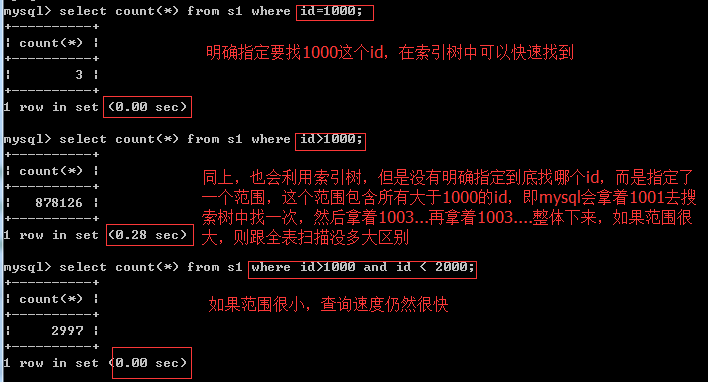
3、不等于!=
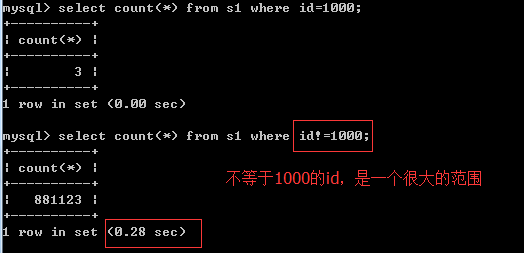
4、 between …and…
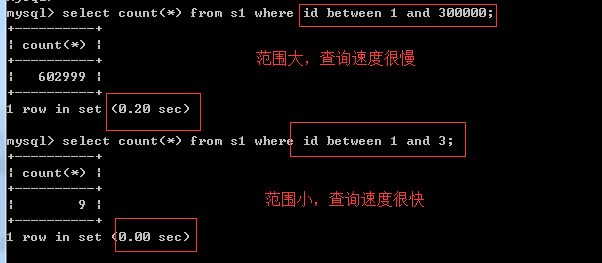
5、like
like:%或者_应该放在右边,并且左边的字符应该尽可能地精确一些,这样锁定的范围才会小一些,例如like "egon3%"而不是like "%egon3"、like "eg%"
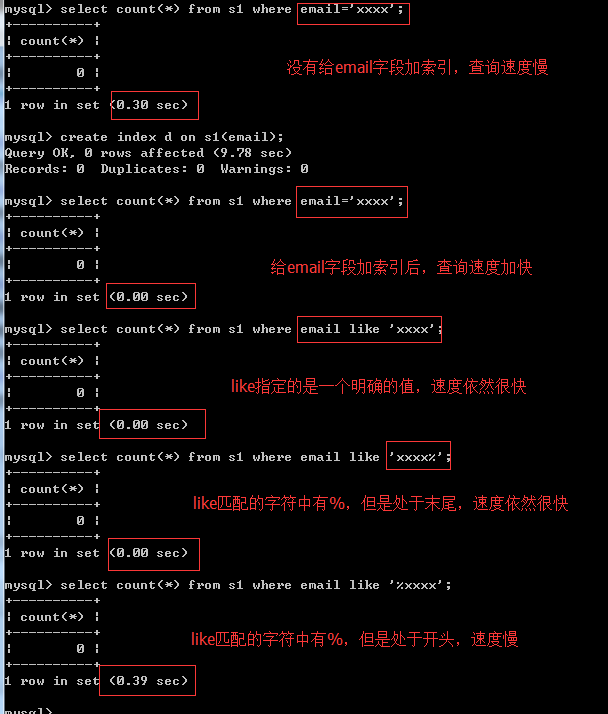
6、索引下推技术
索引下推技术默认是开启的
# 删除索引xxx
mysql> drop index xxx on t1;
Query OK, 0 rows affected (0.01 sec)
Records: 0  Duplicates: 0  Warnings: 0

mysql> desc t1;
+--------+-------------+------+-----+---------+-------+
| Field  | Type        | Null | Key | Default | Extra |
+--------+-------------+------+-----+---------+-------+
| id     | int(11)     | YES  |     | NULL    |       |
| name   | varchar(20) | YES  |     | NULL    |       |
| gender | char(6)     | YES  |     | NULL    |       |
| email  | varchar(50) | YES  | MUL | NULL    |       |
+--------+-------------+------+-----+---------+-------+
4 rows in set (0.00 sec)

# and查询
# 对于连续多个and: mysql会按照联合索引,从左到右的顺序找一个区分度高的索引字段(这样便可以快速锁定很小的范围),加速查询。
# 区分度最高的是email(命中普通索引),所以制作联合索引为(email,name,gender)
mysql> explain select count(id) from t1 where name="nana" and email="nana666@haha" and gender="male";
+----+-------------+-------+------+---------------+------+---------+-------+------+------------------------------------+
| id | select_type | table | type | possible_keys | key  | key_len | ref   | rows | Extra                              |
+----+-------------+-------+------+---------------+------+---------+-------+------+------------------------------------+
|  1 | SIMPLE      | t1    | ref  | zzz           | zzz  | 203     | const |    1 | Using index condition; Using where |
+----+-------------+-------+------+---------------+------+---------+-------+------+------------------------------------+

# or查询
# 对于连续多个or: mysql会按照条件的顺序,从左到右依次判断,即联合索引为(name,email,gender),并不会加速查询
mysql> explain select count(id) from t1 where name="nana" or email="nana666@haha" or gender="male";
and与or的逻辑:
条件1 and 条件2:所有条件都成立才算成立,但凡要有一个条件不成立则最终结果不成立

条件1 or 条件2:只要有一个条件成立则最终结果就成立
and连接的多个条件属于小范围,or连接的多个条件属于大范围。
对于连续多个and:
mysql会按照联合索引,从左到右的顺序找一个区分度高的索引字段(这样可以快速锁定很小的范围),加速查询。
对于连续多个or:
mysql会按照条件的顺序,从左到右依次判断,并不会加速查询。
7、其他情况:不走索引
# 1)没有查询条件,或者查询条件没有用到索引列
没有查询条件
mysql> explain select * from world.city;

没有用索引列做条件
mysql> explain select * from world.city where 1=1;
mysql> explain select * from world.city where name='shanghai';

# 2)查询结果集是原表中的大部分数据,应该是25%以上
如果生产中,必须有这种全表扫描的需求不走索引
mysql> explain select * from world.city where population > 50;

如果业务允许,可以使用limit控制,可以走索引
mysql> explain select * from world.city where population>50 limit 10;

如果业务不允许,可以使用缓存
前面加上缓存,memcached,redis

# 3)索引本身失效,统计数据不真实
反复修改,插入数据,索引被修改坏了,每次都会进行排序

# 4)查询条件使用函数在索引列上或者对索引列进行运算,运算包括(+,-,*等)
mysql> explain select * from world.city where id=9;
mysql> select * from tb1 where reverse(email) = 'egon';

查询ID等于9的数据,会导致不走索引
mysql> explain select * from world.city where id-1=8;

查询ID等于9的数据,可以在后面作加减
mysql> explain select * from world.city where id=8+1;

# 5)隐式转换,会导致索引失效
如果列是字符串类型,传入条件是必须用引号引起来,不然...
select * from tb1 where email = 999;

创建一个表
create table test(id int, name varchar(20), phonenum varchar(10));

插入几条数据
insert into test values(1,'jc','110'),(2,'xf',119),(3,'jh',120);

建立索引,没有相同值可以给唯一索引
alter table test unique key idx_num(phonenum);

查看索引
show index from test;

查询语句级别
不走索引
explain select * from test where phonenum=110;
走索引
explain select * from test where phonenum='110'; -- 引号可能导致大事故
因为这一列是varchar类型,必须以字符来查询


# 6)<> 和 not in  , or 也不走索引
mysql> explain select * from test where phonenum <> '120';
mysql> explain select * from test where phonenum not in (120);
mysql> explain select * from test where telnum='110' or telnum='119';

使用union all可以走索引
mysql> explain select * from test where telnum='110' union all select * from test where telnum='119';

# 7)like模糊查询%在最前面,不走索引
%在前面不走索引
mysql> explain select * from city where countrycode like '%HN';

%在后面,走索引
mysql> explain select * from city where countrycode like 'CH%';

放在后面也不是一定了,因为涉及到第二点结果的占总数据的比例

%在最前面的搜索需求,建议使用elasticsearch  ES  ELK(E) 搜索引擎式的 数据库

# 8)单独引用联合索引里非第一位置的索引列
组合索引最左前缀
如果组合索引为:(name,email)
name and email -- 命中索引
name -- 命中索引
email -- 未命中索引

# 9)排序条件为索引,则select字段必须也是索引字段,否则无法命中
- order by
select name from s1 order by email desc;
当根据索引排序时候,select查询的字段如果不是索引,则速度仍然很慢
select email from s1 order by email desc;
特别的:如果对主键排序,则还是速度很快:
select * from tb1 order by nid desc;
8、总结索引使用原则
- 1、在创建索引的时候,会把该列所有的数据按照btree的方式进行排序

- 2、为常作为查询条件的字段建立索引

- 3、限制索引的数目,不要每列都创建索引
每个索引都需要占用磁盘空间,索引越多,需要的磁盘空间就越大。
修改表时,对索引的重构和更新很麻烦。越多的索引,会使更新表变得很浪费时间。

- 4、在同一列上,尽量避免创建多个索引,可以创建多个但是它们是有优先级的,先走一个就不会再走另一个索引了;
    alter table student add index idx_name(name);
    alter table country add unique key uni_name(name);

- 5、避免对大列建索引,在数据很长的列上创建前缀索引

- 6、如果可以创建唯一索引,就创建唯一索引(该列的数据不重复),查询速度快

- 7、不要对重复度高的字段创建索引

- 8、索引不要参与计算

- 9、为经常要排序,分组,联合操作的列,创建联合索引
经常需要ORDER BY、GROUP BY、DISTINCT和UNION等操作的字段,排序操作会浪费很多时间。
如果为其建立索引,可以有效地避免排序操作

- 10、尽量使用前缀来索引
创建索引的时候,可以给该列所有数据进行排序
create index xxxx on tb(title(19)) # text类型,必须制定长度

- 11、删除不再使用或者很少使用的索引
表中的数据被大量更新,或者数据的使用方式被改变后,原有的一些索引可能不再需要。数据库管理员应当定期找出这些索引,将它们删除,从而减少索引对更新操作的影响。

- 12、避免使用select *

- 13、count(1)或count(列) 代替 count(*),ps:mysql中没有差别了

- 14、创建表时尽量时 varchar 代替 char

- 15、表的字段顺序固定长度的字段优先

- 16、使用连接(JOIN)来代替子查询(Sub-Queries)

- 17、连表时注意条件类型需一致
9、联合索引与最左前缀匹配原则
条件中需要用到多个字段,并且多次查询中的多个字段都包含某一个字段,即可创建联合索引
什么时候创建联合索引?
条件中需要用到多个字段,并且多次查询中的多个字段都包含某一个字段。
创建联合索引需要注意的问题:
重复度低且占用空间较小的字段应该尽量往左放,让其称为最左前缀。
使用联合索引,满足加速条件的规则:
使用select查询数据的时候,where条件中必须包含最左前缀的字段,命中索引才可以实现加速
三、慢查询优化的基本步骤
# 0.先运行看看是否真的很慢,注意设置SQL_NO_CACHE
# 1.where条件单表查,锁定最小返回记录表。这句话的意思是把查询语句的where都应用到表中返回的记录数最小的表开始查起,单表每个字段分别查询,看哪个字段的区分度最高
# 2.explain查看执行计划,是否与1预期一致(从锁定记录较少的表开始查询)
# 3.order by limit 形式的sql语句让排序的表优先查
# 4.了解业务方使用场景
# 5.加索引时参照建索引的几大原则
# 6.观察结果,不符合预期继续从0分析
四、explain使用
之前总说到查询速度、查询效率,那使用什么去查看查询的快慢呢,就用explain
1.explain用法
我们之前查询过SQL、
#1.查询中国和美国的城市 or 和 in
mysql> select * from world.city where countrycode='CHN' or countrycode='USA';
mysql> select * from world.city where countrycode in ('CHN','USA');

#2.union all (联合查询) 讲索引的时候再说
mysql> select * from world.city where countrycode=‘USA’ union all select * from world.city where countrycode=‘CHN’;

#3.explain用法
explain select * from city where countrycode='USA' or countrycode='CHN';
explain select * from city where countrycode in ('USA','CHN');
explain select * from world.city where countrycode='USA' union all select * from world.city where countrycode='CHN';
2.explain结果注解
mysql> explain select id from student where id=2;

#ID:
id相同,执行顺序由上至下
id不同,如果是子查询,id的序号会递增,id值越大优先级越高,越先被执行
#type:
查询使用了哪种类型
#possible_keys:
可能应用在这张表中的索引,一个或多个
#key:
实际使用的索引,如果为NULL,则没有使用索引
#key_len (可以使用前缀索引控制)
表示索引中使用的字节数,可通过该列计算查询中使用的索引的长度,在不损失精确性的情况下,长度越短越好。
#ref
级别是否在ref之上
#rows
根据表统计信息及索引选用情况,大致估算出找到所需的记录所需要读取的行数,也就是说,用的越少越好
#Extra
Using filesort:使用order by时
Using temporary:使用排序order by和分组查询group by时
3.查询数据种类
1)全表扫描

#1.什么是全表扫描
在explain语句结果中type为ALL,MySQL将遍历全表以找到匹配的行

#2.什么时候出现全表扫描?
1.业务确实要获取所有数据
mysql> explain select * from city;

2.不走索引导致的全表扫描
2.1 没索引
mysql> explain select * from city where District=‘shanghai’;
#创建索引后速度会提升,变成索引扫描了
mysql> alter table city add index idx_District(District);
mysql> explain select * from city where District=‘shanghai’;
2.2 索引创建有问题
2.3 语句有问题

2)索引扫描

#常见的索引扫描类型:
1)index 全索引扫描,index与ALL区别为index类型只遍历索引树(性能也不高)
mysql> explain select population from city;

2)range 范围查询,只检索给定范围的行,使用一个索引来选择行,一般来说,SQL语句只要达到range级别,就可以了
mysql> explain select * from city where countrycode in (‘USA’,‘CHN’);

3)ref 精确查找,匹配条件有普通索引
#先给population列一个索引
mysql> alter table city add index idx_population(population);
#然后查询
mysql> explain select * from city where population=300000000;

4)eq_ref 类似ref,区别就在使用的索引是唯一索引
explain select city.name,city.countrycode,country.name from city join country on city.countrycode=country.code where city.population<100;

5)const 使用的索引是主键索引
mysql> explain select * from country where code=‘CHN’;

6)system system是const类型的特例,当查询的表只有一行的情况下
mysql> delete from country where code != ‘CHN’;
#有外键删除不了

7)null 执行过程不用访问表或索引,直接选取索引列的最小值
mysql> explain select min(population) from city;