一些登录页面会有滑块验证,如下图:
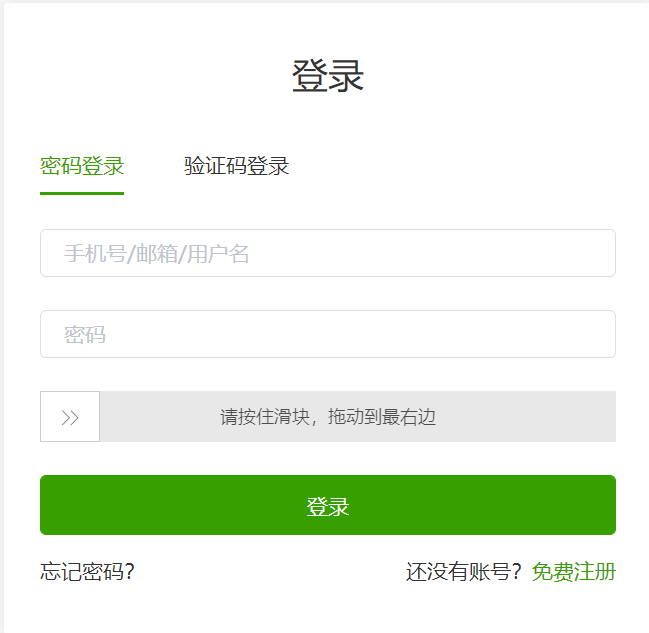
首先尝试用selenium按住滑块,脚本如下:
el1 = driver.find_element_by_xpath('//*[@id="nc_1_n1z"]')  # 按住滑块
ActionChains(driver).click_and_hold(on_element=el1).perform()
ActionChains(driver).move_to_element_with_offset(to_element=el1, xoffset=400, yoffset=0).perform()  # 滑动滑块
xoffset表示向右移动,向左则为负,yoffset表示向下移动
但是发现还不行,滑块对自动化程序作了限制,那么只有使用js改window.navigator.webdriver为false了
script = 'Object.defineProperty(navigator,"webdriver",{get:() => false,});'
driver.execute_script(script) # 运行Javascript
完整代码如下:
def onwork_login(**param_dict):
    driver = webdriver.Chrome()
    driver.get("要导航到的网址")  # 导航到onwork页面
    driver.find_element_by_xpath('//*[@id="details-button"]').click()  # 点击高级按钮
    driver.find_element_by_xpath('//*[@id="proceed-link"]').click()  # 点击继续前往
    driver.find_element_by_xpath('//*[@id="app"]/div/div[1]/div/div/a[1]').click()  # 点击右上方登录
    driver.find_element_by_xpath('//*[@id="pane-first"]/div/form/div[1]/div/div/input').send_keys(
        param_dict['username'])  # 输入用户名
    driver.find_element_by_xpath('//*[@id="pane-first"]/div/form/div[2]/div/div[1]/input').send_keys(
        param_dict['password'])  # 输入密码
    ''' js改window.navigator.webdriver属性为false'''
    script = 'Object.defineProperty(navigator,"webdriver",{get:() => false,});'
    driver.execute_script(script)  # 运行Javascript
    el1 = driver.find_element_by_xpath('//*[@id="nc_1_n1z"]')  # 按住滑块
    ActionChains(driver).click_and_hold(on_element=el1).perform()
    ActionChains(driver).move_to_element_with_offset(to_element=el1, xoffset=400, yoffset=0).perform()  # 滑动滑块
    time.sleep(1)
    driver.find_element_by_xpath('//*[@id="pane-first"]/div/button/span').click()  # 点击登录
参考:
https://blog.csdn.net/qq_41338249/article/details/107622186
https://blog.csdn.net/weixin_39861627/article/details/111018765?utm_medium=distribute.pc_relevant.none-task-blog-2~default~baidujs_title~default-4.control&spm=1001.2101.3001.4242