打开 WPF工程该文件
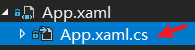
增加 如下代码:
 1 using System;
 2 using System.Collections.Generic;
 3 using System.Configuration;
 4 using System.Data;
 5 using System.Diagnostics;
 6 using System.IO;
 7 using System.Linq;
 8 using System.Runtime.InteropServices;
 9 using System.Threading.Tasks;
10 using System.Windows;
 1 public static class ConsoleManager
 2 {
 3     private const string Kernel32_DllName = "kernel32.dll";
 4     [DllImport(Kernel32_DllName)]
 5     private static extern bool AllocConsole();
 6     [DllImport(Kernel32_DllName)]
 7     private static extern bool FreeConsole();
 8     [DllImport(Kernel32_DllName)]
 9     private static extern IntPtr GetConsoleWindow();
10     [DllImport(Kernel32_DllName)]
11     private static extern int GetConsoleOutputCP();
12     public static bool HasConsole
13     {
14         get { return GetConsoleWindow() != IntPtr.Zero; }
15     }
16     /// Creates a new console instance if the process is not attached to a console already.
17     public static void Show()
18     {
19         #if DEBUG
20         if (!HasConsole)
21         {
22             AllocConsole();
23             InvalidateOutAndError();
24         }
25         #endif
26     }
27     /// If the process has a console attached to it, it will be detached and no longer visible. Writing to the System.Console is still possible, but no output will be shown.
28     public static void Hide()
29     {
30         #if DEBUG
31         if (HasConsole)
32         {
33             SetOutAndErrorNull();
34             FreeConsole();
35         }
36         #endif
37     }
38     public static void Toggle()
39     {
40         if (HasConsole)
41         {
42             Hide();
43         }
44         else
45         {
46             Show();
47         }
48     }
49     static void InvalidateOutAndError()
50     {
51         Type type = typeof(System.Console);
52         System.Reflection.FieldInfo _out = type.GetField("_out",
53             System.Reflection.BindingFlags.Static | System.Reflection.BindingFlags.NonPublic);
54         System.Reflection.FieldInfo _error = type.GetField("_error",
55             System.Reflection.BindingFlags.Static | System.Reflection.BindingFlags.NonPublic);
56         System.Reflection.MethodInfo _InitializeStdOutError = type.GetMethod("InitializeStdOutError",
57             System.Reflection.BindingFlags.Static | System.Reflection.BindingFlags.NonPublic);
58         Debug.Assert(_out != null);
59         Debug.Assert(_error != null);
60         Debug.Assert(_InitializeStdOutError != null);
61         _out.SetValue(null, null);
62         _error.SetValue(null, null);
63         _InitializeStdOutError.Invoke(null, new object[] { true });
64     }
65     static void SetOutAndErrorNull()
66     {
67         Console.SetOut(TextWriter.Null);
68         Console.SetError(TextWriter.Null);
69     }
70 }
修改增加运行语句:
 1     /// <summary>
 2     /// Interaction logic for App.xaml
 3     /// </summary>
 4     public partial class App : Application
 5     {
 6         App()
 7         {
 8             ConsoleManager.Show();
 9         }
10     }
OK