我在Windows 7 的使用中,出现了光盘打不开的情况,即插入光盘后有反应去看不到其中的文件甚至于光盘信息,经查,是因为注册表中烧录CB的临时文件夹被更改为”\”所以导致的,我们只要将之改回原来的有效路径就能正常访问光驱了。
# chsword.cnblogs.com
# Zou Jian 2010-1-3
$reg="HKEY_CURRENT_USER\Software\Microsoft\Windows\CurrentVersion\Explorer\CD Burning\StagingInfo\"
	$un=[System.Environment]::UserName
	$hx="\"
Get-ChildItem -Path Registry::$reg -Name | foreach-object -process {
 	$newreg=$reg+$_
	$c =  Get-ItemProperty -Path Registry::$newreg -Name StagingPath
    if($c.StagingPath -eq $hx){
    	$newPath="C:\Users\"+$un+"\AppData\Local\Microsoft\Windows\Burn\Burn1"
    	Remove-ItemProperty -Path Registry::$newreg -Name StagingPath
    	New-ItemProperty -Path  Registry::$newreg -Name StagingPath -PropertyType String -Value $newPath
    	"Done. you can open your Disk"
    }
 }
我们以管理员模式打开PowerShell
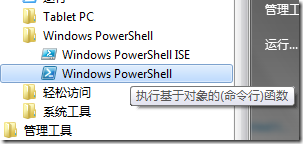
然后将以上代码复制进去点回车执行,即可解决问题
