Troubleshooting SSL related issues (Server Certificate)
Tools Used in this Troubleshooter:
- SSLDiag
- Network Monitor 3.4/Wireshark
This material is provided for informational purposes only. Microsoft makes no warranties, express or implied.
Overview
This document will help you in troubleshooting SSL issues related to IIS only. Client Certificates troubleshooting will not be covered in this document. Server Certificates are meant for Server Authentication and we will be dealing only with Server Certificates in this document.
If the Client certificates section is set to "Require" and then you run into issues, then please don't refer this document. This is meant for troubleshooting SSL Server certificates issue only.
It is important to know that every certificate comprises of a public key (used for encryption) and a private key (used for decryption). The private key is known only to the server.
The default port for https is 443.
I am under the assumption the reader is well-versed in SSL Handshake and the Server Authentication process during the SSL handshake.
Description of the Secure Sockets Layer (SSL) Handshake:
https://support.microsoft.com/kb/257591
Description of the Server Authentication Process during the SSL Handshake:
https://support.microsoft.com/kb/257587
Scenarios
The following error message is seen while browsing the website over https:

The first thing that has to be checked is whether the website is accessible over http. If it is not, there likely is a separate issue not covered here. You will need to have the website working on http first before continuing with this troubleshooter.
Now let's assume the website is accessible over http and we get the above error when trying to browse over https. The problem is seen because the SSL handshake failed and hence the error message was seen. There could be many reasons. We will follow a step-by-step approach to solve this problem.
Scenario 1 一共有6个scenario的分析
Check if the server certificate has the private key corresponding to it. Refer the below picture:
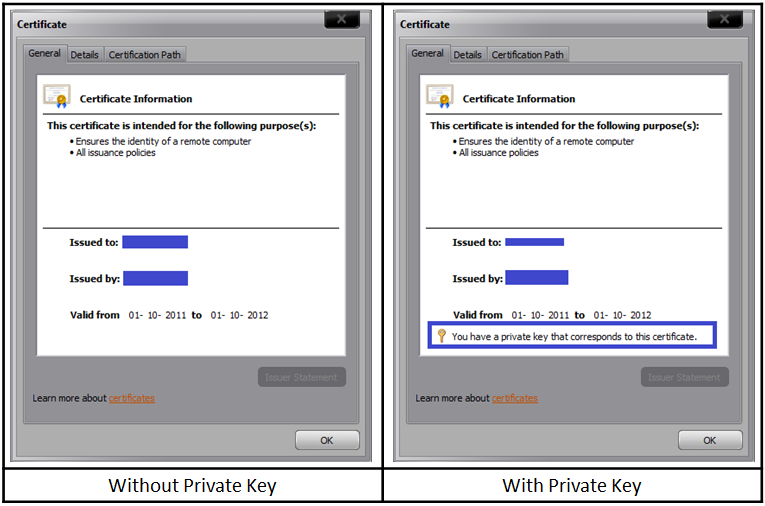
去原文看处理方式
Scenario 2
We went pass the first hurdle and now we have a server certificate containing the private key installed on the website. However, we still get the same error as above. The website is still not accessible over https.
The SSLDiag tool comes in handy here.
Windows Server 2003:
For IIS 7 and IIS 7.5, use vijaysk's SSL Diagnostics tool. Below is the link:
https://blogs.msdn.com/b/vijaysk/archive/2009/09/20/ssl-diagnostics-tool-for-iis-7.aspx
这个下载链接已经失效了,可以用另外一个工具替代 SSL Diagnostics for IIS/IIS Express
Install the tool and run it on the server. If you have a certificate containing private key and still not able to access the website, then you may want to run this tool or check the system event logs for SChannel related warnings/errors.
While running the SSLDiag tool you may get the following error: