某云笔记去除广告
方法一、
- YoudaoNote heme 找到 build.xml 文件
- Shift + F 输入 PanelAd 定位代码
- 替换为如下代码
- 重新打开有道云笔记,广告没了
<PanelAd type="adpanel" css="public" ass="mainform panelclient PanelAd">
    <panelTopLine type="panel" css="AdPanel" Dockstyle="top" Bounds="0,0,0,0"/>
    <MiddlePhotoPanel type="panel" css="public" DockStyle="top" Bounds="0,0,250,160" Margin="0,13,0,13">
        <AdPhoto type="photo" css="Ad AdPhoto" AnchorStyle="center" AutoZoom="ZoomEqual" Bounds="0,0,0,0">
            <AdClose type="button" css="adclear" AnchorStyle="topright" Bounds="-1,1,24,24" />
            <AdText type="label" css="AdText" AnchorStyle="bottomleft" Bounds="6,-6,25,10"/>
        </AdPhoto>
    </MiddlePhotoPanel>
</PanelAd>
注:方法一虽然去除了广告,但会保留广告边框区域,下面会出现一个白板,若要彻底去除请看方法二
方法二、
- 找到文件 YoudaoNote hemedefaultskin.xml
- 搜索skin.xml文件中的 PanelAd
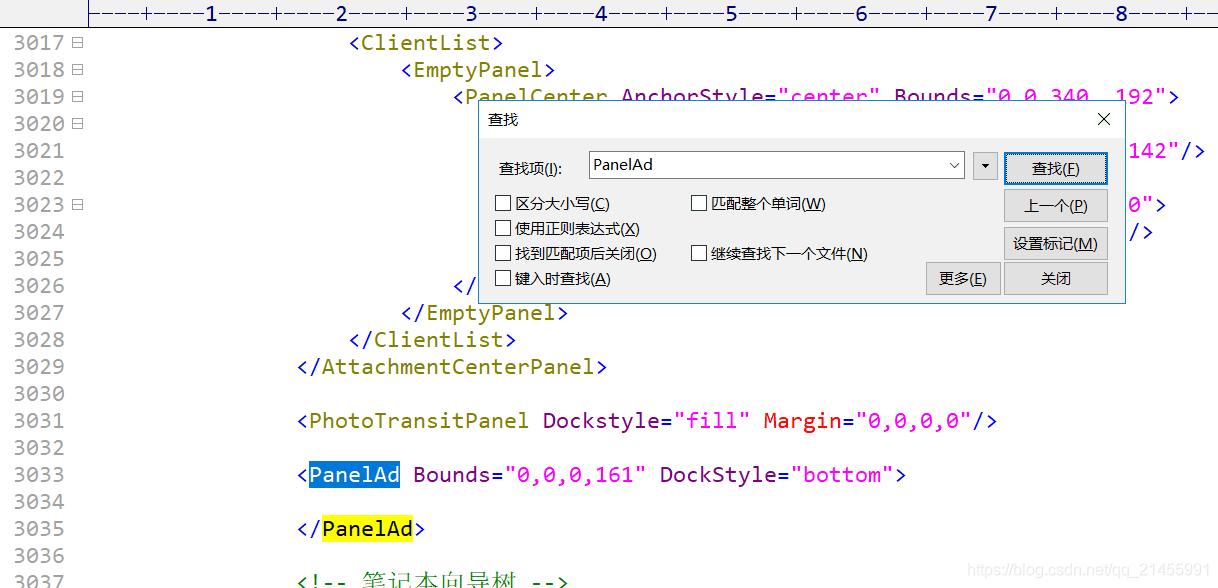
- 删除
<PanelAd Bounds="0,0,0,161" DockStyle="bottom">

</PanelAd>
- 退出重新启动软件