克隆炮弹和硝烟的预制体。


 1 using System.Collections;
 2 using System.Collections.Generic;
 3 using UnityEngine;
 4
 5 public class TankFire : MonoBehaviour {
 6
 7     public Transform fire_point;//发射点Transform
 8
 9     /// <summary>
10     /// 子弹的预设体(预先, 设置, 游戏物体)
11     /// </summary>
12     public GameObject bulletPrefab;
13
14     public GameObject FirePrefab;
15     /// <summary>
16     /// 发射的力道
17     /// </summary>
18     public float force;
19
20     void Update()
21     {
22         if (Input.GetKeyDown(KeyCode.Space))//空格键发射子弹
23         {
24             Fire();
25         }
26     }
27     void Fire()
28     {
29         //-----------炮弹和硝烟的克隆
30         GameObject _bullet = Instantiate(bulletPrefab, fire_point.position, fire_point.rotation);
31         GameObject _fireSmoke = Instantiate(FirePrefab, fire_point.position, fire_point.rotation);
32         //给子弹指定是哪个炮管发射的
33         _bullet.GetComponent<BulletSprite>().TankFire = this;
34         _bullet.GetComponent<Rigidbody>().AddRelativeForce(Vector3.forward * force, ForceMode.Impulse);
35         //定时摧毁炮弹和硝烟
36         Destroy(_bullet, 2.5f);
37         Destroy(_fireSmoke, 1.5f);
38     }
39         //射中指定目标计分
40     public Score scoreText;
41     public void ShotTarget(int score)
42     {
43         scoreText.ScoreNum = score;
44     }
45 }
利用轴的缓动,移动炮管。
 1 using System.Collections;
 2 using System.Collections.Generic;
 3 using UnityEngine;
 4
 5 public class TankMove : MonoBehaviour {
 6
 7     /// <summary>
 8     /// 炮塔
 9     /// </summary>
10     public Transform turret_bass;
11     /// <summary>
12     /// 旋转速度
13     /// </summary>
14     public float e_Turret_Speed;
15     /// <summary>
16     /// 当前炮头角度值
17     /// </summary>
18     private float eTurret;
19     /// <summary>
20     /// 炮管
21     /// </summary>
22     public Transform cannon_bass;
23     /// <summary>
24     /// 上下移动速度
25     /// </summary>
26     public float e_Cannon_Speed;
27     private float eCannon;
28     /// <summary>
29     /// 当前炮管角度值
30     /// </summary>
31     // Use this for initialization
32     void Start()
33     {
34         //当前炮头和炮管初始值
35         eTurret = turret_bass.localEulerAngles.y;
36         eCannon = cannon_bass.localEulerAngles.x;
37     }
38
39     void Update()//FPS=20
40     {
41         //Time.deltaTime//假设FPS为20,则此值的大小约为20分之一,也就是本帧的运行时间
42         //假设一共需要走speed度,则每一帧应该走的度数是每帧的时间乘以度数
43         //后面的input.GetAxis是为了缓动
44         eTurret += Time.deltaTime * e_Turret_Speed * Input.GetAxis("Horizontal");
45         turret_bass.localEulerAngles = new Vector3(0, eTurret, 0);
46
47         eCannon -= Time.deltaTime * e_Cannon_Speed * Input.GetAxis("Vertical");
48         eCannon = Mathf.Clamp(eCannon, -25, 7);
49         cannon_bass.localEulerAngles = new Vector3(eCannon, 0, 0);
50     }
51 }
利用一条射线,设置准星的现隐。添加名为Bullet的Layer,不让准星出现在炮弹上。
 1 using System.Collections;
 2 using System.Collections.Generic;
 3 using UnityEngine;
 4
 5 public class CrossHairs : MonoBehaviour {
 6
 7     public Transform fire_point;
 8     public Transform crosshair;
 9     void Start()
10     {
11
12     }
13     Ray ray;
14     RaycastHit hit;
15     void Update()
16     {
17         Vector3 vec = fire_point.rotation * Vector3.forward;
18         ray = new Ray(fire_point.position, vec);//发射一条射线
19         LayerMask layer = 1 << LayerMask.NameToLayer("Default");//获取Layer层的值
20         if (Physics.Raycast(ray, out hit, 1000, layer.value))
21         {
22             crosshair.gameObject.SetActive(true);//显示瞄准点
23             crosshair.position = hit.point;//point是世界坐标系
24         }
25         else
26         {
27             crosshair.gameObject.SetActive(false);
28         }
29     }
30 }
方块每个都有对应得分数,并添加Enemy标签。
 1 using System.Collections;
 2 using System.Collections.Generic;
 3 using UnityEngine;
 4
 5 public class EnemySprite : MonoBehaviour {
 6
 7     public int socre;
 8     // Use this for initialization
 9     void Start()
10     {
11
12     }
13
14     // Update is called once per frame
15     void Update()
16     {
17
18     }
19 }
检测炮弹是否碰撞方块,调用开火的射中目标的方法
 1 using System.Collections;
 2 using System.Collections.Generic;
 3 using UnityEngine;
 4
 5 public class BulletSprite : MonoBehaviour
 6 {
 7
 8     public GameObject BulletBroke_Prefab;
 9     // Use this for initialization
10     private TankFire tankFire;
11
12     public TankFire TankFire
13     {
14         set
15         {
16             tankFire = value;
17         }
18     }
19
20     // Use this for initialization
21     void Start()
22     {
23
24     }
25
26     // Update is called once per frame
27     void Update()
28     {
29
30     }
31     private void OnCollisionEnter(Collision collision)
32     {
33         if (collision.gameObject.tag == "Enemy")
34         {
35             tankFire.ShotTarget(collision.gameObject.GetComponent<EnemySprite>().socre);
36
37         }
38         GameObject _bulletbroke = Instantiate(BulletBroke_Prefab, transform.position, transform.rotation);
39         Destroy(_bulletbroke, 3f);
40         Destroy(gameObject);
41     }
42 }
最后添加UGUI的Text文本。添加Score脚本组件
 1 using System.Collections;
 2 using System.Collections.Generic;
 3 using UnityEngine;
 4 using UnityEngine.UI;
 5
 6 public class Score : MonoBehaviour
 7 {
 8
 9     private int scoreNum;
10
11     public int ScoreNum
12     {
13         set
14         {
15             scoreNum += value;
16         }
17     }
18
19     // Use this for initialization
20     void Start () {
21
22     }
23
24     // Update is called once per frame
25     void Update ()
26     {
27         ShowScore();
28     }
29
30     void ShowScore()
31     {
32         transform.GetComponent<Text>().text = "Score:"+scoreNum;
33     }
34 }
相机的拉近和缩回。
 1 using System.Collections;
 2 using System.Collections.Generic;
 3 using UnityEngine;
 4
 5 public class CameraMove : MonoBehaviour
 6 {
 7     [SerializeField]
 8     private float _speed;
 9
10     private float cameraTran_z;
11     void Start () {
12         cameraTran_z = transform.localPosition.z;
13     }
14
15
16     void Update ()
17     {
18         cameraTran_z += Input.GetAxis("Mouse ScrollWheel")*_speed;
19         transform.localPosition = new Vector3(
20             transform.localPosition.x,
21             transform.localPosition.y,
22             cameraTran_z
23             );
24     }
25 }
最总效果:

为了让炮弹更加真实,而不是类似子弹效果,对Bullet子弹预设体进行修改。
修改成如下:
 1 using System.Collections;
 2 using System.Collections.Generic;
 3 using UnityEngine;
 4
 5 public class BulletSprite : MonoBehaviour
 6 {
 7
 8     public GameObject BulletBroke_Prefab;//子弹破碎预设体
 9     public GameObject Boom_Prefab;//子弹爆炸效果粒子预设体
10     // Use this for initialization
11     private TankFire tankFire;//开火炮口
12
13     public Collider Triggercolliders;//碰撞触发器(爆炸影响)
14
15     public TankFire TankFire
16     {
17         set
18         {
19             tankFire = value;
20         }
21     }
22
23     void Start()
24     {
25         //让这个子弹2.5秒必须爆炸
26         //2.5
27         Invoke("StartBoom", 2.5f);
28         Destroy(gameObject, 2.5f);
29     }
30
31     private void OnCollisionEnter(Collision collision)//碰撞到物体
32     {
33         if (collision.gameObject.tag == "Enemy")//判断标签是否是敌人
34         {
35             tankFire.ShotTarget(collision.gameObject.GetComponent<EnemySprite>().socre);
36             Debug.Log("1.Boom,启动触发器,进行爆炸");
37             StartBoom();//子弹碰到指定目标物直接爆炸
38         }
39         else
40         {
41             Debug.Log("2.进行计时,0.5秒后爆炸");
42             Invoke("StartBoom", 0.5f);
43         }
44         GameObject _bulletbroke = Instantiate(BulletBroke_Prefab, transform.position, transform.rotation);//克隆子弹碎片
45         Destroy(_bulletbroke, 3f);
46     }
47
48     private bool isT = false;//为了让爆炸效果只出现一次
49     private void StartBoom()
50     {
51         if (!isT)//只运行一次
52         {
53             isT = true;
54             Triggercolliders.enabled = true;//启动触发器爆炸
55             GameObject BoomObj = Instantiate(Boom_Prefab, transform.position, transform.rotation);
56             Destroy(BoomObj, 3f);
57             //Destroy(gameObject);
58         }
59     }
60 }
为子弹子对象添加碰撞器:

先取消BoomTrigger,当子弹要爆炸时就会通过脚本激活组件,挂载BoomIsTrigger.cs组件。
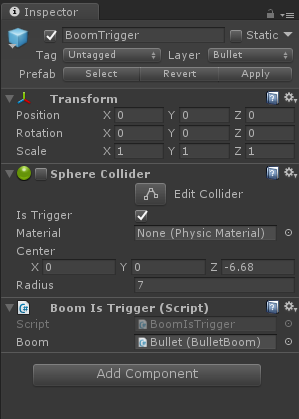
BoomIsTrigger.cs如下:
 1 using System.Collections;
 2 using System.Collections.Generic;
 3 using UnityEngine;
 4
 5 /// <summary>
 6 /// 版本Unity2017.1.0f3
 7 /// </summary>
 8
 9 public class BoomIsTrigger : MonoBehaviour
10 {
11     /// <summary>
12     /// 外层触发器碰撞后相应
13     /// </summary>
14     [SerializeField]
15     private BulletBoom boom;//子弹对象上控制爆炸的组件
16     void OnTriggerEnter(Collider other)
17     {
18         boom.BoomStart(other.gameObject);
19         Destroy(gameObject, 0.01f);
20     }
21 }
最后赋值,挂载爆炸力处理脚本,最后子弹组件:
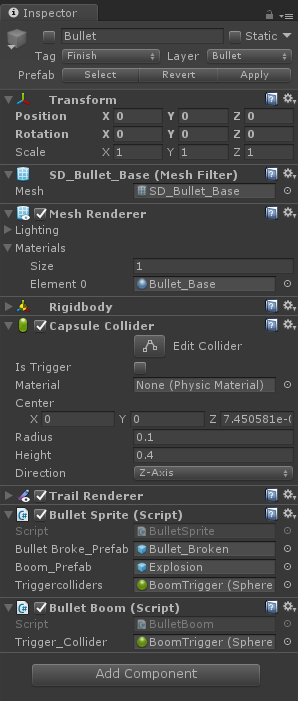
 1 using System.Collections;
 2 using System.Collections.Generic;
 3 using UnityEngine;
 4
 5 /// <summary>
 6 /// 版本Unity2017.1.0f3
 7 /// </summary>
 8
 9 public class BulletBoom : MonoBehaviour
10 {
11     [SerializeField]
12     private SphereCollider Trigger_Collider;//触发器
13     private float radius;//爆炸半径
14
15     public float BoomForce =5;//爆炸力
16     // Use this for initialization
17     void Start()
18     {
19         radius = Trigger_Collider.radius;//爆炸半径的赋值
20     }
21
22     public void BoomStart(GameObject deaths)
23     {
24
25         Vector3 dir = deaths.transform.position - transform.position;
26         Vector3 dir_Nor = Vector3.Normalize(dir);//单位向量(归一化)
27         float dis = Vector3.Distance(transform.position, deaths.transform.position);
28         if (deaths.GetComponent<Rigidbody>() != null)//如果碰撞器上有刚体受力
29         {
30             deaths.GetComponent<Rigidbody>().AddRelativeForce(dir_Nor * (radius - dis) * BoomForce, ForceMode.Impulse);
31         }
32     }
33 }
最终的子弹爆炸效果:
