本文博客地址:http://blog.csdn.net/qq1084283172/article/details/78878057
一、360路由器登录协议分析的工具配置
1. 路由器型号:360路由器P2
2. 浏览器:火狐浏览器
3. 抓包分析工具:Burp Suite 和 Wireshark
二、360路由器登录协议的分析
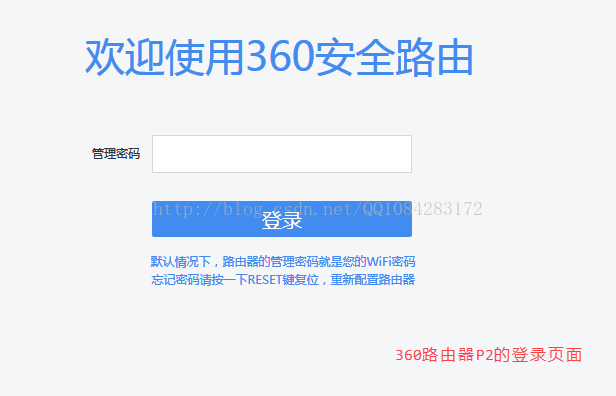
通过对360路由器 P2的包装信息进行查看,发现360路由器P2的web登录页面的ip地址为 192.168.0.1 端口为 80,在进行路由器登录协议分析之前,先自己尝试使用浏览器进行路由器登录页面的测试,比如,输入错误的路由器登录密码和输入正确的路由器登录密码,看看路由器登录页面的错误提示,方便后面对路由器的登录web页面的分析,熟悉和了解一下路由器web管理登录的流程,然后再去分析路由器的登录协议,在进行路由器登录协议分析的时候,通过wifi网络或者网线将电脑或者手机连接到路由器设备,登录路由器的web控制界面,然后将 路由器的web管理页面的Html网页全部保存下来,用以接下来路由器登录协议的分析和模拟,还有一个地方需要注意,对于路由器的登录管理,PC的web登录管理,Android或者iOS的web登录管理,Android或者iOS的App管理登录的协议可能是不同也可能都是相同的,有的路由器的App管理终端就是webview嵌套的web页面请求,有的路由器的App管理终端是自己实现另外一种不同web登录页面管理的App协议。
1. 360路由器P2的PC端Web管理登录页面截图
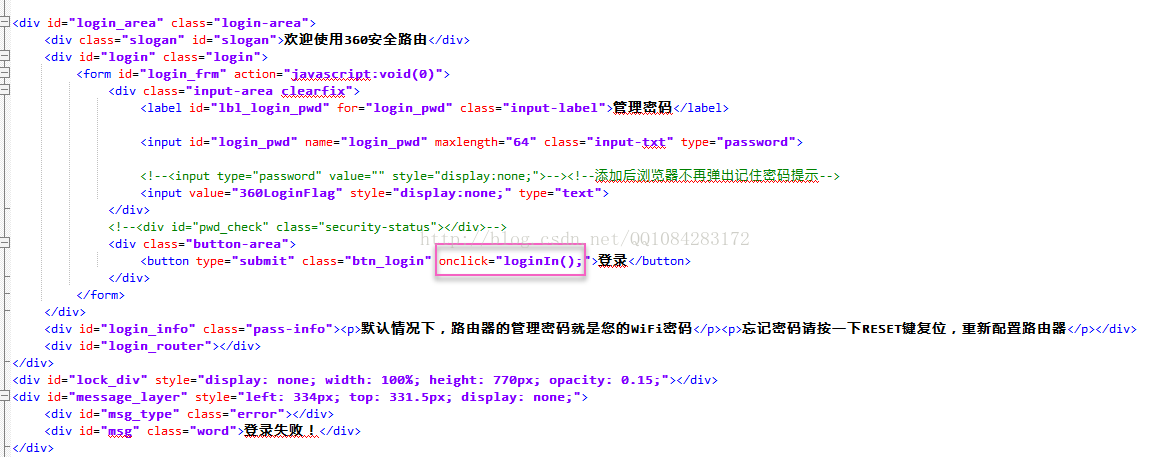
2. 对360路由器P2的PC端Web管理登录页面的Html页面进行分析,了解360路由器登录页面的流程。
(1). 360路由器P2的PC端Web管理登录页面的点击登录按钮处理发送登录请求的事件是由 函数loginIn( ) 来处理的。
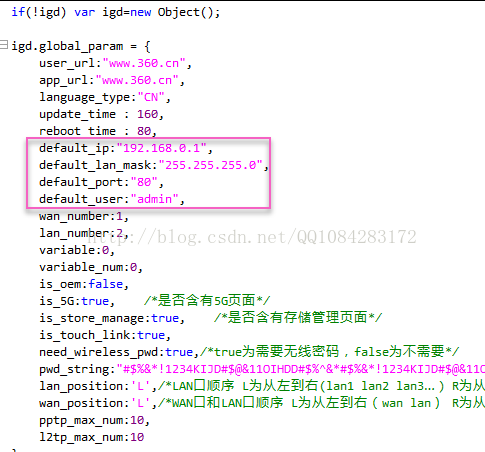
(2). 360路由器P2的PC端Web管理登录的默认用户名是 admin(不需要用户输入,就保存在登录的web页面中),管理员登录的用户登录信息就保存在变量 obj 中,obj.user 保存管理员登录的用户名 admin,obj.pass 保存管理员登录的密码(将用户输入的密码进行 AES/CBC/PKCS7Padding 填充的 AES 加密得到),obj.from 保存管理员登录的登录方式,通过PC登录的此值为1,然后将用户的登录信息 obj 通过 Http 请求 /router/web_login.cgi POST发送给360路由器P2进行管理员登录验证处理,是这么简单么?还需去 函数getAesString( ) 中进行查看一下。
<script>

 function loginIn() {


        if ($.cookie("Qihoo_360_login")) {
            $.cookie('Qihoo_360_login', null, {
                path: '/',
                expires: 1
            });
        }

		// 保存发送给路由器的数据的信息
        var obj = {};

		// 获取默认的用户名:admin
        obj.user = igd.global_param.default_user;
		// 获取用户输入的密码进行AES加密处理
		// AES/CBC/PKCS7Padding
        obj.pass = getAesString($("#login_pwd").val());
        obj.from = 1;//PC

        if (check_input("login_frm")) {

			// 向路由器发送数据信息
            $.post("/router/web_login.cgi", obj, function (data) {
                try {

                    data = eval("(" + data + ")");
					// 判断路由器是否登陆成功
					// {"success":"1","token_id":"c6c0511d81b75a3fae36fbe5532ba353"}
                    if (data["success"]=="1"&&data["token_id"]!="") {

					   // 登陆成功,跳转到登陆路由器的信息主页上
                       location.href = "./new_index.htm?token_id="+data["token_id"];
                    }
                    else {
                        if (!isNaN(data.err_no) && (data.err_no == "48" || data.err_no == "49"|| data.err_no == "50"|| data.err_no == "51"|| data.err_no == "52")) {
                            show_message("login_failure" + data.err_no);
                        } else {
                            show_message("login_failure");
                        }
                    }
                }
                catch (e) {
                    show_message("login_failure");
                }
            });
        }
    }

	var status_detect_timer;

	function wan_status_detect_loop(){
		$.post("/router/interface_status_show.cgi", {noneed: "noneed"});
		if(status_detect_timer)
			window.setInterval(status_detect_timer);
		status_detect_timer = window.setInterval(function(){
			//console.log("do not release link");
			$.post("/router/interface_status_show.cgi", {noneed: "noneed"});
		},30*1000);
	}

</script>
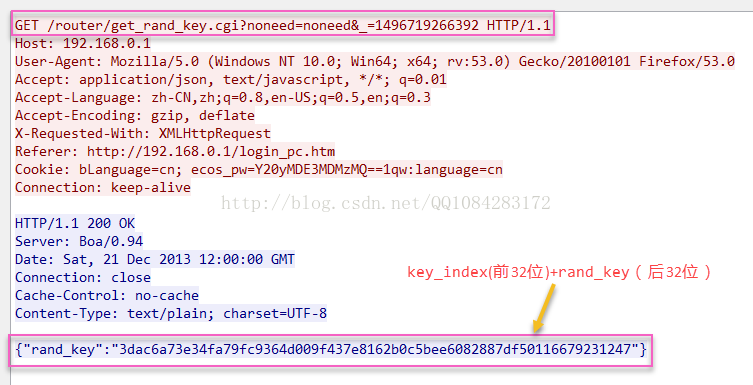
(3). 在360路由器P2的管理员登录的 new_lib.js 文件中找到的 函数getAesString( ) 实现,先调用 函数get_rand_key()
发送 GET方式 的Http请求 /router/get_rand_key.cgi
获取返回的 key_index (前32位)对应的 rand_key 值(后32位),这个rand_key值将作为 AES 加密用户输入密码的
AES秘钥参数key。每次进行360路由器P2管理员登录的时候,key_index 和 rand_key值是成对由360路由器P2生成,返回给web登录管理页面使用的,使用rand_key值作为
CryptoJS.pad.Pkcs7 填充的AES加密算法的密钥参数,对用户输入的密码进行AES加密,然后将 AES加密后的用户密码(后32位)和key_index(前32位)成对的,通过 POST方式 的Http请求
/router/web_login.cgi 发送360路由器P2进行管理员登录的验证,等待360路由器P2返回登录成功或者登录失败的结果。
// #################################################################################################


// 进行路由器的登陆测试
    function loginIn() {


        if ($.cookie("Qihoo_360_login")) {
            $.cookie('Qihoo_360_login', null, {
                path: '/',
                expires: 1
            });
        }

        var obj = {};
		// "admin"
        obj.user = igd.global_param.default_user;
		// 获取用户输入的密码加密后的明文
        obj.pass = getAesString($("#login_pwd").val());
        obj.from = 1;//PC

        if (check_input("login_frm")) {
            $.post("/router/web_login.cgi", obj, function (data) {
                try {
                    data = eval("(" + data + ")");

					// 登陆成功的情况下
                    if (data["success"]=="1"&&data["token_id"]!="") {
                       location.href = "./new_index.htm?token_id="+data["token_id"];
                    }
                    else {
                        if (!isNaN(data.err_no) && (data.err_no == "48" || data.err_no == "49"|| data.err_no == "50"|| data.err_no == "51"|| data.err_no == "52")) {
                            show_message("login_failure" + data.err_no);
                        } else {
                            show_message("login_failure");
                        }
                    }
                }
                catch (e) {
                    show_message("login_failure");
                }
            });
        }
    }

// #################################################################################################

// 获取随机密码
// {"rand_key":"3dac6a73e34fa79fc9364d009f437e8162b0c5bee6082887df50116679231247"}
// 前32位index,后32位aes的key
// 3dac6a73e34fa79fc9364d009f437e81 62b0c5bee6082887df50116679231247

function get_rand_key(error_count, key_index, is_get) {

    error_count = error_count || 0;
    if (error_count > 5) {
        return "";
    }

	// 获取生成的_key_index
    if (key_index) {

		// substr() 方法可在字符串中抽取从 start 下标开始的指定数目的字符。
		// 获取随机32位数字
        key_index = key_index.substr(0, 32);
    }

    if (is_get && key_index == "") {
        return "";
    }

	// arguments.callee 在哪一个函数中运行,它就代表哪一个函数
    var calleeFn = arguments.callee;

	// 用户保存获取返回的数据
    var retObj = {
        "rand_key": "",
        "key_index": key_index
    };

	// 向指定的url发送数据获取key
    $.ajax({
        url: "/router/get_rand_key.cgi",
        data: {
            "noneed": "noneed",
            "key_index": key_index
        },
        dataType: "json",
        async: false,
		// 失败情况
        error: function (XMLHttpRequest, textStatus) {
			// 再次调用当前函数
            retObj = calleeFn(error_count, key_index, is_get);

        },
		// 成功的情况
        success: function (data) {
            if (is_get && data.err_no * 1) {
                retObj["rand_key"] = "";
            } else {
                if (data.rand_key) {

					// 获取返回的数据(后32位)
                    retObj["rand_key"] = data.rand_key.substring(32, 64);
					// 获取返回的数据(前32位)
                    retObj["key_index"] = data.rand_key.substring(0, 32);

                } else {
                    retObj = calleeFn(error_count, key_index, is_get);
                }
            }

        }
    });

    return retObj;
}

/* end by houbingyang */


// 进行字符串的AES加密
// user=admin&pass=3dac6a73e34fa79fc9364d009f437e81104ba5af88ebb24bc69ed56dee27327b&from=1
// 3dac6a73e34fa79fc9364d009f437e81 104ba5af88ebb24bc69ed56dee27327b
// 前32位index,后32位AES加密后的字符串
function getAesString(str, keyObj) {

	// 首先获取随机密码
    var lengthKeyObj = keyObj || get_rand_key(0);
    var key = CryptoJS.enc.Hex.parse(lengthKeyObj.rand_key);
    var iv = CryptoJS.enc.Latin1.parse("360luyou@install");

	// 进行AES的加密
    var encrypted = CryptoJS.AES.encrypt(str, key, {
        iv: iv,
        mode: CryptoJS.mode.CBC,
        padding: CryptoJS.pad.Pkcs7
    });
    var cipher_text = encrypted.ciphertext.toString();
    //var retObj={
    //    "cipher_text":cipher_text,
    //    "key_index":lengthKeyObj.key_index
    //}
    return lengthKeyObj.key_index + cipher_text;
}

// AES解密
function getDAesString(str, keys) {

    var ciphertext = str.substr(32, str.length - 32);
    var lengthKeyObj = {};
    if (keys) {
        lengthKeyObj.rand_key = keys;
    } else {
        lengthKeyObj = get_rand_key(0, str, true);
    }
    if (!lengthKeyObj.rand_key) {
        return str;
    }
    var key = CryptoJS.enc.Hex.parse(lengthKeyObj.rand_key);
    var iv = CryptoJS.enc.Latin1.parse("360luyou@install");
    var str16T64 = CryptoJS.enc.Hex.parse(ciphertext).toString(CryptoJS.enc.Base64);
    var decrypted = CryptoJS.AES.decrypt(str16T64, key, {
        iv: iv,
        mode: CryptoJS.mode.CBC,
        padding: CryptoJS.pad.Pkcs7
    });
    return decrypted.toString(CryptoJS.enc.Utf8);
}
(4). 使用抓包工具Wireshark,对360路由器P2进行PC端Web页面管理员登录成功和登录失败的网络数据抓包结果。
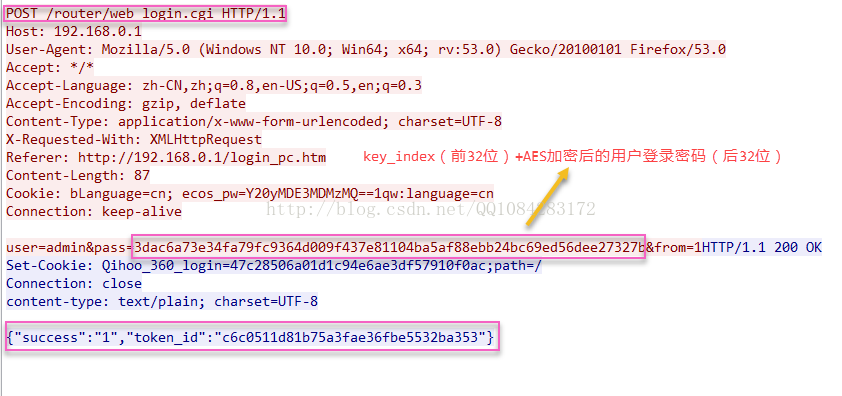
360路由器P2进行 管理员登录成功 的网络数据包结果截图如下所示:
1. 发送GET方式的HTTP请求 GET /router/get_rand_key.cgi 获取加密用户登录密码的AES算法的 密钥参数rand_key。
2. 发送POST方式的HTTP请求 POST /router/web_login.cgi 将AES加密的用户登录密码和用户登录用户名admin,发送给360路由器P2进行管理员登录的验证。
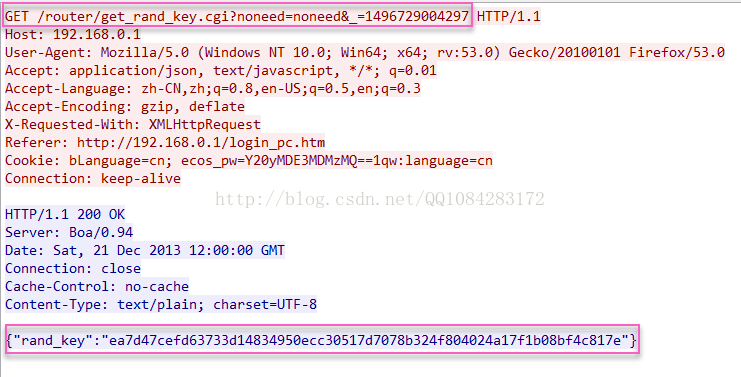
360路由器P2进行 管理员登录失败 的网络数据包结果截图如下所示:
1. 发送GET方式的HTTP请求 GET /router/get_rand_key.cgi 获取加密用户登录密码的AES算法的 密钥参数rand_key。
2. 发送POST方式的HTTP请求 POST /router/web_login.cgi 将AES加密的用户登录密码和用户登录用户名admin,发送给360路由器P2进行管理员登录的验证。
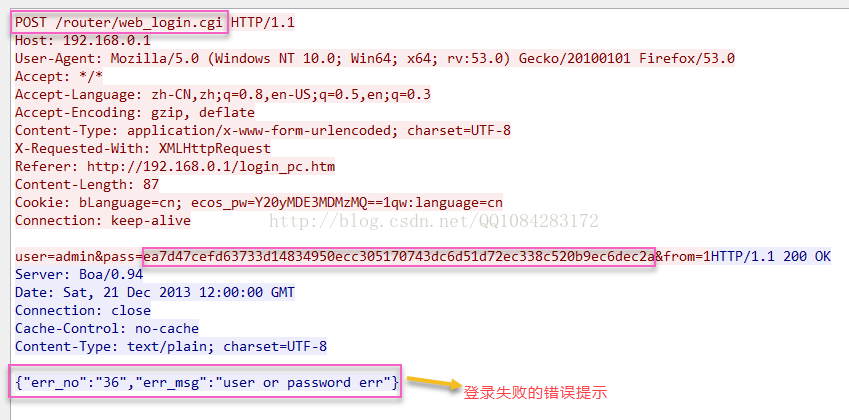
(5). 360路由器P2的PC端Web管理员登录成功和登录失败情况下发送的网络数据包和接收的网络数据包的整理,后面进行路由器管理员登录协议实现的时候,会根据下面的这份数据包来进行编程和登录协议的实现。
登陆成功的情况:

登陆密码:xxxxxxx(不便于泄露)

第1步,先向服务器发送13位随机数字none为1496719266392
GET /router/get_rand_key.cgi?noneed=noneed&_=1496719266392 HTTP/1.1
Host: 192.168.0.1
User-Agent: Mozilla/5.0 (Windows NT 10.0; Win64; x64; rv:53.0) Gecko/20100101 Firefox/53.0
Accept: application/json, text/javascript, */*; q=0.01
Accept-Language: zh-CN,zh;q=0.8,en-US;q=0.5,en;q=0.3
Accept-Encoding: gzip, deflate
X-Requested-With: XMLHttpRequest
Referer: http://192.168.0.1/login_pc.htm
Cookie: bLanguage=cn; ecos_pw=Y20yMDE3MDMzMQ==1qw:language=cn
Connection: keep-alive

HTTP/1.1 200 OK
Server: Boa/0.94
Date: Sat, 21 Dec 2013 12:00:00 GMT
Connection: close
Cache-Control: no-cache
Content-Type: text/plain; charset=UTF-8

{"rand_key":"3dac6a73e34fa79fc9364d009f437e8162b0c5bee6082887df50116679231247"}
// 前32位index,后32位aes的key
// 3dac6a73e34fa79fc9364d009f437e81 62b0c5bee6082887df50116679231247


第2步:
POST /router/web_login.cgi HTTP/1.1
Host: 192.168.0.1
User-Agent: Mozilla/5.0 (Windows NT 10.0; Win64; x64; rv:53.0) Gecko/20100101 Firefox/53.0
Accept: */*
Accept-Language: zh-CN,zh;q=0.8,en-US;q=0.5,en;q=0.3
Accept-Encoding: gzip, deflate
Content-Type: application/x-www-form-urlencoded; charset=UTF-8
X-Requested-With: XMLHttpRequest
Referer: http://192.168.0.1/login_pc.htm
Content-Length: 87
Cookie: bLanguage=cn; ecos_pw=Y20yMDE3MDMzMQ==1qw:language=cn
Connection: keep-alive

user=admin&pass=3dac6a73e34fa79fc9364d009f437e81104ba5af88ebb24bc69ed56dee27327b&from=1
// 3dac6a73e34fa79fc9364d009f437e81 104ba5af88ebb24bc69ed56dee27327b
// 前32位index,后32位AES加密后的字符串

HTTP/1.1 200 OK
Set-Cookie: Qihoo_360_login=47c28506a01d1c94e6ae3df57910f0ac;path=/
Connection: close
content-type: text/plain; charset=UTF-8

{"success":"1","token_id":"c6c0511d81b75a3fae36fbe5532ba353"}


登陆失败的情况:

第1步:
GET /router/get_rand_key.cgi?noneed=noneed&_=1496729004297 HTTP/1.1
Host: 192.168.0.1
User-Agent: Mozilla/5.0 (Windows NT 10.0; Win64; x64; rv:53.0) Gecko/20100101 Firefox/53.0
Accept: application/json, text/javascript, */*; q=0.01
Accept-Language: zh-CN,zh;q=0.8,en-US;q=0.5,en;q=0.3
Accept-Encoding: gzip, deflate
X-Requested-With: XMLHttpRequest
Referer: http://192.168.0.1/login_pc.htm
Cookie: bLanguage=cn; ecos_pw=Y20yMDE3MDMzMQ==1qw:language=cn
Connection: keep-alive


HTTP/1.1 200 OK
Server: Boa/0.94
Date: Sat, 21 Dec 2013 12:00:00 GMT
Connection: close
Cache-Control: no-cache
Content-Type: text/plain; charset=UTF-8

{"rand_key":"ea7d47cefd63733d14834950ecc30517d7078b324f804024a17f1b08bf4c817e"}


第2步:
POST /router/web_login.cgi HTTP/1.1
Host: 192.168.0.1
User-Agent: Mozilla/5.0 (Windows NT 10.0; Win64; x64; rv:53.0) Gecko/20100101 Firefox/53.0
Accept: */*
Accept-Language: zh-CN,zh;q=0.8,en-US;q=0.5,en;q=0.3
Accept-Encoding: gzip, deflate
Content-Type: application/x-www-form-urlencoded; charset=UTF-8
X-Requested-With: XMLHttpRequest
Referer: http://192.168.0.1/login_pc.htm
Content-Length: 87
Cookie: bLanguage=cn; ecos_pw=Y20yMDE3MDMzMQ==1qw:language=cn
Connection: keep-alive

user=admin&pass=ea7d47cefd63733d14834950ecc305170743dc6d51d72ec338c520b9ec6dec2a&from=1


HTTP/1.1 200 OK
Server: Boa/0.94
Date: Sat, 21 Dec 2013 12:00:00 GMT
Connection: close
Cache-Control: no-cache
Content-Type: text/plain; charset=UTF-8

{"err_no":"36","err_msg":"user or password err"}
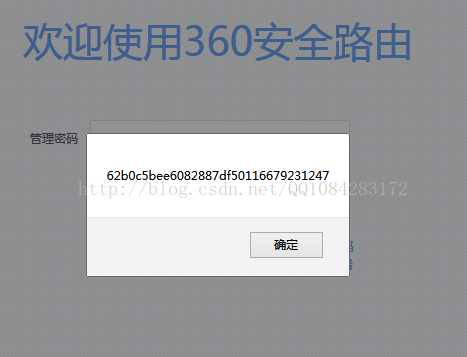
(6). 在进行360路由器P2的管理员登录协议编码实现并测试的时候,由于每次路由器返回的rand_key都是不同的,导致加密流程测试不是很方便,每次都要重新计算AES加密数据进行验证比较麻烦,因此 修改new_lib.js文件 以360路由器P2一次管理员登录的数据包为例,即选取一次管理员登录过程中,360路由器P2返回给管理员web页面的rand_key值为"AES/CBC/PKCS7Padding"填充的AES加密算法的密钥参数key(固定下来),将index_key也固定下来 ,用户输入的密码也固定下来。对new_lib.js文件的修改如下所示,后面进行360路由器P2的管理员登录协议的编码实现测试的时候,就以这3个固定的数据(index_key、rand_key、固定的用户密码)为例进行路由器登录协议算法加密模拟是否正确的测试,只要每一步编码得到的结果和下面代码中 alert打印 出来的数据对应上了,就说明编写的360路由器P2的登录协议的算法加密的模拟是正确的。
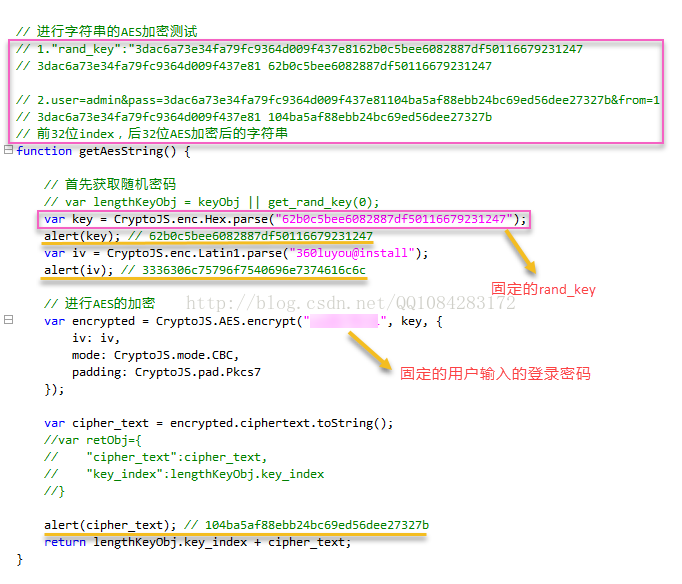
使用修改后的 new_lib.js文件 ,在360路由器P2管理员登录web页面点击 登录 按钮,每点击一次就会 alert打印 出AES加密算法每一步加密操作的数据。
(7). 360路由器P2在对用户输入的登录密码进行加密操作所采用的加密算法AES是用 "AES/CBC/PKCS7Padding" 进行填充的 CBC模式 的 AES128 加密算法,但是Java的AES算法API不支持PKCS7Padding,只支持PKCS5Padding,因此这里需要选择 开源的bouncycastle组件 来实现"AES/CBC/PKCS7Padding" 填充的AES 128加密,具体的详细细节可以参考文章《Android 使用AES/CBC/PKCS7Padding 加解密字符串》,后面对360路由器P2的登录协议中AES 128加密算法的模拟实现也是在这篇文章的代码中进行修改而来的,在路由器登录协议模拟实现过程中用到的一些算法加密的工具类都是在网上一些博客文章中找到的,使用的时候进行了相应的修改,有的忘记作者博客的链接了,要是侵权了告诉我,我做修改;能记得原作者的博客文章地址的,我会给出链接,对原作者一并表示感谢。
三、360路由器P2登录协议模拟的编码实现
1. RouterLogin类是抽象类,getRouterLoginRetCode( )是函数接口,通过函数getRouterLoginRetCode的返回值是否为0即可知道360路由器P2是否登录成功,登录不成功该函数的返回值为-1。
        // 360路由器的登陆测试
//        RouterLogin routerLogin360 = new QihooRouterLogin("192.168.0.1", 80, "");
//        int nRetCode360 = routerLogin360.getRouterLoginRetCode("admin", "xxxxxx");
//        System.out.println("ec 360:"+nRetCode360);
2. 抽象类RouterLogin的实现 RouterLogin.java文件 。
package com.login.core;

import java.io.BufferedReader;
import java.io.IOException;
import java.io.InputStream;
import java.io.InputStreamReader;
import java.net.HttpURLConnection;
import java.net.MalformedURLException;
import java.net.ProtocolException;
import java.net.URL;


public abstract class RouterLogin {

	// 访问的ip地址
	protected String mIpAddress;
	// 访问的ip地址的端口
	protected int mPort;
	// 访问的Ip地址补充的路径
	protected String mFilePath;

	// 登陆路由器的用户名
	protected String mUserName;
	// 登陆路由器的密码
	protected String mPassWord;

	// 是否进行路由器的登陆尝试的标记
	protected boolean mIsTryLogin;
	// 登陆路由器得到的错误码
	protected int mErrorCode;

	// 进行Tenda路由器登陆尝试的任务线程
	protected Thread mLoginThread;

	public RouterLogin(String strIpAddress, int nPort, String strFilePath) {

		this.mIpAddress = strIpAddress;
		this.mPort = nPort;
		this.mFilePath = strFilePath;

		this.mUserName = null;
		this.mPassWord = null;

		this.mIsTryLogin = false;
		this.mErrorCode = -1;

		this.mLoginThread = null;
	}


	// 重置用户名和密码为null
	protected void resetPassWordNull() {

		this.mUserName = null;
		this.mPassWord = null;
	}


	// 保存路由器登陆的用户名和密码
	protected void setPassWord(String strUserName, String strPassWord) {

		this.mUserName = strUserName;
		this.mPassWord = strPassWord;
	}

	// 初始化路由器登陆的任务线程
	abstract void initRouterLoginThread();


	// 启动线程进行路由器登陆的尝试
	protected void startRouterLoginThread() {

		// 启动线程
		this.mLoginThread.start();
	}


	// 设置等待线程执行结束的时间
	protected void waitForThreadOver() {

		// 等待线程执行完成,返回
		for (int i = 0; i < 200; i++) {

			// 判断线程是否执行完成
			if (this.mIsTryLogin == true) {

				break;
			}

			try {

				// 休眠等待
				Thread.sleep(200);

			} catch (InterruptedException e) {

				e.printStackTrace();
			}
		}

	}


	// 使用的格式 createURL(false, this.serverHost, this.serverPort=80, "/HNAP1/")
    protected URL createURL(boolean isUseSSL, String serverHost, int serverPort, String str_file) {

        URL url = null;
        String strHttp = "http";

        // 判断是否使用ssl
        if(isUseSSL) {

            strHttp = String.valueOf(strHttp) + "s";
        }

        // 默认80端口
        if(serverPort == 80) {

            try {

            	return new URL(strHttp, serverHost, str_file);

            } catch(MalformedURLException e) {

                e.printStackTrace();
            }

        } else {

        	try {

        		// 其他端口
				return serverPort == 443 && (isUseSSL) ? new URL(strHttp, serverHost, str_file)
					: new URL(strHttp, serverHost, serverPort, str_file);

			} catch (MalformedURLException e) {

				e.printStackTrace();
			}

        }

		return url;
    }


    // 获取登陆路由器的url
	protected URL getLoginUrl() {

		// 获取登陆路由器的url地址
		return createURL(false, this.mIpAddress, this.mPort, this.mFilePath);
	}


	// 获取路由器登陆需要发送给服务器的数据
	abstract String getSendDataToServerce();


	// 进行路由器的登陆尝试
	abstract void doRouterLogin();


	// 获取服务器返回的数据转换成字符串
	protected String getHtmlContent(InputStream is) {

		if(is == null) {

			return null;
		}

		int data = 0;
		String ResponseHTML = null;

		try {

			BufferedReader pBufRd=new BufferedReader(new InputStreamReader(is));
			StringBuffer sb = new StringBuffer();

			while ((data = pBufRd.read()) != -1) {

				sb.append((char) data);
			}

			ResponseHTML = sb.toString();

		} catch (IOException e) {

			e.printStackTrace();
		}

		return ResponseHTML;
	}


	// 获取Http网络连接对象
	protected HttpURLConnection getHttpURLConnection(URL url) throws IOException {

		HttpURLConnection httpURLConnection = (HttpURLConnection)url.openConnection();

		return httpURLConnection;
	}


	// 设置Http网络请求的参数
	abstract void setHttpRequestProperty(HttpURLConnection httpURLConnection, URL url, String strSendData) throws ProtocolException;


	// 获取路由器的登陆之后返回的结果码
	public abstract int getRouterLoginRetCode(String strUserName, String strPassWord);

}
3. 360路由器P2登录协议的具体实现的重要 类QihooRouterLogin 所在的 QihooRouterLogin.java文件 。
package com.login.core;

import java.io.BufferedReader;
import java.io.IOException;
import java.io.InputStream;
import java.io.InputStreamReader;
import java.io.OutputStream;
import java.io.UnsupportedEncodingException;
import java.net.HttpURLConnection;
import java.net.MalformedURLException;
import java.net.ProtocolException;
import java.net.URL;
import java.util.Random;
import org.json.JSONException;
import org.json.JSONObject;

import com.tools.encode.AES128;
import com.tools.encode.Base64;
import com.tools.log.DebugLog;

import org.bouncycastle.util.encoders.Hex;


// 360路由器P2测试成功
// "AES/CBC/PKCS7Padding"填充的AES 128的实现需要使用开源的组件bouncycastle
// 这里使用的是 bcprov-jdk16-146.jar
public class QihooRouterLogin extends RouterLogin {

	// 前32位
	// retObj["key_index"] = data.rand_key.substring(0, 32)
	private String m_pre_key_index_32;

	// 后32位--AES的秘钥参数
	// retObj["rand_key"] = data.rand_key.substring(32, 64)
	private String m_last_rand_key_32;


	public QihooRouterLogin(String strIpAddress, int nPort, String strFilePath) {

		super(strIpAddress, nPort, strFilePath);

		this.m_pre_key_index_32 = null;
		this.m_last_rand_key_32 = null;
	}

	@Override
	void initRouterLoginThread() {

		// 设置进行路由器登陆的任务线程
		this.mLoginThread = new RouterLoginThread(this);

	}


	// 将16进制字符串转成字节数组
    private byte[] hexStringToByte(String hex) {

        int len = (hex.length() / 2);
        byte[] result = new byte[len];

        // 直接将字符串转成字符数组
        char[] achar = hex.toCharArray();
        // 将每2个字符转成1个字节
        for (int i = 0; i < len; i++) {

            int pos = i * 2;
            result[i] = (byte) (toByte(achar[pos]) << 4 | toByte(achar[pos + 1]));
        }

        return result;
    }

    private byte toByte(char c) {

    	// 小写字母的情况
        byte b = (byte) "0123456789abcdef".indexOf(c);

        return b;
    }


    // 将字节数组转成16进制字符串
    private final String bytesToHexString(byte[] bArray) {

        StringBuffer sb = new StringBuffer(bArray.length);
        String sTemp;

        for (int i = 0; i < bArray.length; i++) {

            sTemp = Integer.toHexString(0xFF & bArray[i]);
            if (sTemp.length() < 2)
                sb.append(0);

            // 小写字母的情况
            sb.append(sTemp.toLowerCase());
        }

        return sb.toString();
    }

    // 将"ISO-8859-1"字符串转成字节数组
    private byte[] latin1ToArray(String strLatin1) {

		byte[] btArrayIv = null;
		try {

			// 将字符串转换成ISO-8859-1编码的字节数组
			btArrayIv = strLatin1.getBytes("ISO-8859-1");

		} catch (UnsupportedEncodingException e) {

			e.printStackTrace();
		}

		return btArrayIv;
    }


	// 获取服务器验证需要的Aes字符串
	private String getAesString() {

//		// 将字符串转成16进制的整形
//		byte[] btKeyArray = stringToHexArray(this.m_last_rand_key_32);
//
//		// 将字符串转成Latin1格式-Latin1是ISO-8859-1的别名,有些环境下写作Latin-1。
//		// ISO-8859-1编码是单字节编码,向下兼容ASCII,其编码范围是0x00-0xFF,0x00-0x7F之间完全和ASCII一致,0x80-0x9F之间是控制字符,0xA0-0xFF之间是文字符号。
//		byte[] btIvArray = stringToLatin1Array("360luyou@install");
//
//
//		try {
//
//			// 生成iv
//			CryptoHandler aes = new CryptoHandler(btKeyArray, btIvArray);
//
//			// 对用户的密码进行,使用PKCS7Padding填充的AES-128-CBC的加密
//			String str_ciphertext = aes.encrypt(this.mPassWord);
//
//			// 发送给服务器的数据-- lengthKeyObj.key_index + cipher_text
//			String strAes = this.m_pre_key_index_32+str_ciphertext;
//			DebugLog.log("getAesString:"+strAes);
//
//			return strAes;
//
//		} catch (Exception e) {
//
//			e.printStackTrace();
//		}

		// 获取AES的秘钥参数key
		byte[] btArrayKey = this.hexStringToByte(this.m_last_rand_key_32);
		DebugLog.log("AES key:"+this.bytesToHexString(btArrayKey));

		// 获取AES的加密向量iv
		byte[] btArrayIv = this.latin1ToArray("360luyou@install");
		// 3336306c75796f7540696e7374616c6c
		DebugLog.log("AES iv:"+this.bytesToHexString(btArrayIv));

		// 进行"AES/CBC/PKCS7Padding"的加密处理
		AES128 aes = new AES128(btArrayIv);

		// 被加密的字符串:cm20170331
		DebugLog.log("AES enc data befor:"+this.mPassWord);

		// 进行用户密码的AES加密
		byte[] enc = aes.encrypt(this.mPassWord.getBytes(), btArrayKey);

		String strEncode = new String(Hex.encode(enc));
		// 加密后的内容:104ba5af88ebb24bc69ed56dee27327b
		DebugLog.log("AES enc data after:"+strEncode);

		return strEncode;
	}

	@Override
	String getSendDataToServerce() {

		// 获取需要的Aes字符串(发送的pass的后32位)
		String strAesString = getAesString();

		// 通过PC发送给服务器的数据
		// user=admin&pass=3dac6a73e34fa79fc9364d009f437e81104ba5af88ebb24bc69ed56dee27327b&from=1
		String strPostData = "user=admin&pass="+this.m_pre_key_index_32+strAesString+"&from=1";

		return strPostData;
	}

	// 用户随机生成13位随机数字字符串
	private static String getRandomString(int length) {

	    String base_first = "123456789";
	    String base_next = "0123456789";

	    Random random = new Random();
	    StringBuffer sb = new StringBuffer();

	    // 生成第一个数字字符串的数字
	    int nIndex = random.nextInt(base_first.length());
	    // 拼接字符串
        sb.append(base_first.charAt(nIndex));

	    // 生成其他的数字字符串
	    for (int i = 0; i < length-1; i++) {

	    	// 获取随机字符串的取值序列号
	        int number = random.nextInt(base_next.length());
	        // 拼接字符串
	        sb.append(base_next.charAt(number));
	    }

	    return sb.toString();
	}


	// 获取网络请求返回的数据
	private String getHTMLContent(InputStream is) {

		if(is == null) {

			return null;
		}

		int data = 0;
		String ResponseHTML = null;

		try {

			BufferedReader pBufRd=new BufferedReader(new InputStreamReader(is));
			StringBuffer sb = new StringBuffer();

			while ((data = pBufRd.read()) != -1) {

				sb.append((char) data);
			}

			ResponseHTML = sb.toString();

		} catch (IOException e) {

			e.printStackTrace();
		}

		return ResponseHTML;
	}


	public void getRandKey() {

		// 获取13位的随机字符串
		String strRandKey = getRandomString(13);
		DebugLog.log("getRandKey strRandKey:"+strRandKey);

		// 获取base64加密的用户密码
		String strBase64 = Base64.encodeToString(this.mPassWord);

		// 获取路由器登陆的AES的密钥参数的url地址
		String strUrl = "http://"+this.mIpAddress+"/router/get_rand_key.cgi?noneed=noneed&_="+strRandKey;
		DebugLog.log("getRandKey url:"+strUrl);

		try {

			// 构建Http网络请求对象
			HttpURLConnection httpURLConnection = (HttpURLConnection)(new URL(strUrl).openConnection());
			// 判断网络请求对象是否为null
			if (httpURLConnection != null) {

		        // 设置Http请求的等待超时时间
		        httpURLConnection.setConnectTimeout(3000);
		        httpURLConnection.setReadTimeout(10000);
		        // 开启输出流
		        httpURLConnection.setDoInput(true);
		        // 关闭写入流
		        httpURLConnection.setDoOutput(false);
		        // 网络请求的方法为"GET"
		        httpURLConnection.setRequestMethod("GET");
		        // 使用Post方式不能使用缓存
		        //httpURLConnection.setUseCaches(false);

				httpURLConnection.setRequestProperty("Host", this.mIpAddress);
				httpURLConnection.setRequestProperty("User-Agent", "Mozilla/5.0 (Windows NT 10.0; Win64; x64; rv:53.0) Gecko/20100101 Firefox/53.0");
				httpURLConnection.setRequestProperty("Accept", "application/json, text/javascript, */*; q=0.01");
				httpURLConnection.setRequestProperty("Accept-Language", "zh-CN,zh;q=0.8,en-US;q=0.5,en;q=0.3");
				httpURLConnection.setRequestProperty("Accept-Encoding", "gzip, deflate");
				httpURLConnection.setRequestProperty("X-Requested-With", "XMLHttpRequest");
				httpURLConnection.setRequestProperty("Referer", "http://"+this.mIpAddress+"/login_pc.htm");
				httpURLConnection.setRequestProperty("Cookie", "bLanguage=cn; ecos_pw="+strBase64+"1qw:language=cn");
				httpURLConnection.setRequestProperty("Connection", "keep-alive");

				// 获取网络输出流
				InputStream inputstm = httpURLConnection.getInputStream();
				// 检查
				if (inputstm != null) {

					// 获取到服务器返回的数据
					String strRetData = getHTMLContent(inputstm);
					// 打印结果
					DebugLog.log("getRandKey ret data:"+strRetData);

					// 解析json数据
					try {

						JSONObject jSONObject = new JSONObject(strRetData);

						// 获取服务器返回的rand_key
						String str_rand_key = jSONObject.getString("rand_key");
						// 打印结果
						DebugLog.log("ret rand key:"+str_rand_key);

						// 前32位 key_index
						this.m_pre_key_index_32 = str_rand_key.substring(0, 32);
						DebugLog.log("key index:"+this.m_pre_key_index_32);

						// 后32位 rand_key
						this.m_last_rand_key_32 = str_rand_key.substring(32, 64);
						DebugLog.log("rand key:"+this.m_last_rand_key_32);

						return;

					} catch (JSONException e) {

						// 需要修改值
						e.printStackTrace();
					}

				}

			}

		} catch (MalformedURLException e) {

			e.printStackTrace();

		} catch (IOException e) {

			e.printStackTrace();
		}

		this.m_pre_key_index_32 = null;
		this.m_last_rand_key_32 = null;
	}


	// 进行路由器的登陆测试
	@Override
	void doRouterLogin() {

		Class<? extends QihooRouterLogin> clazz = this.getClass();
		// 进行代码块的同步处理
		synchronized (clazz) {

			// 获取服务器返回的key_index和rand_key
			getRandKey();
			if (this.m_last_rand_key_32 != null && !this.m_last_rand_key_32.equals("") && this.m_pre_key_index_32 != null && !this.m_pre_key_index_32.equals("")) {

				// 获取请求服务器的url地址
				URL url = super.createURL(false, this.mIpAddress, this.mPort, "/router/web_login.cgi");
				DebugLog.log("post url:"+url.toExternalForm());

				// 发送给服务器的数据
            	// user=admin&pass=3dac6a73e34fa79fc9364d009f437e81104ba5af88ebb24bc69ed56dee27327b&from=1
				String strPostData = getSendDataToServerce();
				DebugLog.log("post data:"+strPostData);

				try {

					// 构建Http网络请求的对象
					HttpURLConnection httpUrlConnect = super.getHttpURLConnection(url);
					if (httpUrlConnect != null) {

						// 设置路由器网络请求的参数
						this.setHttpRequestProperty(httpUrlConnect, url, strPostData);

						// 向服务器发送数据
			            OutputStream outputStream = httpUrlConnect.getOutputStream();
			            if (outputStream != null) {

				            // 向服务器发送数据
				            outputStream.write(strPostData.getBytes());

				            int response = httpUrlConnect.getResponseCode();
				            // 打印服务器的返回码
				            DebugLog.log("response code:"+response);

				            if (response == HttpURLConnection.HTTP_OK) {

								// 获取网络输出流
								InputStream inputstm = httpUrlConnect.getInputStream();
								// 检查
								if (inputstm != null) {

									// 获取到服务器返回的数据
									String strRetData = getHTMLContent(inputstm);
									// 打印结果
									DebugLog.log("getRandKey ret data:"+strRetData);

									try {

										// 解析json数据
										JSONObject jSONObject = new JSONObject(strRetData);

										// {"success":"1","token_id":"c6c0511d81b75a3fae36fbe5532ba353"}
										String str_success = jSONObject.getString("success");
										String str_token_id = jSONObject.getString("token_id");

										// 判读是否登陆路由器成功
										if (str_success.equals("1") && str_token_id != null && !str_token_id.equals("")) {

											// 登陆路由器成功
											this.mErrorCode = 0;

										} else {

											// {"err_no":"36","err_msg":"user or password err"} 密码错误的情况
											String err_no = jSONObject.getString("err_no");
											if (err_no.equals("36")) {

												// 用户名或者密码错误的情况
												this.mErrorCode = 36;

											} else {

												this.mErrorCode = -1;
											}
										}

										// 设置已经登陆尝试过的标记
										this.mIsTryLogin = true;
										// 直接返回
										return;

									} catch (JSONException e) {

										// 登陆路由器失败
										this.mErrorCode = -1;

										e.printStackTrace();
									}

									// 关闭资源
									inputstm.close();
									inputstm = null;

								}

							} else {

								// 登陆路由器失败
								this.mErrorCode = -1;
							}

				            // 进行资源的清理
				            outputStream.close();
				            outputStream = null;
			            }

			            // 关闭网络连接
			            httpUrlConnect.disconnect();

						// 设置已经登陆尝试过的标记
						this.mIsTryLogin = true;
						return;
					}

				} catch (IOException e) {

					// 登陆路由器失败
					this.mErrorCode = -1;

					e.printStackTrace();
				}
			}

			// 设置已经登陆尝试过的标记
			this.mIsTryLogin = true;
		}

	}


	@Override
	void setHttpRequestProperty(HttpURLConnection httpURLConnection, URL url,
			String strSendData) throws ProtocolException {

        // 设置Http请求的等待超时时间
        httpURLConnection.setConnectTimeout(2000);
        httpURLConnection.setReadTimeout(4000);
        // 开启输入输出流
        httpURLConnection.setDoInput(true);
        httpURLConnection.setDoOutput(true);
        // 网络请求的方法为"POST"
        httpURLConnection.setRequestMethod("POST");
        // 使用Post方式不能使用缓存
        httpURLConnection.setUseCaches(false);

        // 设置Http请求头的各种参数属性
        httpURLConnection.setRequestProperty("Host", this.mIpAddress);	// Host: 192.168.1.1
        httpURLConnection.setRequestProperty("User-Agent", "Mozilla/5.0 (Windows NT 10.0; Win64; x64; rv:53.0) Gecko/20100101 Firefox/53.0");
        httpURLConnection.setRequestProperty("Accept", "*/*");
        httpURLConnection.setRequestProperty("Accept-Language", "zh-CN,zh;q=0.8,en-US;q=0.5,en;q=0.3");
        httpURLConnection.setRequestProperty("Accept-Encoding", "gzip, deflate");
        httpURLConnection.setRequestProperty("Content-Type", "application/x-www-form-urlencoded; charset=UTF-8");
        httpURLConnection.setRequestProperty("X-Requested-With", "XMLHttpRequest");
        httpURLConnection.setRequestProperty("Referer", "http://192.168.0.1/login_pc.htm");

        // 发送的数据的字节长度
        httpURLConnection.setRequestProperty("Content-Length", strSendData.length()+"");
		// 获取base64加密的用户密码
		String strBase64 = Base64.encodeToString(this.mPassWord);
		httpURLConnection.setRequestProperty("Cookie", "bLanguage=cn; ecos_pw="+strBase64+"1qw:language=cn");

        httpURLConnection.setRequestProperty("Connection", "keep-alive");

	}


	@Override
	public int getRouterLoginRetCode(String strUserName, String strPassWord) {

		// 保存路由器登陆的用户名和密码
		super.setPassWord(strUserName, strPassWord);

		// 创建路由器登陆尝试的任务线程
		this.initRouterLoginThread();
		// 启动线程执行任务
		super.startRouterLoginThread();

		// 等待线程执行任务结束
		super.waitForThreadOver();

		// 返回路由器登陆返回的错误码
		return this.mErrorCode;
	}

}
4. 360路由器P2登录协议中CBC模式 AES/CBC/PKCS7Padding填充 的 AES128算法
具体实现的重要类AES128所在的 AES128.java文件,在使用这个类的过程中需要导入开源组件的 类org.bouncycastle.jce.provider.BouncyCastleProvider ,具体的就是要下载 开源组件包bcprov-jdk16-146.jar
导入到工程项目中,能使工程项目编译通过。
package com.tools.encode;


import java.security.Key;
import java.security.NoSuchAlgorithmException;
import java.security.NoSuchProviderException;
import java.security.Security;
import java.util.Arrays;

import javax.crypto.Cipher;
import javax.crypto.NoSuchPaddingException;
import javax.crypto.spec.IvParameterSpec;
import javax.crypto.spec.SecretKeySpec;

import org.bouncycastle.jce.provider.BouncyCastleProvider;
/**
 *
 * @author ngh
 * AES128 算法
 *
 * CBC 模式
 *
 * PKCS7Padding 填充模式
 *
 * CBC模式需要添加一个参数iv
 *
 * 介于java 不支持PKCS7Padding,只支持PKCS5Padding 但是PKCS7Padding 和 PKCS5Padding 没有什么区别
 * 要实现在java端用PKCS7Padding填充,需要用到bouncycastle组件来实现
 */
public class AES128 {

 // 算法名称
 final String KEY_ALGORITHM = "AES";
 // 加解密算法/模式/填充方式
 final String algorithmStr = "AES/CBC/PKCS7Padding";

 private Key key;
 private Cipher cipher;
 boolean isInited = false;
 byte[] iv = null;

 // 设置加密的向量
 public AES128(byte[] iv) {

	this.iv = iv;
}


public void init(byte[] keyBytes) {

	  // 如果密钥不足16位,那么就补足.  这个if 中的内容很重要
	  int base = 16;
	  if (keyBytes.length % base != 0) {

		   int groups = keyBytes.length / base + (keyBytes.length % base != 0 ? 1 : 0);
		   byte[] temp = new byte[groups * base];
		   Arrays.fill(temp, (byte) 0);
		   System.arraycopy(keyBytes, 0, temp, 0, keyBytes.length);
		   keyBytes = temp;
	  }

	  // 初始化
	  Security.addProvider(new BouncyCastleProvider());
	  // 转化成JAVA的密钥格式
	  key = new SecretKeySpec(keyBytes, KEY_ALGORITHM);
	  try {
	   // 初始化cipher
	   cipher = Cipher.getInstance(algorithmStr, "BC");

	  } catch (NoSuchAlgorithmException e) {

		  e.printStackTrace();
	  } catch (NoSuchPaddingException e) {
		  e.printStackTrace();
	  } catch (NoSuchProviderException e) {
		  e.printStackTrace();
	  }
 }


 /**
  * 加密方法
  *
  * @param content
  *            要加密的字符串
  * @param keyBytes
  *            加密密钥
  * @return
  */
 public byte[] encrypt(byte[] content, byte[] keyBytes) {

  byte[] encryptedText = null;
  init(keyBytes);
  System.out.println("IV:" + new String(iv));

  try {

	   cipher.init(Cipher.ENCRYPT_MODE, key, new IvParameterSpec(iv));
	   encryptedText = cipher.doFinal(content);

  } catch (Exception e) {

	  e.printStackTrace();
  }

  return encryptedText;
 }


 /**
  * 解密方法
  *
  * @param encryptedData
  *            要解密的字符串
  * @param keyBytes
  *            解密密钥
  * @return
  */
 public byte[] decrypt(byte[] encryptedData, byte[] keyBytes) {

  byte[] encryptedText = null;
  init(keyBytes);
  System.out.println("IV:" + new String(iv));

  try {

	   cipher.init(Cipher.DECRYPT_MODE, key, new IvParameterSpec(iv));
	   encryptedText = cipher.doFinal(encryptedData);

  } catch (Exception e) {

	  e.printStackTrace();
  }

  return encryptedText;
 }

}
5. 工具类Base64所在的 Base64文件,代码来自于网上,侵权请告知修改 。
package com.tools.encode;

import java.util.Arrays;
import java.io.UnsupportedEncodingException;

/**
 * One of the <b>fastest</b> Base64 encoder/decoder implementations. Base64
 * encoding is defined in RFC 2045.
 */
public class Base64 {

    private static final char[] CHARS = "ABCDEFGHIJKLMNOPQRSTUVWXYZabcdefghijklmnopqrstuvwxyz0123456789+/"
            .toCharArray();

    private static final int[] INV = new int[256];

    static {

        Arrays.fill(INV, -1);
        for (int i = 0, iS = CHARS.length; i < iS; i++) {
            INV[CHARS[i]] = i;
        }
        INV['='] = 0;
    }

    /**
     * Returns Base64 characters, a clone of used array.
     */
    public static char[] getAlphabet() {

        return CHARS.clone();
    }

    // ---------------------------------------------------------------- char[]

    public static char[] encodeToChar(String s) {
        try {
            return encodeToChar(s.getBytes("UTF-8"), false);
        } catch (UnsupportedEncodingException ignore) {
            return null;
        }
    }

    public static char[] encodeToChar(byte[] arr) {
        return encodeToChar(arr, false);
    }

    /**
     * Encodes a raw byte array into a BASE64 <code>char[]</code>.
     */
    public static char[] encodeToChar(byte[] arr, boolean lineSeparator) {
        int len = arr != null ? arr.length : 0;
        if (len == 0) {
            return new char[0];
        }

        int evenlen = (len / 3) * 3;
        int cnt = ((len - 1) / 3 + 1) << 2;
        int destLen = cnt + (lineSeparator ? (cnt - 1) / 76 << 1 : 0);
        char[] dest = new char[destLen];

        for (int s = 0, d = 0, cc = 0; s < evenlen;) {
            int i = (arr[s++] & 0xff) << 16 | (arr[s++] & 0xff) << 8
                    | (arr[s++] & 0xff);

            dest[d++] = CHARS[(i >>> 18) & 0x3f];
            dest[d++] = CHARS[(i >>> 12) & 0x3f];
            dest[d++] = CHARS[(i >>> 6) & 0x3f];
            dest[d++] = CHARS[i & 0x3f];

            if (lineSeparator && (++cc == 19) && (d < (destLen - 2))) {
                dest[d++] = '
';
                dest[d++] = '
';
                cc = 0;
            }
        }

        int left = len - evenlen; // 0 - 2.
        if (left > 0) {
            int i = ((arr[evenlen] & 0xff) << 10)
                    | (left == 2 ? ((arr[len - 1] & 0xff) << 2) : 0);

            dest[destLen - 4] = CHARS[i >> 12];
            dest[destLen - 3] = CHARS[(i >>> 6) & 0x3f];
            dest[destLen - 2] = left == 2 ? CHARS[i & 0x3f] : '=';
            dest[destLen - 1] = '=';
        }
        return dest;
    }


    /**
     * Decodes a BASE64 encoded char array.
     */
    public byte[] decode(char[] arr) {

        int length = arr.length;
        if (length == 0) {
            return new byte[0];
        }

        int sndx = 0, endx = length - 1;
        int pad = arr[endx] == '=' ? (arr[endx - 1] == '=' ? 2 : 1) : 0;
        int cnt = endx - sndx + 1;
        int sepCnt = length > 76 ? (arr[76] == '
' ? cnt / 78 : 0) << 1 : 0;
        int len = ((cnt - sepCnt) * 6 >> 3) - pad;
        byte[] dest = new byte[len];

        int d = 0;
        for (int cc = 0, eLen = (len / 3) * 3; d < eLen;) {
            int i = INV[arr[sndx++]] << 18 | INV[arr[sndx++]] << 12
                    | INV[arr[sndx++]] << 6 | INV[arr[sndx++]];

            dest[d++] = (byte) (i >> 16);
            dest[d++] = (byte) (i >> 8);
            dest[d++] = (byte) i;

            if (sepCnt > 0 && ++cc == 19) {
                sndx += 2;
                cc = 0;
            }
        }

        if (d < len) {
            int i = 0;
            for (int j = 0; sndx <= endx - pad; j++) {
                i |= INV[arr[sndx++]] << (18 - j * 6);
            }
            for (int r = 16; d < len; r -= 8) {
                dest[d++] = (byte) (i >> r);
            }
        }

        return dest;
    }


    public static byte[] encodeToByte(String s) {
        try {
            return encodeToByte(s.getBytes("UTF-8"), false);
        } catch (UnsupportedEncodingException ignore) {
            return null;
        }
    }

    public static byte[] encodeToByte(byte[] arr) {
        return encodeToByte(arr, false);
    }

    /**
     * Encodes a raw byte array into a BASE64 <code>byte[]</code>.
     */
    public static byte[] encodeToByte(byte[] arr, boolean lineSep) {
        int len = arr != null ? arr.length : 0;
        if (len == 0) {
            return new byte[0];
        }

        int evenlen = (len / 3) * 3;
        int cnt = ((len - 1) / 3 + 1) << 2;
        int destlen = cnt + (lineSep ? (cnt - 1) / 76 << 1 : 0);
        byte[] dest = new byte[destlen];

        for (int s = 0, d = 0, cc = 0; s < evenlen;) {
            int i = (arr[s++] & 0xff) << 16 | (arr[s++] & 0xff) << 8
                    | (arr[s++] & 0xff);

            dest[d++] = (byte) CHARS[(i >>> 18) & 0x3f];
            dest[d++] = (byte) CHARS[(i >>> 12) & 0x3f];
            dest[d++] = (byte) CHARS[(i >>> 6) & 0x3f];
            dest[d++] = (byte) CHARS[i & 0x3f];

            if (lineSep && ++cc == 19 && d < destlen - 2) {
                dest[d++] = '
';
                dest[d++] = '
';
                cc = 0;
            }
        }

        int left = len - evenlen;
        if (left > 0) {
            int i = ((arr[evenlen] & 0xff) << 10)
                    | (left == 2 ? ((arr[len - 1] & 0xff) << 2) : 0);

            dest[destlen - 4] = (byte) CHARS[i >> 12];
            dest[destlen - 3] = (byte) CHARS[(i >>> 6) & 0x3f];
            dest[destlen - 2] = left == 2 ? (byte) CHARS[i & 0x3f] : (byte) '=';
            dest[destlen - 1] = '=';
        }
        return dest;
    }


    /**
     * Decodes a BASE64 encoded byte array.
     */
    public static byte[] decode(byte[] arr) {
        int length = arr.length;
        if (length == 0) {
            return new byte[0];
        }

        int sndx = 0, endx = length - 1;
        int pad = arr[endx] == '=' ? (arr[endx - 1] == '=' ? 2 : 1) : 0;
        int cnt = endx - sndx + 1;
        int sepCnt = length > 76 ? (arr[76] == '
' ? cnt / 78 : 0) << 1 : 0;
        int len = ((cnt - sepCnt) * 6 >> 3) - pad;
        byte[] dest = new byte[len];

        int d = 0;
        for (int cc = 0, eLen = (len / 3) * 3; d < eLen;) {
            int i = INV[arr[sndx++]] << 18 | INV[arr[sndx++]] << 12
                    | INV[arr[sndx++]] << 6 | INV[arr[sndx++]];

            dest[d++] = (byte) (i >> 16);
            dest[d++] = (byte) (i >> 8);
            dest[d++] = (byte) i;

            if (sepCnt > 0 && ++cc == 19) {
                sndx += 2;
                cc = 0;
            }
        }

        if (d < len) {
            int i = 0;
            for (int j = 0; sndx <= endx - pad; j++) {
                i |= INV[arr[sndx++]] << (18 - j * 6);
            }
            for (int r = 16; d < len; r -= 8) {
                dest[d++] = (byte) (i >> r);
            }
        }

        return dest;
    }


    public static String encodeToString(String s) {
        try {

            return new String(encodeToChar(s.getBytes("UTF-8"), false));

        } catch (UnsupportedEncodingException ignore) {

            return null;
        }
    }

    public static String decodeToString(String s) {
        try {
            return new String(decode(s), "UTF-8");
        } catch (UnsupportedEncodingException ignore) {
            return null;
        }
    }

    public static String encodeToString(byte[] arr) {
        return new String(encodeToChar(arr, false));
    }


    /**
     * Encodes a raw byte array into a BASE64 <code>String</code>.
     */
    public static String encodeToString(byte[] arr, boolean lineSep) {
        return new String(encodeToChar(arr, lineSep));
    }


    /**
     * Decodes a BASE64 encoded string.
     */
    public static byte[] decode(String s) {
        int length = s.length();
        if (length == 0) {
            return new byte[0];
        }

        int sndx = 0, endx = length - 1;
        int pad = s.charAt(endx) == '=' ? (s.charAt(endx - 1) == '=' ? 2 : 1)
                : 0;
        int cnt = endx - sndx + 1;
        int sepCnt = length > 76 ? (s.charAt(76) == '
' ? cnt / 78 : 0) << 1
                : 0;
        int len = ((cnt - sepCnt) * 6 >> 3) - pad;
        byte[] dest = new byte[len];

        int d = 0;
        for (int cc = 0, eLen = (len / 3) * 3; d < eLen;) {
            int i = INV[s.charAt(sndx++)] << 18 | INV[s.charAt(sndx++)] << 12
                    | INV[s.charAt(sndx++)] << 6 | INV[s.charAt(sndx++)];

            dest[d++] = (byte) (i >> 16);
            dest[d++] = (byte) (i >> 8);
            dest[d++] = (byte) i;

            if (sepCnt > 0 && ++cc == 19) {
                sndx += 2;
                cc = 0;
            }
        }

        if (d < len) {
            int i = 0;
            for (int j = 0; sndx <= endx - pad; j++) {
                i |= INV[s.charAt(sndx++)] << (18 - j * 6);
            }
            for (int r = 16; d < len; r -= 8) {
                dest[d++] = (byte) (i >> r);
            }
        }

        return dest;
    }

}
6. 工具类DebugLog所在的 DebugLog.java文件。
package com.tools.log;

public class DebugLog {

	private static boolean mIsDebug;

	static {

		mIsDebug = true;
	}

	// 打印日志消息
	public static void log(String str) {

		if (true == mIsDebug) {

			System.out.println(str);
		}

	}
}
7. 工具类MD5所在的 MD5.java文件,代码来自于网络,侵权请告知修改。
package com.tools.encode;

import java.security.MessageDigest;
import java.security.NoSuchAlgorithmException;
/*
 * MD5 算法
*/
public class MD5 {

    // 全局数组
    private final static String[] strDigits = { "0", "1", "2", "3", "4", "5",
            "6", "7", "8", "9", "a", "b", "c", "d", "e", "f" };

    public MD5() {}

    // 返回形式为数字组字符串
    private static String byteToArrayString(byte bByte) {
        int iRet = bByte;
        // System.out.println("iRet="+iRet);
        if (iRet < 0) {
            iRet += 256;
        }
        int iD1 = iRet / 16;
        int iD2 = iRet % 16;
        return strDigits[iD1] + strDigits[iD2];
    }

    // 返回形式只为数字
    private static String byteToNum(byte bByte) {
        int iRet = bByte;
        System.out.println("iRet1=" + iRet);
        if (iRet < 0) {
            iRet += 256;
        }
        return String.valueOf(iRet);
    }

    // 转换字节数组为16进制字串
    private static String byteToString(byte[] bByte) {

        StringBuffer sBuffer = new StringBuffer();
        for (int i = 0; i < bByte.length; i++) {
            sBuffer.append(byteToArrayString(bByte[i]));
        }

        return sBuffer.toString();
    }

    // 进行字符串的MD5加密
    public static String getMD5Code(String strObj) {

        String resultString = null;
        try {

            resultString = new String(strObj);

            MessageDigest md = MessageDigest.getInstance("MD5");
            // md.digest() 该函数返回值为存放哈希值结果的byte数组
            resultString = byteToString(md.digest(strObj.getBytes()));

        } catch (NoSuchAlgorithmException ex) {

            ex.printStackTrace();
        }
        return resultString;
    }

}
提示下:上面的路由器登录测试代码已经测试了很多次是没有问题,但是还需要优化,在进行网络资源清理和回收上处理的不是很好。