zoukankan      html  css  js  c++  java
  • 索引与慢查询优化

    索引与慢查询优化

    索引在mysql中也叫键,是存储引擎用于快速找到记录的一种数据结构

    primary key

    unique key

    index key

    注意:外键(foreign key)不是用来加速查询的,以上的三种key都是用来加速查询的,还具有额外的约束条件(primary key:非空且唯一,unique key:唯一),index key没有任何约束功能,只能iasu查询

    索引是一种数据结构,类似于书的目录。

    本质 :通过不断缩小想要的数据的范围来筛选出最终的结果,同时把随机的事件变成 顺序的事件,即我们可以通过同一种查找方式来锁定数据

    索引的影响

    在表中由大量的数据的前提下,创建索引的速度会很慢

    在索引创建完毕后,对表的查询性能会大幅度提升但是写的性能会降低。

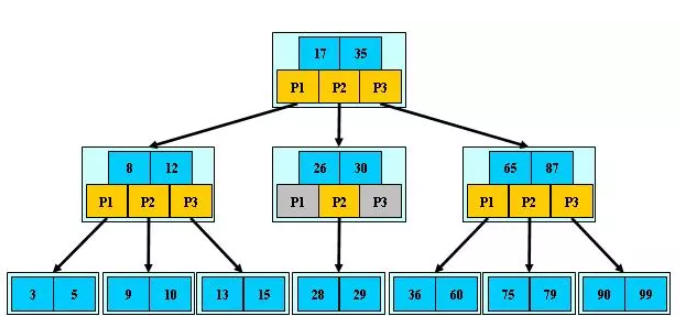
    b+树
    img

    只有叶子节点是真实数据,根与树枝节点存的是虚拟数据

    查询的次数由树的层数决定,层数越低次数越少

    聚集索引(primary key)

    所谓聚集索引就是主键,innodb引擎规定一张表里必须要有主键

    特点:叶子节点存放的是一条完整的记录

    辅助索引(unique,index)

    辅助索引:查询数据时不可能只用id作为筛选条件,为此需要给其他字段建立索引,这些索引就是辅助索引

    特点:叶子节点存放的是辅助索引字段对应的那条记录的主键值

    栗子:

    #1.准备表
    create table s1(
    id int,
    name varchar(20),
    gender char(6),
    email varchar(50)
    );
    #2.创建存储过程,实现批量插入记录
    delimiter $$ #声明存储过程的结束符号为$$
    create procedure auto_insert1()
    BEGIN
       declare i int default 1;
       while(i<30)do
           insert into s1 values(i,'jason','male',concat('jason',i,'@oldboy'));
           set i=i+1;
       end while;
    END$$ #$$结束
    delimiter ; #重新声明分号为结束符号
    #3.查看存储过程
    show create procedure auto_insert1G
    #4.调用存储过程
    call auto_insert1();
    #5.表没有任何索引的情况下
    select * from s1 where id=30000;
    #6.避免打印带来的时间损耗
    select count(id) from s1 where id = 30000;
    select count(id) from s1 where id = 1;
    #7.给id做一个主键
    alter table s1 add primary key(id);  # 速度很慢

    select count(id) from s1 where id = 1;  # 速度相较于未建索引之前两者差着数量级
    select count(id) from s1 where name = 'jason'  # 速度仍然很慢
    """
    范围问题
    """
    # 并不是加了索引,以后查询的时候按照这个字段速度就一定快  
    select count(id) from s1 where id > 1;  # 速度相较于id = 1慢了很多
    select count(id) from s1 where id >1 and id < 3;
    select count(id) from s1 where id > 1 and id < 10000;
    select count(id) from s1 where id != 3;
    alter table s1 drop primary key;  # 删除主键 单独再来研究name字段
    select count(id) from s1 where name = 'jason';  # 又慢了

    create index idx_name on s1(name);  # 给s1表的name字段创建索引
    select count(id) from s1 where name = 'jason'  # 仍然很慢!!!
    """
    再来看b+树的原理,数据需要区分度比较高,而我们这张表全是jason,根本无法区分
    那这个树其实就建成了“一根棍子”
    """
    select count(id) from s1 where name = 'xxx';  
    # 这个会很快,我就是一根棍,第一个不匹配直接不需要再往下走了
    select count(id) from s1 where name like 'xxx';
    select count(id) from s1 where name like 'xxx%';
    select count(id) from s1 where name like '%xxx';  # 慢 最左匹配特性

    # 区分度低的字段不能建索引
    drop index idx_name on s1;

    # 给id字段建普通的索引
    create index idx_id on s1(id);
    select count(id) from s1 where id = 3;  # 快了
    select count(id) from s1 where id*12 = 3;  # 慢了 索引的字段一定不要参与计算

    drop index idx_id on s1;
    select count(id) from s1 where name='jason' and gender = 'male' and id = 3 and email = 'xxx';
    # 针对上面这种连续多个and的操作,mysql会从左到右先找区分度比较高的索引字段,先将整体范围降下来再去比较其他条件
    create index idx_name on s1(name);
    select count(id) from s1 where name='jason' and gender = 'male' and id = 3 and email = 'xxx';  # 并没有加速

    drop index idx_name on s1;
    # 给name,gender这种区分度不高的字段加上索引并不难加快查询速度

    create index idx_id on s1(id);
    select count(id) from s1 where name='jason' and gender = 'male' and id = 3 and email = 'xxx';  # 快了 先通过id已经讲数据快速锁定成了一条了
    select count(id) from s1 where name='jason' and gender = 'male' and id > 3 and email = 'xxx';  # 慢了 基于id查出来的数据仍然很多,然后还要去比较其他字段

    drop index idx_id on s1

    create index idx_email on s1(email);
    select count(id) from s1 where name='jason' and gender = 'male' and id > 3 and email = 'xxx';  # 快 通过email字段一剑封喉

    联合索引

    select count(id) from s1 where name='jason' and gender = 'male' and id > 3 and email = 'xxx';  
    # 如果上述四个字段区分度都很高,那给谁建都能加速查询
    # 给email加然而不用email字段
    select count(id) from s1 where name='jason' and gender = 'male' and id > 3;
    # 给name加然而不用name字段
    select count(id) from s1 where gender = 'male' and id > 3;
    # 给gender加然而不用gender字段
    select count(id) from s1 where id > 3;

    # 带来的问题是所有的字段都建了索引然而都没有用到,还需要花费四次建立的时间
    create index idx_all on s1(email,name,gender,id);  # 最左匹配原则,区分度高的往左放
    select count(id) from s1 where name='jason' and gender = 'male' and id > 3 and email = 'xxx';  # 速度变快


  • 相关阅读:
    关于在MAC上进行 LARAVEL 环境 Homestead 安装过程记录
    js 贷款计算器
    js 实现阶乘
    js 两点间距离函数
    composer Your requirements could not be resolved to an installable set of packages
    vue 项目优化记录 持续更新...
    vue 项目打包
    vue 真机调试页面出现空白
    vue 真机调试
    谈谈-Android状态栏的编辑
  • 原文地址:https://www.cnblogs.com/cyfdtz/p/12108026.html
Copyright © 2011-2022 走看看