大家都知道windows phone值允许一个第三方的应用程序在前台运行,所以应用程序就不能在后台从服务器上取数据。所以微软提供推送通知服务给第三方应用程序取得更新通知的消息,让用户觉得这个程序运行在后台。
熟悉C/S架构、B/S架构的朋友都知道,C/S架构中客户端到服务器的消息传输可以是双向的,客户端即可以主动从服务器获取消息,也可以被动接受来自服务器通知。而B/S架构浏览器只能主动从服务器获取消息,也就是说如果浏览器没有请求,服务器是不可能传输数据给客户端的。由此看来windows phone是C/S模式,同时微软不允许手机被动接收服务器的消息,但是这样无法实现服务器通知。WP提供了一种代理的机制来实现服务器通知,这就是推送通知。
过去移动应用程序需要经常主动去调查其相应的Web服务,以了解是否有任何等待处理的通知。这样做虽然有效,但是会导致手机的无线设备频繁打开,从而对电池续航时间带来负面影响. 使用推送通知的方式取代主动调查,web service能够提醒应用程序获取所需要的重要更新。
1、推送消息的过程
推送通知是一种云服务器代理,服务器不能直接向手机客户端发送消息,必须通过云服务器代理发送。
步骤如下:
(1)Window Phone客户端应用程序请求与微软推送通知服务(Microsoft Push Notification Services)建立通道连接,微软推送通知服务(Microsoft Push Notification Services)使用通道URI响应。
(2)Window Phone客户端应用程序向监视服务(Web Service或者Cloud Application)发送包含推送通知服务通道URI以及负载的消息。
(3)当监视服务检测到信息更改时(如航班取消、航班延期或天气警报),它会向微软推送通知服务(Microsoft Push Notification Services)发送消息。
(4)微软推送通知服务(Microsoft Push Notification Services)将消息中继到Windows Phone设备,由Window Phone客户端应用程序处理收到的消息。
(5)需要时WP设备往Cloud服务读取更多的数据
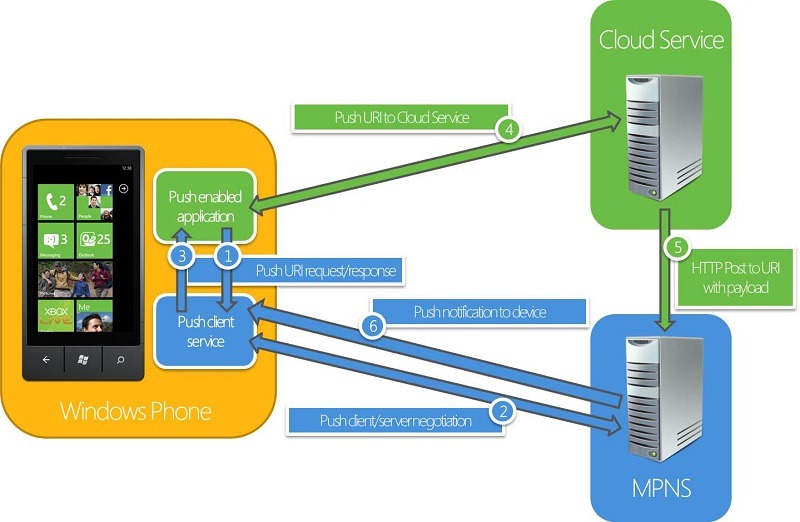
当一个Web service有信息要发送到应用程序,它先发送一个通知到Push Notification Service,该服务随后将通知路由到应用程序。根据推送通知的格式和装载量,信息作为原始数据传递到应用程序,应用程序的标题明显地更新或显示一个Toast通知。然后如果需要的话应用程序可以使用自己的协议联系web service以获取更新。
Push Notification Service在推送通知发送后向你的web service发送一个回复码.然而,Push Notification Service不能为你的推送提醒是否成功传递到应用程序提供端到端的确认。
另外一种图解如下:
(1)客户端从推送云服务(MPNS)获取通知URI,提交给自己的第三方服务器。

(2)自己的第三方服务器的通过URI提交通知给推送云服务(MPNS),推送云服务(MPNS)推送通知到手机。

2、消息类型
(1)Raw Notification
- 可以发送任何格式的数据,格式可以任意设定;
- 应该程序可以根据需要加工数据;
- 应用程序相关(application-specific)的通知消息;
- 只有在应用程序运行时,才发送.如果当前没有运行您的应用程序,Raw通知将被微软推通知服务丢弃,不会传递到Windows Phone设备。
(2)Toast Notification
- 发送的数据为指定的xml格式;
- 如果应用程序正在运行,内容发送到应用程序中;
- 如果应用程序不在运行,弹出Tost消息框显示消息;
a.App图标加上两个文本描述:标题与副标题,标题为粗体字显示的字符串,副标题为非粗体字显示的字符串;
b.打断用户当前的操作,但是是临时的,且不破坏用户的工作流,十秒钟后自动消失;
c.用户可以点击进行跟踪。

(3)Tile Notification
- 发送的数据为指定的XML格式;
- 不会往应用程序进行发送;
- 如果用户把应用程序pin to start,那么更新数据发送到start screen的tile里面。
a.包含三个属性,背景(background)、标题(title)和计算器(count);
b.每个属性都有固定的格式与位置;
c.可以使用其中的属性,不一定三个属性一起使用。

例子,有点长哈:
用一个WinForm作为服务器端:

Form1.cs
private void SendButton_Click(object sender, EventArgs e)
        {
            string msg = String.Format("{0}{1}, {2}度", LocationComboBox.Text,WeatherComboBox.Text, TemperatureTextBox.Text);
            string type = NotificationTypeComboBox.Text as string;
            if (type == "Raw")
            {
                byte[] strBytes = new UTF8Encoding().GetBytes(msg);
                SendRawNotification(strBytes);
            }
            else if (type == "Toast")
            {
                string toastMessage = "<?xml version=\"1.0\" encoding=\"utf-8\"?>" +
                        "<wp:Notification xmlns:wp=\"WPNotification\">" +
                           "<wp:Toast>" +
                              "<wp:Text1>天气更新</wp:Text1>" +
                              "<wp:Text2>" + msg + "</wp:Text2>" +
                           "</wp:Toast>" +
                        "</wp:Notification>";
                byte[] strBytes = new UTF8Encoding().GetBytes(toastMessage);
                SendToastNotification(strBytes);
            }
            else if (type == "Tile")
            {
                string tileMessage = "<?xml version=\"1.0\" encoding=\"utf-8\"?>" +
                    "<wp:Notification xmlns:wp=\"WPNotification\">" +
                       "<wp:Tile>" +
                          "<wp:BackgroundImage>/Images/" + WeatherComboBox.Text + ".png</wp:BackgroundImage>" +
                          "<wp:Count>" + TemperatureTextBox.Text + "</wp:Count>" +
                          "<wp:Title>" + LocationComboBox.Text + "</wp:Title>" +
                       "</wp:Tile> " +
                    "</wp:Notification>";
                byte[] strBytes = new UTF8Encoding().GetBytes(tileMessage);
                SendTileNotification(strBytes);
            }
        }

        private void SendTileNotification(byte[] Payload)
        {
            // The URI that the Push Notification Service returns to the Push Client when creating a notification channel.
            HttpWebRequest sendNotificationRequest = (HttpWebRequest)WebRequest.Create(NotificationUriTextBox.Text);

            // HTTP POST is the only allowed method to send the notification.
            sendNotificationRequest.Method = WebRequestMethods.Http.Post;

            // The optional custom header X-MessageID uniquely identifies a notification message. If it is present, the
            // same value is returned in the notification response. It must be a string that contains a UUID.
            sendNotificationRequest.Headers["X-MessageID"] = Guid.NewGuid().ToString();

            // Sets toast notification
            sendNotificationRequest.ContentType = "text/xml; charset=utf-8";
            sendNotificationRequest.Headers.Add("X-WindowsPhone-Target", "token");
            sendNotificationRequest.Headers.Add("X-NotificationClass", "1");
            // Possible batching interval values:
            // 1: The message is delivered by the Push Notification Service immediately.
            // 11: The message is delivered by the Push Notification Service within 450 seconds.
            // 21: The message is delivered by the Push Notification Service within 900 seconds.

            // Sets the web request content length.
            sendNotificationRequest.ContentLength = Payload.Length;

            // Sets the notification payload to send.
            byte[] notificationMessage = Payload;

            // Sends the notification.
            using (Stream requestStream = sendNotificationRequest.GetRequestStream())
            {
                requestStream.Write(notificationMessage, 0, notificationMessage.Length);
            }

            // Gets the response.
            HttpWebResponse response = (HttpWebResponse)sendNotificationRequest.GetResponse();
            string notificationStatus = response.Headers["X-NotificationStatus"];
            string notificationChannelStatus = response.Headers["X-SubscriptionStatus"];
            string deviceConnectionStatus = response.Headers["X-DeviceConnectionStatus"];
            MsgLabel.Text = String.Format("通知状态:{0},管道状态:{1},设备状态:{2}",
                notificationStatus, notificationChannelStatus, deviceConnectionStatus);
        }

        private void SendToastNotification(byte[] Payload)
        {
            // The URI that the Push Notification Service returns to the Push Client when creating a notification channel.
            HttpWebRequest sendNotificationRequest = (HttpWebRequest)WebRequest.Create(NotificationUriTextBox.Text);

            // HTTP POST is the only allowed method to send the notification.
            sendNotificationRequest.Method = WebRequestMethods.Http.Post;

            // The optional custom header X-MessageID uniquely identifies a notification message. If it is present, the
            // same value is returned in the notification response. It must be a string that contains a UUID.
            sendNotificationRequest.Headers["X-MessageID"] = Guid.NewGuid().ToString();

            // Sets toast notification
            sendNotificationRequest.ContentType = "text/xml; charset=utf-8";
            sendNotificationRequest.Headers.Add("X-WindowsPhone-Target", "toast");
            sendNotificationRequest.Headers.Add("X-NotificationClass", "2");
            // Possible batching interval values:
            // 2: The message is delivered by the Push Notification Service immediately.
            // 12: The message is delivered by the Push Notification Service within 450 seconds.
            // 22: The message is delivered by the Push Notification Service within 900 seconds.

            // Sets the web request content length.
            sendNotificationRequest.ContentLength = Payload.Length;

            // Sets the notification payload to send.
            byte[] notificationMessage = Payload;

            // Sends the notification.
            using (Stream requestStream = sendNotificationRequest.GetRequestStream())
            {
                requestStream.Write(notificationMessage, 0, notificationMessage.Length);
            }

            // Gets the response.
            HttpWebResponse response = (HttpWebResponse)sendNotificationRequest.GetResponse();
            string notificationStatus = response.Headers["X-NotificationStatus"];
            string notificationChannelStatus = response.Headers["X-SubscriptionStatus"];
            string deviceConnectionStatus = response.Headers["X-DeviceConnectionStatus"];
            MsgLabel.Text = String.Format("通知状态:{0},管道状态:{1},设备状态:{2}",
                notificationStatus, notificationChannelStatus, deviceConnectionStatus);
        }

        private void SendRawNotification(byte[] Payload)
        {
            // The URI that the Push Notification Service returns to the Push Client when creating a notification channel.
            HttpWebRequest sendNotificationRequest = (HttpWebRequest)WebRequest.Create(NotificationUriTextBox.Text);

            // HTTP POST is the only allowed method to send the notification.
            sendNotificationRequest.Method = WebRequestMethods.Http.Post;

            // The optional custom header X-MessageID uniquely identifies a notification message. If it is present, the
            // same value is returned in the notification response. It must be a string that contains a UUID.
            sendNotificationRequest.Headers["X-MessageID"] = Guid.NewGuid().ToString();

            // Sets raw notification
            sendNotificationRequest.ContentType = "text/xml; charset=utf-8";
            sendNotificationRequest.Headers.Add("X-NotificationClass", "3");
            // Possible batching interval values:
            // 3: The message is delivered by the Push Notification Service immediately.
            // 13: The message is delivered by the Push Notification Service within 450 seconds.
            // 23: The message is delivered by the Push Notification Service within 900 seconds.

            // Sets the web request content length.
            sendNotificationRequest.ContentLength = Payload.Length;

            // Sets the notification payload to send.
            byte[] notificationMessage = Payload;

            // Sends the notification.
            using (Stream requestStream = sendNotificationRequest.GetRequestStream())
            {
                requestStream.Write(notificationMessage, 0, notificationMessage.Length);
            }

            // Gets the response.
            HttpWebResponse response = (HttpWebResponse)sendNotificationRequest.GetResponse();
            string notificationStatus = response.Headers["X-NotificationStatus"];
            string notificationChannelStatus = response.Headers["X-SubscriptionStatus"];
            string deviceConnectionStatus = response.Headers["X-DeviceConnectionStatus"];
            MsgLabel.Text = String.Format("通知状态:{0},管道状态:{1},设备状态:{2}",notificationStatus, notificationChannelStatus, deviceConnectionStatus);
        }

windows phone端

MainPages.xaml.cs
private HttpNotificationChannel httpChannel;
 private const string channelName = "Channel1";
private void button1_Click(object sender, RoutedEventArgs e)
        {
            httpChannel = HttpNotificationChannel.Find(channelName);

            //Delete the Channel if exists
            if (httpChannel != null)
            {
                httpChannel.Close();

                httpChannel.Dispose();
            }

            //Create the channel
            httpChannel = new HttpNotificationChannel(channelName, "NotificationService");

            //Register to UriUpdated event - occurs when channel successfully opens
            httpChannel.ChannelUriUpdated += new EventHandler<NotificationChannelUriEventArgs>(httpChannel_ChannelUriUpdated);

            //general error handling for push channel
            httpChannel.ErrorOccurred += new EventHandler<NotificationChannelErrorEventArgs>(httpChannel_ErrorOccurred);

            //Subscribed to Raw Notification
            httpChannel.HttpNotificationReceived += new EventHandler<HttpNotificationEventArgs>(httpChannel_HttpNotificationReceived);

            //Open the channel
            httpChannel.Open();

            //subscrive to toast notification when running app
            httpChannel.ShellToastNotificationReceived += new EventHandler<NotificationEventArgs>(httpChannel_ShellToastNotificationReceived);

            //subscrive to toast notification
            httpChannel.BindToShellToast();

            //subscrive to tile notification
            httpChannel.BindToShellTile();
        }

        void httpChannel_ShellToastNotificationReceived(object sender, NotificationEventArgs e)
        {
            string msg = "";
            foreach (var key in e.Collection.Keys)
            {
                msg += key + ": " + e.Collection[key] + Environment.NewLine;
            }
            Dispatcher.BeginInvoke(() =>
            {
                MsgTextBlock.Text = msg;
            });
        }

        void httpChannel_HttpNotificationReceived(object sender, HttpNotificationEventArgs e)
        {
            using (var reader = new StreamReader(e.Notification.Body))
            {
                string msg = reader.ReadToEnd();
                Dispatcher.BeginInvoke(() =>
                {
                    MsgTextBlock.Text = msg;
                });
            }
        }

        void httpChannel_ErrorOccurred(object sender, NotificationChannelErrorEventArgs e)
        {
            Dispatcher.BeginInvoke(() =>
            {
                MsgTextBlock.Text = e.Message;
            });
        }

        void httpChannel_ChannelUriUpdated(object sender, NotificationChannelUriEventArgs e)
        {
            Debug.WriteLine("ChannelUri: {0}", e.ChannelUri);
        }
3、不使用推送通知定时更新Tile
(1)定时自动更新Tile
(2)支持Update一次或者多次
(3)只支持网络图片,图片小雨80k,而且最多使用15秒钟下载
(4)最短间隔为1小时
4、使用规范
(1)当前版本的Window Phone只支持最多15个第三方应用程序使用推送通知服务
(2)询问用户是否使用推送通知服务
(3)为用户提供取消订阅的选项
参考链接:How to: Send a Push Notification for Windows Phone
http://msdn.microsoft.com/en-us/library/ff402545(VS.92).aspx
How to: Receive Push Notifications in an Application for Windows Phone
http://msdn.microsoft.com/zh-cn/library/ff402556%28v=VS.92%29.aspx
推送通知服务
http://www.cnblogs.com/dnso/articles/1961814.html
Windows Phone 7编程实践—推送通知_剖析推送通知实现架构
http://www.cnblogs.com/xuesong/archive/2011/04/08/2008987.html
WP7应用开发笔记(15) 推送通知
http://www.cnblogs.com/kiminozo/archive/2012/01/28/2330516.html
原文链接:http://www.cnblogs.com/zhangkai2237/archive/2012/02/19/2358331.html